PySide.QtGui.QGroupBox widget provides a group box frame with a title.
A group box provides a frame, a title and a keyboard shortcut, and displays various other widgets inside itself. The title is on top, the keyboard shortcut moves keyboard focus to one of the group box's child widgets.
PySide.QtGui.QGroupBox also lets you set the PySide.QtGui.QGroupBox.title() (normally set in the constructor) and the title's PySide.QtGui.QGroupBox.alignment() . Group boxes can be checkable() ; child widgets in checkable group boxes are enabled or disabled depending on whether or not the group box is checked() .
You can minimize the space consumption of a group box by enabling the flat() property. In most styles , enabling this property results in the removal of the left, right and bottom edges of the frame.
PySide.QtGui.QGroupBox doesn't automatically lay out the child widgets (which are often PySide.QtGui.QCheckBox es or PySide.QtGui.QRadioButton s but can be any widgets). The following example shows how we can set up a PySide.QtGui.QGroupBox with a layout:
groupBox = QGroupBox("Exclusive Radio Buttons")
radio1 = QRadioButton("&Radio button 1")
radio2 = QRadioButton("R&adio button 2")
radio3 = QRadioButton("Ra&dio button 3")
radio1.setChecked(True)
vbox = QVBoxLayout()
vbox.addWidget(radio1)
vbox.addWidget(radio2)
vbox.addWidget(radio3)
vbox.addStretch(1)
groupBox.setLayout(vbox)
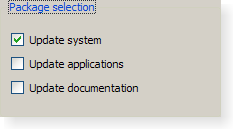
|
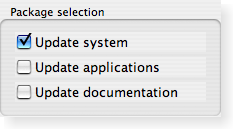
|
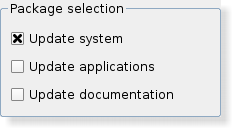
|
| A Windows XP style group box. | A Macintosh style group box. | A Plastique style group box. |
另请参阅
| 参数: |
|
|---|
Constructs a group box widget with the given parent but with no title.
Constructs a group box with the given title and parent .
| 返回类型: | PySide.QtCore.Qt.Alignment |
|---|
This property holds the alignment of the group box title..
Most styles place the title at the top of the frame. The horizontal alignment of the title can be specified using single values from the following list:
The default alignment is Qt.AlignLeft .
另请参阅
Qt.Alignment
| 参数: | checked – PySide.QtCore.bool |
|---|
| 参数: | option – PySide.QtGui.QStyleOptionGroupBox |
|---|
初始化 option 采用值来自此 PySide.QtGui.QGroupBox 。此方法对子类是有用的,当需要 PySide.QtGui.QStyleOptionGroupBox ,但不希望自己填充所有信息。
| 返回类型: | PySide.QtCore.bool |
|---|
This property holds whether the group box has a checkbox in its title.
If this property is true, the group box displays its title using a checkbox in place of an ordinary label. If the checkbox is checked, the group box's children are enabled; otherwise they are disabled and inaccessible.
By default, group boxes are not checkable.
If this property is enabled for a group box, it will also be initially checked to ensure that its contents are enabled.
另请参阅
checked()
| 返回类型: | PySide.QtCore.bool |
|---|
This property holds whether the group box is checked.
If the group box is checkable, it is displayed with a check box. If the check box is checked, the group box's children are enabled; otherwise the children are disabled and are inaccessible to the user.
By default, checkable group boxes are also checked.
另请参阅
checkable()
| 返回类型: | PySide.QtCore.bool |
|---|
This property holds whether the group box is painted flat or has a frame.
A group box usually consists of a surrounding frame with a title at the top. If this property is enabled, only the top part of the frame is drawn in most styles; otherwise the whole frame is drawn.
By default, this property is disabled; i.e. group boxes are not flat unless explicitly specified.
注意
In some styles, flat and non-flat group boxes have similar representations and may not be as distinguishable as they are in other styles.
| 参数: | alignment – PySide.QtCore.int |
|---|
| 参数: | checkable – PySide.QtCore.bool |
|---|
This property holds whether the group box has a checkbox in its title.
If this property is true, the group box displays its title using a checkbox in place of an ordinary label. If the checkbox is checked, the group box's children are enabled; otherwise they are disabled and inaccessible.
By default, group boxes are not checkable.
If this property is enabled for a group box, it will also be initially checked to ensure that its contents are enabled.
另请参阅
checked()
| 参数: | checked – PySide.QtCore.bool |
|---|
This property holds whether the group box is checked.
If the group box is checkable, it is displayed with a check box. If the check box is checked, the group box's children are enabled; otherwise the children are disabled and are inaccessible to the user.
By default, checkable group boxes are also checked.
另请参阅
checkable()
| 参数: | flat – PySide.QtCore.bool |
|---|
This property holds whether the group box is painted flat or has a frame.
A group box usually consists of a surrounding frame with a title at the top. If this property is enabled, only the top part of the frame is drawn in most styles; otherwise the whole frame is drawn.
By default, this property is disabled; i.e. group boxes are not flat unless explicitly specified.
注意
In some styles, flat and non-flat group boxes have similar representations and may not be as distinguishable as they are in other styles.
| 参数: | title – unicode |
|---|
This property holds the group box title text.
The group box title text will have a keyboard shortcut if the title contains an ampersand (‘&') followed by a letter.
g.setTitle("&User information")
In the example above, Alt+U moves the keyboard focus to the group box. See the QShortcut documentation for details (to display an actual ampersand, use ‘&&').
There is no default title text.
| 返回类型: | unicode |
|---|
This property holds the group box title text.
The group box title text will have a keyboard shortcut if the title contains an ampersand (‘&') followed by a letter.
g.setTitle("&User information")
In the example above, Alt+U moves the keyboard focus to the group box. See the QShortcut documentation for details (to display an actual ampersand, use ‘&&').
There is no default title text.
| 参数: | arg__1 – PySide.QtCore.bool |
|---|

