A main window provides a framework for building an application's user interface. Qt has PySide.QtGui.QMainWindow and its 相关类 for main window management. PySide.QtGui.QMainWindow has its own layout to which you can add PySide.QtGui.QToolBar s, PySide.QtGui.QDockWidget s, a PySide.QtGui.QMenuBar ,和 PySide.QtGui.QStatusBar 。布局具有可以被任何种类 Widget 占据的中心区域。见以下布局图像。
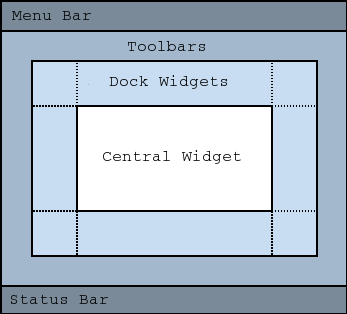
注意
不支持创建没有中心 Widget 的主窗口。必须有中心小部件,即使它只是占位符。
中心小部件通常是标准 Qt Widget,譬如 PySide.QtGui.QTextEdit 或 PySide.QtGui.QGraphicsView 。自定义 Widget 还可以用于高级应用程序。设置中心 Widget 采用 setCentralWidget() .
主窗口有 SDI (单文档界面) 或 MDI (多文档界面)。在 Qt 中创建 MDI 应用程序通过使用 PySide.QtGui.QMdiArea 作为中心 Widget。
现在,我们将研究可以被添加到主窗口的每一其它 Widget。举例说明如何创建和添加它们。
工具栏的实现在 PySide.QtGui.QToolBar 类。把工具栏添加到主窗口采用 addToolBar() .
控制工具栏的初始位置通过把它们赋值给特定 Qt.ToolBarArea 。可以通过插入工具栏打断分割区域 - 把它想像成文本编辑中的换行符 - 采用 addToolBarBreak() or insertToolBarBreak() 。还可以限定用户放置采用 QToolBar.setAllowedAreas() and QToolBar.setMovable() .
可以检索工具栏图标的尺寸采用 iconSize() 。尺寸从属平台;可以设置固定尺寸采用 setIconSize() 。可以更改工具栏中所有工具按钮的外观采用 setToolButtonStyle() .
以下是创建工具栏的范例:
def createToolBars(self):
    fileToolBar = addToolBar(tr("File"))
    fileToolBar.addAction(Act)
停放 Widget 的实现在 PySide.QtGui.QDockWidget 类。停放 Widget 是可以停放在主窗口中的窗口。可以把停放 Widget 添加到主窗口采用 addDockWidget() .
有 4 个停放 Widget 区域,给出通过 Qt.DockWidgetArea enum: left, right, top, and bottom. You can specify which dock widget area that should occupy the corners where the areas overlap with setCorner() . By default each area can only contain one row (vertical or horizontal) of dock widgets, but if you enable nesting with setDockNestingEnabled() , dock widgets can be added in either direction.
Two dock widgets may also be stacked on top of each other. A PySide.QtGui.QTabBar is then used to select which of the widgets that should be displayed.
We give an example of how to create and add dock widgets to a main window:
dockWidget = QDockWidget(tr("Dock Widget"), self)
dockWidget.setAllowedAreas(Qt.LeftDockWidgetArea |
                                       Qt.RightDockWidgetArea)
dockWidget.setWidget(dockWidgetContents)
addDockWidget(Qt.LeftDockWidgetArea, dockWidget)
PySide.QtGui.QMainWindow can store the state of its layout with saveState() ;稍后,可以检索它采用 restoreState() 。它是存储的工具栏和停放 Widget 的位置和尺寸 (相对于主窗口的尺寸)。
另请参阅
PySide.QtGui.QMenuBar PySide.QtGui.QToolBar PySide.QtGui.QStatusBar PySide.QtGui.QDockWidget 应用程序范例 停放 Widget 范例 MDI 范例 SDI 范例 菜单范例
| 参数: |
|
|---|
This enum contains flags that specify the docking behavior of PySide.QtGui.QMainWindow .
| 常量 | 描述 |
|---|---|
| QMainWindow.AnimatedDocks | 等同于 animated() 特性。 |
| QMainWindow.AllowNestedDocks | 等同于 dockNestingEnabled() 特性。 |
| QMainWindow.AllowTabbedDocks | The user can drop one dock widget “on top” of another. The two widgets are stacked and a tab bar appears for selecting which one is visible. |
| QMainWindow.ForceTabbedDocks | Each dock area contains a single stack of tabbed dock widgets. In other words, dock widgets cannot be placed next to each other in a dock area. If this option is set, AllowNestedDocks 不起作用。 |
| QMainWindow.VerticalTabs | The two vertical dock areas on the sides of the main window show their tabs vertically. If this option is not set, all dock areas show their tabs at the bottom. Implies AllowTabbedDocks 。另请参阅 PySide.QtGui.QMainWindow.setTabPosition() . |
These options only control how dock widgets may be dropped in a PySide.QtGui.QMainWindow . They do not re-arrange the dock widgets to conform with the specified options. For this reason they should be set before any dock widgets are added to the main window. Exceptions to this are the AnimatedDocks and VerticalTabs options, which may be set at any time.
| 参数: |
|
|---|
| 参数: |
|
|---|
| 参数: |
|
|---|
| 参数: | title – unicode |
|---|---|
| 返回类型: | PySide.QtGui.QToolBar |
这是重载函数。
创建 PySide.QtGui.QToolBar object, setting its window title to title , and inserts it into the top toolbar area.
| 参数: | toolbar – PySide.QtGui.QToolBar |
|---|
这是重载函数。
Equivalent of calling addToolBar( Qt.TopToolBarArea , toolbar )
| 参数: | area – PySide.QtCore.Qt.ToolBarArea |
|---|
| 返回类型: | PySide.QtGui.QWidget |
|---|
返回主窗口的中心 Widget。此函数返回零,若中心 Widget 未设置。
| 参数: | corner – PySide.QtCore.Qt.Corner |
|---|---|
| 返回类型: | PySide.QtCore.Qt.DockWidgetArea |
| 返回类型: | PySide.QtGui.QMenu |
|---|
Returns a popup menu containing checkable entries for the toolbars and dock widgets present in the main window. If there are no toolbars and dock widgets present, this function returns a null pointer.
By default, this function is called by the main window when the user activates a context menu, typically by right-clicking on a toolbar or a dock widget.
If you want to create a custom popup menu, reimplement this function and return a newly-created popup menu. Ownership of the popup menu is transferred to the caller.
| 返回类型: | PySide.QtGui.QMainWindow.DockOptions |
|---|
This property holds the docking behavior of PySide.QtGui.QMainWindow .
默认值为 AnimatedDocks | AllowTabbedDocks .
| 参数: | dockwidget – PySide.QtGui.QDockWidget |
|---|---|
| 返回类型: | PySide.QtCore.Qt.DockWidgetArea |
返回 Qt.DockWidgetArea for dockwidget 。若 dockwidget has not been added to the main window, this function returns Qt::NoDockWidgetArea .
另请参阅
PySide.QtGui.QMainWindow.addDockWidget() PySide.QtGui.QMainWindow.splitDockWidget() Qt.DockWidgetArea
| 返回类型: | PySide.QtCore.bool |
|---|
This property holds whether the tab bar for tabbed dockwidgets is set to document mode..
默认为 false。
另请参阅
| 返回类型: | PySide.QtCore.QSize |
|---|
This property holds size of toolbar icons in this mainwindow..
The default is the default tool bar icon size of the GUI style. Note that the icons used must be at least of this size as the icons are only scaled down.
| 参数: | iconSize – PySide.QtCore.QSize |
|---|
| 参数: |
|
|---|
插入 toolbar into the area occupied by the before toolbar so that it appears before it. For example, in normal left-to-right layout operation, this means that toolbar will appear to the left of the toolbar specified by before in a horizontal toolbar area.
| 参数: | before – PySide.QtGui.QToolBar |
|---|
Inserts a toolbar break before the toolbar specified by before .
| 返回类型: | PySide.QtCore.bool |
|---|
This property holds whether manipulating dock widgets and tool bars is animated.
When a dock widget or tool bar is dragged over the main window, the main window adjusts its contents to indicate where the dock widget or tool bar will be docked if it is dropped. Setting this property causes PySide.QtGui.QMainWindow to move its contents in a smooth animation. Clearing this property causes the contents to snap into their new positions.
By default, this property is set. It may be cleared if the main window contains widgets which are slow at resizing or repainting themselves.
Setting this property is identical to setting the AnimatedDocks option using PySide.QtGui.QMainWindow.setDockOptions() .
| 返回类型: | PySide.QtCore.bool |
|---|
This property holds whether docks can be nested.
If this property is false, dock areas can only contain a single row (horizontal or vertical) of dock widgets. If this property is true, the area occupied by a dock widget can be split in either direction to contain more dock widgets.
Dock nesting is only necessary in applications that contain a lot of dock widgets. It gives the user greater freedom in organizing their main window. However, dock nesting leads to more complex (and less intuitive) behavior when a dock widget is dragged over the main window, since there are more ways in which a dropped dock widget may be placed in the dock area.
Setting this property is identical to setting the AllowNestedDocks option using PySide.QtGui.QMainWindow.setDockOptions() .
| 参数: | pos – PySide.QtCore.QPoint |
|---|---|
| 返回类型: | PySide.QtCore.bool |
| 返回类型: | PySide.QtGui.QMenuBar |
|---|
Returns the menu bar for the main window. This function creates and returns an empty menu bar if the menu bar does not exist.
If you want all windows in a Mac application to share one menu bar, don't use this function to create it, because the menu bar created here will have this PySide.QtGui.QMainWindow as its parent. Instead, you must create a menu bar that does not have a parent, which you can then share among all the Mac windows. Create a parent-less menu bar this way:
menuBar = QMenuBar()
| 返回类型: | PySide.QtGui.QWidget |
|---|
Returns the menu bar for the main window. This function returns null if a menu bar hasn't been constructed yet.
| 参数: | dockwidget – PySide.QtGui.QDockWidget |
|---|
移除 dockwidget from the main window layout and hides it. Note that the dockwidget is not deleted.
| 参数: | toolbar – PySide.QtGui.QToolBar |
|---|
移除 toolbar from the main window layout and hides it. Note that the toolbar is not deleted.
| 参数: | before – PySide.QtGui.QToolBar |
|---|
Removes a toolbar break previously inserted before the toolbar specified by before .
| 参数: | dockwidget – PySide.QtGui.QDockWidget |
|---|---|
| 返回类型: | PySide.QtCore.bool |
Restores the state of dockwidget if it is created after the call to PySide.QtGui.QMainWindow.restoreState() . Returns true if the state was restored; otherwise returns false.
| 参数: |
|
|---|---|
| 返回类型: |
PySide.QtCore.bool |
Restores the state of this mainwindow's toolbars and dockwidgets. The version number is compared with that stored in state . If they do not match, the mainwindow's state is left unchanged, and this function returns false ; otherwise, the state is restored, and this function returns true .
要还原保存几何体使用 PySide.QtCore.QSettings ,可以使用的代码像这样:
def readSettings(self):
    settings = QSettings("MyCompany", "MyApp")
    restoreGeometry(settings.value("myWidget/geometry"))
    restoreState(settings.value("myWidget/windowState"))
| 参数: | version – PySide.QtCore.int |
|---|---|
| 返回类型: | PySide.QtCore.QByteArray |
Saves the current state of this mainwindow's toolbars and dockwidgets. The version number is stored as part of the data.
PySide.QtCore.QObject.objectName() property is used to identify each PySide.QtGui.QToolBar and PySide.QtGui.QDockWidget . You should make sure that this property is unique for each PySide.QtGui.QToolBar and PySide.QtGui.QDockWidget you add to the PySide.QtGui.QMainWindow
To restore the saved state, pass the return value and version number to PySide.QtGui.QMainWindow.restoreState() .
要在窗口关闭时保存几何体,可以实现像这样的关闭事件:
def closeEvent(self, event):
    settings = QSettings("MyCompany", "MyApp")
    settings.setValue("geometry", self.saveGeometry())
    settings.setValue("windowState", self.saveState())
    QMainWindow.closeEvent(self, event)
| 参数: | enabled – PySide.QtCore.bool |
|---|
This property holds whether manipulating dock widgets and tool bars is animated.
When a dock widget or tool bar is dragged over the main window, the main window adjusts its contents to indicate where the dock widget or tool bar will be docked if it is dropped. Setting this property causes PySide.QtGui.QMainWindow to move its contents in a smooth animation. Clearing this property causes the contents to snap into their new positions.
By default, this property is set. It may be cleared if the main window contains widgets which are slow at resizing or repainting themselves.
Setting this property is identical to setting the AnimatedDocks option using PySide.QtGui.QMainWindow.setDockOptions() .
| 参数: | widget – PySide.QtGui.QWidget |
|---|
设置给定 widget 成为主窗口的中心小部件。
注意: PySide.QtGui.QMainWindow 拥有所有权对于 widget pointer and deletes it at the appropriate time.
| 参数: |
|
|---|
| 参数: | enabled – PySide.QtCore.bool |
|---|
This property holds whether docks can be nested.
If this property is false, dock areas can only contain a single row (horizontal or vertical) of dock widgets. If this property is true, the area occupied by a dock widget can be split in either direction to contain more dock widgets.
Dock nesting is only necessary in applications that contain a lot of dock widgets. It gives the user greater freedom in organizing their main window. However, dock nesting leads to more complex (and less intuitive) behavior when a dock widget is dragged over the main window, since there are more ways in which a dropped dock widget may be placed in the dock area.
Setting this property is identical to setting the AllowNestedDocks option using PySide.QtGui.QMainWindow.setDockOptions() .
| 参数: | options – PySide.QtGui.QMainWindow.DockOptions |
|---|
This property holds the docking behavior of PySide.QtGui.QMainWindow .
默认值为 AnimatedDocks | AllowTabbedDocks .
| 参数: | enabled – PySide.QtCore.bool |
|---|
This property holds whether the tab bar for tabbed dockwidgets is set to document mode..
默认为 false。
另请参阅
| 参数: | iconSize – PySide.QtCore.QSize |
|---|
This property holds size of toolbar icons in this mainwindow..
The default is the default tool bar icon size of the GUI style. Note that the icons used must be at least of this size as the icons are only scaled down.
| 参数: | menubar – PySide.QtGui.QMenuBar |
|---|
把主窗口菜单栏设为 menuBar .
注意: PySide.QtGui.QMainWindow 拥有所有权对于 menuBar pointer and deletes it at the appropriate time.
| 参数: | menubar – PySide.QtGui.QWidget |
|---|
把主窗口菜单栏设为 menuBar .
PySide.QtGui.QMainWindow 拥有所有权对于 menuBar pointer and deletes it at the appropriate time.
| 参数: | statusbar – PySide.QtGui.QStatusBar |
|---|
把主窗口状态栏设为 statusbar .
Setting the status bar to 0 will remove it from the main window. Note that PySide.QtGui.QMainWindow 拥有所有权对于 statusbar pointer and deletes it at the appropriate time.
| 参数: |
|
|---|
| 参数: | tabShape – PySide.QtGui.QTabWidget.TabShape |
|---|
This property holds the tab shape used for tabbed dock widgets..
默认为 QTabWidget.Rounded .
| 参数: | toolButtonStyle – PySide.QtCore.Qt.ToolButtonStyle |
|---|
This property holds style of toolbar buttons in this mainwindow..
默认为 Qt.ToolButtonIconOnly .
| 参数: | set – PySide.QtCore.bool |
|---|
This property holds whether the window uses the unified title and toolbar look on Mac OS X.
This property is false by default and only has any effect on Mac OS X 10.4 or higher.
If set to true, then the top toolbar area is replaced with a Carbon HIToolbar or a Cocoa NSToolbar (depending on whether Qt was built with Carbon or Cocoa). All toolbars in the top toolbar area and any toolbars added afterwards are moved to that. This means a couple of things.
Setting this back to false will remove these restrictions.
Qt.WA_MacBrushedMetal attribute takes precedence over this property.
| 参数: |
|
|---|
| 返回类型: | PySide.QtGui.QStatusBar |
|---|
返回用于主窗口的状态栏。此函数创建并返回空状态栏,若状态栏不存在。
| 参数: | area – PySide.QtCore.Qt.DockWidgetArea |
|---|---|
| 返回类型: | PySide.QtGui.QTabWidget.TabPosition |
| 返回类型: | PySide.QtGui.QTabWidget.TabShape |
|---|
This property holds the tab shape used for tabbed dock widgets..
默认为 QTabWidget.Rounded .
| 参数: | dockwidget – PySide.QtGui.QDockWidget |
|---|---|
| 返回类型: |
Returns the dock widgets that are tabified together with dockwidget .
| 参数: |
|
|---|
移动 second dock widget on top of first dock widget, creating a tabbed docked area in the main window.
| 参数: | toolbar – PySide.QtGui.QToolBar |
|---|---|
| 返回类型: | PySide.QtCore.Qt.ToolBarArea |
返回 Qt.ToolBarArea for toolbar 。若 toolbar has not been added to the main window, this function returns Qt::NoToolBarArea .
另请参阅
PySide.QtGui.QMainWindow.addToolBar() PySide.QtGui.QMainWindow.addToolBarBreak() Qt.ToolBarArea
| 参数: | toolbar – PySide.QtGui.QToolBar |
|---|---|
| 返回类型: | PySide.QtCore.bool |
Returns whether there is a toolbar break before the toolbar .
| 返回类型: | PySide.QtCore.Qt.ToolButtonStyle |
|---|
This property holds style of toolbar buttons in this mainwindow..
默认为 Qt.ToolButtonIconOnly .
| 参数: | toolButtonStyle – PySide.QtCore.Qt.ToolButtonStyle |
|---|
| 返回类型: | PySide.QtCore.bool |
|---|
This property holds whether the window uses the unified title and toolbar look on Mac OS X.
This property is false by default and only has any effect on Mac OS X 10.4 or higher.
If set to true, then the top toolbar area is replaced with a Carbon HIToolbar or a Cocoa NSToolbar (depending on whether Qt was built with Carbon or Cocoa). All toolbars in the top toolbar area and any toolbars added afterwards are moved to that. This means a couple of things.
Setting this back to false will remove these restrictions.
Qt.WA_MacBrushedMetal attribute takes precedence over this property.

