PySide.QtGui.QTabWidget class provides a stack of tabbed widgets.
选项卡小部件提供选项卡栏 (见 PySide.QtGui.QTabBar ) and a “page area” that is used to display pages related to each tab. By default, the tab bar is shown above the page area, but different configurations are available (see QTabWidget.TabPosition ). Each tab is associated with a different widget (called a page). Only the current page is shown in the page area; all the other pages are hidden. The user can show a different page by clicking on its tab or by pressing its Alt+*letter* shortcut if it has one.
The normal way to use PySide.QtGui.QTabWidget is to do the following:
选项卡位置的定义通过 PySide.QtGui.QTabWidget.tabPosition() ,它们的形状通过 PySide.QtGui.QTabWidget.tabShape() .
信号 PySide.QtGui.QTabWidget.currentChanged() is emitted when the user selects a page.
当前页面索引可用作 PySide.QtGui.QTabWidget.currentIndex() , the current page widget with PySide.QtGui.QTabWidget.currentWidget() . You can retrieve a pointer to a page widget with a given index using PySide.QtGui.QTabWidget.widget() , and can find the index position of a widget with PySide.QtGui.QTabWidget.indexOf() 。使用 PySide.QtGui.QTabWidget.setCurrentWidget() or PySide.QtGui.QTabWidget.setCurrentIndex() to show a particular page.
可以更改选项卡的文本和图标使用 PySide.QtGui.QTabWidget.setTabText() or PySide.QtGui.QTabWidget.setTabIcon() . A tab and its associated page can be removed with PySide.QtGui.QTabWidget.removeTab() .
可以随时启用或禁用每选项卡 (见 PySide.QtGui.QTabWidget.setTabEnabled() ). If a tab is enabled, the tab text is drawn normally and the user can select that tab. If it is disabled, the tab is drawn in a different way and the user cannot select that tab. Note that even if a tab is disabled, the page can still be visible, for example if all of the tabs happen to be disabled.
选项卡小部件可以是拆分复杂对话框的很好方式。另一方式是使用 PySide.QtGui.QStackedWidget 提供在页面之间导航的一些手段,例如 PySide.QtGui.QToolBar 或 PySide.QtGui.QListWidget .
Most of the functionality in PySide.QtGui.QTabWidget is provided by a PySide.QtGui.QTabBar (在顶部,提供选项卡) 和 PySide.QtGui.QStackedWidget (大部分区域,组织各个页面)。
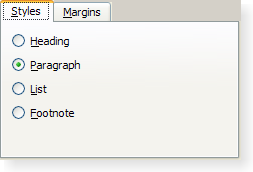
|
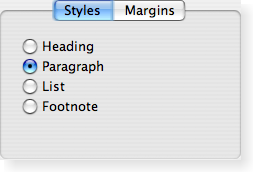
|
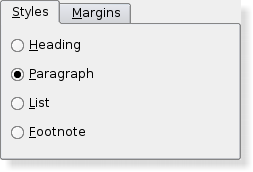
|
| A Windows XP style tab widget. | A Macintosh style tab widget. | A Plastique style tab widget. |
| 参数: | parent – PySide.QtGui.QWidget |
|---|
构造选项卡式 Widget 采用父级 parent .
此枚举类型定义选项卡的形状:
| 常量 | 描述 |
|---|---|
| QTabWidget.Rounded | 选项卡采用圆角外观绘制。这是默认形状。 |
| QTabWidget.Triangular | 选项卡采用三角形外观绘制。 |
此枚举类型定义在哪里 PySide.QtGui.QTabWidget 绘制选项卡行:
| 常量 | 描述 |
|---|---|
| QTabWidget.North | 选项卡绘制在页面上方。 |
| QTabWidget.South | 选项卡绘制在页面下方。 |
| QTabWidget.West | 选项卡绘制在页面左侧。 |
| QTabWidget.East | 选项卡绘制在页面右侧。 |
| 参数: |
|
|---|---|
| 返回类型: |
PySide.QtCore.int |
添加选项卡采用给定 page and label to the tab widget, and returns the index of the tab in the tab bar.
若选项卡的 label contains an ampersand, the letter following the ampersand is used as a shortcut for the tab, e.g. if the label is “Bro&wse” then Alt+W becomes a shortcut which will move the focus to this tab.
注意
If you call PySide.QtGui.QTabWidget.addTab() after PySide.QtGui.QWidget.show() , the layout system will try to adjust to the changes in its widgets hierarchy and may cause flicker. To prevent this, you can set the QWidget.updatesEnabled 特性为 false 在改变前;记得设置特性为 true 当改变完成后,使小部件再次接收描绘事件。
| 参数: |
|
|---|---|
| 返回类型: |
PySide.QtCore.int |
这是重载函数。
添加选项卡采用给定 page , icon ,和 label to the tab widget, and returns the index of the tab in the tab bar.
This function is the same as PySide.QtGui.QTabWidget.addTab() , but with an additional icon .
移除所有页面,但不删除它们。调用此函数相当于调用 PySide.QtGui.QTabWidget.removeTab() until the tab widget is empty.
| 参数: | corner – PySide.QtCore.Qt.Corner |
|---|---|
| 返回类型: | PySide.QtGui.QWidget |
| 返回类型: | PySide.QtCore.int |
|---|
This property holds the number of tabs in the tab bar.
默认情况下,此特性包含 0 值。
| 参数: | index – PySide.QtCore.int |
|---|
| 返回类型: | PySide.QtCore.int |
|---|
This property holds the index position of the current tab page.
当前索引为 -1,若没有当前 Widget。
默认情况下,此特性包含 -1 值,因为小部件最初没有选项卡。
| 返回类型: | PySide.QtGui.QWidget |
|---|
返回由选项卡对话框所显示的目前页面指针。选项卡对话框会尽力确保此值从不为 0 (但若足够努力,可以)。
| 返回类型: | PySide.QtCore.bool |
|---|
This property holds Whether or not the tab widget is rendered in a mode suitable for document pages. This is the same as document mode on Mac OS X..
当设置此特性时,不渲染选项卡小部件框架。此模式用于展示文档类型页面 (页面涵盖大部分选项卡小部件区域)。
另请参阅
PySide.QtGui.QTabWidget.elideMode() QTabBar.documentMode QTabBar.usesScrollButtons QStyle.SH_TabBar_PreferNoArrows
| 返回类型: | PySide.QtCore.Qt.TextElideMode |
|---|
This property holds how to elide text in the tab bar.
此特性控制如何省略项,当没有足够空间展示它们 (对于给定选项卡栏尺寸) 时。
默认情况下,值从属样式。
另请参阅
QTabBar.elideMode PySide.QtGui.QTabWidget.usesScrollButtons() QStyle.SH_TabBar_ElideMode
| 返回类型: | PySide.QtCore.QSize |
|---|
This property holds The size for icons in the tab bar.
默认值从属样式。这是图标将拥有的最大尺寸。图标不按比例缩放,若尺寸较小。
另请参阅
| 参数: | widget – PySide.QtGui.QWidget |
|---|---|
| 返回类型: | PySide.QtCore.int |
返回页面占据的索引位置由 Widget w ,或 -1 若找不到 Widget。
| 参数: | option – PySide.QtGui.QStyleOptionTabWidgetFrame |
|---|
初始化 option 采用值来自此 PySide.QtGui.QTabWidget 。此方法对子类是有用的,当需要 PySide.QtGui.QStyleOptionTabWidgetFrame ,但不希望自己填充所有信息。
| 参数: |
|
|---|---|
| 返回类型: |
PySide.QtCore.int |
插入选项卡采用给定 label and page 到选项卡小部件在指定 index , and returns the index of the inserted tab in the tab bar.
标签显示在选项卡中且外观可能有所不同,从属选项卡小部件配置。
若选项卡的 label contains an ampersand, the letter following the ampersand is used as a shortcut for the tab, e.g. if the label is “Bro&wse” then Alt+W becomes a shortcut which will move the focus to this tab.
若 index 超出范围,只需追加选项卡。否则,将其插入在指定位置。
若 PySide.QtGui.QTabWidget 为空在调用此函数之前,新页面变为当前页面。在 <= 当前索引的索引处插入新选项卡将递增当前索引,但保持当前页面。
注意
If you call PySide.QtGui.QTabWidget.insertTab() after PySide.QtGui.QWidget.show() , the layout system will try to adjust to the changes in its widgets hierarchy and may cause flicker. To prevent this, you can set the QWidget.updatesEnabled 特性为 false 在改变前;记得设置特性为 true 当改变完成后,使小部件再次接收描绘事件。
| 参数: |
|
|---|---|
| 返回类型: |
PySide.QtCore.int |
这是重载函数。
插入选项卡采用给定 label , page ,和 icon 到选项卡小部件在指定 index , and returns the index of the inserted tab in the tab bar.
This function is the same as PySide.QtGui.QTabWidget.insertTab() , but with an additional icon .
| 返回类型: | PySide.QtCore.bool |
|---|
This property holds This property holds whether the user can move the tabs within the tabbar area..
By default, this property is false;
| 参数: | index – PySide.QtCore.int |
|---|---|
| 返回类型: | PySide.QtCore.bool |
返回 true 若页面在位置 index is enabled; otherwise returns false.
| 参数: | index – PySide.QtCore.int |
|---|
移除选项卡,在位置 index 从此 Widget 堆栈。页面 Widget 本身未被删除。
| 参数: |
|
|---|
| 参数: | index – PySide.QtCore.int |
|---|
This property holds the index position of the current tab page.
当前索引为 -1,若没有当前 Widget。
默认情况下,此特性包含 -1 值,因为小部件最初没有选项卡。
| 参数: | widget – PySide.QtGui.QWidget |
|---|
Makes widget 当前小部件。 widget 使用的必须是此选项卡小部件的页面。
| 参数: | set – PySide.QtCore.bool |
|---|
This property holds Whether or not the tab widget is rendered in a mode suitable for document pages. This is the same as document mode on Mac OS X..
当设置此特性时,不渲染选项卡小部件框架。此模式用于展示文档类型页面 (页面涵盖大部分选项卡小部件区域)。
另请参阅
PySide.QtGui.QTabWidget.elideMode() QTabBar.documentMode QTabBar.usesScrollButtons QStyle.SH_TabBar_PreferNoArrows
| 参数: | arg__1 – PySide.QtCore.Qt.TextElideMode |
|---|
This property holds how to elide text in the tab bar.
此特性控制如何省略项,当没有足够空间展示它们 (对于给定选项卡栏尺寸) 时。
默认情况下,值从属样式。
另请参阅
QTabBar.elideMode PySide.QtGui.QTabWidget.usesScrollButtons() QStyle.SH_TabBar_ElideMode
| 参数: | size – PySide.QtCore.QSize |
|---|
This property holds The size for icons in the tab bar.
默认值从属样式。这是图标将拥有的最大尺寸。图标不按比例缩放,若尺寸较小。
另请参阅
| 参数: | movable – PySide.QtCore.bool |
|---|
This property holds This property holds whether the user can move the tabs within the tabbar area..
By default, this property is false;
| 参数: | arg__1 – PySide.QtGui.QTabBar |
|---|
替换对话框的 PySide.QtGui.QTabBar 头采用选项卡栏 tb 。注意,这必须被调用 before 任何选项卡被添加,或行为不确定。
| 参数: |
|
|---|
若 enable 为 true,页面在位置 index 被启用;否则页面在位置 index 被禁用。页面选项卡被适当重新绘制。
PySide.QtGui.QTabWidget 使用 QWidget.setEnabled() internally, rather than keeping a separate flag.
注意,即使选项卡/页面被禁用也可能可见。若页面已经可见, PySide.QtGui.QTabWidget 不会隐藏它;若所有页面被禁用, PySide.QtGui.QTabWidget 将展示它们之一。
| 参数: |
|
|---|
这是重载函数。
设置 icon 为选项卡在位置 index .
| 参数: | arg__1 – PySide.QtGui.QTabWidget.TabPosition |
|---|
This property holds the position of the tabs in this tab widget.
此特性的可能值,描述通过 QTabWidget.TabPosition 枚举。
默认情况下,此特性被设为 North .
另请参阅
QTabWidget.TabPosition
| 参数: | s – PySide.QtGui.QTabWidget.TabShape |
|---|
This property holds the shape of the tabs in this tab widget.
此特性的可能值, QTabWidget.Rounded (默认) 或 QTabWidget.Triangular .
另请参阅
QTabWidget.TabShape
| 参数: |
|
|---|
定义新 label 为页面,在位置 index ‘s tab.
If the provided text contains an ampersand character (‘&'), a shortcut is automatically created for it. The character that follows the ‘&' will be used as the shortcut key. Any previous shortcut will be overwritten, or cleared if no shortcut is defined by the text. See the QShortcut documentation for details (to display an actual ampersand, use ‘&&').
| 参数: |
|
|---|
设置选项卡工具提示为页面,在位置 index to tip .
| 参数: |
|
|---|
设置 What's This 帮助文本为页面,在位置 index to text .
| 参数: | closeable – PySide.QtCore.bool |
|---|
This property holds whether close buttons are automatically added to each tab..
| 参数: | arg__1 – PySide.QtCore.bool |
|---|
| 参数: | useButtons – PySide.QtCore.bool |
|---|
This property holds Whether or not a tab bar should use buttons to scroll tabs when it has many tabs..
当选项卡栏选项卡太多时 (对于其大小),选项卡栏可以选择展开其大小,或添加按钮以允许卷动选项卡。
默认情况下,值从属样式。
另请参阅
PySide.QtGui.QTabWidget.elideMode() QTabBar.usesScrollButtons QStyle.SH_TabBar_PreferNoArrows
| 返回类型: | PySide.QtGui.QTabBar |
|---|
返回当前 PySide.QtGui.QTabBar .
| 参数: | index – PySide.QtCore.int |
|---|
| 参数: | index – PySide.QtCore.int |
|---|---|
| 返回类型: | PySide.QtGui.QIcon |
返回页面选项卡图标,在位置 index .
| 参数: | index – PySide.QtCore.int |
|---|
调用此虚拟处理程序,在添加或插入新选项卡后于位置 index .
| 返回类型: | PySide.QtGui.QTabWidget.TabPosition |
|---|
This property holds the position of the tabs in this tab widget.
此特性的可能值,描述通过 QTabWidget.TabPosition 枚举。
默认情况下,此特性被设为 North .
另请参阅
QTabWidget.TabPosition
| 参数: | index – PySide.QtCore.int |
|---|
此虚拟处理程序被调用,在选项卡被移除后从位置 index .
| 返回类型: | PySide.QtGui.QTabWidget.TabShape |
|---|
This property holds the shape of the tabs in this tab widget.
此特性的可能值, QTabWidget.Rounded (默认) 或 QTabWidget.Triangular .
另请参阅
QTabWidget.TabShape
| 参数: | index – PySide.QtCore.int |
|---|---|
| 返回类型: | unicode |
返回页面选项卡标签文本,在位置 index .
| 参数: | index – PySide.QtCore.int |
|---|---|
| 返回类型: | unicode |
返回页面选项卡工具提示,在位置 index 或空字符串若未设置工具提示。
| 参数: | index – PySide.QtCore.int |
|---|---|
| 返回类型: | unicode |
返回页面 What's This 帮助文本,在位置 index ,或空字符串若未设置帮助文本。
| 返回类型: | PySide.QtCore.bool |
|---|
This property holds whether close buttons are automatically added to each tab..
| 返回类型: | PySide.QtCore.bool |
|---|
This property holds Whether or not a tab bar should use buttons to scroll tabs when it has many tabs..
当选项卡栏选项卡太多时 (对于其大小),选项卡栏可以选择展开其大小,或添加按钮以允许卷动选项卡。
默认情况下,值从属样式。
另请参阅
PySide.QtGui.QTabWidget.elideMode() QTabBar.usesScrollButtons QStyle.SH_TabBar_PreferNoArrows
| 参数: | index – PySide.QtCore.int |
|---|---|
| 返回类型: | PySide.QtGui.QWidget |
返回选项卡页面,在索引位置 index or 0 if the index 超出范围。

