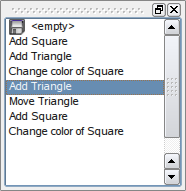
PySide.QtGui.QUndoView class displays the contents of a PySide.QtGui.QUndoStack .
PySide.QtGui.QUndoView 是 PySide.QtGui.QListView ,显示被压入撤消堆栈的命令列表。始终选择最近执行的命令。选择不同的命令导致调用 QUndoStack.setIndex() , rolling the state of the document backwards or forward to the new command.
堆栈可以被明确设置采用 PySide.QtGui.QUndoView.setStack() . Alternatively, a PySide.QtGui.QUndoGroup 对象可以被设置采用 PySide.QtGui.QUndoView.setGroup() . The view will then update itself automatically whenever the active stack of the group changes.
| 参数: |
|
|---|
构造新视图采用父级 parent and sets the observed group to group .
The view will update itself autmiatically whenever the active stack of the group changes.
构造新视图采用父级 parent and sets the observed stack to stack .
构造新视图采用父级 parent .
| 返回类型: | PySide.QtGui.QIcon |
|---|
This property holds the icon used to represent the clean state..
堆栈可能拥有清理状态设置采用 QUndoStack.setClean() . This is usually the state of the document at the point it was saved. PySide.QtGui.QUndoView can display an icon in the list of commands to show the clean state. If this property is a null icon, no icon is shown. The default value is the null icon.
| 返回类型: | unicode |
|---|
This property holds the label used for the empty state..
The empty label is the topmost element in the list of commands, which represents the state of the document before any commands were pushed on the stack. The default is the string “<empty>”.
| 返回类型: | PySide.QtGui.QUndoGroup |
|---|
Returns the group displayed by this view.
If the view is not looking at group, this function returns 0.
| 参数: | icon – PySide.QtGui.QIcon |
|---|
This property holds the icon used to represent the clean state..
堆栈可能拥有清理状态设置采用 QUndoStack.setClean() . This is usually the state of the document at the point it was saved. PySide.QtGui.QUndoView can display an icon in the list of commands to show the clean state. If this property is a null icon, no icon is shown. The default value is the null icon.
| 参数: | label – unicode |
|---|
This property holds the label used for the empty state..
The empty label is the topmost element in the list of commands, which represents the state of the document before any commands were pushed on the stack. The default is the string “<empty>”.
| 参数: | group – PySide.QtGui.QUndoGroup |
|---|
Sets the group displayed by this view to group 。若 group is 0, the view will be empty.
The view will update itself autmiatically whenever the active stack of the group changes.
| 参数: | stack – PySide.QtGui.QUndoStack |
|---|
Sets the stack displayed by this view to stack 。若 stack is 0, the view will be empty.
If the view was previously looking at a PySide.QtGui.QUndoGroup , the group is set to 0.
| 返回类型: | PySide.QtGui.QUndoStack |
|---|
Returns the stack currently displayed by this view. If the view is looking at a PySide.QtGui.QUndoGroup , this the group's active stack.

