PySide.QtWebKit.QWebView class provides a widget that is used to view and edit web documents.
PySide.QtWebKit.QWebView is the main widget component of the QtWebKit web browsing module. It can be used in various applications to display web content live from the Internet.
A web site can be loaded onto PySide.QtWebKit.QWebView 采用 PySide.QtWebKit.QWebView.load() function. Like all Qt widgets, the PySide.QtGui.QWidget.show() function must be invoked in order to display PySide.QtWebKit.QWebView . The snippet below illustrates this:
view = QWebView(parent)
view.load(QUrl("http://qt.nokia.com/"))
view.show()
另外, PySide.QtWebKit.QWebView.setUrl() can also be used to load a web site. If you have the HTML content readily available, you can use PySide.QtWebKit.QWebView.setHtml() 代替。
PySide.QtWebKit.QWebView.loadStarted() signal is emitted when the view begins loading. The PySide.QtWebKit.QWebView.loadProgress() signal, on the other hand, is emitted whenever an element of the web view completes loading, such as an embedded image, a script, etc. Finally, the PySide.QtWebKit.QWebView.loadFinished() signal is emitted when the view has loaded completely. It's argument - either true or false - indicates load success or failure.
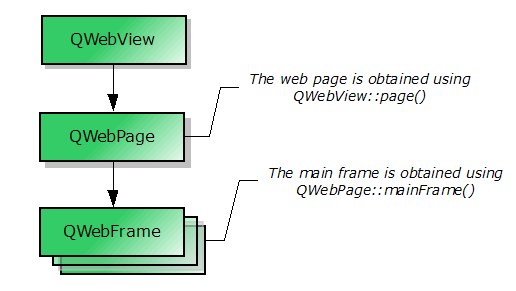
PySide.QtWebKit.QWebView.page() function returns a pointer to the web page object. See Elements of QWebView for an explanation of how the web page is related to the view. To modify your web view's settings, you can access the PySide.QtWebKit.QWebSettings object with the PySide.QtWebKit.QWebView.settings() function. With PySide.QtWebKit.QWebSettings , you can change the default fonts, enable or disable features such as JavaScript and plugins.
可以访问 HTML 文档的标题采用 PySide.QtWebKit.QWebView.title() property. Additionally, a web site may also specify an icon, which can be accessed using the PySide.QtWebKit.QWebView.icon() property. If the title or the icon changes, the corresponding PySide.QtWebKit.QWebView.titleChanged() and PySide.QtWebKit.QWebView.iconChanged() signals will be emitted. The PySide.QtWebKit.QWebView.textSizeMultiplier() property can be used to change the overall size of the text displayed in the web view.
If you require a custom context menu, you can implement it by reimplementing PySide.QtGui.QWidget.contextMenuEvent() and populating your PySide.QtGui.QMenu with the actions obtained from PySide.QtWebKit.QWebView.pageAction() . More functionality such as reloading the view, copying selected text to the clipboard, or pasting into the view, is also encapsulated within the PySide.QtGui.QAction objects returned by PySide.QtWebKit.QWebView.pageAction() . These actions can be programmatically triggered using PySide.QtWebKit.QWebView.triggerPageAction() . Alternatively, the actions can be added to a toolbar or a menu directly. PySide.QtWebKit.QWebView maintains the state of the returned actions but allows modification of action properties such as PySide.QtGui.QAction.text() or PySide.QtGui.QAction.icon() .
A PySide.QtWebKit.QWebView can be printed onto a PySide.QtGui.QPrinter 使用 print() function. This function is marked as a slot and can be conveniently connected to PySide.QtGui.QPrintPreviewDialog ‘s PySide.QtGui.QPrintPreviewDialog.paintRequested() 信号。
If you want to provide support for web sites that allow the user to open new windows, such as pop-up windows, you can subclass PySide.QtWebKit.QWebView and reimplement the PySide.QtWebKit.QWebView.createWindow() 函数。
PySide.QtWebKit.QWebView consists of other objects such as PySide.QtWebKit.QWebFrame and PySide.QtWebKit.QWebPage . The flowchart below shows these elements are related.
注意
It is possible to use PySide.QtWebKit.QWebPage and PySide.QtWebKit.QWebFrame , without using PySide.QtWebKit.QWebView , if you do not require PySide.QtGui.QWidget attributes. Nevertheless, QtWebKit depends on QtGui , so you should use a PySide.QtGui.QApplication 而不是 PySide.QtCore.QCoreApplication .
另请参阅
Previewer Example Web 浏览器 Form Extractor Example Google Chat Example Fancy Browser Example
| 参数: | parent – PySide.QtGui.QWidget |
|---|
构造空 PySide.QtWebKit.QWebView 采用父级 parent .
方便槽,用于把先前文档加载进由导航链接构建的文档列表。什么都不做,若没有先前文档。
它相当于
view.page().triggerPageAction(QWebPage.GoBack)
| 参数: | type – PySide.QtWebKit.QWebPage.WebWindowType |
|---|---|
| 返回类型: | PySide.QtWebKit.QWebView |
| 参数: |
|
|---|---|
| 返回类型: |
PySide.QtCore.bool |
方便槽,用于把下一文档加载进由导航链接构建的文档列表。什么都不做,若没有下一文档。
它相当于
view.page().triggerPageAction(QWebPage.GoForward)
| 返回类型: | PySide.QtCore.bool |
|---|
This property holds whether this page contains selected content or not..
默认情况下,此特性为 false。
| 返回类型: | PySide.QtWebKit.QWebHistory |
|---|
返回指向导航网页的视图历史的指针。
它相当于
view.page().history()
| 返回类型: | PySide.QtGui.QIcon |
|---|
This property holds the icon associated with the web page currently viewed.
默认情况下,此特性包含 null 图标。
| 返回类型: | PySide.QtCore.bool |
|---|
This property holds whether the document was modified by the user.
Parts of HTML documents can be editable for example through the contenteditable 属性在 HTML 元素。
默认情况下,此特性为 false。
| 参数: | arg__1 – PySide.QtCore.QUrl |
|---|
| 参数: | url – PySide.QtCore.QUrl |
|---|
加载指定 url 并显示它。
注意
The view remains the same until enough data has arrived to display the new url .
另请参阅
PySide.QtWebKit.QWebView.setUrl() PySide.QtWebKit.QWebView.url() PySide.QtWebKit.QWebView.urlChanged() QUrl.fromUserInput()
| 参数: |
|
|---|
| 参数: | arg__1 – PySide.QtCore.bool |
|---|
| 参数: | progress – PySide.QtCore.int |
|---|
| 返回类型: | PySide.QtWebKit.QWebPage |
|---|
返回指向底层 Web 页面的指针。
| 参数: | action – PySide.QtWebKit.QWebPage.WebAction |
|---|---|
| 返回类型: | PySide.QtGui.QAction |
| 参数: | arg__1 – PySide.QtGui.QPrinter |
|---|
打印主框架到给定 printer .
另请参阅
QWebFrame.print() PySide.QtGui.QPrintPreviewDialog
重新加载当前文档。
| 返回类型: | PySide.QtGui.QPainter.RenderHints |
|---|
This property holds the default render hints for the view.
These hints are used to initialize PySide.QtGui.QPainter before painting the Web page.
QPainter.TextAntialiasing and QPainter.SmoothPixmapTransform are enabled by default.
注意
This property is not available on Symbian. However, the getter and setter functions can still be used directly.
另请参阅
QPainter.renderHints()
| 返回类型: | unicode |
|---|
此特性保持目前选中的 HTML。
默认情况下,此特性包含空字符串。
| 返回类型: | unicode |
|---|
此特性保持当前选中的文本。
默认情况下,此特性包含空字符串。
| 参数: |
|
|---|
Sets the content of the web view to the specified content data 。若 mimeType argument is empty it is currently assumed that the content is HTML but in future versions we may introduce auto-detection.
内容中引用的外部对象的定位相对于 baseUrl .
data 被立即加载;外部对象是异步加载的。
| 参数: |
|
|---|
将 Web 视图内容设为指定 html .
External objects such as stylesheets or images referenced in the HTML document are located relative to baseUrl .
html 被立即加载;外部对象是异步加载的。
When using this method, WebKit assumes that external resources such as JavaScript programs or style sheets are encoded in UTF-8 unless otherwise specified. For example, the encoding of an external script can be specified through the charset attribute of the HTML script tag. Alternatively, the encoding can also be specified by the web server.
This is a convenience function equivalent to setContent(html, “text/html”, baseUrl).
警告
This function works only for HTML, for other mime types (i.e. XHTML, SVG) PySide.QtWebKit.QWebView.setContent() should be used instead.
| 参数: | page – PySide.QtWebKit.QWebPage |
|---|
Makes page 成为 Web 视图的新网页。
父级 PySide.QtCore.QObject 为提供页面仍然是对象所有者。若当前页面是 Web 视图子页面,则删除它。
| 参数: |
|
|---|
| 参数: | hints – PySide.QtGui.QPainter.RenderHints |
|---|
This property holds the default render hints for the view.
These hints are used to initialize PySide.QtGui.QPainter before painting the Web page.
QPainter.TextAntialiasing and QPainter.SmoothPixmapTransform are enabled by default.
注意
This property is not available on Symbian. However, the getter and setter functions can still be used directly.
另请参阅
QPainter.renderHints()
| 参数: | factor – PySide.QtCore.qreal |
|---|
This property holds the scaling factor for all text in the frame.
Use setZoomFactor instead, in combination with the ZoomTextOnly attribute in PySide.QtWebKit.QWebSettings .
注意
Setting this property also enables the ZoomTextOnly attribute in PySide.QtWebKit.QWebSettings .
By default, this property contains a value of 1.0.
| 参数: | url – PySide.QtCore.QUrl |
|---|
This property holds the url of the web page currently viewed.
设置此特性清零视图并加载 URL。
默认情况下,此特性包含空的无效 URL。
| 参数: | factor – PySide.QtCore.qreal |
|---|
此特性保持视图的缩放因子。
| 返回类型: | PySide.QtWebKit.QWebSettings |
|---|
Returns a pointer to the view/page specific settings object.
它相当于
view.page().settings()
| 参数: | text – unicode |
|---|
停止加载文档的方便槽。
它相当于
view.page().triggerPageAction(QWebPage.Stop)
| 返回类型: | PySide.QtCore.qreal |
|---|
This property holds the scaling factor for all text in the frame.
Use setZoomFactor instead, in combination with the ZoomTextOnly attribute in PySide.QtWebKit.QWebSettings .
注意
Setting this property also enables the ZoomTextOnly attribute in PySide.QtWebKit.QWebSettings .
By default, this property contains a value of 1.0.
| 返回类型: | unicode |
|---|
This property holds the title of the web page currently viewed.
默认情况下,此特性包含空字符串。
| 参数: | title – unicode |
|---|
| 参数: |
|
|---|
| 返回类型: | PySide.QtCore.QUrl |
|---|
This property holds the url of the web page currently viewed.
设置此特性清零视图并加载 URL。
默认情况下,此特性包含空的无效 URL。
| 参数: | arg__1 – PySide.QtCore.QUrl |
|---|
| 返回类型: | PySide.QtCore.qreal |
|---|
此特性保持视图的缩放因子。

