继承者: QTableWidget
PySide.QtGui.QTableView class provides a default model/view implementation of a table view.
A PySide.QtGui.QTableView implements a table view that displays items from a model. This class is used to provide standard tables that were previously provided by the QTable 类,但使用由 Qt 模型/视图体系结构提供的方式更灵活。
PySide.QtGui.QTableView class is one of the 模型/视图类 且属于 Qt 的 模型/视图框架 .
PySide.QtGui.QTableView implements the interfaces defined by the PySide.QtGui.QAbstractItemView 类以允许它显示提供数据,通过模型派生自 PySide.QtCore.QAbstractItemModel 类。
表格拥有的垂直 Header 头部可以获得使用 PySide.QtGui.QTableView.verticalHeader() function, and a horizontal header that is available through the PySide.QtGui.QTableView.horizontalHeader() function. The height of each row in the table can be found by using PySide.QtGui.QTableView.rowHeight() ; similarly, the width of columns can be found using PySide.QtGui.QTableView.columnWidth() . Since both of these are plain widgets, you can hide either of them using their PySide.QtGui.QWidget.hide() 函数。
行和列可以被隐藏和展示采用 PySide.QtGui.QTableView.hideRow() , PySide.QtGui.QTableView.hideColumn() , PySide.QtGui.QTableView.showRow() ,和 PySide.QtGui.QTableView.showColumn() . They can be selected with PySide.QtGui.QTableView.selectRow() and PySide.QtGui.QTableView.selectColumn() . The table will show a grid depending on the PySide.QtGui.QTableView.showGrid() 特性。
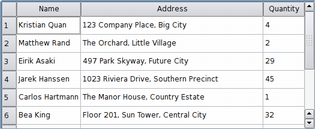
The items shown in a table view, like those in the other item views, are rendered and edited using standard delegates . However, for some tasks it is sometimes useful to be able to insert widgets in a table instead. Widgets are set for particular indexes with the PySide.QtGui.QAbstractItemView.setIndexWidget() function, and later retrieved with PySide.QtGui.QAbstractItemView.indexWidget() .
|
By default, the cells in a table do not expand to fill the available space. You can make the cells fill the available space by stretching the last header section. Access the relevant header using PySide.QtGui.QTableView.horizontalHeader() or PySide.QtGui.QTableView.verticalHeader() and set the header's PySide.QtGui.QHeaderView.stretchLastSection() 特性。 To distribute the available space according to the space requirement of each column or row, call the view's PySide.QtGui.QTableView.resizeColumnsToContents() or PySide.QtGui.QTableView.resizeRowsToContents() 函数。 |
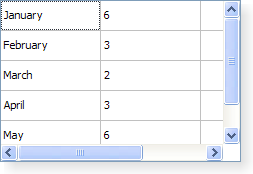
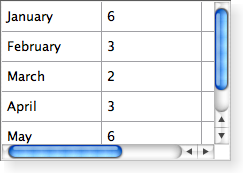
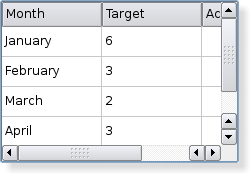
PySide.QtGui.QTableView is styled appropriately for each platform. The following images show how it looks on three different platforms. Go to the Qt Widget 画廊 to see its appearance in other styles.
|
|
|
| A Windows XP style table view. | A Macintosh style table view. | A Plastique style table view. |
另请参阅
PySide.QtGui.QTableWidget 视图类 PySide.QtCore.QAbstractItemModel PySide.QtGui.QAbstractItemView 图表范例 像素器范例 表格模型范例
| 参数: | parent – PySide.QtGui.QWidget |
|---|
Constructs a table view with a parent to represent the data.
Removes all row and column spans in the table view.
| 参数: | x – PySide.QtCore.int |
|---|---|
| 返回类型: | PySide.QtCore.int |
Returns the column in which the given x-coordinate, x ,在内容坐标中定位。
注意
This function returns -1 if the given coordinate is not valid (has no column).
| 参数: |
|
|---|
This slot is called whenever columns are added or deleted. The previous number of columns is specified by oldCount , and the new number of columns is specified by newCount .
| 参数: |
|
|---|
This slot is called to change the index of the given column in the table view. The old index is specified by oldIndex , and the new index by newIndex .
| 参数: |
|
|---|
调用此槽改变宽度为给定 column 。旧宽度的指定通过 oldWidth ,和新宽度通过 newWidth .
| 参数: |
|
|---|---|
| 返回类型: |
PySide.QtCore.int |
Returns the column span of the table element at ( row , column )。默认为 1。
| 参数: | column – PySide.QtCore.int |
|---|---|
| 返回类型: | PySide.QtCore.int |
Returns the x-coordinate in contents coordinates of the given column .
| 参数: | column – PySide.QtCore.int |
|---|---|
| 返回类型: | PySide.QtCore.int |
Returns the width of the given column .
| 返回类型: | PySide.QtCore.Qt.PenStyle |
|---|
This property holds the pen style used to draw the grid..
This property holds the style used when drawing the grid (see PySide.QtGui.QTableView.showGrid() ).
| 参数: | column – PySide.QtCore.int |
|---|
隐藏给定 column .
| 参数: | row – PySide.QtCore.int |
|---|
隐藏给定 row .
| 返回类型: | PySide.QtGui.QHeaderView |
|---|
返回表格视图的水平 Header 头。
另请参阅
PySide.QtGui.QTableView.setHorizontalHeader() PySide.QtGui.QTableView.verticalHeader() QAbstractItemModel.headerData()
| 参数: | column – PySide.QtCore.int |
|---|---|
| 返回类型: | PySide.QtCore.bool |
Returns true if the given column is hidden; otherwise returns false.
| 返回类型: | PySide.QtCore.bool |
|---|
This property holds whether the button in the top-left corner is enabled.
If this property is true then button in the top-left corner of the table view is enabled. Clicking on this button will select all the cells in the table view.
This property is true by default.
| 参数: | row – PySide.QtCore.int |
|---|---|
| 返回类型: | PySide.QtCore.bool |
Returns true if the given row is hidden; otherwise returns false.
| 返回类型: | PySide.QtCore.bool |
|---|
This property holds whether sorting is enabled.
If this property is true, sorting is enabled for the table. If this property is false, sorting is not enabled. The default value is false.
注意
. Setting the property to true with PySide.QtGui.QTableView.setSortingEnabled() immediately triggers a call to PySide.QtGui.QTableView.sortByColumn() with the current sort section and order.
| 参数: | column – PySide.QtCore.int |
|---|
Resizes the given column based on the size hints of the delegate used to render each item in the column.
注意
Only visible columns will be resized. Reimplement PySide.QtGui.QTableView.sizeHintForColumn() to resize hidden columns as well.
Resizes all columns based on the size hints of the delegate used to render each item in the columns.
| 参数: | row – PySide.QtCore.int |
|---|
Resizes the given row based on the size hints of the delegate used to render each item in the row.
Resizes all rows based on the size hints of the delegate used to render each item in the rows.
| 参数: | y – PySide.QtCore.int |
|---|---|
| 返回类型: | PySide.QtCore.int |
返回行在给定 y 坐标 y ,在内容坐标中定位。
注意
此函数返回 -1 若给定坐标无效 (没有行)。
| 参数: |
|
|---|
This slot is called whenever rows are added or deleted. The previous number of rows is specified by oldCount , and the new number of rows is specified by newCount .
| 参数: | row – PySide.QtCore.int |
|---|---|
| 返回类型: | PySide.QtCore.int |
返回高度为给定 row .
| 参数: |
|
|---|
This slot is called to change the index of the given row in the table view. The old index is specified by oldIndex , and the new index by newIndex .
| 参数: |
|
|---|
This slot is called to change the height of the given row . The old height is specified by oldHeight , and the new height by newHeight .
| 参数: |
|
|---|---|
| 返回类型: |
PySide.QtCore.int |
Returns the row span of the table element at ( row , column )。默认为 1。
| 参数: | row – PySide.QtCore.int |
|---|---|
| 返回类型: | PySide.QtCore.int |
Returns the y-coordinate in contents coordinates of the given row .
| 参数: | column – PySide.QtCore.int |
|---|
选择给定 column in the table view if the current QAbstractItemView.SelectionMode and QAbstractItemView.SelectionBehavior allows columns to be selected.
| 参数: | row – PySide.QtCore.int |
|---|
选择给定 row in the table view if the current QAbstractItemView.SelectionMode and QAbstractItemView.SelectionBehavior allows rows to be selected.
| 参数: |
|
|---|
若 hide is true the given column will be hidden; otherwise it will be shown.
| 参数: |
|
|---|
设置宽度为给定 column to be width .
| 参数: | enable – PySide.QtCore.bool |
|---|
This property holds whether the button in the top-left corner is enabled.
If this property is true then button in the top-left corner of the table view is enabled. Clicking on this button will select all the cells in the table view.
This property is true by default.
| 参数: | style – PySide.QtCore.Qt.PenStyle |
|---|
This property holds the pen style used to draw the grid..
This property holds the style used when drawing the grid (see PySide.QtGui.QTableView.showGrid() ).
| 参数: | header – PySide.QtGui.QHeaderView |
|---|
Sets the widget to use for the horizontal header to header .
| 参数: |
|
|---|
Sets the height of the given row to be height .
| 参数: |
|
|---|
若 hide is true row will be hidden, otherwise it will be shown.
| 参数: | show – PySide.QtCore.bool |
|---|
This property holds whether the grid is shown.
If this property is true a grid is drawn for the table; if the property is false, no grid is drawn. The default value is true.
| 参数: | enable – PySide.QtCore.bool |
|---|
This property holds whether sorting is enabled.
If this property is true, sorting is enabled for the table. If this property is false, sorting is not enabled. The default value is false.
注意
. Setting the property to true with PySide.QtGui.QTableView.setSortingEnabled() immediately triggers a call to PySide.QtGui.QTableView.sortByColumn() with the current sort section and order.
| 参数: |
|
|---|
Sets the span of the table element at ( row , column ) to the number of rows and columns specified by ( rowSpanCount , columnSpanCount ).
| 参数: | header – PySide.QtGui.QHeaderView |
|---|
Sets the widget to use for the vertical header to header .
| 参数: | on – PySide.QtCore.bool |
|---|
This property holds the item text word-wrapping policy.
If this property is true then the item text is wrapped where necessary at word-breaks; otherwise it is not wrapped at all. This property is true by default.
Note that even of wrapping is enabled, the cell will not be expanded to fit all text. Ellipsis will be inserted according to the current PySide.QtGui.QAbstractItemView.textElideMode() .
| 参数: | column – PySide.QtCore.int |
|---|
Show the given column .
| 返回类型: | PySide.QtCore.bool |
|---|
This property holds whether the grid is shown.
If this property is true a grid is drawn for the table; if the property is false, no grid is drawn. The default value is true.
| 参数: | row – PySide.QtCore.int |
|---|
Show the given row .
| 参数: |
|
|---|
| 返回类型: | PySide.QtGui.QHeaderView |
|---|
Returns the table view's vertical header.
另请参阅
PySide.QtGui.QTableView.setVerticalHeader() PySide.QtGui.QTableView.horizontalHeader() QAbstractItemModel.headerData()
| 参数: | index – PySide.QtCore.QModelIndex |
|---|---|
| 返回类型: | PySide.QtCore.int |
| 返回类型: | PySide.QtCore.bool |
|---|
This property holds the item text word-wrapping policy.
If this property is true then the item text is wrapped where necessary at word-breaks; otherwise it is not wrapped at all. This property is true by default.
Note that even of wrapping is enabled, the cell will not be expanded to fit all text. Ellipsis will be inserted according to the current PySide.QtGui.QAbstractItemView.textElideMode() .

