继承者: QGraphicsOpacityEffect , QGraphicsDropShadowEffect , QGraphicsBlurEffect , QGraphicsColorizeEffect
注意
该类在 Qt4.6 引入
PySide.QtGui.QGraphicsEffect class is the base class for all graphics effects.
Effects alter the appearance of elements by hooking into the rendering pipeline and operating between the source (e.g., a PySide.QtGui.QGraphicsPixmapItem ) and the destination device (e.g., PySide.QtGui.QGraphicsView ‘s viewport). Effects can be disabled by calling setEnabled(false). If effects are disabled, the source is rendered directly.
To add a visual effect to a PySide.QtGui.QGraphicsItem , for example, you can use one of the standard effects, or alternately, create your own effect by creating a subclass of PySide.QtGui.QGraphicsEffect . The effect can then be installed on the item using QGraphicsItem.setGraphicsEffect() .
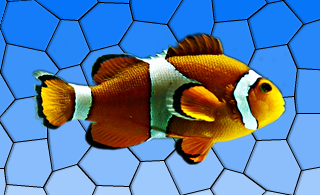
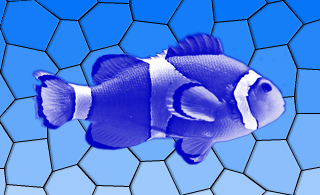
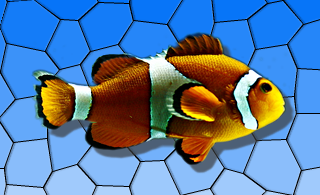
Qt provides the following standard effects:
|
|

|
|

|
|
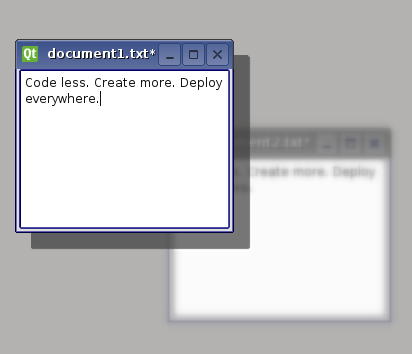
For more information on how to use each effect, refer to the specific effect's documentation.
To create your own custom effect, create a subclass of PySide.QtGui.QGraphicsEffect (or any other existing effects) and reimplement the virtual function PySide.QtGui.QGraphicsEffect.draw() . This function is called whenever the effect needs to redraw. The PySide.QtGui.QGraphicsEffect.draw() function takes the painter with which to draw as an argument. For more information, refer to the documenation for PySide.QtGui.QGraphicsEffect.draw() . In the PySide.QtGui.QGraphicsEffect.draw() function you can call PySide.QtGui.QGraphicsEffect.sourcePixmap() to get a pixmap of the graphics effect source which you can then process.
If your effect changes, use PySide.QtGui.QGraphicsEffect.update() to request for a redraw. If your custom effect changes the bounding rectangle of the source, e.g., a radial glow effect may need to apply an extra margin, you can reimplement the virtual PySide.QtGui.QGraphicsEffect.boundingRectFor() function, and call PySide.QtGui.QGraphicsEffect.updateBoundingRect() to notify the framework whenever this rectangle changes. The virtual PySide.QtGui.QGraphicsEffect.sourceChanged() function is called to notify the effects that the source has changed in some way - e.g., if the source is a PySide.QtGui.QGraphicsRectItem and its rectangle parameters have changed.
| 参数: | parent – PySide.QtCore.QObject |
|---|
构造新 PySide.QtGui.QGraphicsEffect instance having the specified parent .
This enum describes how the pixmap returned from sourcePixmap should be padded.
| 常量 | 描述 |
|---|---|
| QGraphicsEffect.NoPad | The pixmap should not receive any additional padding. |
| QGraphicsEffect.PadToTransparentBorder | The pixmap should be padded to ensure it has a completely transparent border. |
| QGraphicsEffect.PadToEffectiveBoundingRect | The pixmap should be padded to match the effective bounding rectangle of the effect. |
This enum describes what has changed in QGraphicsEffectSource .
| 常量 | 描述 |
|---|---|
| QGraphicsEffect.SourceAttached | The effect is installed on a source. |
| QGraphicsEffect.SourceDetached | The effect is uninstalled on a source. |
| QGraphicsEffect.SourceBoundingRectChanged | The bounding rect of the source has changed. |
| QGraphicsEffect.SourceInvalidated | The visual appearance of the source has changed. |
| 返回类型: | PySide.QtCore.QRectF |
|---|
Returns the effective bounding rectangle for this effect, i.e., the bounding rectangle of the source in device coordinates, adjusted by any margins applied by the effect itself.
| 参数: | sourceRect – PySide.QtCore.QRectF |
|---|---|
| 返回类型: | PySide.QtCore.QRectF |
Returns the effective bounding rectangle for this effect, given the provided rect in the device coordinates. When writing you own custom effect, you must call PySide.QtGui.QGraphicsEffect.updateBoundingRect() whenever any parameters are changed that may cause this this function to return a different value.
| 参数: | painter – PySide.QtGui.QPainter |
|---|
This pure virtual function draws the effect and is called whenever the source needs to be drawn.
Reimplement this function in a PySide.QtGui.QGraphicsEffect subclass to provide the effect's drawing implementation, using painter .
例如:
def draw(self, painter):
    # ...
    offset = QPoint()
    if self.sourceIsPixmap():
        # No point in drawing in device coordinates (pixmap will be scaled anyways).
        pixmap = sourcePixmap(Qt.LogicalCoordinates, offset)
        ...
        painter.drawPixmap(offset, pixmap)
    else:
        # Draw pixmap in device coordinates to avoid pixmap scaling
        pixmap = sourcePixmap(Qt.DeviceCoordinates, offset)
        painter.setWorldTransform(QTransform())
        # ...
        painter.drawPixmap(offset, pixmap)
    # ...
This function should not be called explicitly by the user, since it is meant for reimplementation purposes only.
| 参数: | painter – PySide.QtGui.QPainter |
|---|
Draws the source directly using the given painter .
This function should only be called from QGraphicsEffect.draw() .
例如:
def draw(self, painter):
    # Fully opaque draw directly without going through a pixmap.
    if qFuzzyCompare(self.opacity, 1):
        drawSource(painter)
        return
    # ...
| 参数: | enabled – PySide.QtCore.bool |
|---|
| 返回类型: | PySide.QtCore.bool |
|---|
This property holds whether the effect is enabled or not..
If an effect is disabled, the source will be rendered with as normal, with no interference from the effect. If the effect is enabled, the source will be rendered with the effect applied.
This property is enabled by default.
Using this property, you can disable certain effects on slow platforms, in order to ensure that the user interface is responsive.
| 参数: | enable – PySide.QtCore.bool |
|---|
This property holds whether the effect is enabled or not..
If an effect is disabled, the source will be rendered with as normal, with no interference from the effect. If the effect is enabled, the source will be rendered with the effect applied.
This property is enabled by default.
Using this property, you can disable certain effects on slow platforms, in order to ensure that the user interface is responsive.
| 参数: | system – PySide.QtCore.Qt.CoordinateSystem |
|---|---|
| 返回类型: | PySide.QtCore.QRectF |
| 参数: | flags – PySide.QtGui.QGraphicsEffect.ChangeFlags |
|---|
| 返回类型: | PySide.QtCore.bool |
|---|
Returns true if the source effectively is a pixmap, e.g., a PySide.QtGui.QGraphicsPixmapItem .
This function is useful for optimization purposes. For instance, there's no point in drawing the source in device coordinates to avoid pixmap scaling if this function returns true - the source pixmap will be scaled anyways.
| 参数: |
|
|---|---|
| 返回类型: |
Schedules a redraw of the effect. Call this function whenever the effect needs to be redrawn. This function does not trigger a redraw of the source.
This function notifies the effect framework when the effect's bounding rectangle has changed. As a custom effect author, you must call this function whenever you change any parameters that will cause the virtual PySide.QtGui.QGraphicsEffect.boundingRectFor() function to return a different value.
This function will call PySide.QtGui.QGraphicsEffect.update() if this is necessary.

