注意
该类在 Qt4.6 引入
PySide.QtGui.QGraphicsColorizeEffect class provides a colorize effect.
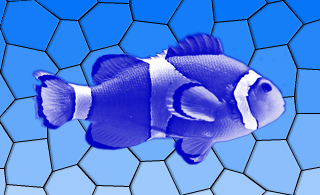
彩色化效果渲染源采用色调为其 PySide.QtGui.QGraphicsColorizeEffect.color() . The color can be modified using the PySide.QtGui.QGraphicsColorizeEffect.setColor() 函数。
默认情况下,颜色是浅蓝色 ( PySide.QtGui.QColor (0, 0, 192)).
| 参数: | parent – PySide.QtCore.QObject |
|---|
构造新 PySide.QtGui.QGraphicsColorizeEffect instance. The parent 参数会被传递给 PySide.QtGui.QGraphicsEffect ‘s constructor.
| 返回类型: | PySide.QtGui.QColor |
|---|
This property holds the color of the effect..
默认情况下,颜色是浅蓝色 ( PySide.QtGui.QColor (0, 0, 192)).
| 参数: | color – PySide.QtGui.QColor |
|---|
| 参数: | c – PySide.QtGui.QColor |
|---|
This property holds the color of the effect..
默认情况下,颜色是浅蓝色 ( PySide.QtGui.QColor (0, 0, 192)).
| 参数: | strength – PySide.QtCore.qreal |
|---|
This property holds the strength of the effect..
默认情况下,强度为 1.0。强度 0.0 等于没有效果,而强度 1.0 意味着完全彩色化。
| 返回类型: | PySide.QtCore.qreal |
|---|
This property holds the strength of the effect..
默认情况下,强度为 1.0。强度 0.0 等于没有效果,而强度 1.0 意味着完全彩色化。
| 参数: | strength – PySide.QtCore.qreal |
|---|

