继承者: QToolBox , QAbstractScrollArea , QGraphicsView , QDeclarativeView , QAbstractItemView , QTreeView , QHelpContentWidget , QTreeWidget , QHeaderView , QTableView , QTableWidget , QColumnView , QListView , QUndoView , QListWidget , QHelpIndexWidget , QStackedWidget , QSplitter , QScrollArea , QPlainTextEdit , QTextEdit , QTextBrowser , QMdiArea , QLCDNumber , QLabel
PySide.QtGui.QFrame class is the base class of widgets that can have a frame.
PySide.QtGui.QMenu uses this to “raise” the menu above the surrounding screen. PySide.QtGui.QProgressBar has a “sunken” look. PySide.QtGui.QLabel 拥有 Flat (扁平) 外观。像这些的 Widget 框架可以改变。
label = QLabel()
label.setFrameStyle(QFrame.Panel | QFrame.Raised)
label.setLineWidth(2)
pbar = QProgressBar()
label.setFrameStyle(QFrame.NoFrame)
PySide.QtGui.QFrame class can also be used directly for creating simple placeholder frames without any contents.
框架样式的指定通过 frame shape 和 shadow style 用于在视觉上分隔框架与周围 Widget。 这些特性可以一起设置使用 PySide.QtGui.QFrame.setFrameStyle() function and read with PySide.QtGui.QFrame.frameStyle() .
框架形状包括 NoFrame , Box , Panel , StyledPanel , HLine and VLine ;阴影样式包括 Plain , Raised and Sunken .
框架 Widget 拥有 3 个描述边框厚度的属性: PySide.QtGui.QFrame.lineWidth() , PySide.QtGui.QFrame.midLineWidth() ,和 PySide.QtGui.QFrame.frameWidth() .
定制框架和框架内容之间的边距采用 QWidget.setContentsMargins() 函数。
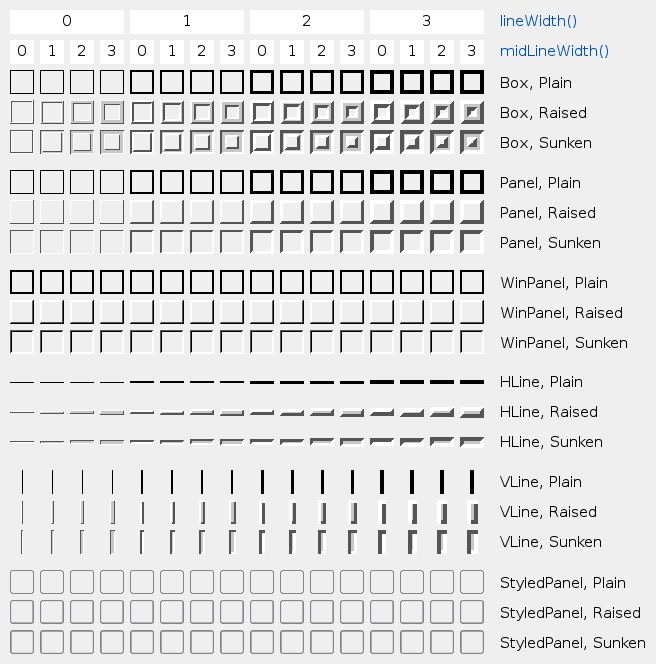
此表展示一些样式和线宽的组合:
| 参数: |
|
|---|
此枚举定义 2 常量,可以用于提取 2 分量为 PySide.QtGui.QFrame.frameStyle() :
| 常量 | 描述 |
|---|---|
| QFrame.Shadow_Mask | QFrame.Shadow 部分在 PySide.QtGui.QFrame.frameStyle() |
| QFrame.Shape_Mask | QFrame.Shape 部分在 PySide.QtGui.QFrame.frameStyle() |
通常,不需要使用这些,由于 PySide.QtGui.QFrame.frameShadow() and PySide.QtGui.QFrame.frameShape() already extract the QFrame.Shadow 和 QFrame.Shape 部分在 PySide.QtGui.QFrame.frameStyle() .
此枚举类型定义框架可用形状。
| 常量 | 描述 |
|---|---|
| QFrame.NoFrame | PySide.QtGui.QFrame 什么都不绘制 |
| QFrame.Box | PySide.QtGui.QFrame 在其内容周围绘制方框 |
| QFrame.Panel | PySide.QtGui.QFrame 绘制平面以使内容看起来凸起 (或凹陷) |
| QFrame.StyledPanel | 绘制外观从属当前 GUI 样式的矩形面板。可以凸起或凹陷。 |
| QFrame.HLine | PySide.QtGui.QFrame 绘制无边框水平线 (作为分隔符很有用) |
| QFrame.VLine | PySide.QtGui.QFrame 绘制无边框垂直线 (作为分隔符很有用) |
| QFrame.WinPanel | draws a rectangular panel that can be raised or sunken like those in Windows 2000. Specifying this shape sets the line width to 2 pixels. WinPanel is provided for compatibility. For GUI style independence we recommend using StyledPanel 代替。 |
当不调用 PySide.QtGui.QStyle ,形状交互影响 QFrame.Shadow , PySide.QtGui.QFrame.lineWidth() 和 PySide.QtGui.QFrame.midLineWidth() to create the total result. See the picture of the frames in the main class documentation.
另请参阅
QFrame.Shadow QFrame.style() QStyle.drawPrimitive()
此枚举类型定义用于把 3D 效果给予框架的阴影类型。
| 常量 | 描述 |
|---|---|
| QFrame.Plain | the frame and contents appear level with the surroundings; draws using the palette QPalette.WindowText color (without any 3D effect) |
| QFrame.Raised | the frame and contents appear raised; draws a 3D raised line using the light and dark colors of the current color group |
| QFrame.Sunken | the frame and contents appear sunken; draws a 3D sunken line using the light and dark colors of the current color group |
阴影交互影响 QFrame.Shape , PySide.QtGui.QFrame.lineWidth() 和 PySide.QtGui.QFrame.midLineWidth() . See the picture of the frames in the main class documentation.
另请参阅
QFrame.Shape PySide.QtGui.QFrame.lineWidth() PySide.QtGui.QFrame.midLineWidth()
| 参数: | arg__1 – PySide.QtGui.QPainter |
|---|
Mostly for the sake of Q3Frame
| 返回类型: | PySide.QtCore.QRect |
|---|
This property holds the frame's rectangle.
The frame's rectangle is the rectangle the frame is drawn in. By default, this is the entire widget. Setting the rectangle does does not cause a widget update. The frame rectangle is automatically adjusted when the widget changes size.
若将矩形设为 null 矩形 (例如, PySide.QtCore.QRect (0, 0, 0, 0)), then the resulting frame rectangle is equivalent to the widget rectangle .
| 返回类型: | PySide.QtGui.QFrame.Shadow |
|---|
This property holds the frame shadow value from the frame style.
| 返回类型: | PySide.QtGui.QFrame.Shape |
|---|
This property holds the frame shape value from the frame style.
| 返回类型: | PySide.QtCore.int |
|---|
返回框架样式。
默认值为 QFrame.Plain .
| 返回类型: | PySide.QtCore.int |
|---|
This property holds the width of the frame that is drawn..
注意:框架宽度从属 frame style , not only the line width and the mid-line width. For example, the style specified by NoFrame always has a frame width of 0, whereas the style Panel has a frame width equivalent to the line width.
| 返回类型: | PySide.QtCore.int |
|---|
This property holds the line width.
注意: total 线宽为框架用作分隔符 ( HLine and VLine ) 指定通过 PySide.QtGui.QFrame.frameWidth() .
默认值为 1。
| 返回类型: | PySide.QtCore.int |
|---|
This property holds the width of the mid-line.
默认值为 0。
| 参数: | arg__1 – PySide.QtCore.QRect |
|---|
This property holds the frame's rectangle.
The frame's rectangle is the rectangle the frame is drawn in. By default, this is the entire widget. Setting the rectangle does does not cause a widget update. The frame rectangle is automatically adjusted when the widget changes size.
若将矩形设为 null 矩形 (例如, PySide.QtCore.QRect (0, 0, 0, 0)), then the resulting frame rectangle is equivalent to the widget rectangle .
| 参数: | arg__1 – PySide.QtGui.QFrame.Shadow |
|---|
This property holds the frame shadow value from the frame style.
| 参数: | arg__1 – PySide.QtGui.QFrame.Shape |
|---|
This property holds the frame shape value from the frame style.
| 参数: | arg__1 – PySide.QtCore.int |
|---|
将框架样式设为 style .
style 是框架形状和框架阴影样式之间的按位 OR。见主类文档编制中的框架图片。
框架形状给出在 QFrame.Shape 和阴影样式在 QFrame.Shadow .
若指定大于 0 的中线宽度,则绘制附加线条为 Raised or Sunken Box , HLine ,和 VLine 框架。使用当前颜色组的中间色绘制中间线条。
| 参数: | arg__1 – PySide.QtCore.int |
|---|
This property holds the line width.
注意: total 线宽为框架用作分隔符 ( HLine and VLine ) 指定通过 PySide.QtGui.QFrame.frameWidth() .
默认值为 1。
| 参数: | arg__1 – PySide.QtCore.int |
|---|
This property holds the width of the mid-line.
默认值为 0。

