PySide.QtGui.QTabletEvent class contains parameters that describe a Tablet event.
Tablet Events are generated from a Wacom tablet. Most of the time you will want to deal with events from the tablet as if they were events from a mouse; for example, you would retrieve the cursor position with PySide.QtGui.QTabletEvent.x() , PySide.QtGui.QTabletEvent.y() , PySide.QtGui.QTabletEvent.pos() , PySide.QtGui.QTabletEvent.globalX() , PySide.QtGui.QTabletEvent.globalY() ,和 PySide.QtGui.QTabletEvent.globalPos() . In some situations you may wish to retrieve the extra information provided by the tablet device driver; for example, you might want to do subpixeling with higher resolution coordinates or you may want to adjust color brightness based on pressure. PySide.QtGui.QTabletEvent allows you to read the PySide.QtGui.QTabletEvent.pressure() , PySide.QtGui.QTabletEvent.xTilt() ,和 PySide.QtGui.QTabletEvent.yTilt() , as well as the type of device being used with PySide.QtGui.QTabletEvent.device() (见 QTabletEvent.TabletDevice ). It can also give you the minimum and maximum values for each device's pressure and high resolution coordinates.
A tablet event contains a special accept flag that indicates whether the receiver wants the event. You should call QTabletEvent.accept() if you handle the tablet event; otherwise it will be sent to the parent widget. The exception are TabletEnterProximity and TabletLeaveProximity events, these are only sent to PySide.QtGui.QApplication and don't check whether or not they are accepted.
QWidget.setEnabled() function can be used to enable or disable mouse and keyboard events for a widget.
事件处理程序 QWidget.tabletEvent() receives all three types of tablet events. Qt will first send a tabletEvent then, if it is not accepted, it will send a mouse event. This allows applications that don't utilize tablets to use a tablet like a mouse, while also enabling those who want to use both tablets and mouses differently.
| 参数: |
|
|---|
此枚举定义生成事件的设备类型。
| 常量 | 描述 |
|---|---|
| QTabletEvent.NoDevice | 没有设备,或未知设备。 |
| QTabletEvent.Puck | 游标 (类似扁平鼠标的设备,带有十字准线透明圆圈)。 |
| QTabletEvent.Stylus | 手写笔。 |
| QTabletEvent.Airbrush | 喷枪 |
| QTabletEvent.FourDMouse | 4D 鼠标。 |
| QTabletEvent.RotationStylus | 特殊手写笔,还知道旋转 (6D 手写笔)。 |
此枚举定义生成事件是什么点类型。
| 常量 | 描述 |
|---|---|
| QTabletEvent.UnknownPointer | 未知设备。 |
| QTabletEvent.Pen | 像手写笔设备的尖端 (笔的窄端)。 |
| QTabletEvent.Cursor | 任何像游标的设备。 |
| QTabletEvent.Eraser | 像手写笔设备的橡皮擦端 (笔的宽端)。 |
| 返回类型: | PySide.QtGui.QTabletEvent.TabletDevice |
|---|
返回生成事件的设备类型。
另请参阅
QTabletEvent.TabletDevice
| 返回类型: | PySide.QtCore.QPoint |
|---|
Returns the global position of the device at the time of the event . This is important on asynchronous windows systems like X11; whenever you move your widgets around in response to mouse events, PySide.QtGui.QTabletEvent.globalPos() can differ significantly from the current position QCursor.pos() .
| 返回类型: | PySide.QtCore.int |
|---|
返回事件发生时鼠标指针的全局 x 位置。
| 返回类型: | PySide.QtCore.int |
|---|
返回事件发生时数位板设备的全局 y 位置。
| 返回类型: | PySide.QtCore.QPointF |
|---|
The high precision coordinates delivered from the tablet expressed. Sub pixeling information is in the fractional part of the PySide.QtCore.QPointF .
| 返回类型: | PySide.QtCore.qreal |
|---|
The high precision x position of the tablet device.
| 返回类型: | PySide.QtCore.qreal |
|---|
The high precision y position of the tablet device.
| 返回类型: | PySide.QtGui.QTabletEvent.PointerType |
|---|
返回生成事件的点类型。
| 返回类型: | PySide.QtCore.QPoint |
|---|
返回设备位置,相对接收事件 Widget。
若为响应鼠标事件而移动 Widget,使用 PySide.QtGui.QTabletEvent.globalPos() instead of this function.
| 返回类型: | PySide.QtCore.qreal |
|---|
Returns the pressure for the device. 0.0 indicates that the stylus is not on the tablet, 1.0 indicates the maximum amount of pressure for the stylus.
| 返回类型: | PySide.QtCore.qreal |
|---|
Returns the rotation of the current device in degress. This is usually given by a 4D Mouse. If the device doesn't support rotation this value is always 0.0.
| 返回类型: | PySide.QtCore.qreal |
|---|
Returns the tangential pressure for the device. This is typically given by a finger wheel on an airbrush tool. The range is from -1.0 to 1.0. 0.0 indicates a neutral position. Current airbrushes can only move in the positive direction from the neutrual position. If the device does not support tangential pressure, this value is always 0.0.
| 返回类型: | PySide.QtCore.qint64 |
|---|
Returns a unique ID for the current device, making it possible to differentiate between multiple devices being used at the same time on the tablet.
此特征的支持从属数位板。
同一设备的值可能因操作系统而异。
Later versions of the Wacom driver for Linux will now report the ID information. If you have a tablet that supports unique ID and are not getting the information on Linux, consider upgrading your driver.
As of Qt 4.2, the unique ID is the same regardless of the orientation of the pen. Earlier versions would report a different value when using the eraser-end versus the pen-end of the stylus on some OS's.
| 返回类型: | PySide.QtCore.int |
|---|
返回设备的 x 位置,相对接收事件 Widget。
| 返回类型: | PySide.QtCore.int |
|---|
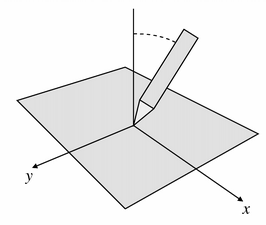
Returns the angle between the device (a pen, for example) and the perpendicular in the direction of the x axis. Positive values are towards the tablet's physical right. The angle is in the range -60 to +60 degrees.
| 返回类型: | PySide.QtCore.int |
|---|
返回设备的 y 位置,相对接收事件 Widget。
| 返回类型: | PySide.QtCore.int |
|---|
Returns the angle between the device (a pen, for example) and the perpendicular in the direction of the y axis. Positive values are towards the bottom of the tablet. The angle is within the range -60 to +60 degrees.
| 返回类型: | PySide.QtCore.int |
|---|
Returns the z position of the device. Typically this is represented by a wheel on a 4D Mouse. If the device does not support a Z-axis, this value is always zero. This is not the same as pressure.

