Qt 名称空间包含整个 Qt 库所用的杂项标识符。 更多 …

def
bin
(s)
def
bom
(s)
def
center
(s)
def
dec
(s)
def
endl
(s)
def
fixed
(s)
def
flush
(s)
def
forcepoint
(s)
def
forcesign
(s)
def
hex
(s)
def
left
(s)
def
lowercasebase
(s)
def
lowercasedigits
(s)
def
noforcepoint
(s)
def
noforcesign
(s)
def
noshowbase
(s)
def
oct
(s)
def
reset
(s)
def
right
(s)
def
scientific
(s)
def
showbase
(s)
def
uppercasebase
(s)
def
uppercasedigits
(s)
def
ws
(s)
PySide2.QtCore.Qt.
GlobalColor

Qt’s predefined
QColor
对象:
|
常量 |
描述 |
|---|---|
|
Qt.white |
白色 (#ffffff) |
|
Qt.black |
黑色 (#000000) |
|
Qt.red |
红色 (#ff0000) |
|
Qt.darkRed |
深红色 (#800000) |
|
Qt.green |
绿色 (#00ff00) |
|
Qt.darkGreen |
深绿色 (#008000) |
|
Qt.blue |
蓝色 (#0000ff) |
|
Qt.darkBlue |
深蓝色 (#000080) |
|
Qt.cyan |
青色 (#00ffff) |
|
Qt.darkCyan |
深青色 (#008080) |
|
Qt.magenta |
洋红色 (#ff00ff) |
|
Qt.darkMagenta |
深洋红色 (#800080) |
|
Qt.yellow |
黄色 (#ffff00) |
|
Qt.darkYellow |
深黄色 (#808000) |
|
Qt.gray |
灰色 (#a0a0a4) |
|
Qt.darkGray |
深灰色 (#808080) |
|
Qt.lightGray |
浅灰色 (#c0c0c0) |
|
Qt.transparent |
透明黑色值 (即,
|
|
Qt.color0 |
0 像素值 (用于位图) |
|
Qt.color1 |
1 像素值 (用于位图) |
另请参阅
PySide2.QtCore.Qt.
KeyboardModifier

此枚举描述修饰符键。
|
常量 |
描述 |
|---|---|
|
Qt.NoModifier |
未按下修饰符键。 |
|
Qt.ShiftModifier |
按下键盘 Shift 键。 |
|
Qt.ControlModifier |
按下键盘 Ctrl 键。 |
|
Qt.AltModifier |
按下键盘 Alt 键。 |
|
Qt.MetaModifier |
按下键盘 Meta 键。 |
|
Qt.KeypadModifier |
按下 Keypad (小键盘) 按钮。 |
|
Qt.GroupSwitchModifier |
仅 X11 (除非在 Windows 上通过命令行自变量激活)。按下键盘 Mode_switch 键。 |
注意
在 macOS,
ControlModifier
值相当于键盘 Command 键,和
MetaModifier
值相当于 Control 键。
KeypadModifier
值也将在按下方向键时设置,因为方向键被认为是 Keypad (小键盘) 的一部分。
注意
On Windows Keyboards, and
Key_Meta
被映射到 Windows 键。
另请参阅
MouseButton
Modifier
PySide2.QtCore.Qt.
Modifier

This enum provides shorter names for the keyboard modifier keys supported by Qt.
注意
在 macOS,
CTRL
值相当于键盘 Command 键,和
META
value corresponds to the Control keys.
|
常量 |
描述 |
|---|---|
|
Qt.SHIFT |
The Shift keys provided on all standard keyboards. |
|
Qt.META |
Meta 键。 |
|
Qt.CTRL |
Ctrl 键。 |
|
Qt.ALT |
正常 Alt 键,但不像 AltGr 键。 |
|
Qt.UNICODE_ACCEL |
The shortcut is specified as a Unicode code point, not as a Qt Key. |
另请参阅
KeyboardModifier
MouseButton
PySide2.QtCore.Qt.
MouseButton

此枚举类型描述不同的鼠标按钮。
|
常量 |
描述 |
|---|---|
|
Qt.NoButton |
按钮状态不引用任何按钮 (见
|
|
Qt.AllButtons |
This value corresponds to a mask of all possible mouse buttons. Use to set the ‘acceptedButtons’ property of a MouseArea 以接受 ALL 鼠标按钮。 |
|
Qt.LeftButton |
左边按钮被按下,或事件引用左边按钮 (左边按钮可能是惯用左手鼠标的右边按钮)。 |
|
Qt.RightButton |
右边按钮。 |
|
Qt.MidButton |
中间按钮。 |
|
Qt.MiddleButton |
中间按钮。 |
|
Qt.BackButton |
The ‘Back’ button. (Typically present on the ‘thumb’ side of a mouse with extra buttons. This is NOT the tilt wheel.) |
|
Qt.XButton1 |
The ‘Back’ Button. |
|
Qt.ExtraButton1 |
The ‘Back’ Button. |
|
Qt.ForwardButton |
The ‘Forward’ Button. (Typically present beside the ‘Back’ button, and also pressed by the thumb.) |
|
Qt.XButton2 |
The ‘Forward Button. |
|
Qt.ExtraButton2 |
The ‘Forward’ Button. |
|
Qt.TaskButton |
The ‘Task’ Button. |
|
Qt.ExtraButton3 |
The ‘Task’ Button. |
|
Qt.ExtraButton4 |
第 7 个非滚轮鼠标按钮。 |
|
Qt.ExtraButton5 |
第 8 个非滚轮鼠标按钮。 |
|
Qt.ExtraButton6 |
第 9 个非滚轮鼠标按钮。 |
|
Qt.ExtraButton7 |
第 10 个非滚轮鼠标按钮。 |
|
Qt.ExtraButton8 |
第 11 个非滚轮鼠标按钮。 |
|
Qt.ExtraButton9 |
第 12 个非滚轮鼠标按钮。 |
|
Qt.ExtraButton10 |
第 13 个非滚轮鼠标按钮。 |
|
Qt.ExtraButton11 |
第 14 个非滚轮鼠标按钮。 |
|
Qt.ExtraButton12 |
第 15 个非滚轮鼠标按钮。 |
|
Qt.ExtraButton13 |
第 16 个非滚轮鼠标按钮。 |
|
Qt.ExtraButton14 |
第 17 个非滚轮鼠标按钮。 |
|
Qt.ExtraButton15 |
第 18 个非滚轮鼠标按钮。 |
|
Qt.ExtraButton16 |
第 19 个非滚轮鼠标按钮。 |
|
Qt.ExtraButton17 |
第 20 个非滚轮鼠标按钮。 |
|
Qt.ExtraButton18 |
第 21 个非滚轮鼠标按钮。 |
|
Qt.ExtraButton19 |
第 22 个非滚轮鼠标按钮。 |
|
Qt.ExtraButton20 |
第 23 个非滚轮鼠标按钮。 |
|
Qt.ExtraButton21 |
第 24 个非滚轮鼠标按钮。 |
|
Qt.ExtraButton22 |
第 25 个非滚轮鼠标按钮。 |
|
Qt.ExtraButton23 |
第 26 个非滚轮鼠标按钮。 |
|
Qt.ExtraButton24 |
第 27 个非滚轮鼠标按钮。 |
注意
Some models of multi-button mice are pre-configured with high-numbered Buttons emulating keyboard sequences, for use in specific games. In order for these Buttons to be seen as actual ‘Mouse Buttons’, the device must be re-configured (using the vendor’s configuration tool).
另请参阅
KeyboardModifier
Modifier
PySide2.QtCore.Qt.
取向

This type is used to signify an object’s orientation.
|
常量 |
描述 |
|---|---|
|
Qt.Horizontal |
|
|
Qt.Vertical |
取向被用于
QScrollBar
例如。
PySide2.QtCore.Qt.
FocusPolicy

此枚举类型定义 Widget 在获得键盘聚焦方面可以拥有的各种策略。
|
常量 |
描述 |
|---|---|
|
Qt.TabFocus |
Widget 通过 Tab 键接受聚焦。 |
|
Qt.ClickFocus |
Widget 通过点击接受聚焦。 |
|
Qt.StrongFocus |
the widget accepts focus by both tabbing and clicking. On macOS this will also be indicate that the widget accepts tab focus when in ‘Text/List focus mode’. |
|
Qt.WheelFocus |
like plus the widget accepts focus by using the mouse wheel. |
|
Qt.NoFocus |
Widget 不接受聚焦。 |
PySide2.QtCore.Qt.
TabFocusBehavior

This enum type provides different focus behaviors for tab navigation.
|
常量 |
描述 |
|---|---|
|
Qt.NoTabFocus |
iterate nothing. |
|
Qt.TabFocusTextControls |
iterate text controls and widgets. |
|
Qt.TabFocusListControls |
iterate list controls and widgets. |
|
Qt.TabFocusAllControls |
iterate all controls and widgets. |
New in version 5.5.
PySide2.QtCore.Qt.
SortOrder

此枚举描述如何排序 Widget 中的项是的。
|
常量 |
描述 |
|---|---|
|
Qt.AscendingOrder |
The items are sorted ascending e.g. starts with ‘AAA’ ends with ‘ZZZ’ in Latin-1 locales |
|
Qt.DescendingOrder |
The items are sorted descending e.g. starts with ‘ZZZ’ ends with ‘AAA’ in Latin-1 locales |
PySide2.QtCore.Qt.
SplitBehaviorFlags

This enum specifies how the split() functions should behave with respect to empty strings.
|
常量 |
描述 |
|---|---|
|
Qt.KeepEmptyParts |
If a field is empty, keep it in the result. |
|
Qt.SkipEmptyParts |
If a field is empty, don’t include it in the result. |
另请参阅
split()
New in version 5.14.
PySide2.QtCore.Qt.
TileRule

此枚举描述在绘制时如何重复或拉伸图像部分。
|
常量 |
描述 |
|---|---|
|
Qt.StretchTile |
比例缩放图像以拟合可用区域。 |
|
Qt.RepeatTile |
Repeat the image until there is no more space. May crop the last image. |
|
Qt.RoundTile |
Similar to Repeat, but scales the image down to ensure that the last tile is not cropped. |
4.6 版新增。
PySide2.QtCore.Qt.
AlignmentFlag

This enum type is used to describe alignment. It contains horizontal and vertical flags that can be combined to produce the required effect.
TextElideMode
enum can also be used in many situations to fine-tune the appearance of aligned text.
水平标志:
|
常量 |
描述 |
|---|---|
|
Qt.AlignLeft |
与左边缘对齐。 |
|
Qt.AlignRight |
与右边缘对齐。 |
|
Qt.AlignHCenter |
在可用空间水平居中。 |
|
Qt.AlignJustify |
在可用空间两端对齐文本。 |
垂直标志:
|
常量 |
描述 |
|---|---|
|
Qt.AlignTop |
与顶部对齐。 |
|
Qt.AlignBottom |
与底部对齐。 |
|
Qt.AlignVCenter |
在可用空间垂直居中。 |
|
Qt.AlignBaseline |
与基线对齐。 |
每次只可使用一水平标志。有一个二维标志:
|
常量 |
描述 |
|---|---|
|
Qt.AlignCenter |
在两个维度上居中。 |
You can use at most one horizontal and one vertical flag at a time. counts as both horizontal and vertical.
Three enum values are useful in applications that can be run in right-to-left mode:
|
常量 |
描述 |
|---|---|
|
Qt.AlignAbsolute |
If the widget’s layout direction is
|
|
Qt.AlignLeading |
Synonym for . |
|
Qt.AlignTrailing |
Synonym for . |
掩码:
|
常量 |
描述 |
|---|---|
|
Qt.AlignHorizontal_Mask |
|
|
Qt.AlignVertical_Mask |
Conflicting combinations of flags have undefined meanings.
PySide2.QtCore.Qt.
TextFlag

This enum type is used to define some modifier flags. Some of these flags only make sense in the context of printing:
|
常量 |
描述 |
|---|---|
|
Qt.TextSingleLine |
Treats all whitespace as spaces and prints just one line. |
|
Qt.TextDontClip |
If it’s impossible to stay within the given bounds, it prints outside. |
|
Qt.TextExpandTabs |
Makes the U+0009 (ASCII tab) character move to the next tab stop. |
|
Qt.TextShowMnemonic |
Displays the string “&P” as P For an ampersand, use “&&”. |
|
Qt.TextWordWrap |
Breaks lines at appropriate points, e.g. at word boundaries. |
|
Qt.TextWrapAnywhere |
Breaks lines anywhere, even within words. |
|
Qt.TextHideMnemonic |
Same as but doesn’t draw the underlines. |
|
Qt.TextDontPrint |
Treat this text as “hidden” and don’t print it. |
|
Qt.TextIncludeTrailingSpaces |
When this option is set,
|
|
Qt.TextJustificationForced |
Ensures that text lines are justified. |
You can use as many modifier flags as you want, except that and cannot be combined.
Flags that are inappropriate for a given use are generally ignored.
PySide2.QtCore.Qt.
TextElideMode

This enum specifies where the ellipsis should appear when displaying texts that don’t fit:
|
常量 |
描述 |
|---|---|
|
Qt.ElideLeft |
省略号应出现在文本的开头。 |
|
Qt.ElideRight |
省略号应出现在文本的末尾。 |
|
Qt.ElideMiddle |
省略号应出现在文本的中间。 |
|
Qt.ElideNone |
省略号不应出现在文本中。 |
is normally the most appropriate choice for URLs (e.g., ” http://bugreports.qt…/QTWEBSITE-13/ “), whereas is appropriate for other strings (e.g., ” Deploying Applications on Ma… “).
另请参阅
textElideMode
elidedText()
AlignmentFlag
elideMode
PySide2.QtCore.Qt.
WhiteSpaceMode

This enum describes the types of whitespace mode that are used by the
QTextDocument
class to meet the requirements of different kinds of textual information.
|
常量 |
描述 |
|---|---|
|
Qt.WhiteSpaceNormal |
The whitespace mode used to display normal word wrapped text in paragraphs. |
|
Qt.WhiteSpacePre |
A preformatted text mode in which whitespace is reproduced exactly. |
|
Qt.WhiteSpaceNoWrap |
PySide2.QtCore.Qt.
HitTestAccuracy

This enum contains the types of accuracy that can be used by the
QTextDocument
class when testing for mouse clicks on text documents.
|
常量 |
描述 |
|---|---|
|
Qt.ExactHit |
The point at which input occurred must coincide exactly with input-sensitive parts of the document. |
|
Qt.FuzzyHit |
The point at which input occurred can lie close to input-sensitive parts of the document. |
PySide2.QtCore.Qt.
WindowType

此枚举类型用于为 Widget 指定各种窗口系统特性。它们相当不寻常,但在某些情况下是必要的。其中一些标志从属底层窗口管理器是否支持它们。
主要类型是
|
常量 |
描述 |
|---|---|
|
Qt.Widget |
这是默认类型对于
|
|
Qt.Window |
Indicates that the widget is a window, usually with a window system frame and a title bar, irrespective of whether the widget has a parent or not. Note that it is not possible to unset this flag if the widget does not have a parent. |
|
Qt.Dialog |
Indicates that the widget is a window that should be decorated as a dialog (i.e., typically no maximize or minimize buttons in the title bar). This is the default type for
|
|
Qt.Sheet |
Indicates that the window is a sheet on macOS. Since using a sheet implies window modality, the recommended way is to use
|
|
Qt.Drawer |
指示小部件是 macOS 抽屉。 |
|
Qt.Popup |
Indicates that the widget is a pop-up top-level window, i.e. that it is modal, but has a window system frame appropriate for pop-up menus. |
|
Qt.Tool |
Indicates that the widget is a tool window. A tool window is often a small window with a smaller than usual title bar and decoration, typically used for collections of tool buttons. If there is a parent, the tool window will always be kept on top of it. If there isn’t a parent, you may consider using as well. If the window system supports it, a tool window can be decorated with a somewhat lighter frame. It can also be combined with . On macOS, tool windows correspond to the
NSPanel
class of windows. This means that the window lives on a level above normal windows making it impossible to put a normal window on top of it. By default, tool windows will disappear when the application is inactive. This can be controlled by the
|
|
Qt.ToolTip |
指示 Widget 是工具提示。这在内部使用以实现
|
|
Qt.SplashScreen |
指示窗口是闪屏。这是默认类型对于
|
|
Qt.Desktop |
Indicates that this widget is the desktop. This is the type for
|
|
Qt.SubWindow |
指示此 Widget 是子窗口,譬如
|
|
Qt.ForeignWindow |
Indicates that this window object is a handle representing a native platform window created by another process or by manually using native code. |
|
Qt.CoverWindow |
Indicates that the window represents a cover window, which is shown when the application is minimized on some platforms. |
There are also a number of flags which you can use to customize the appearance of top-level windows. These have no effect on other windows:
|
常量 |
描述 |
|---|---|
|
Qt.MSWindowsFixedSizeDialogHint |
Gives the window a thin dialog border on Windows. This style is traditionally used for fixed-size dialogs. |
注意
The use of this flag is not recommended in multi-monitor environments. This is because the system will enforce that the window maintains its native size when moving it across screens. This is particularly undesirable when using monitors with different resolutions.
|
常量 |
描述 |
|---|---|
|
Qt.MSWindowsOwnDC |
Gives the window its own display context on Windows. |
|
Qt.BypassWindowManagerHint |
This flag can be used to indicate to the platform plugin that “all” window manager protocols should be disabled. This flag will behave different depending on what operating system the application is running on and what window manager is running. The flag can be used to get a native window with no configuration set. |
|
Qt.X11BypassWindowManagerHint |
Bypass the window manager completely. This results in a borderless window that is not managed at all (i.e., no keyboard input unless you call
|
|
Qt.FramelessWindowHint |
Produces a borderless window. The user cannot move or resize a borderless window via the window system. On X11, the result of the flag is dependent on the window manager and its ability to understand Motif and/or NETWM hints. Most existing modern window managers can handle this. |
|
Qt.NoDropShadowWindowHint |
Disables window drop shadow on supporting platforms. |
CustomizeWindowHint
flag is used to enable customization of the window controls. This flag must be set to allow the
WindowTitleHint
,
WindowSystemMenuHint
,
WindowMinimizeButtonHint
,
WindowMaximizeButtonHint
and
WindowCloseButtonHint
flags to be changed.
|
常量 |
描述 |
|---|---|
|
Qt.CustomizeWindowHint |
关闭默认窗口标题提示。 |
|
Qt.WindowTitleHint |
赋予窗口标题栏。 |
|
Qt.WindowSystemMenuHint |
Adds a window system menu, and possibly a close button (for example on Mac). If you need to hide or show a close button, it is more portable to use
|
|
Qt.WindowMinimizeButtonHint |
Adds a minimize button. On some platforms this implies for it to work. |
|
Qt.WindowMaximizeButtonHint |
Adds a maximize button. On some platforms this implies for it to work. |
|
Qt.WindowMinMaxButtonsHint |
Adds a minimize and a maximize button. On some platforms this implies for it to work. |
|
Qt.WindowCloseButtonHint |
Adds a close button. On some platforms this implies for it to work. |
|
Qt.WindowContextHelpButtonHint |
Adds a context help button to dialogs. On some platforms this implies for it to work. |
|
Qt.MacWindowToolBarButtonHint |
On macOS adds a tool bar button (i.e., the oblong button that is on the top right of windows that have toolbars). |
|
Qt.WindowFullscreenButtonHint |
在 MacOS 添加全屏按钮。 |
|
Qt.BypassGraphicsProxyWidget |
Prevents the window and its children from automatically embedding themselves into a
|
|
Qt.WindowShadeButtonHint |
Adds a shade button in place of the minimize button if the underlying window manager supports it. |
|
Qt.WindowStaysOnTopHint |
Informs the window system that the window should stay on top of all other windows. Note that on some window managers on X11 you also have to pass for this flag to work correctly. |
|
Qt.WindowStaysOnBottomHint |
Informs the window system that the window should stay on bottom of all other windows. |
注意
On X11, this hint will work only in window managers that support _NET_WM_STATE_BELOW atom. If a window always on the bottom has a parent, the parent will also be left on the bottom. This window hint is currently not implemented for macOS.
注意
在 Windows,这仅工作于无框或全屏窗口。
|
常量 |
描述 |
|---|---|
|
Qt.WindowTransparentForInput |
Informs the window system that this window is used only for output (displaying something) and does not take input. Therefore input events should pass through as if it wasn’t there. |
|
Qt.WindowOverridesSystemGestures |
Informs the window system that this window implements its own set of gestures and that system level gestures, like for instance three-finger desktop switching, should be disabled. |
|
Qt.WindowDoesNotAcceptFocus |
Informs the window system that this window should not receive the input focus. |
|
Qt.MaximizeUsingFullscreenGeometryHint |
Informs the window system that when maximizing the window it should use as much of the available screen geometry as possible, including areas that may be covered by system UI such as status bars or application launchers. This may result in the window being placed under these system UIs, but does not guarantee it, depending on whether or not the platform supports it. When the flag is enabled the user is responsible for taking
|
|
Qt.WindowType_Mask |
A mask for extracting the window type part of the window flags. |
另请参阅
windowFlags
窗口标志范例
PySide2.QtCore.Qt.
WindowState

此枚举类型用于指定顶层窗口的当前状态。
状态是
|
常量 |
描述 |
|---|---|
|
Qt.WindowNoState |
窗口未设置状态 (在正常状态)。 |
|
Qt.WindowMinimized |
窗口被最小化 (即:图标化)。 |
|
Qt.WindowMaximized |
窗户被最大化,采用框架围绕它。 |
|
Qt.WindowFullScreen |
窗口填充整个屏幕,没有任何框架围绕它。 |
|
Qt.WindowActive |
窗口是活动窗口,即:它拥有键盘聚焦。 |
PySide2.QtCore.Qt.
ApplicationState

This enum type is used to specify the current state of the application.
状态是
|
常量 |
描述 |
|---|---|
|
Qt.ApplicationSuspended |
The application is about to suspend. When entering this state, the application should save its state, cease all activities, and be prepared for code execution to stop. While suspended, the application can be killed at any time without further warnings (e.g. when low memory forces the OS to purge suspended applications). |
|
Qt.ApplicationHidden |
The application is hidden and runs in the background. This is the normal state for applications that need to do background processing, like playing music, while the user interacts with other applications. The application should free up all graphical resources when entering this state. |
|
Qt.ApplicationInactive |
The application is visible, but not selected to be in front. On desktop platforms, this typically means that the user activated another application. On mobile platforms, it is more common to enter this state when the OS is interrupting the user with e.g. incoming calls or SMS-messages. While in this state, consider reducing CPU-intensive tasks. |
|
Qt.ApplicationActive |
The application is visible and selected to be in front. |
New in version 5.1.
PySide2.QtCore.Qt.
ScreenOrientation

This enum type specifies the various orientations a screen might have.
|
常量 |
描述 |
|---|---|
|
Qt.PrimaryOrientation |
The display’s primary orientation. |
|
Qt.LandscapeOrientation |
Landscape orientation, display width is greater than display height. |
|
Qt.PortraitOrientation |
Portrait orientation, display height is greater than display width, rotated 90 degree clockwise relative to landscape. |
|
Qt.InvertedLandscapeOrientation |
Inverted landscape orientation, rotated 180 degrees relative to landscape. |
|
Qt.InvertedPortraitOrientation |
Inverted portrait orientation, rotated 180 degrees relative to portrait. |
New in version 5.0.
PySide2.QtCore.Qt.
WidgetAttribute

此枚举类型用于指定各种 Widget 属性。属性被设置和清零采用
setAttribute()
, and queried with
testAttribute()
, although some have special convenience functions which are mentioned below.
|
常量 |
描述 |
|---|---|
|
Qt.WA_AcceptDrops |
允许来自拖放操作的数据掉落到 Widget (见
|
|
Qt.WA_AlwaysShowToolTips |
为不活动窗口启用工具提示。 |
|
Qt.WA_ContentsPropagated |
This flag is superfluous and obsolete; it no longer has any effect. Since Qt 4.1, all widgets that do not set propagate their contents. |
|
Qt.WA_CustomWhatsThis |
Indicates that the widget wants to continue operating normally in “What’s This?” mode. This is set by the widget’s author. |
|
Qt.WA_DeleteOnClose |
使 Qt 删除此 Widget 当小部件接受关闭事件时 (见
|
|
Qt.WA_Disabled |
Indicates that the widget is disabled, i.e. it does not receive any mouse or keyboard events. There is also a getter functions
|
|
Qt.WA_DontShowOnScreen |
Indicates that the widget is hidden or is not a part of the viewable Desktop. |
|
Qt.WA_ForceDisabled |
Indicates that the widget is explicitly disabled, i.e. it will remain disabled even when all its ancestors are set to the enabled state. This implies . This is set/cleared by
|
|
Qt.WA_ForceUpdatesDisabled |
Indicates that updates are explicitly disabled for the widget; i.e. it will remain disabled even when all its ancestors are set to the updates-enabled state. This implies . This is set/cleared by
|
|
Qt.WA_GroupLeader |
此属性已弃用。
使用
|
|
Qt.WA_Hover |
Forces Qt to generate paint events when the mouse enters or leaves the widget. This feature is typically used when implementing custom styles; see the 样式 范例了解细节。 |
|
Qt.WA_InputMethodEnabled |
启用用于亚洲语言的输入法。必须设置,当创建自定义文本编辑 Widget 时。 |
|
Qt.WA_KeyboardFocusChange |
Set on a toplevel window when the users changes focus with the keyboard (tab, backtab, or shortcut). |
|
Qt.WA_KeyCompression |
Enables key event compression if set, and disables it if not set. By default key compression is off, so widgets receive one key press event for each key press (or more, since autorepeat is usually on). If you turn it on and your program doesn’t keep up with key input, Qt may try to compress key events so that more than one character can be processed in each event. For example, a word processor widget might receive 2, 3 or more characters in each
|
|
Qt.WA_LayoutOnEntireRect |
Indicates that the widget wants
|
|
Qt.WA_LayoutUsesWidgetRect |
Ignore the layout item rect from the style when laying out this widget with
|
|
Qt.WA_MacNoClickThrough |
此值已过时且不起作用。 |
|
Qt.WA_MacOpaqueSizeGrip |
Indicates that the native size grip should be opaque instead of transparent (the default). This attribute is only applicable to macOS and is set by the widget’s author. |
|
Qt.WA_MacShowFocusRect |
Indicates that this widget should get a
|
|
Qt.WA_MacNormalSize |
Indicates the widget should have the normal size for widgets in macOS. This attribute is only applicable to macOS. |
|
Qt.WA_MacSmallSize |
Indicates the widget should have the small size for widgets in macOS. This attribute is only applicable to macOS. |
|
Qt.WA_MacMiniSize |
Indicates the widget should have the mini size for widgets in macOS. This attribute is only applicable to macOS. |
|
Qt.WA_MacVariableSize |
Indicates the widget can choose between alternative sizes for widgets to avoid clipping. This attribute is only applicable to macOS. |
|
Qt.WA_MacBrushedMetal |
此值已过时且不起作用。 |
|
Qt.WA_Mapped |
Indicates that the widget is mapped on screen. This is set/cleared by the Qt kernel. |
|
Qt.WA_MouseNoMask |
Makes the widget receive mouse events for the entire widget regardless of the currently set mask, overriding
|
|
Qt.WA_MouseTracking |
指示 Widget 已启用鼠标跟踪。见
|
|
Qt.WA_Moved |
指示 Widget 拥有明确位置。这的设置/清零通过
|
|
Qt.WA_MSWindowsUseDirect3D |
此值已过时且不起作用。 |
|
Qt.WA_NoBackground |
This value is obsolete. Use instead. |
|
Qt.WA_NoChildEventsForParent |
Indicates that the widget does not want ChildAdded or ChildRemoved events sent to its parent. This is rarely necessary but can help to avoid automatic insertion widgets like splitters and layouts. This is set by a widget’s author. |
|
Qt.WA_NoChildEventsFromChildren |
Indicates that the widget does not want to receive ChildAdded or ChildRemoved events sent from its children. This is set by a widget’s author. |
|
Qt.WA_NoMouseReplay |
Used for pop-up widgets. Indicates that the most recent mouse press event should not be replayed when the pop-up widget closes. The flag is set by the widget’s author and cleared by the Qt kernel every time the widget receives a new mouse event. |
|
Qt.WA_NoMousePropagation |
Prohibits mouse events from being propagated to the widget’s parent. This attribute is disabled by default. |
|
Qt.WA_TransparentForMouseEvents |
When enabled, this attribute disables the delivery of mouse events to the widget and its children. Mouse events are delivered to other widgets as if the widget and its children were not present in the widget hierarchy; mouse clicks and other events effectively “pass through” them. This attribute is disabled by default. |
|
Qt.WA_NoSystemBackground |
指示 Widget 没有背景 (即:当 Widget 接收描绘事件时,不自动重新绘制背景)。 注意 : Unlike , newly exposed areas are never filled with the background (e.g., after showing a window for the first time the user can see “through” it until the application processes the paint events). This flag is set or cleared by the widget’s author. |
|
Qt.WA_OpaquePaintEvent |
Indicates that the widget paints all its pixels when it receives a paint event. Thus, it is not required for operations like updating, resizing, scrolling and focus changes to erase the widget before generating paint events. The use of provides a small optimization by helping to reduce flicker on systems that do not support double buffering and avoiding computational cycles necessary to erase the background prior to painting. 注意 : Unlike , makes an effort to avoid transparent window backgrounds. This flag is set or cleared by the widget’s author. |
|
Qt.WA_OutsideWSRange |
Indicates that the widget is outside the valid range of the window system’s coordinate system. A widget outside the valid range cannot be mapped on screen. This is set/cleared by the Qt kernel. |
|
Qt.WA_PaintOnScreen |
Indicates that the widget wants to draw directly onto the screen. Widgets with this attribute set do not participate in composition management, i.e. they cannot be semi-transparent or shine through semi-transparent overlapping widgets.
注意
: This flag is only supported on X11 and it disables double buffering. On Qt for Embedded Linux, the flag only works when set on a top-level widget and it relies on support from the active screen driver. This flag is set or cleared by the widget’s author. To render outside of Qt’s paint system, e.g., if you require native painting primitives, you need to reimplement
|
|
Qt.WA_PaintUnclipped |
Makes all painters operating on this widget unclipped. Children of this widget or other widgets in front of it do not clip the area the painter can paint on. This flag is only supported for widgets with the flag set. The preferred way to do this in a cross platform way is to create a transparent widget that lies in front of the other widgets. |
|
Qt.WA_PendingMoveEvent |
Indicates that a move event is pending, e.g., when a hidden widget was moved. This flag is set or cleared by the Qt kernel. |
|
Qt.WA_PendingResizeEvent |
Indicates that a resize event is pending, e.g., when a hidden widget was resized. This flag is set or cleared by the Qt kernel. |
|
Qt.WA_QuitOnClose |
Makes Qt quit the application when the last widget with the attribute set has accepted closeEvent(). This behavior can be modified with the
|
|
Qt.WA_Resized |
Indicates that the widget has an explicit size. This flag is set or cleared by
|
|
Qt.WA_RightToLeft |
Indicates that the layout direction for the widget is right to left. |
|
Qt.WA_SetCursor |
Indicates that the widget has a cursor of its own. This flag is set or cleared by
|
|
Qt.WA_SetFont |
Indicates that the widget has a font of its own. This flag is set or cleared by
|
|
Qt.WA_SetPalette |
Indicates that the widget has a palette of its own. This flag is set or cleared by
|
|
Qt.WA_SetStyle |
Indicates that the widget has a style of its own. This flag is set or cleared by
|
|
Qt.WA_ShowModal |
此属性已弃用。
使用
|
|
Qt.WA_StaticContents |
Indicates that the widget contents are north-west aligned and static. On resize, such a widget will receive paint events only for parts of itself that are newly visible. This flag is set or cleared by the widget’s author. |
|
Qt.WA_StyleSheet |
Indicates that the widget is styled using a 样式表 . is set whenever a widget is subject to a style sheet, even if the style sheet did not affect the widget appearance. |
|
Qt.WA_StyleSheetTarget |
Indicates that the widget appearance was modified by a 样式表 . will also be set. This value was introduced in Qt 5.12. |
|
Qt.WA_TabletTracking |
Indicates that the widget has tablet tracking enabled. See
|
|
Qt.WA_TranslucentBackground |
Indicates that the widget should have a translucent background, i.e., any non-opaque regions of the widgets will be translucent because the widget will have an alpha channel. Setting this flag causes to be set. On Windows the widget also needs the
|
|
Qt.WA_UnderMouse |
Indicates that the widget is under the mouse cursor. The value is not updated correctly during drag and drop operations. There is also a getter function,
|
|
Qt.WA_UpdatesDisabled |
Indicates that updates are blocked (including the system background). This flag is set or cleared by the Qt kernel. 警告 : This flag must never be set or cleared by the widget’s author. |
|
Qt.WA_WindowModified |
Indicates that the window is marked as modified. On some platforms this flag will do nothing, on others (including macOS and Windows) the window will take a modified appearance. This flag is set or cleared by
|
|
Qt.WA_WindowPropagation |
Makes a toplevel window inherit font, palette and locale from its parent. |
|
Qt.WA_MacAlwaysShowToolWindow |
On macOS, show the tool window even when the application is not active. By default, all tool windows are hidden when the application is inactive. |
|
Qt.WA_SetLocale |
Indicates the locale should be taken into consideration in the widget. |
|
Qt.WA_StyledBackground |
Indicates the widget should be drawn using a styled background. |
|
Qt.WA_ShowWithoutActivating |
Show the widget without making it active. |
|
Qt.WA_NativeWindow |
Indicates that a native window is created for the widget. Enabling this flag will also force a native window for the widget’s ancestors unless is set. |
|
Qt.WA_DontCreateNativeAncestors |
Indicates that the widget’s ancestors are kept non-native even though the widget itself is native. |
|
Qt.WA_X11NetWmWindowTypeDesktop |
Adds _NET_WM_WINDOW_TYPE_DESKTOP to the window’s _NET_WM_WINDOW_TYPE X11 window property. See http://standards.freedesktop.org/wm-spec/ for more details. This attribute has no effect on non-X11 platforms. |
|
Qt.WA_X11NetWmWindowTypeDock |
Adds _NET_WM_WINDOW_TYPE_DOCK to the window’s _NET_WM_WINDOW_TYPE X11 window property. See http://standards.freedesktop.org/wm-spec/ for more details. This attribute has no effect on non-X11 platforms. |
|
Qt.WA_X11NetWmWindowTypeToolBar |
Adds _NET_WM_WINDOW_TYPE_TOOLBAR to the window’s _NET_WM_WINDOW_TYPE X11 window property. See
http://standards.freedesktop.org/wm-spec/
for more details. This attribute has no effect on non-X11 platforms.
注意
: Qt automatically sets this attribute for
|
|
Qt.WA_X11NetWmWindowTypeMenu |
Adds _NET_WM_WINDOW_TYPE_MENU to the window’s _NET_WM_WINDOW_TYPE X11 window property. See
http://standards.freedesktop.org/wm-spec/
for more details. This attribute has no effect on non-X11 platforms.
注意
: Qt automatically sets this attribute for
|
|
Qt.WA_X11NetWmWindowTypeUtility |
Adds _NET_WM_WINDOW_TYPE_UTILITY to the window’s _NET_WM_WINDOW_TYPE X11 window property. See
http://standards.freedesktop.org/wm-spec/
for more details. This attribute has no effect on non-X11 platforms.
注意
: Qt automatically sets this attribute for the
|
|
Qt.WA_X11NetWmWindowTypeSplash |
Adds _NET_WM_WINDOW_TYPE_SPLASH to the window’s _NET_WM_WINDOW_TYPE X11 window property. See
http://standards.freedesktop.org/wm-spec/
for more details. This attribute has no effect on non-X11 platforms.
注意
: Qt automatically sets this attribute for the
|
|
Qt.WA_X11NetWmWindowTypeDialog |
Adds _NET_WM_WINDOW_TYPE_DIALOG to the window’s _NET_WM_WINDOW_TYPE X11 window property. See
http://standards.freedesktop.org/wm-spec/
for more details. This attribute has no effect on non-X11 platforms.
注意
: Qt automatically sets this attribute for the
|
|
Qt.WA_X11NetWmWindowTypeDropDownMenu |
Adds _NET_WM_WINDOW_TYPE_DROPDOWN_MENU to the window’s _NET_WM_WINDOW_TYPE X11 window property. See
http://standards.freedesktop.org/wm-spec/
for more details. This attribute has no effect on non-X11 platforms.
注意
: Qt automatically sets this attribute for
|
|
Qt.WA_X11NetWmWindowTypePopupMenu |
Adds _NET_WM_WINDOW_TYPE_POPUP_MENU to the window’s _NET_WM_WINDOW_TYPE X11 window property. See
http://standards.freedesktop.org/wm-spec/
for more details. This attribute has no effect on non-X11 platforms.
注意
: Qt automatically sets this attribute for
|
|
Qt.WA_X11NetWmWindowTypeToolTip |
Adds _NET_WM_WINDOW_TYPE_TOOLTIP to the window’s _NET_WM_WINDOW_TYPE X11 window property. See
http://standards.freedesktop.org/wm-spec/
for more details. This attribute has no effect on non-X11 platforms.
注意
: Qt automatically sets this attribute for the
|
|
Qt.WA_X11NetWmWindowTypeNotification |
Adds _NET_WM_WINDOW_TYPE_NOTIFICATION to the window’s _NET_WM_WINDOW_TYPE X11 window property. See http://standards.freedesktop.org/wm-spec/ for more details. This attribute has no effect on non-X11 platforms. |
|
Qt.WA_X11NetWmWindowTypeCombo |
Adds _NET_WM_WINDOW_TYPE_COMBO to the window’s _NET_WM_WINDOW_TYPE X11 window property. See
http://standards.freedesktop.org/wm-spec/
for more details. This attribute has no effect on non-X11 platforms.
注意
: Qt automatically sets this attribute for the
|
|
Qt.WA_X11NetWmWindowTypeDND |
Adds _NET_WM_WINDOW_TYPE_DND to the window’s _NET_WM_WINDOW_TYPE X11 window property. See http://standards.freedesktop.org/wm-spec/ for more details. This attribute has no effect on non-X11 platforms. 注意 : Qt automatically sets this attribute on the feedback widget used during a drag. |
|
Qt.WA_MacFrameworkScaled |
此值已过时且不起作用。 |
|
Qt.WA_AcceptTouchEvents |
Allows touch events (see
|
|
Qt.WA_TouchPadAcceptSingleTouchEvents |
Allows touchpad single touch events to be sent to the widget. |
|
Qt.WA_X11DoNotAcceptFocus |
Asks the window manager to not give focus to this top level window. This attribute has no effect on non-X11 platforms. |
|
Qt.WA_AlwaysStackOnTop |
Since Qt 5.4, this value forces
|
|
Qt.WA_ContentsMarginsRespectsSafeArea |
A
|
PySide2.QtCore.Qt.
ApplicationAttribute

This enum describes attributes that change the behavior of application-wide features. These are enabled and disabled using
setAttribute()
, and can be tested for with
testAttribute()
.
|
常量 |
描述 |
|---|---|
|
Qt.AA_DontShowIconsInMenus |
Actions with the Icon property won’t be shown in any menus unless specifically set by the
|
|
Qt.AA_DontShowShortcutsInContextMenus |
Actions with the Shortcut property won’t be shown in any shortcut menus unless specifically set by the
|
|
Qt.AA_NativeWindows |
Ensures that widgets have native windows. |
|
Qt.AA_DontCreateNativeWidgetSiblings |
Ensures that siblings of native widgets stay non-native unless specifically set by the
|
|
Qt.AA_PluginApplication |
Indicates that Qt is used to author a plugin. Depending on the operating system, it suppresses specific initializations that do not necessarily make sense in the plugin case. For example on macOS, this includes avoiding loading our nib for the main menu and not taking possession of the native menu bar. Setting this attribute to true will also set the attribute to true. It also disables native event filters. This attribute must be set before
|
|
Qt.AA_DontUseNativeMenuBar |
All menubars created while this attribute is set to true won’t be used as a native menubar (e.g, the menubar at the top of the main screen on macOS). |
|
Qt.AA_MacDontSwapCtrlAndMeta |
On macOS by default, Qt swaps the Control and Meta (Command) keys (i.e., whenever Control is pressed, Qt sends Meta, and whenever Meta is pressed Control is sent). When this attribute is true, Qt will not do the flip.
|
|
Qt.AA_Use96Dpi |
Assume the screen has a resolution of 96 DPI rather than using the OS-provided resolution. This will cause font rendering to be consistent in pixels-per-point across devices rather than defining 1 point as 1/72 inch. |
|
Qt.AA_SynthesizeTouchForUnhandledMouseEvents |
All mouse events that are not accepted by the application will be translated to touch events instead. |
|
Qt.AA_SynthesizeMouseForUnhandledTouchEvents |
All touch events that are not accepted by the application will be translated to left button mouse events instead. This attribute is enabled by default. |
|
Qt.AA_UseHighDpiPixmaps |
Make
|
|
Qt.AA_ForceRasterWidgets |
Make top-level widgets use pure raster surfaces, and do not support non-native GL-based child widgets. |
|
Qt.AA_UseDesktopOpenGL |
Forces the usage of desktop OpenGL (for example,
opengl32.dll
or
libGL.so
) on platforms that use dynamic loading of the OpenGL implementation. This attribute must be set before
|
|
Qt.AA_UseOpenGLES |
Forces the usage of OpenGL ES 2.0 or higher on platforms that use dynamic loading of the OpenGL implementation. This attribute must be set before
|
|
Qt.AA_UseSoftwareOpenGL |
Forces the usage of a software based OpenGL implementation on platforms that use dynamic loading of the OpenGL implementation. This will typically be a patched build of
Mesa llvmpipe
, providing OpenGL 2.1. The value may have no effect if no such OpenGL implementation is available. The default name of this library is
|
|
Qt.AA_ShareOpenGLContexts |
Enables resource sharing between the OpenGL contexts used by classes like
|
|
Qt.AA_SetPalette |
Indicates whether a palette was explicitly set on the
|
|
Qt.AA_EnableHighDpiScaling |
Enables high-DPI scaling in Qt on supported platforms (see also High DPI Displays). Supported platforms are X11, Windows and Android. Enabling makes Qt scale the main (device independent) coordinate system according to display scale factors provided by the operating system. This corresponds to setting the QT_AUTO_SCREEN_SCALE_FACTOR environment variable to 1. This attribute must be set before
|
|
Qt.AA_DisableHighDpiScaling |
Disables high-DPI scaling in Qt, exposing window system coordinates. Note that the window system may do its own scaling, so this does not guarantee that
|
|
Qt.AA_UseStyleSheetPropagationInWidgetStyles |
By default, Qt Style Sheets disable regular
|
|
Qt.AA_DontUseNativeDialogs |
All dialogs created while this attribute is set to true won’t use the native dialogs provided by the platform. This value was added in Qt 5.7. |
|
Qt.AA_SynthesizeMouseForUnhandledTabletEvents |
All tablet events that are not accepted by the application will be translated to mouse events instead. This attribute is enabled by default. This value was added in Qt 5.7. |
|
Qt.AA_CompressHighFrequencyEvents |
Enables compression of certain frequent events. On the X11 windowing system, the default value is true, which means that
|
|
Qt.AA_CompressTabletEvents |
Enables compression of input events from tablet devices. Notice that must be true for events compression to be enabled, and that this flag extends the former to tablet events. Currently supported on the X11 windowing system, Windows 8 and above. The default value is false. This value was added in Qt 5.10. |
|
Qt.AA_DontCheckOpenGLContextThreadAffinity |
When making a context current using
|
|
Qt.AA_DisableShaderDiskCache |
Disables caching of shader program binaries on disk. By default Qt Quick,
|
|
Qt.AA_DisableWindowContextHelpButton |
禁用
|
|
Qt.AA_DisableSessionManager |
禁用
|
|
Qt.AA_DisableNativeVirtualKeyboard |
When this attribute is set, the native on-screen virtual keyboard will not be shown automatically when a text input widget gains focus on a system without a physical keyboard. Currently supported on the Windows platform only. This value was added in 5.15 |
The following values are deprecated or obsolete:
|
常量 |
描述 |
|---|---|
|
Qt.AA_ImmediateWidgetCreation |
This attribute is no longer fully supported in Qt 5. It ensures that widgets are created as soon as they are constructed. By default, resources for widgets are allocated on demand to improve efficiency and minimize resource usage. Setting or clearing this attribute affects widgets constructed after the change. Setting it tells Qt to create toplevel windows immediately. Therefore, if it is important to minimize resource consumption, do not set this attribute. |
|
Qt.AA_MacPluginApplication |
This attribute has been deprecated. Use instead. |
|
Qt.AA_MSWindowsUseDirect3DByDefault |
此值已过时且不起作用。 |
|
Qt.AA_X11InitThreads |
此值已过时且不起作用。 |
PySide2.QtCore.Qt.
ImageConversionFlag

The options marked “(default)” are set if no other values from the list are included (since the defaults are zero):
彩色/单色首选 (被忽略对于
QBitmap
):
|
常量 |
描述 |
|---|---|
|
Qt.AutoColor |
(默认) - 若图像有
|
|
Qt.ColorOnly |
像素图抖动/转换为
|
|
Qt.MonoOnly |
像素图变成单色。若有必要,使用所选抖动算法进行抖动。 |
抖动模式首选:
|
常量 |
描述 |
|---|---|
|
Qt.DiffuseDither |
(默认) - 使用误差扩散的高质量抖动。 |
|
Qt.OrderedDither |
更快,有序抖动。 |
|
Qt.ThresholdDither |
没有抖动;使用最接近的颜色。 |
1 位 Alpha 蒙版的抖动模式首选:
|
常量 |
描述 |
|---|---|
|
Qt.ThresholdAlphaDither |
(默认) - 没有抖动。 |
|
Qt.OrderedAlphaDither |
更快,有序抖动。 |
|
Qt.DiffuseAlphaDither |
使用误差扩散的高质量抖动。 |
颜色匹配 vs 抖动偏好:
|
常量 |
描述 |
|---|---|
|
Qt.PreferDither |
始终抖动图像当转换为更小色彩空间时。 |
|
Qt.AvoidDither |
Only dither to indexed formats if the source image uses more different colors than the size of the color table of the destination format. |
|
Qt.AutoDither |
(default) - Only dither when down-converting to 1 or 8-bit indexed formats. |
|
Qt.NoOpaqueDetection |
Do not check whether the image contains non-opaque pixels. Use this if you know that the image is semi-transparent and you want to avoid the overhead of checking the pixels in the image until a non-opaque pixel is found, or if you want the pixmap to retain an alpha channel for some other reason. If the image has no alpha channel this flag has no effect. |
|
Qt.NoFormatConversion |
Don’t do any format conversions on the image. Can be useful when converting a
|
PySide2.QtCore.Qt.
BGMode

背景模式:
|
常量 |
描述 |
|---|---|
|
Qt.TransparentMode |
|
|
Qt.OpaqueMode |
PySide2.QtCore.Qt.
Key

Qt 使用的键名。
|
常量 |
描述 |
|---|---|
|
Qt.Key_Escape |
|
|
Qt.Key_Tab |
|
|
Qt.Key_Backtab |
|
|
Qt.Key_Backspace |
|
|
Qt.Key_Return |
|
|
Qt.Key_Enter |
通常位于 Keypad (小键盘) 上。 |
|
Qt.Key_Insert |
|
|
Qt.Key_Delete |
|
|
Qt.Key_Pause |
Pause/Break 键 ( 注意 :与暂停媒体无关) |
|
Qt.Key_Print |
|
|
Qt.Key_SysReq |
|
|
Qt.Key_Clear |
相当于
Clear
键当选择 Apple 键盘模型时。在其它系统,通常把它映射到数字 Keypad (小键盘) 键
5
,当
Num Lock
is
|
|
Qt.Key_Home |
|
|
Qt.Key_End |
|
|
Qt.Key_Left |
|
|
Qt.Key_Up |
|
|
Qt.Key_Right |
|
|
Qt.Key_Down |
|
|
Qt.Key_PageUp |
|
|
Qt.Key_PageDown |
|
|
Qt.Key_Shift |
|
|
Qt.Key_Control |
在 macOS,这相当于 Command 键。 |
|
Qt.Key_Meta |
在 macOS,这相当于 Control 键。在 Windows 键盘,此键被映射到 Windows 键。 |
|
Qt.Key_Alt |
|
|
Qt.Key_AltGr |
在 Windows 发送此键的 KeyDown 事件时,还会设置 Ctrl+Alt 修饰符。 |
|
Qt.Key_CapsLock |
|
|
Qt.Key_NumLock |
|
|
Qt.Key_ScrollLock |
|
|
Qt.Key_F1 |
|
|
Qt.Key_F2 |
|
|
Qt.Key_F3 |
|
|
Qt.Key_F4 |
|
|
Qt.Key_F5 |
|
|
Qt.Key_F6 |
|
|
Qt.Key_F7 |
|
|
Qt.Key_F8 |
|
|
Qt.Key_F9 |
|
|
Qt.Key_F10 |
|
|
Qt.Key_F11 |
|
|
Qt.Key_F12 |
|
|
Qt.Key_F13 |
|
|
Qt.Key_F14 |
|
|
Qt.Key_F15 |
|
|
Qt.Key_F16 |
|
|
Qt.Key_F17 |
|
|
Qt.Key_F18 |
|
|
Qt.Key_F19 |
|
|
Qt.Key_F20 |
|
|
Qt.Key_F21 |
|
|
Qt.Key_F22 |
|
|
Qt.Key_F23 |
|
|
Qt.Key_F24 |
|
|
Qt.Key_F25 |
|
|
Qt.Key_F26 |
|
|
Qt.Key_F27 |
|
|
Qt.Key_F28 |
|
|
Qt.Key_F29 |
|
|
Qt.Key_F30 |
|
|
Qt.Key_F31 |
|
|
Qt.Key_F32 |
|
|
Qt.Key_F33 |
|
|
Qt.Key_F34 |
|
|
Qt.Key_F35 |
|
|
Qt.Key_Super_L |
|
|
Qt.Key_Super_R |
|
|
Qt.Key_Menu |
|
|
Qt.Key_Hyper_L |
|
|
Qt.Key_Hyper_R |
|
|
Qt.Key_Help |
|
|
Qt.Key_Direction_L |
|
|
Qt.Key_Direction_R |
|
|
Qt.Key_Space |
|
|
Qt.Key_Any |
|
|
Qt.Key_Exclam |
|
|
Qt.Key_QuoteDbl |
|
|
Qt.Key_NumberSign |
|
|
Qt.Key_Dollar |
|
|
Qt.Key_Percent |
|
|
Qt.Key_Ampersand |
|
|
Qt.Key_Apostrophe |
|
|
Qt.Key_ParenLeft |
|
|
Qt.Key_ParenRight |
|
|
Qt.Key_Asterisk |
|
|
Qt.Key_Plus |
|
|
Qt.Key_Comma |
|
|
Qt.Key_Minus |
|
|
Qt.Key_Period |
|
|
Qt.Key_Slash |
|
|
Qt.Key_0 |
|
|
Qt.Key_1 |
|
|
Qt.Key_2 |
|
|
Qt.Key_3 |
|
|
Qt.Key_4 |
|
|
Qt.Key_5 |
|
|
Qt.Key_6 |
|
|
Qt.Key_7 |
|
|
Qt.Key_8 |
|
|
Qt.Key_9 |
|
|
Qt.Key_Colon |
|
|
Qt.Key_Semicolon |
|
|
Qt.Key_Less |
|
|
Qt.Key_Equal |
|
|
Qt.Key_Greater |
|
|
Qt.Key_Question |
|
|
Qt.Key_At |
|
|
Qt.Key_A |
|
|
Qt.Key_B |
|
|
Qt.Key_C |
|
|
Qt.Key_D |
|
|
Qt.Key_E |
|
|
Qt.Key_F |
|
|
Qt.Key_G |
|
|
Qt.Key_H |
|
|
Qt.Key_I |
|
|
Qt.Key_J |
|
|
Qt.Key_K |
|
|
Qt.Key_L |
|
|
Qt.Key_M |
|
|
Qt.Key_N |
|
|
Qt.Key_O |
|
|
Qt.Key_P |
|
|
Qt.Key_Q |
|
|
Qt.Key_R |
|
|
Qt.Key_S |
|
|
Qt.Key_T |
|
|
Qt.Key_U |
|
|
Qt.Key_V |
|
|
Qt.Key_W |
|
|
Qt.Key_X |
|
|
Qt.Key_Y |
|
|
Qt.Key_Z |
|
|
Qt.Key_BracketLeft |
|
|
Qt.Key_Backslash |
|
|
Qt.Key_BracketRight |
|
|
Qt.Key_AsciiCircum |
|
|
Qt.Key_Underscore |
|
|
Qt.Key_QuoteLeft |
|
|
Qt.Key_BraceLeft |
|
|
Qt.Key_Bar |
|
|
Qt.Key_BraceRight |
|
|
Qt.Key_AsciiTilde |
|
|
Qt.Key_nobreakspace |
|
|
Qt.Key_exclamdown |
|
|
Qt.Key_cent |
|
|
Qt.Key_sterling |
|
|
Qt.Key_currency |
|
|
Qt.Key_yen |
|
|
Qt.Key_brokenbar |
|
|
Qt.Key_section |
|
|
Qt.Key_diaeresis |
|
|
Qt.Key_copyright |
|
|
Qt.Key_ordfeminine |
|
|
Qt.Key_guillemotleft |
|
|
Qt.Key_notsign |
|
|
Qt.Key_hyphen |
|
|
Qt.Key_registered |
|
|
Qt.Key_macron |
|
|
Qt.Key_degree |
|
|
Qt.Key_plusminus |
|
|
Qt.Key_twosuperior |
|
|
Qt.Key_threesuperior |
|
|
Qt.Key_acute |
|
|
Qt.Key_mu |
|
|
Qt.Key_paragraph |
|
|
Qt.Key_periodcentered |
|
|
Qt.Key_cedilla |
|
|
Qt.Key_onesuperior |
|
|
Qt.Key_masculine |
|
|
Qt.Key_guillemotright |
|
|
Qt.Key_onequarter |
|
|
Qt.Key_onehalf |
|
|
Qt.Key_threequarters |
|
|
Qt.Key_questiondown |
|
|
Qt.Key_Agrave |
|
|
Qt.Key_Aacute |
|
|
Qt.Key_Acircumflex |
|
|
Qt.Key_Atilde |
|
|
Qt.Key_Adiaeresis |
|
|
Qt.Key_Aring |
|
|
Qt.Key_AE |
|
|
Qt.Key_Ccedilla |
|
|
Qt.Key_Egrave |
|
|
Qt.Key_Eacute |
|
|
Qt.Key_Ecircumflex |
|
|
Qt.Key_Ediaeresis |
|
|
Qt.Key_Igrave |
|
|
Qt.Key_Iacute |
|
|
Qt.Key_Icircumflex |
|
|
Qt.Key_Idiaeresis |
|
|
Qt.Key_ETH |
|
|
Qt.Key_Ntilde |
|
|
Qt.Key_Ograve |
|
|
Qt.Key_Oacute |
|
|
Qt.Key_Ocircumflex |
|
|
Qt.Key_Otilde |
|
|
Qt.Key_Odiaeresis |
|
|
Qt.Key_multiply |
|
|
Qt.Key_Ooblique |
|
|
Qt.Key_Ugrave |
|
|
Qt.Key_Uacute |
|
|
Qt.Key_Ucircumflex |
|
|
Qt.Key_Udiaeresis |
|
|
Qt.Key_Yacute |
|
|
Qt.Key_THORN |
|
|
Qt.Key_ssharp |
|
|
Qt.Key_division |
|
|
Qt.Key_ydiaeresis |
|
|
Qt.Key_Multi_key |
|
|
Qt.Key_Codeinput |
|
|
Qt.Key_SingleCandidate |
|
|
Qt.Key_MultipleCandidate |
|
|
Qt.Key_PreviousCandidate |
|
|
Qt.Key_Mode_switch |
|
|
Qt.Key_Kanji |
|
|
Qt.Key_Muhenkan |
|
|
Qt.Key_Henkan |
|
|
Qt.Key_Romaji |
|
|
Qt.Key_Hiragana |
|
|
Qt.Key_Katakana |
|
|
Qt.Key_Hiragana_Katakana |
|
|
Qt.Key_Zenkaku |
|
|
Qt.Key_Hankaku |
|
|
Qt.Key_Zenkaku_Hankaku |
|
|
Qt.Key_Touroku |
|
|
Qt.Key_Massyo |
|
|
Qt.Key_Kana_Lock |
|
|
Qt.Key_Kana_Shift |
|
|
Qt.Key_Eisu_Shift |
|
|
Qt.Key_Eisu_toggle |
|
|
Qt.Key_Hangul |
|
|
Qt.Key_Hangul_Start |
|
|
Qt.Key_Hangul_End |
|
|
Qt.Key_Hangul_Hanja |
|
|
Qt.Key_Hangul_Jamo |
|
|
Qt.Key_Hangul_Romaja |
|
|
Qt.Key_Hangul_Jeonja |
|
|
Qt.Key_Hangul_Banja |
|
|
Qt.Key_Hangul_PreHanja |
|
|
Qt.Key_Hangul_PostHanja |
|
|
Qt.Key_Hangul_Special |
|
|
Qt.Key_Dead_Grave |
|
|
Qt.Key_Dead_Acute |
|
|
Qt.Key_Dead_Circumflex |
|
|
Qt.Key_Dead_Tilde |
|
|
Qt.Key_Dead_Macron |
|
|
Qt.Key_Dead_Breve |
|
|
Qt.Key_Dead_Abovedot |
|
|
Qt.Key_Dead_Diaeresis |
|
|
Qt.Key_Dead_Abovering |
|
|
Qt.Key_Dead_Doubleacute |
|
|
Qt.Key_Dead_Caron |
|
|
Qt.Key_Dead_Cedilla |
|
|
Qt.Key_Dead_Ogonek |
|
|
Qt.Key_Dead_Iota |
|
|
Qt.Key_Dead_Voiced_Sound |
|
|
Qt.Key_Dead_Semivoiced_Sound |
|
|
Qt.Key_Dead_Belowdot |
|
|
Qt.Key_Dead_Hook |
|
|
Qt.Key_Dead_Horn |
|
|
Qt.Key_Dead_Stroke |
|
|
Qt.Key_Dead_Abovecomma |
|
|
Qt.Key_Dead_Abovereversedcomma |
|
|
Qt.Key_Dead_Doublegrave |
|
|
Qt.Key_Dead_Belowring |
|
|
Qt.Key_Dead_Belowmacron |
|
|
Qt.Key_Dead_Belowcircumflex |
|
|
Qt.Key_Dead_Belowtilde |
|
|
Qt.Key_Dead_Belowbreve |
|
|
Qt.Key_Dead_Belowdiaeresis |
|
|
Qt.Key_Dead_Invertedbreve |
|
|
Qt.Key_Dead_Belowcomma |
|
|
Qt.Key_Dead_Currency |
|
|
Qt.Key_Dead_a |
|
|
Qt.Key_Dead_A |
|
|
Qt.Key_Dead_e |
|
|
Qt.Key_Dead_E |
|
|
Qt.Key_Dead_i |
|
|
Qt.Key_Dead_I |
|
|
Qt.Key_Dead_o |
|
|
Qt.Key_Dead_O |
|
|
Qt.Key_Dead_u |
|
|
Qt.Key_Dead_U |
|
|
Qt.Key_Dead_Small_Schwa |
|
|
Qt.Key_Dead_Capital_Schwa |
|
|
Qt.Key_Dead_Greek |
|
|
Qt.Key_Dead_Lowline |
|
|
Qt.Key_Dead_Aboveverticalline |
|
|
Qt.Key_Dead_Belowverticalline |
|
|
Qt.Key_Dead_Longsolidusoverlay |
|
|
Qt.Key_Back |
|
|
Qt.Key_Forward |
|
|
Qt.Key_Stop |
|
|
Qt.Key_Refresh |
|
|
Qt.Key_VolumeDown |
|
|
Qt.Key_VolumeMute |
|
|
Qt.Key_VolumeUp |
|
|
Qt.Key_BassBoost |
|
|
Qt.Key_BassUp |
|
|
Qt.Key_BassDown |
|
|
Qt.Key_TrebleUp |
|
|
Qt.Key_TrebleDown |
|
|
Qt.Key_MediaPlay |
A key setting the state of the media player to play |
|
Qt.Key_MediaStop |
A key setting the state of the media player to stop |
|
Qt.Key_MediaPrevious |
|
|
Qt.Key_MediaNext |
|
|
Qt.Key_MediaRecord |
|
|
Qt.Key_MediaPause |
A key setting the state of the media player to pause ( 注意 : not the pause/break key) |
|
Qt.Key_MediaTogglePlayPause |
A key to toggle the play/pause state in the media player (rather than setting an absolute state) |
|
Qt.Key_HomePage |
|
|
Qt.Key_Favorites |
|
|
Qt.Key_Search |
|
|
Qt.Key_Standby |
|
|
Qt.Key_OpenUrl |
|
|
Qt.Key_LaunchMail |
|
|
Qt.Key_LaunchMedia |
|
|
Qt.Key_Launch0 |
On X11 this key is mapped to “My Computer” (XF86XK_MyComputer) key for legacy reasons. |
|
Qt.Key_Launch1 |
On X11 this key is mapped to “Calculator” (XF86XK_Calculator) key for legacy reasons. |
|
Qt.Key_Launch2 |
On X11 this key is mapped to XF86XK_Launch0 key for legacy reasons. |
|
Qt.Key_Launch3 |
On X11 this key is mapped to XF86XK_Launch1 key for legacy reasons. |
|
Qt.Key_Launch4 |
On X11 this key is mapped to XF86XK_Launch2 key for legacy reasons. |
|
Qt.Key_Launch5 |
On X11 this key is mapped to XF86XK_Launch3 key for legacy reasons. |
|
Qt.Key_Launch6 |
On X11 this key is mapped to XF86XK_Launch4 key for legacy reasons. |
|
Qt.Key_Launch7 |
On X11 this key is mapped to XF86XK_Launch5 key for legacy reasons. |
|
Qt.Key_Launch8 |
On X11 this key is mapped to XF86XK_Launch6 key for legacy reasons. |
|
Qt.Key_Launch9 |
On X11 this key is mapped to XF86XK_Launch7 key for legacy reasons. |
|
Qt.Key_LaunchA |
On X11 this key is mapped to XF86XK_Launch8 key for legacy reasons. |
|
Qt.Key_LaunchB |
On X11 this key is mapped to XF86XK_Launch9 key for legacy reasons. |
|
Qt.Key_LaunchC |
On X11 this key is mapped to XF86XK_LaunchA key for legacy reasons. |
|
Qt.Key_LaunchD |
On X11 this key is mapped to XF86XK_LaunchB key for legacy reasons. |
|
Qt.Key_LaunchE |
On X11 this key is mapped to XF86XK_LaunchC key for legacy reasons. |
|
Qt.Key_LaunchF |
On X11 this key is mapped to XF86XK_LaunchD key for legacy reasons. |
|
Qt.Key_LaunchG |
On X11 this key is mapped to XF86XK_LaunchE key for legacy reasons. |
|
Qt.Key_LaunchH |
On X11 this key is mapped to XF86XK_LaunchF key for legacy reasons. |
|
Qt.Key_MonBrightnessUp |
|
|
Qt.Key_MonBrightnessDown |
|
|
Qt.Key_KeyboardLightOnOff |
|
|
Qt.Key_KeyboardBrightnessUp |
|
|
Qt.Key_KeyboardBrightnessDown |
|
|
Qt.Key_PowerOff |
|
|
Qt.Key_WakeUp |
|
|
Qt.Key_Eject |
|
|
Qt.Key_ScreenSaver |
|
|
Qt.Key_WWW |
|
|
Qt.Key_Memo |
|
|
Qt.Key_LightBulb |
|
|
Qt.Key_Shop |
|
|
Qt.Key_History |
|
|
Qt.Key_AddFavorite |
|
|
Qt.Key_HotLinks |
|
|
Qt.Key_BrightnessAdjust |
|
|
Qt.Key_Finance |
|
|
Qt.Key_Community |
|
|
Qt.Key_AudioRewind |
|
|
Qt.Key_BackForward |
|
|
Qt.Key_ApplicationLeft |
|
|
Qt.Key_ApplicationRight |
|
|
Qt.Key_Book |
|
|
Qt.Key_CD |
|
|
Qt.Key_Calculator |
On X11 this key is not mapped for legacy reasons. Use instead. |
|
Qt.Key_ToDoList |
|
|
Qt.Key_ClearGrab |
|
|
Qt.Key_Close |
|
|
Qt.Key_Copy |
|
|
Qt.Key_Cut |
|
|
Qt.Key_Display |
|
|
Qt.Key_DOS |
|
|
Qt.Key_Documents |
|
|
Qt.Key_Excel |
|
|
Qt.Key_Explorer |
|
|
Qt.Key_Game |
|
|
Qt.Key_Go |
|
|
Qt.Key_iTouch |
|
|
Qt.Key_LogOff |
|
|
Qt.Key_Market |
|
|
Qt.Key_Meeting |
|
|
Qt.Key_MenuKB |
|
|
Qt.Key_MenuPB |
|
|
Qt.Key_MySites |
|
|
Qt.Key_News |
|
|
Qt.Key_OfficeHome |
|
|
Qt.Key_Option |
|
|
Qt.Key_Paste |
|
|
Qt.Key_Phone |
|
|
Qt.Key_Calendar |
|
|
Qt.Key_Reply |
|
|
Qt.Key_Reload |
|
|
Qt.Key_RotateWindows |
|
|
Qt.Key_RotationPB |
|
|
Qt.Key_RotationKB |
|
|
Qt.Key_Save |
|
|
Qt.Key_Send |
|
|
Qt.Key_Spell |
|
|
Qt.Key_SplitScreen |
|
|
Qt.Key_Support |
|
|
Qt.Key_TaskPane |
|
|
Qt.Key_Terminal |
|
|
Qt.Key_Tools |
|
|
Qt.Key_Travel |
|
|
Qt.Key_Video |
|
|
Qt.Key_Word |
|
|
Qt.Key_Xfer |
|
|
Qt.Key_ZoomIn |
|
|
Qt.Key_ZoomOut |
|
|
Qt.Key_Away |
|
|
Qt.Key_Messenger |
|
|
Qt.Key_WebCam |
|
|
Qt.Key_MailForward |
|
|
Qt.Key_Pictures |
|
|
Qt.Key_Music |
|
|
Qt.Key_Battery |
|
|
Qt.Key_Bluetooth |
|
|
Qt.Key_WLAN |
|
|
Qt.Key_UWB |
|
|
Qt.Key_AudioForward |
|
|
Qt.Key_AudioRepeat |
|
|
Qt.Key_AudioRandomPlay |
|
|
Qt.Key_Subtitle |
|
|
Qt.Key_AudioCycleTrack |
|
|
Qt.Key_Time |
|
|
Qt.Key_Hibernate |
|
|
Qt.Key_View |
|
|
Qt.Key_TopMenu |
|
|
Qt.Key_PowerDown |
|
|
Qt.Key_Suspend |
|
|
Qt.Key_ContrastAdjust |
|
|
Qt.Key_TouchpadToggle |
|
|
Qt.Key_TouchpadOn |
|
|
Qt.Key_TouchpadOff |
|
|
Qt.Key_MicMute |
|
|
Qt.Key_Red |
|
|
Qt.Key_Green |
|
|
Qt.Key_Yellow |
|
|
Qt.Key_Blue |
|
|
Qt.Key_ChannelUp |
|
|
Qt.Key_ChannelDown |
|
|
Qt.Key_Guide |
|
|
Qt.Key_Info |
|
|
Qt.Key_Settings |
|
|
Qt.Key_MicVolumeUp |
|
|
Qt.Key_MicVolumeDown |
|
|
Qt.Key_New |
|
|
Qt.Key_Open |
|
|
Qt.Key_Find |
|
|
Qt.Key_Undo |
|
|
Qt.Key_Redo |
|
|
Qt.Key_MediaLast |
|
|
Qt.Key_unknown |
|
|
Qt.Key_Call |
A key to answer or initiate a call (see for a key to toggle current call state) |
|
Qt.Key_Camera |
A key to activate the camera shutter. On Windows Runtime, the environment variable QT_QPA_ENABLE_CAMERA_KEYS must be set to receive the event. |
|
Qt.Key_CameraFocus |
A key to focus the camera. On Windows Runtime, the environment variable QT_QPA_ENABLE_CAMERA_KEYS must be set to receive the event. |
|
Qt.Key_Context1 |
|
|
Qt.Key_Context2 |
|
|
Qt.Key_Context3 |
|
|
Qt.Key_Context4 |
|
|
Qt.Key_Flip |
|
|
Qt.Key_Hangup |
A key to end an ongoing call (see for a key to toggle current call state) |
|
Qt.Key_No |
|
|
Qt.Key_Select |
|
|
Qt.Key_Yes |
|
|
Qt.Key_ToggleCallHangup |
A key to toggle the current call state (ie. either answer, or hangup) depending on current call state |
|
Qt.Key_VoiceDial |
|
|
Qt.Key_LastNumberRedial |
|
|
Qt.Key_Execute |
|
|
Qt.Key_Printer |
|
|
Qt.Key_Play |
|
|
Qt.Key_Sleep |
|
|
Qt.Key_Zoom |
|
|
Qt.Key_Exit |
|
|
Qt.Key_Cancel |
另请参阅
key()
PySide2.QtCore.Qt.
ArrowType

|
常量 |
描述 |
|---|---|
|
Qt.NoArrow |
|
|
Qt.UpArrow |
|
|
Qt.DownArrow |
|
|
Qt.LeftArrow |
|
|
Qt.RightArrow |
PySide2.QtCore.Qt.
PenStyle

This enum type defines the pen styles that can be drawn using
QPainter
. The styles are:
|
|
|
|
|
|
|
|
|
常量 |
描述 |
|---|---|
|
Qt.NoPen |
no line at all. For example,
|
|
Qt.SolidLine |
A plain line. |
|
Qt.DashLine |
Dashes separated by a few pixels. |
|
Qt.DotLine |
Dots separated by a few pixels. |
|
Qt.DashDotLine |
Alternate dots and dashes. |
|
Qt.DashDotDotLine |
One dash, two dots, one dash, two dots. |
|
Qt.CustomDashLine |
A custom pattern defined using
|
另请参阅
PySide2.QtCore.Qt.
PenCapStyle

This enum type defines the pen cap styles supported by Qt, i.e. the line end caps that can be drawn using
QPainter
.
|
|
|
|
|
常量 |
描述 |
|---|---|
|
Qt.FlatCap |
a square line end that does not cover the end point of the line. |
|
Qt.SquareCap |
a square line end that covers the end point and extends beyond it by half the line width. |
|
Qt.RoundCap |
a rounded line end. |
另请参阅
PySide2.QtCore.Qt.
PenJoinStyle

This enum type defines the pen join styles supported by Qt, i.e. which joins between two connected lines can be drawn using
QPainter
.
|
|
|
|
|
常量 |
描述 |
|---|---|
|
Qt.MiterJoin |
The outer edges of the lines are extended to meet at an angle, and this area is filled. |
|
Qt.BevelJoin |
The triangular notch between the two lines is filled. |
|
Qt.RoundJoin |
A circular arc between the two lines is filled. |
|
Qt.SvgMiterJoin |
A miter join corresponding to the definition of a miter join in the SVG 1.2 Tiny specification. |
另请参阅
PySide2.QtCore.Qt.
BrushStyle

This enum type defines the brush styles supported by Qt, i.e. the fill pattern of shapes drawn using
QPainter
.
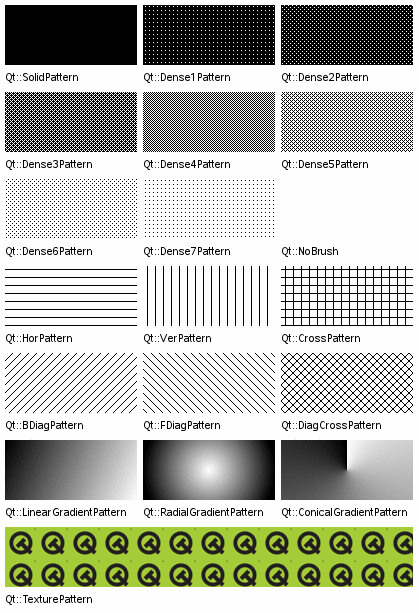
|
常量 |
描述 |
|---|---|
|
Qt.NoBrush |
没有笔刷图案。 |
|
Qt.SolidPattern |
Uniform color. |
|
Qt.Dense1Pattern |
Extremely dense brush pattern. |
|
Qt.Dense2Pattern |
Very dense brush pattern. |
|
Qt.Dense3Pattern |
Somewhat dense brush pattern. |
|
Qt.Dense4Pattern |
Half dense brush pattern. |
|
Qt.Dense5Pattern |
Somewhat sparse brush pattern. |
|
Qt.Dense6Pattern |
Very sparse brush pattern. |
|
Qt.Dense7Pattern |
Extremely sparse brush pattern. |
|
Qt.HorPattern |
Horizontal lines. |
|
Qt.VerPattern |
Vertical lines. |
|
Qt.CrossPattern |
Crossing horizontal and vertical lines. |
|
Qt.BDiagPattern |
Backward diagonal lines. |
|
Qt.FDiagPattern |
Forward diagonal lines. |
|
Qt.DiagCrossPattern |
Crossing diagonal lines. |
|
Qt.LinearGradientPattern |
Linear gradient (set using a dedicated
|
|
Qt.ConicalGradientPattern |
Conical gradient (set using a dedicated
|
|
Qt.RadialGradientPattern |
Radial gradient (set using a dedicated
|
|
Qt.TexturePattern |
自定义图案 (见
|
另请参阅
PySide2.QtCore.Qt.
SizeMode

此枚举用于
drawRoundedRect()
and
addRoundedRect()
functions to specify the radii of rectangle corners with respect to the dimensions of the bounding rectangles specified.
|
常量 |
描述 |
|---|---|
|
Qt.AbsoluteSize |
使用绝对度量指定尺寸。 |
|
Qt.RelativeSize |
指定相对于边界矩形的尺寸,通常使用百分比度量。 |
PySide2.QtCore.Qt.
UIEffect

此枚举描述可用 UI 效果。
By default, Qt will try to use the platform specific desktop settings for each effect. Use the
setDesktopSettingsAware()
function (passing
false
as argument) to prevent this, and the
setEffectEnabled()
to enable or disable a particular effect.
Note that all effects are disabled on screens running at less than 16-bit color depth.
|
常量 |
描述 |
|---|---|
|
Qt.UI_AnimateMenu |
展示动画菜单。 |
|
Qt.UI_FadeMenu |
展示褪色菜单。 |
|
Qt.UI_AnimateCombo |
Show animated comboboxes. |
|
Qt.UI_AnimateTooltip |
Show tooltip animations. |
|
Qt.UI_FadeTooltip |
Show tooltip fading effects. |
|
Qt.UI_AnimateToolBox |
Reserved |
另请参阅
setEffectEnabled()
setDesktopSettingsAware()
PySide2.QtCore.Qt.
CursorShape

此枚举类型定义可以使用的各种光标。
标准箭头光标是处于正常状态的 Widget 的默认值。
|
常量 |
描述 |
|---|---|
|
Qt.ArrowCursor |
|
|
Qt.UpArrowCursor |
|
|
Qt.CrossCursor |
|
|
Qt.WaitCursor |
|
|
Qt.IBeamCursor |
|
|
Qt.SizeVerCursor |
|
|
Qt.SizeHorCursor |
|
|
Qt.SizeBDiagCursor |
|
|
Qt.SizeFDiagCursor |
|
|
Qt.SizeAllCursor |
|
|
Qt.BlankCursor |
A blank/invisible cursor, typically used when the cursor shape needs to be hidden. |
|
Qt.SplitVCursor |
|
|
Qt.SplitHCursor |
|
|
Qt.PointingHandCursor |
|
|
Qt.ForbiddenCursor |
|
|
Qt.OpenHandCursor |
|
|
Qt.ClosedHandCursor |
|
|
Qt.WhatsThisCursor |
|
|
Qt.BusyCursor |
|
|
Qt.DragMoveCursor |
通常使用的光标当拖曳项时。 |
|
Qt.DragCopyCursor |
A cursor that is usually used when dragging an item to copy it. |
|
Qt.DragLinkCursor |
A cursor that is usually used when dragging an item to make a link to it. |
|
Qt.BitmapCursor |
PySide2.QtCore.Qt.
TextFormat

此枚举用于可以显示纯文本和富文本的 Widget,例如
QLabel
. It is used for deciding whether a text string should be interpreted as one or the other. This is normally done by passing one of the enum values to a QTextEdit::setTextFormat() function.
|
常量 |
描述 |
|---|---|
|
Qt.PlainText |
文本字符串被解释成纯文本字符串。 |
|
Qt.RichText |
文本字符串被解释成富文本字符串。见 支持的 HTML 子集 对于富文本的定义。 |
|
Qt.AutoText |
The text string is interpreted as for if
|
|
Qt.MarkdownText |
文本字符串被解释成 Markdown 格式文本。该枚举值在 Qt 5.14 添加。 |
PySide2.QtCore.Qt.
AspectRatioMode

This enum type defines what happens to the aspect ratio when scaling an rectangle.
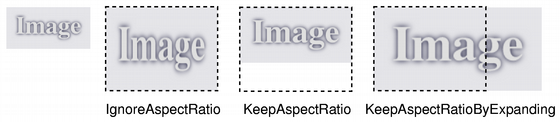
|
常量 |
描述 |
|---|---|
|
Qt.IgnoreAspectRatio |
The size is scaled freely. The aspect ratio is not preserved. |
|
Qt.KeepAspectRatio |
The size is scaled to a rectangle as large as possible inside a given rectangle, preserving the aspect ratio. |
|
Qt.KeepAspectRatioByExpanding |
The size is scaled to a rectangle as small as possible outside a given rectangle, preserving the aspect ratio. |
另请参阅
scale()
scaled()
PySide2.QtCore.Qt.
DockWidgetArea

|
常量 |
描述 |
|---|---|
|
Qt.LeftDockWidgetArea |
|
|
Qt.RightDockWidgetArea |
|
|
Qt.TopDockWidgetArea |
|
|
Qt.BottomDockWidgetArea |
|
|
Qt.AllDockWidgetAreas |
|
|
Qt.NoDockWidgetArea |
PySide2.QtCore.Qt.
DockWidgetAreaSizes

PySide2.QtCore.Qt.
ToolBarArea

|
常量 |
描述 |
|---|---|
|
Qt.LeftToolBarArea |
|
|
Qt.RightToolBarArea |
|
|
Qt.TopToolBarArea |
|
|
Qt.BottomToolBarArea |
|
|
Qt.AllToolBarAreas |
|
|
Qt.NoToolBarArea |
PySide2.QtCore.Qt.
ToolBarAreaSizes

PySide2.QtCore.Qt.
DateFormat

|
常量 |
描述 |
|---|---|
|
Qt.TextDate |
The default Qt format, which includes the day and month name, the day number in the month, and the year in full. The day and month names will be short, localized names. This is basically equivalent to using the date format string, “ddd MMM d yyyy”. See
|
|
Qt.ISODate |
ISO 8601
extended format: either
|
|
Qt.ISODateWithMs |
ISO 8601 extended format, including milliseconds if applicable. |
|
Qt.SystemLocaleShortDate |
该枚举值将在 Qt 6 被弃用并移除。
使用
|
|
Qt.SystemLocaleLongDate |
该枚举值将在 Qt 6 被弃用并移除。
使用
|
|
Qt.DefaultLocaleShortDate |
该枚举值将在 Qt 6 被弃用并移除。
使用
|
|
Qt.DefaultLocaleLongDate |
该枚举值将在 Qt 6 被弃用并移除。
使用
|
|
Qt.SystemLocaleDate |
该枚举值将在 Qt 6 被弃用并移除。 It is equivalent to . |
|
Qt.LocaleDate |
该枚举值将在 Qt 6 被弃用并移除。 It is equivalent to . |
|
Qt.LocalDate |
该枚举值将在 Qt 6 被弃用并移除。 It is equivalent to . |
|
Qt.RFC2822Date |
RFC 2822, RFC 850 and RFC 1036 format: either
|
注意
For
ISODate
formats, each
Y
,
M
and
D
represents a single digit of the year, month and day used to specify the date. Each
H
,
M
and
S
represents a single digit of the hour, minute and second used to specify the time. The presence of a literal
T
character is used to separate the date and time when both are specified.
PySide2.QtCore.Qt.
TimeSpec

|
常量 |
描述 |
|---|---|
|
Qt.LocalTime |
Locale dependent time (Timezones and Daylight Savings Time). |
|
Qt.UTC |
Coordinated Universal Time, replaces Greenwich Mean Time. |
|
Qt.OffsetFromUTC |
An offset in seconds from Coordinated Universal Time. |
|
Qt.TimeZone |
A named time zone using a specific set of Daylight Savings rules. |
PySide2.QtCore.Qt.
DayOfWeek

|
常量 |
描述 |
|---|---|
|
Qt.Monday |
|
|
Qt.Tuesday |
|
|
Qt.Wednesday |
|
|
Qt.Thursday |
|
|
Qt.Friday |
|
|
Qt.Saturday |
|
|
Qt.Sunday |
PySide2.QtCore.Qt.
ScrollBarPolicy

This enum type describes the various modes of
QAbstractScrollArea
‘s scroll bars.
|
常量 |
描述 |
|---|---|
|
Qt.ScrollBarAsNeeded |
|
|
Qt.ScrollBarAlwaysOff |
|
|
Qt.ScrollBarAlwaysOn |
|
(The modes for the horizontal and vertical scroll bars are independent.)
PySide2.QtCore.Qt.
CaseSensitivity

|
常量 |
描述 |
|---|---|
|
Qt.CaseInsensitive |
|
|
Qt.CaseSensitive |
PySide2.QtCore.Qt.
Corner

此枚举类型指定矩形角落:
|
常量 |
描述 |
|---|---|
|
Qt.TopLeftCorner |
矩形的左上角。 |
|
Qt.TopRightCorner |
矩形的右上角。 |
|
Qt.BottomLeftCorner |
矩形的左下角。 |
|
Qt.BottomRightCorner |
矩形的右下角。 |
PySide2.QtCore.Qt.
Edge

This enum type specifies an edge in a rectangle:
|
常量 |
描述 |
|---|---|
|
Qt.TopEdge |
The top edge of the rectangle. |
|
Qt.LeftEdge |
The left edge of the rectangle. |
|
Qt.RightEdge |
The right edge of the rectangle. |
|
Qt.BottomEdge |
The bottom edge of the rectangle. |
New in version 5.1.
PySide2.QtCore.Qt.
ConnectionType

此枚举描述可以用于信号和槽之间的连接类型。尤其,它确定是把特定信号立即交付给槽,还是在以后队列交付。
|
常量 |
描述 |
|---|---|
|
Qt.AutoConnection |
(默认)
若接收者
|
|
Qt.DirectConnection |
槽被立即援引当发射信号时。槽在发信号的线程中执行。 |
|
Qt.QueuedConnection |
The slot is invoked when control returns to the event loop of the receiver’s thread. The slot is executed in the receiver’s thread. |
|
Qt.BlockingQueuedConnection |
Same as , except that the signalling thread blocks until the slot returns. This connection must not 被使用,若接收者活在发信号线程中,否则应用程序将死锁。 |
|
Qt.UniqueConnection |
This is a flag that can be combined with any one of the above connection types, using a bitwise OR. When is set,
|
With queued connections, the parameters must be of types that are known to Qt’s meta-object system, because Qt needs to copy the arguments to store them in an event behind the scenes. If you try to use a queued connection and get the error message:
QObject::connect: Cannot queue arguments of type 'MyType'
调用
qRegisterMetaType()
to register the data type before you establish the connection.
When using signals and slots with multiple threads, see Signals and Slots Across Threads.
另请参阅
connect()
qRegisterMetaType()
Q_DECLARE_METATYPE()
PySide2.QtCore.Qt.
ShortcutContext

对于
Shortcut
event to occur, the shortcut’s key sequence must be entered by the user in a context where the shortcut is active. The possible contexts are these:
|
常量 |
描述 |
|---|---|
|
Qt.WidgetShortcut |
快捷方式是活动的当其父级 Widget 拥有聚焦时。 |
|
Qt.WidgetWithChildrenShortcut |
快捷方式活动,当其父级 Widget 或其任何子级拥有聚焦时。顶层 Widget 的子级不受此快捷上下文的影响,除了弹出窗口。 |
|
Qt.WindowShortcut |
快捷方式活动,当其父级 Widget 是活动顶层窗口的逻辑子 Widget 时。 |
|
Qt.ApplicationShortcut |
快捷方式活动,当应用程序的某一窗口活动时。 |
PySide2.QtCore.Qt.
FillRule

指定应该使用哪种方法来填充路径和多边形。
|
常量 |
描述 |
|---|---|
|
Qt.OddEvenFill |
Specifies that the region is filled using the odd even fill rule. With this rule, we determine whether a point is inside the shape by using the following method. Draw a horizontal line from the point to a location outside the shape, and count the number of intersections. If the number of intersections is an odd number, the point is inside the shape. This mode is the default. |
|
Qt.WindingFill |
Specifies that the region is filled using the non zero winding rule. With this rule, we determine whether a point is inside the shape by using the following method. Draw a horizontal line from the point to a location outside the shape. Determine whether the direction of the line at each intersection point is up or down. The winding number is determined by summing the direction of each intersection. If the number is non zero, the point is inside the shape. This fill mode can also in most cases be considered as the intersection of closed shapes. |
PySide2.QtCore.Qt.
MaskMode

This enum specifies the behavior of the
createMaskFromColor()
and
createMaskFromColor()
函数。
|
常量 |
描述 |
|---|---|
|
Qt.MaskInColor |
Creates a mask where all pixels matching the given color are opaque. |
|
Qt.MaskOutColor |
Creates a mask where all pixels matching the given color are transparent. |
PySide2.QtCore.Qt.
ClipOperation

|
常量 |
描述 |
|---|---|
|
Qt.NoClip |
此操作关闭剪辑。 |
|
Qt.ReplaceClip |
Replaces the current clip path/rect/region with the one supplied in the function call. |
|
Qt.IntersectClip |
Intersects the current clip path/rect/region with the one supplied in the function call. |
PySide2.QtCore.Qt.
ItemSelectionMode

This enum is used in
QGraphicsItem
,
QGraphicsScene
and
QGraphicsView
to specify how items are selected, or how to determine if shapes and items collide.
|
常量 |
描述 |
|---|---|
|
Qt.ContainsItemShape |
The output list contains only items whose
|
|
Qt.IntersectsItemShape |
The output list contains both items whose
|
|
Qt.ContainsItemBoundingRect |
The output list contains only items whose
|
|
Qt.IntersectsItemBoundingRect |
The output list contains both items whose
|
另请参阅
items()
collidingItems()
items()
collidesWithItem()
collidesWithPath()
PySide2.QtCore.Qt.
ItemSelectionOperation

This enum is used in
QGraphicsScene
to specify what to do with currently selected items when setting a selection area.
|
常量 |
描述 |
|---|---|
|
Qt.ReplaceSelection |
The currently selected items are replaced by items in the selection area. |
|
Qt.AddToSelection |
The items in the selection area are added to the currently selected items. |
另请参阅
setSelectionArea()
New in version 5.5.
PySide2.QtCore.Qt.
TransformationMode

此枚举类型定义图像变换 (如比例缩放) 是否应该平滑。
|
常量 |
描述 |
|---|---|
|
Qt.FastTransformation |
变换被快速履行,不进行平滑处理。 |
|
Qt.SmoothTransformation |
使用双线性过滤,变换结果图像。 |
另请参阅
scaled()
PySide2.QtCore.Qt.
Axis

This enum type defines three values to represent the three axes in the cartesian coordinate system.
|
常量 |
描述 |
|---|---|
|
Qt.XAxis |
The X axis. |
|
Qt.YAxis |
The Y axis. |
|
Qt.ZAxis |
The Z axis. |
另请参阅
rotate()
rotateRadians()
PySide2.QtCore.Qt.
FocusReason

此枚举指定聚焦为什么改变。它会被传递透过
setFocus
且可以检索在
QFocusEvent
被发送给 Widget 当聚焦改变时。
|
常量 |
描述 |
|---|---|
|
Qt.MouseFocusReason |
发生鼠标动作。 |
|
Qt.TabFocusReason |
按下 Tab 键。 |
|
Qt.BacktabFocusReason |
发生 Backtab。输入可能包括 Shift 或 Control 键;如 Shift+Tab。 |
|
Qt.ActiveWindowFocusReason |
窗口系统使此窗口活动或不活动。 |
|
Qt.PopupFocusReason |
应用程序打开/关闭弹出窗口,抓取/释放键盘焦点。 |
|
Qt.ShortcutFocusReason |
The user typed a label’s buddy shortcut |
|
Qt.MenuBarFocusReason |
菜单栏获得聚焦。 |
|
Qt.OtherFocusReason |
另一原因,通常特定于应用程序。 |
另请参阅
PySide2.QtCore.Qt.
ContextMenuPolicy

此枚举类型定义 Widget 在展示上下文菜单方面可以采用的各种策略。
|
常量 |
描述 |
|---|---|
|
Qt.NoContextMenu |
the widget does not feature a context menu, context menu handling is deferred to the widget’s parent. |
|
Qt.PreventContextMenu |
Widget 不提供上下文菜单,且相比
|
|
Qt.DefaultContextMenu |
the widget’s
|
|
Qt.ActionsContextMenu |
Widget 显示其
|
|
Qt.CustomContextMenu |
Widget 发射
|
PySide2.QtCore.Qt.
InputMethodQuery

|
常量 |
描述 |
|---|---|
|
Qt.ImEnabled |
Widget 接受输入法输入。 |
|
Qt.ImMicroFocus |
此查询已过时。使用
|
|
Qt.ImCursorRectangle |
在 Widget 坐标中覆盖输入光标区域的矩形。 |
|
Qt.ImFont |
目前文本输入使用的字体。 |
|
Qt.ImCursorPosition |
在环绕输入区域文本中的光标逻辑位置 (见
|
|
Qt.ImSurroundingText |
输入区域周围的纯文本,例如:当前段落。 |
|
Qt.ImCurrentSelection |
目前选中的文本。 |
|
Qt.ImMaximumTextLength |
The maximum number of characters that the widget can hold. If there is no limit,
|
|
Qt.ImAnchorPosition |
The position of the selection anchor. This may be less or greater than
|
|
Qt.ImHints |
有关期望输入的输入法提示。(见
|
|
Qt.ImPreferredLanguage |
首选的输入语言。 |
|
Qt.ImPlatformData |
用于输入法的特定平台数据。 |
|
Qt.ImAbsolutePosition |
在整个文档中的光标逻辑位置。 |
|
Qt.ImTextBeforeCursor |
The plain text before the cursor. The widget can decide how much text to return, but must not return an empty string unless the cursor is at the start of the document. |
|
Qt.ImTextAfterCursor |
The plain text after the cursor. The widget can decide how much text to return, but must not return an empty string unless the cursor is at the end of the document. |
|
Qt.ImEnterKeyType |
The Enter key type. |
|
Qt.ImAnchorRectangle |
选定锚点的边界矩形。该值在 Qt 5.7 添加。 |
|
Qt.ImInputItemClipRectangle |
The actual exposed input item rectangle. Parts of the input item might be clipped. This value will take clipping into consideration and return the actual painted item rectangle. The rectangle is in widget coordinates. |
掩码:
|
常量 |
描述 |
|---|---|
|
Qt.ImQueryInput |
通常在输入时更改特性。 |
|
Qt.ImQueryAll |
查询所有输入法特性。 |
PySide2.QtCore.Qt.
InputMethodHint

|
常量 |
描述 |
|---|---|
|
Qt.ImhNone |
没有提示。 |
更改行为的标志:
|
常量 |
描述 |
|---|---|
|
Qt.ImhHiddenText |
输入法不应该展示字符当键入时。这是自动设置的当设置
|
|
Qt.ImhSensitiveData |
活动输入法不应该把键入文本存储在任何持久性存储中 (像预测用户字典)。 |
|
Qt.ImhNoAutoUppercase |
输入法不应该试着自动切换到大写当句子结束时。 |
|
Qt.ImhPreferNumbers |
数字是首选的 (但不是必需的)。 |
|
Qt.ImhPreferUppercase |
大写字母是首选的 (但不是必需的)。 |
|
Qt.ImhPreferLowercase |
小写字母是首选的 (但不是必需的)。 |
|
Qt.ImhNoPredictiveText |
键入时不使用预测文本 (即:查找字典)。 |
|
Qt.ImhDate |
作为日期字段的文本编辑器函数。 |
|
Qt.ImhTime |
作为时间字段的文本编辑器函数。 |
|
Qt.ImhPreferLatin |
拉丁字符是首选的 (但不是必需的)。 |
|
Qt.ImhMultiLine |
可以在文本字段中录入多行。 |
|
Qt.ImhNoEditMenu |
不使用内置编辑菜单。该标志在 Qt 5.11 引入。 |
|
Qt.ImhNoTextHandles |
不使用内置文本光标和选定手柄。该标志在 Qt 5.11 引入。 |
限定输入的标志 (排斥标志):
|
常量 |
描述 |
|---|---|
|
Qt.ImhDigitsOnly |
只允许数字。 |
|
Qt.ImhFormattedNumbersOnly |
只允许输入数字。这包括小数点和负号。 |
|
Qt.ImhUppercaseOnly |
只允许输入大写字母。 |
|
Qt.ImhLowercaseOnly |
只允许输入小写字母。 |
|
Qt.ImhDialableCharactersOnly |
只允许适合电话拨号的字符。 |
|
Qt.ImhEmailCharactersOnly |
只允许适合 Email 地址的字符。 |
|
Qt.ImhUrlCharactersOnly |
只允许适合 URL 的字符。 |
|
Qt.ImhLatinOnly |
只允许基于拉丁语的输入。 |
掩码:
|
常量 |
描述 |
|---|---|
|
Qt.ImhExclusiveInputMask |
此掩码产生非 0 若使用任何排斥标志。 |
注意
If several exclusive flags are OR-ed together, the resulting character set will consist of the union of the specified sets. For instance specifying
ImhNumbersOnly
and
ImhUppercaseOnly
would yield a set consisting of numbers and uppercase letters.
另请参阅
inputMethodHints()
4.6 版新增。
PySide2.QtCore.Qt.
EnterKeyType

This can be used to alter the appearance of the Return key on an on-screen keyboard.
注意
Not all of these values are supported on all platforms. For unsupported values the default key will be used instead.
|
常量 |
描述 |
|---|---|
|
Qt.EnterKeyDefault |
The default Enter key. This can either be a button closing the keyboard, or a Return button causing a new line in case of a multi-line input field. |
|
Qt.EnterKeyReturn |
Show a Return button that inserts a new line. The keyboard will not close when this button is pressed. |
|
Qt.EnterKeyDone |
Show a “Done” button. The keyboard will close when this button is pressed. |
|
Qt.EnterKeyGo |
Show a “Go” button. Typically used in an address bar when entering a URL; the keyboard will close when this button is pressed. |
|
Qt.EnterKeySend |
Show a “Send” button. The keyboard will close when this button is pressed. |
|
Qt.EnterKeySearch |
Show a “Search” button. The keyboard will close when this button is pressed. |
|
Qt.EnterKeyNext |
Show a “Next” button. Typically used in a form to allow navigating to the next input field; the keyboard will not close when this button is pressed. |
|
Qt.EnterKeyPrevious |
Show a “Previous” button. The keyboard will not close when this button is pressed. |
New in version 5.6.
PySide2.QtCore.Qt.
ToolButtonStyle

The style of the tool button, describing how the button’s text and icon should be displayed.
|
常量 |
描述 |
|---|---|
|
Qt.ToolButtonIconOnly |
只显示图标。 |
|
Qt.ToolButtonTextOnly |
只显示文本。 |
|
Qt.ToolButtonTextBesideIcon |
The text appears beside the icon. |
|
Qt.ToolButtonTextUnderIcon |
The text appears under the icon. |
|
Qt.ToolButtonFollowStyle |
Follow the
|
PySide2.QtCore.Qt.
LayoutDirection

Specifies the direction of Qt’s layouts and text handling.
|
常量 |
描述 |
|---|---|
|
Qt.LeftToRight |
从左到右布局。 |
|
Qt.RightToLeft |
从右到左布局。 |
|
Qt.LayoutDirectionAuto |
自动布局。 |
Right-to-left layouts are necessary for certain languages, notably Arabic and Hebrew.
serves two purposes. When used in conjunction with widgets and layouts, it will imply to use the layout direction set on the parent widget or
QApplication
. This has the same effect as
unsetLayoutDirection()
.
When is used in conjunction with text layouting, it will imply that the text directionality is determined from the content of the string to be layouted.
另请参阅
setLayoutDirection()
setLayoutDirection()
setTextDirection()
isRightToLeft()
PySide2.QtCore.Qt.
AnchorPoint

Specifies a side of a layout item that can be anchored. This is used by
QGraphicsAnchorLayout
.
|
常量 |
描述 |
|---|---|
|
Qt.AnchorLeft |
The left side of a layout item. |
|
Qt.AnchorHorizontalCenter |
A “virtual” side that is centered between the left and the right side of a layout item. |
|
Qt.AnchorRight |
The right side of a layout item. |
|
Qt.AnchorTop |
The top side of a layout item. |
|
Qt.AnchorVerticalCenter |
A “virtual” side that is centered between the top and the bottom side of a layout item. |
|
Qt.AnchorBottom |
The bottom side of a layout item. |
4.6 版新增。
PySide2.QtCore.Qt.
FindChildOption

|
常量 |
描述 |
|---|---|
|
Qt.FindDirectChildrenOnly |
仅查找对象的直接子级。 |
|
Qt.FindChildrenRecursively |
查找对象的所有子级 (递归搜索)。 |
New in version 5.0.
PySide2.QtCore.Qt.
DropAction

|
常量 |
描述 |
|---|---|
|
Qt.CopyAction |
Copy the data to the target. |
|
Qt.MoveAction |
Move the data from the source to the target. |
|
Qt.LinkAction |
Create a link from the source to the target. |
|
Qt.ActionMask |
|
|
Qt.IgnoreAction |
Ignore the action (do nothing with the data). |
|
Qt.TargetMoveAction |
On Windows, this value is used when the ownership of the D&D data should be taken over by the target application, i.e., the source application should not delete the data. On X11 this value is used to do a move. is not used on the Mac. |
PySide2.QtCore.Qt.
CheckState

此枚举描述可复选项、控件及 Widget 的状态。
|
常量 |
描述 |
|---|---|
|
Qt.Unchecked |
项被取消复选。 |
|
Qt.PartiallyChecked |
The item is partially checked. Items in hierarchical models may be partially checked if some, but not all, of their children are checked. |
|
Qt.Checked |
项被复选。 |
另请参阅
QCheckBox
ItemFlags
ItemDataRole
PySide2.QtCore.Qt.
ItemDataRole

模型中每项拥有一组与之关联的数据元素,每数据元素带有其自己的角色。视图使用角色来指示模型,其需要哪种数据类型。自定义模型应该返回这些类型的数据。
一般用途的角色 (和关联的类型):
|
常量 |
描述 |
|---|---|
|
Qt.DisplayRole |
要以文本形式渲染的关键数据。(
|
|
Qt.DecorationRole |
|
|
Qt.EditRole |
采用适合于在编辑器中编辑的形式的数据。(
|
|
Qt.ToolTipRole |
The data displayed in the item’s tooltip. (
|
|
Qt.StatusTipRole |
被显示在状态栏中的数据。(
|
|
Qt.WhatsThisRole |
The data displayed for the item in “What’s This?” mode. (
|
|
Qt.SizeHintRole |
会被提供给视图的项尺寸提示。(
|
描述外观和元数据的角色 (与关联类型):
|
常量 |
描述 |
|---|---|
|
Qt.FontRole |
用于采用默认委托渲染项的字体。(
|
|
Qt.TextAlignmentRole |
采用默认委托渲染项的文本对齐方式。(
|
|
Qt.BackgroundRole |
用于采用默认委托渲染项的背景笔刷。(
|
|
Qt.BackgroundColorRole |
This role is obsolete. Use instead. |
|
Qt.ForegroundRole |
用于采用默认委托渲染项的前景笔刷 (文本颜色,通常)。(
|
|
Qt.TextColorRole |
This role is obsolete. Use instead. |
|
Qt.CheckStateRole |
此角色被用于获取项的被复选状态。(
|
|
Qt.InitialSortOrderRole |
此角色被用于获取 Header 头视图区间的初始排序次序。(
|
可访问性角色 (与关联类型):
|
常量 |
描述 |
|---|---|
|
Qt.AccessibleTextRole |
要被用于可访问性扩展和插件 (如:屏幕阅读器) 的文本。(
|
|
Qt.AccessibleDescriptionRole |
用于可访问性目的的项描述。(
|
用户角色:
|
常量 |
描述 |
|---|---|
|
Qt.UserRole |
可以被用于特定应用程序目的的第一角色。 |
对于用户角色,由开发者决定要使用哪种类型,并确保组件使用正确类型,当访问和设置数据时。
PySide2.QtCore.Qt.
ItemFlag

此枚举描述项的特性:
|
常量 |
描述 |
|---|---|
|
Qt.NoItemFlags |
它没有设置任何特性。 |
|
Qt.ItemIsSelectable |
它可以被选中。 |
|
Qt.ItemIsEditable |
它可以被编辑。 |
|
Qt.ItemIsDragEnabled |
可以拖曳它。 |
|
Qt.ItemIsDropEnabled |
可以将它用作掉落目标。 |
|
Qt.ItemIsUserCheckable |
它可以被用户复选 (或取消复选)。 |
|
Qt.ItemIsEnabled |
用户可以与项交互。 |
|
Qt.ItemIsAutoTristate |
The item’s state depends on the state of its children. This enables automatic management of the state of parent items in
|
|
Qt.ItemIsTristate |
This enum value is deprecated. Use instead. |
|
Qt.ItemNeverHasChildren |
The item never has child items. This is used for optimization purposes only. |
|
Qt.ItemIsUserTristate |
The user can cycle through three separate states. This value was added in Qt 5.5. |
Note that checkable items need to be given both a suitable set of flags and an initial state, indicating whether the item is checked or not. This is handled automatically for model/view components, but needs to be explicitly set for instances of
QListWidgetItem
,
QTableWidgetItem
,和
QTreeWidgetItem
.
Note that it is undefined behavior to reimplement
hasChildren
to return true for an index if that index has the flag set.
另请参阅
PySide2.QtCore.Qt.
MatchFlag

此枚举描述可以使用的匹配类型,当搜索模型项时。
|
常量 |
描述 |
|---|---|
|
Qt.MatchExactly |
Performs
|
|
Qt.MatchFixedString |
Performs string-based matching. String-based comparisons are case-insensitive unless the
|
|
Qt.MatchContains |
搜索术语包含在项中。 |
|
Qt.MatchStartsWith |
搜索术语匹配项开头。 |
|
Qt.MatchEndsWith |
搜索术语匹配项末尾。 |
|
Qt.MatchCaseSensitive |
搜索区分大小写。 |
|
Qt.MatchRegExp |
Performs string-based matching using a regular expression as the search term. Uses the deprecated
|
|
Qt.MatchRegularExpression |
Performs string-based matching using a regular expression as the search term. Uses
|
|
Qt.MatchWildcard |
Performs string-based matching using a string with wildcards as the search term. |
|
Qt.MatchWrap |
Perform a search that wraps around, so that when the search reaches the last item in the model, it begins again at the first item and continues until all items have been examined. |
|
Qt.MatchRecursive |
搜索整个层次结构。 |
另请参阅
compare()
QRegExp
QRegularExpression
PySide2.QtCore.Qt.
WindowModality

This enum specifies the behavior of a modal window. A modal window is one that blocks input to other windows. Note that windows that are children of a modal window are not blocked.
The values are:
|
常量 |
描述 |
|---|---|
|
Qt.NonModal |
The window is not modal and does not block input to other windows. |
|
Qt.WindowModal |
The window is modal to a single window hierarchy and blocks input to its parent window, all grandparent windows, and all siblings of its parent and grandparent windows. |
|
Qt.ApplicationModal |
The window is modal to the application and blocks input to all windows. |
另请参阅
windowModality
QDialog
PySide2.QtCore.Qt.
TextInteractionFlag

此枚举指定文本显示 Widget,如何应答用户输入。
|
常量 |
描述 |
|---|---|
|
Qt.NoTextInteraction |
不可能与文本进行交互。 |
|
Qt.TextSelectableByMouse |
可以采用鼠标选择文本,然后使用上下文菜单 (或标准键盘快捷键) 将其拷贝到剪贴板。 |
|
Qt.TextSelectableByKeyboard |
可以采用键盘光标键选择文本。展示文本光标。 |
|
Qt.LinksAccessibleByMouse |
可以采用鼠标突显和激活链接。 |
|
Qt.LinksAccessibleByKeyboard |
可以使用 Tab 聚焦链接,并采用 Enter 激活它们。 |
|
Qt.TextEditable |
文本是完全可编辑的。 |
|
Qt.TextEditorInteraction |
默认文本编辑器。 |
|
Qt.TextBrowserInteraction |
默认为
|
PySide2.QtCore.Qt.
EventPriority

此枚举可用于指定事件优先级。
|
常量 |
描述 |
|---|---|
|
Qt.HighEventPriority |
Events with this priority are sent before events with or . |
|
Qt.NormalEventPriority |
Events with this priority are sent after events with , but before events with . |
|
Qt.LowEventPriority |
Events with this priority are sent after events with or . |
Note that these values are provided purely for convenience, since event priorities can be any value between
INT_MAX
and
INT_MIN
, inclusive. For example, you can define custom priorities as being relative to each other:
enum CustomEventPriority
{
    // An important event
    ImportantEventPriority = Qt::HighEventPriority,
    // A more important event
    MoreImportantEventPriority = ImportantEventPriority + 1,
    // A critical event
    CriticalEventPriority = 100 * MoreImportantEventPriority,
    // Not that important
    StatusEventPriority = Qt::LowEventPriority,
    // These are less important than Status events
    IdleProcessingDoneEventPriority = StatusEventPriority - 1
};
另请参阅
PySide2.QtCore.Qt.
SizeHint

此枚举用于
sizeHint()
|
常量 |
描述 |
|---|---|
|
Qt.MinimumSize |
用于指定图形布局项的最小尺寸。 |
|
Qt.PreferredSize |
用于指定图形布局项的首选尺寸。 |
|
Qt.MaximumSize |
用于指定图形布局项的最大尺寸。 |
|
Qt.MinimumDescent |
用于指定图形布局项中文本字符串的最小下降。 |
另请参阅
sizeHint()
PySide2.QtCore.Qt.
WindowFrameSection

This enum is used to describe parts of a window frame. It is returned by
windowFrameSectionAt()
to describe what section of the window frame is under the mouse.
|
常量 |
描述 |
|---|---|
|
Qt.NoSection |
|
|
Qt.LeftSection |
|
|
Qt.TopLeftSection |
|
|
Qt.TopSection |
|
|
Qt.TopRightSection |
|
|
Qt.RightSection |
|
|
Qt.BottomRightSection |
|
|
Qt.BottomSection |
|
|
Qt.BottomLeftSection |
|
|
Qt.TitleBarArea |
另请参阅
windowFrameEvent()
paintWindowFrame()
windowFrameSectionAt()
PySide2.QtCore.Qt.
CoordinateSystem

此枚举指定坐标系统。
|
常量 |
描述 |
|---|---|
|
Qt.DeviceCoordinates |
Coordinates are relative to the top-left corner of the object’s paint device. |
|
Qt.LogicalCoordinates |
坐标相对于对象的左上角。 |
4.6 版新增。
PySide2.QtCore.Qt.
TouchPointState

This enum represents the state of a touch point at the time a
QTouchEvent
occurred.
|
常量 |
描述 |
|---|---|
|
Qt.TouchPointPressed |
The touch point is now pressed. |
|
Qt.TouchPointMoved |
The touch point moved. |
|
Qt.TouchPointStationary |
The touch point did not move. |
|
Qt.TouchPointReleased |
The touch point was released. |
4.6 版新增。
PySide2.QtCore.Qt.
GestureState

此枚举类型描述手势的状态。
|
常量 |
描述 |
|---|---|
|
Qt.NoGesture |
未检测到手势。 |
|
Qt.GestureStarted |
连续手势已开始。 |
|
Qt.GestureUpdated |
手势继续。 |
|
Qt.GestureFinished |
手势已完成。 |
|
Qt.GestureCanceled |
手势被取消。 |
另请参阅
4.6 版新增。
PySide2.QtCore.Qt.
GestureType

此枚举类型描述标准手势。
|
常量 |
描述 |
|---|---|
|
Qt.TapGesture |
点击手势。 |
|
Qt.TapAndHoldGesture |
点击并保持 (长点击) 手势。 |
|
Qt.PanGesture |
平移手势。 |
|
Qt.PinchGesture |
捏合手势。 |
|
Qt.SwipeGesture |
轻扫手势。 |
|
Qt.CustomGesture |
可以用于测试的标志,若手势是用户定义手势 ID。 |
注册用户定义手势采用
registerRecognizer()
function which generates a custom gesture ID with the flag set.
另请参阅
QGesture
grabGesture()
grabGesture()
4.6 版新增。
PySide2.QtCore.Qt.
GestureFlag

此枚举类型描述可以使用的额外标志,当订阅手势时。
|
常量 |
描述 |
|---|---|
|
Qt.DontStartGestureOnChildren |
默认情况下,手势可以从 Widget 或其任何子级开始。使用此标志可禁用此并仅允许从 Widget 开始手势。 |
|
Qt.ReceivePartialGestures |
允许将任何忽略手势事件传播给有指定此提示的父级 Widget。默认情况下,手势处于
|
|
Qt.IgnoredGesturesPropagateToParent |
从 Qt 4.7 起,此标志允许微调手势事件传播。通过设置标志当
|
另请参阅
grabGesture()
grabGesture()
4.6 版新增。
PySide2.QtCore.Qt.
NativeGestureType

此枚举返回手势类型。
|
常量 |
描述 |
|---|---|
|
Qt.BeginNativeGesture |
在手势事件流之前发送。 |
|
Qt.EndNativeGesture |
在手势事件流之后发送。 |
|
Qt.PanNativeGesture |
在平移手势之后发送。类似于点击并拖曳鼠标移动。 |
|
Qt.ZoomNativeGesture |
指定放大增量 (以百分比为单位)。 |
|
Qt.SmartZoomNativeGesture |
布尔放大状态。 |
|
Qt.RotateNativeGesture |
旋转增量 (以度为单位)。 |
|
Qt.SwipeNativeGesture |
在轻扫移动后发送。 |
New in version 5.0.
此枚举类型描述移动聚焦的模式。
|
常量 |
描述 |
|---|---|
|
Qt.NavigationModeNone |
仅用于触摸屏。 |
|
Qt.NavigationModeKeypadTabOrder |
|
|
Qt.NavigationModeKeypadDirectional |
|
|
Qt.NavigationModeCursorAuto |
The mouse cursor is used to change focus, it is displayed only on non touchscreen devices. The keypad is used to implement a virtual cursor, unless the device has an analog mouse type of input device (e.g. touchpad). This is the recommended setting for an application such as a web browser that needs pointer control on both touch and non-touch devices. |
|
Qt.NavigationModeCursorForceVisible |
The mouse cursor is used to change focus, it is displayed regardless of device type. The keypad is used to implement a virtual cursor, unless the device has an analog mouse type of input device (e.g. touchpad) |
注意
Cursor navigation is not currently implemented on any platform and behaves as .
另请参阅
setNavigationMode()
navigationMode()
4.6 版新增。
PySide2.QtCore.Qt.
CursorMoveStyle

此枚举描述文本光标的可用移动样式。选项:
|
常量 |
描述 |
|---|---|
|
Qt.LogicalMoveStyle |
Within a left-to-right text block, decrease cursor position when pressing left arrow key, increase cursor position when pressing the right arrow key. If the text block is right-to-left, the opposite behavior applies. |
|
Qt.VisualMoveStyle |
Pressing the left arrow key will always cause the cursor to move left, regardless of the text’s writing direction. Pressing the right arrow key will always cause the cursor to move right. |
New in version 4.8.
PySide2.QtCore.Qt.
TimerType

计时器类型指示计时器可以多精确。
|
常量 |
描述 |
|---|---|
|
Qt.PreciseTimer |
精密计时器试着保持毫秒精度 |
|
Qt.CoarseTimer |
粗糙计时器试着保持精度在 5% 的期望间隔 |
|
Qt.VeryCoarseTimer |
非常粗糙计时器仅保持完全秒精度 |
On UNIX (including Linux, macOS, and iOS), Qt will keep millisecond accuracy for . For , the interval will be adjusted up to 5% to align the timer with other timers that are expected to fire at or around the same time. The objective is to make most timers wake up at the same time, thereby reducing CPU wakeups and power consumption.
On Windows, Qt will use Windows’s Multimedia timer facility (if available) for and normal Windows timers for and .
On all platforms, the interval for is rounded to the nearest full second (e.g. an interval of 23500ms will be rounded to 24000ms, and 20300ms to 20000ms).
New in version 5.0.
PySide2.QtCore.Qt.
ScrollPhase

此枚举描述卷动的相位。
|
常量 |
描述 |
|---|---|
|
Qt.NoScrollPhase |
The input device doesn’t support scroll phase. This value was introduced in Qt 5.7. |
|
Qt.ScrollBegin |
卷动即将开始,但卷动距离尚未改变。 |
|
Qt.ScrollUpdate |
卷动距离已改变 (默认)。 |
|
Qt.ScrollEnd |
卷动已结束,滚动距离不再改变。 |
|
Qt.ScrollMomentum |
用户不再触摸输入设备,但由于卷动动量而继续卷动。该值在 Qt 5.12 引入。 |
New in version 5.2.
PySide2.QtCore.Qt.
MouseEventSource

此枚举描述鼠标事件的来源,且可以用于确定事件是否是源自其它设备 (如触摸屏) 的人工鼠标事件。
|
常量 |
描述 |
|---|---|
|
Qt.MouseEventNotSynthesized |
The most common value. On platforms where such information is available this value indicates that the event was generated in response to a genuine mouse event in the system. |
|
Qt.MouseEventSynthesizedBySystem |
Indicates that the mouse event was synthesized from a touch event by the platform. |
|
Qt.MouseEventSynthesizedByQt |
Indicates that the mouse event was synthesized from an unhandled touch event by Qt. |
|
Qt.MouseEventSynthesizedByApplication |
Indicates that the mouse event was synthesized by the application. This allows distinguishing application-generated mouse events from the ones that are coming from the system or are synthesized by Qt. This value was introduced in Qt 5.6 |
另请参阅
AA_SynthesizeMouseForUnhandledTouchEvents
New in version 5.3.
PySide2.QtCore.Qt.
MouseEventFlag

This enum provides additional information concerning a
QMouseEvent
.
|
常量 |
描述 |
|---|---|
|
Qt.MouseEventCreatedDoubleClick |
Indicates that Qt has created a
|
New in version 5.3.
PySide2.QtCore.Qt.
ChecksumType

This enum describes the possible standards used by
qChecksum()
.
|
常量 |
描述 |
|---|---|
|
Qt.ChecksumIso3309 |
Checksum calculation based on ISO 3309. |
|
Qt.ChecksumItuV41 |
Checksum calculation based on ITU-V.41. |
New in version 5.9.
PySide2.QtCore.Qt.
HighDpiScaleFactorRoundingPolicy

此枚举描述可能的高 DPI (每英寸点数) 比例因子舍入策略,决定如何处理非整数比例因子 (譬如 Windows 150%)。
The active policy is set by calling QGuiApplication::setHighDdpiScaleFactorRoundingPolicy() before the application object is created, or by setting the QT_SCALE_FACTOR_ROUNDING_POLICY environment variable.
|
常量 |
描述 |
|---|---|
|
Qt.HighDpiScaleFactorRoundingPolicy.Round |
向上舍入到 .5 及以上。 |
|
Qt.HighDpiScaleFactorRoundingPolicy.Ceil |
总是向上舍入。 |
|
Qt.HighDpiScaleFactorRoundingPolicy.Floor |
总是向下舍入。 |
|
Qt.HighDpiScaleFactorRoundingPolicy.RoundPreferFloor |
向上舍入到 .75 及以上。 |
|
Qt.HighDpiScaleFactorRoundingPolicy.PassThrough |
Don’t round. |
另请参阅
setHighDpiScaleFactorRoundingPolicy()
AA_EnableHighDpiScaling
New in version 5.14.
PySide2.QtCore.Qt.
bin
(
s
)

s
–
QTextStream
调用
setIntegerBase
(2) on
stream
并返回
stream
.
PySide2.QtCore.Qt.
bom
(
s
)

s
–
QTextStream
Toggles insertion of the Byte Order Mark on
stream
when
QTextStream
is used with a UTF codec.
另请参阅
setGenerateByteOrderMark()
													QTextStream


													manipulators
PySide2.QtCore.Qt.
center
(
s
)

s
–
QTextStream
调用
setFieldAlignment
(
AlignCenter
) on
stream
并返回
stream
.
另请参阅
left()
right()
													QTextStream


													manipulators
PySide2.QtCore.Qt.
dec
(
s
)

s
–
QTextStream
调用
setIntegerBase
(10) on
stream
并返回
stream
.
PySide2.QtCore.Qt.
endl
(
s
)

s
–
QTextStream
Writes ‘\n’ to the
stream
and flushes the stream.
相当于
stream << '\n' << flush
Note: On Windows, all ‘\n’ characters are written as ‘\r\n’ if
QTextStream
‘s device or string is opened using the
文本
标志。
PySide2.QtCore.Qt.
fixed
(
s
)

s
–
QTextStream
调用
setRealNumberNotation
(
FixedNotation
) on
stream
并返回
stream
.
另请参阅
scientific()
													QTextStream


													manipulators
PySide2.QtCore.Qt.
flush
(
s
)

s
–
QTextStream
调用
flush()
on
stream
并返回
stream
.
PySide2.QtCore.Qt.
forcepoint
(
s
)

s
–
QTextStream
调用
setNumberFlags
(
numberFlags()
|
ForcePoint
) on
stream
并返回
stream
.
另请参阅
noforcepoint()
forcesign()
showbase()
													QTextStream


													manipulators
PySide2.QtCore.Qt.
forcesign
(
s
)

s
–
QTextStream
调用
setNumberFlags
(
numberFlags()
|
ForceSign
) on
stream
并返回
stream
.
另请参阅
noforcesign()
forcepoint()
showbase()
													QTextStream


													manipulators
PySide2.QtCore.Qt.
hex
(
s
)

s
–
QTextStream
调用
setIntegerBase
(16) on
stream
并返回
stream
.
注意
The hex modifier can only be used for writing to streams.
PySide2.QtCore.Qt.
left
(
s
)

s
–
QTextStream
调用
setFieldAlignment
(
AlignLeft
) on
stream
并返回
stream
.
另请参阅
right()
center()
													QTextStream


													manipulators
PySide2.QtCore.Qt.
lowercasebase
(
s
)

s
–
QTextStream
调用
setNumberFlags
(
numberFlags()
& ~
UppercaseBase
) on
stream
并返回
stream
.
另请参阅
uppercasebase()
lowercasedigits()
													QTextStream


													manipulators
PySide2.QtCore.Qt.
lowercasedigits
(
s
)

s
–
QTextStream
调用
setNumberFlags
(
numberFlags()
& ~
UppercaseDigits
) on
stream
并返回
stream
.
另请参阅
uppercasedigits()
lowercasebase()
													QTextStream


													manipulators
PySide2.QtCore.Qt.
noforcepoint
(
s
)

s
–
QTextStream
调用
setNumberFlags
(
numberFlags()
& ~
ForcePoint
) on
stream
并返回
stream
.
另请参阅
forcepoint()
noforcesign()
noshowbase()
													QTextStream


													manipulators
PySide2.QtCore.Qt.
noforcesign
(
s
)

s
–
QTextStream
调用
setNumberFlags
(
numberFlags()
& ~
ForceSign
) on
stream
并返回
stream
.
另请参阅
forcesign()
noforcepoint()
noshowbase()
													QTextStream


													manipulators
PySide2.QtCore.Qt.
noshowbase
(
s
)

s
–
QTextStream
调用
setNumberFlags
(
numberFlags()
& ~
ShowBase
) on
stream
并返回
stream
.
另请参阅
showbase()
noforcesign()
noforcepoint()
													QTextStream


													manipulators
PySide2.QtCore.Qt.
oct
(
s
)

s
–
QTextStream
调用
setIntegerBase
(8) on
stream
并返回
stream
.
PySide2.QtCore.Qt.
reset
(
s
)

s
–
QTextStream
调用
reset()
on
stream
并返回
stream
.
另请参阅
flush()
													QTextStream


													manipulators
PySide2.QtCore.Qt.
right
(
s
)

s
–
QTextStream
调用
setFieldAlignment
(
AlignRight
) on
stream
并返回
stream
.
另请参阅
left()
center()
													QTextStream


													manipulators
PySide2.QtCore.Qt.
scientific
(
s
)

s
–
QTextStream
调用
setRealNumberNotation
(
ScientificNotation
) on
stream
并返回
stream
.
另请参阅
fixed()
													QTextStream


													manipulators
PySide2.QtCore.Qt.
showbase
(
s
)

s
–
QTextStream
调用
setNumberFlags
(
numberFlags()
|
ShowBase
) on
stream
并返回
stream
.
另请参阅
noshowbase()
forcesign()
forcepoint()
													QTextStream


													manipulators
PySide2.QtCore.Qt.
uppercasebase
(
s
)

s
–
QTextStream
调用
setNumberFlags
(
numberFlags()
|
UppercaseBase
) on
stream
并返回
stream
.
另请参阅
lowercasebase()
uppercasedigits()
													QTextStream


													manipulators
PySide2.QtCore.Qt.
uppercasedigits
(
s
)

s
–
QTextStream
调用
setNumberFlags
(
numberFlags()
|
UppercaseDigits
) on
stream
并返回
stream
.
另请参阅
lowercasedigits()
uppercasebase()
													QTextStream


													manipulators
PySide2.QtCore.Qt.
ws
(
s
)

s
–
QTextStream
调用
skipWhiteSpace()
on
stream
并返回
stream
.
另请参阅
													QTextStream


													manipulators

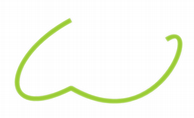

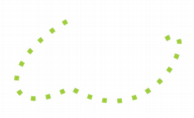
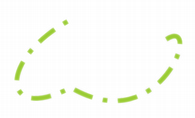
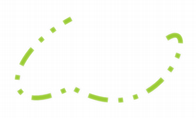





 标准箭头光标。
 向上指向屏幕顶部的箭头。
 A crosshair cursor, typically used to help the user accurately select a point on the screen.
 An hourglass or watch cursor, usually shown during operations that prevent the user from interacting with the application.
 ^ 插入符号或 ibeam 光标,指示 Widget 可以接受和显示文本输入。
 A cursor used for elements that are used to vertically resize top-level windows.
 A cursor used for elements that are used to horizontally resize top-level windows.
 A cursor used for elements that are used to diagonally resize top-level windows at their top-right and bottom-left corners.
 A cursor used for elements that are used to diagonally resize top-level windows at their top-left and bottom-right corners.
 A cursor used for elements that are used to resize top-level windows in any direction.
 A cursor used for vertical splitters, indicating that a handle can be dragged horizontally to adjust the use of available space.
 A cursor used for horizontal splitters, indicating that a handle can be dragged vertically to adjust the use of available space.
 A pointing hand cursor that is typically used for clickable elements such as hyperlinks.
 A slashed circle cursor, typically used during drag and drop operations to indicate that dragged content cannot be dropped on particular widgets or inside certain regions.
 A cursor representing an open hand, typically used to indicate that the area under the cursor is the visible part of a canvas that the user can click and drag in order to scroll around.
 A cursor representing a closed hand, typically used to indicate that a dragging operation is in progress that involves scrolling.
 An arrow with a question mark, typically used to indicate the presence of What’s This? help for a widget.
 An hourglass or watch cursor, usually shown during operations that allow the user to interact with the application while they are performed in the background.