QGraphicsAnchorLayoutclass provides a layout where one can anchor widgets together in Graphics View. 更多 …

4.6 版新增。
def
addAnchor
(firstItem, firstEdge, secondItem, secondEdge)
def
addAnchors
(firstItem, secondItem[, orientations=Qt.Horizontal | Qt.Vertical])
def
addCornerAnchors
(firstItem, firstCorner, secondItem, secondCorner)
def
anchor
(firstItem, firstEdge, secondItem, secondEdge)
def
horizontalSpacing
()
def
setHorizontalSpacing
(spacing)
def
setSpacing
(spacing)
def
setVerticalSpacing
(spacing)
def
verticalSpacing
()
锚点布局允许开发者指定应如何相对彼此及布局本身,放置 Widget。制定规范是经由将锚点添加到布局,通过调用
addAnchor(),addAnchors()oraddCornerAnchors().可以访问布局中的现有锚点,采用
anchor()function. Items that are anchored are automatically added to the layout, and if items are removed, all their anchors will be automatically removed.
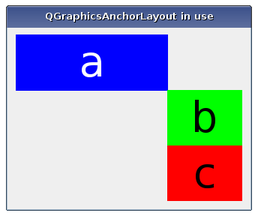
Anchors are always set up between edges of an item, where the “center” is also considered to be an edge. Consider the following example:
layout.addAnchor(b, Qt.AnchorLeft, a, Qt.AnchorRight)
layout.addAnchor(b, Qt.AnchorTop, a, Qt.AnchorBottom)
Here, the right edge of item
ais anchored to the left edge of itemband the bottom edge of itemais anchored to the top edge of itemb, with the result that itembwill be placed diagonally to the right and below itemb.
addCornerAnchors()function provides a simpler way of anchoring the corners of two widgets than the two individual calls toaddAnchor()shown in the code above. Here, we see how a widget can be anchored to the top-left corner of the enclosing layout:layout.addCornerAnchors(a, Qt.TopLeftCorner, layout, Qt.TopLeftCorner)In cases where anchors are used to match the widths or heights of widgets, it is convenient to use the
addAnchors()function. As with the other functions for specifying anchors, it can also be used to anchor a widget to a layout.
QGraphicsAnchorLayoutrespects each item’s size hints and size policies. Note that there are some properties ofQSizePolicythat arenot respected.
The layout may distribute some space between the items. If the spacing has not been explicitly specified, the actual amount of space will usually be 0.
However, if the first edge is the opposite of the second edge (e.g., the right edge of the first widget is anchored to the left edge of the second widget), the size of the anchor will be queried from the style through a pixel metric:
PM_LayoutHorizontalSpacingfor horizontal anchors andPM_LayoutVerticalSpacingfor vertical anchors.If the spacing is negative, the items will overlap to some extent.
There are some features that
QGraphicsAnchorLayoutcurrently does not support. This might change in the future, so avoid using these features if you want to avoid any future regressions in behaviour:
Stretch factors are not respected.
ExpandFlagis not respected.Height for width is not respected.
QGraphicsAnchorLayout
(
[
parent=None
]
)

- param parent
构造
QGraphicsAnchorLayout
实例。
parent
会被传递给
QGraphicsLayout
‘s constructor.
PySide2.QtWidgets.QGraphicsAnchorLayout.
addAnchor
(
firstItem
,
firstEdge
,
secondItem
,
secondEdge
)

firstItem
–
QGraphicsLayoutItem
firstEdge
–
AnchorPoint
secondItem
–
QGraphicsLayoutItem
secondEdge
–
AnchorPoint
QGraphicsAnchor
Creates an anchor between the edge
firstEdge
of item
firstItem
and the edge
secondEdge
of item
secondItem
. The spacing of the anchor is picked up from the style. Anchors between a layout edge and an item edge will have a size of 0. If there is already an anchor between the edges, the new anchor will replace the old one.
firstItem
and
secondItem
are automatically added to the layout if they are not part of the layout. This means that
count()
can increase by up to 2.
The spacing an anchor will get depends on the type of anchor. For instance, anchors from the Right edge of one item to the Left edge of another (or vice versa) will use the default horizontal spacing. The same behaviour applies to Bottom to Top anchors, (but they will use the default vertical spacing). For all other anchor combinations, the spacing will be 0. All anchoring functions will follow this rule.
The spacing can also be set manually by using
setSpacing()
方法。
Calling this function where
firstItem
or
secondItem
are ancestors of the layout have undefined behaviour.
PySide2.QtWidgets.QGraphicsAnchorLayout.
addAnchors
(
firstItem
,
secondItem
[
,
orientations=Qt.Horizontal | Qt.Vertical
]
)

firstItem
–
QGraphicsLayoutItem
secondItem
–
QGraphicsLayoutItem
orientations
–
Orientations
Anchors two or four edges of
firstItem
with the corresponding edges of
secondItem
, so that
firstItem
has the same size as
secondItem
in the dimensions specified by
orientations
.
For example, the following example anchors the left and right edges of two items to match their widths:
layout.addAnchor(b, Qt.AnchorLeft, c, Qt.AnchorLeft)
layout.addAnchor(b, Qt.AnchorRight, c, Qt.AnchorRight)
This can also be achieved using the following line of code:
layout.addAnchors(b, c, Qt.Horizontal)
PySide2.QtWidgets.QGraphicsAnchorLayout.
addCornerAnchors
(
firstItem
,
firstCorner
,
secondItem
,
secondCorner
)

firstItem
–
QGraphicsLayoutItem
firstCorner
–
Corner
secondItem
–
QGraphicsLayoutItem
secondCorner
–
Corner
创建 2 个点介于
firstItem
and
secondItem
指定通过角落,
firstCorner
and
secondCorner
, where one is for the horizontal edge and another one for the vertical edge.
This is a convenience function, since anchoring corners can be expressed as anchoring two edges. For instance:
layout.addAnchor(a, Qt.AnchorTop, layout, Qt.AnchorTop)
layout.addAnchor(a, Qt.AnchorLeft, layout, Qt.AnchorLeft)
This can also be achieved with the following line of code:
layout.addCornerAnchors(a, Qt.TopLeftCorner, layout, Qt.TopLeftCorner)
If there is already an anchor between the edge pairs, it will be replaced by the anchors that this function specifies.
firstItem
and
secondItem
are automatically added to the layout if they are not part of the layout. This means that
count()
can increase by up to 2.
另请参阅
PySide2.QtWidgets.QGraphicsAnchorLayout.
anchor
(
firstItem
,
firstEdge
,
secondItem
,
secondEdge
)

firstItem
–
QGraphicsLayoutItem
firstEdge
–
AnchorPoint
secondItem
–
QGraphicsLayoutItem
secondEdge
–
AnchorPoint
QGraphicsAnchor
Returns the anchor between the anchor points defined by
firstItem
and
firstEdge
and
secondItem
and
secondEdge
. If there is no such anchor, the function will return 0.
PySide2.QtWidgets.QGraphicsAnchorLayout.
horizontalSpacing
(
)

qreal
Returns the default horizontal spacing for the anchor layout.
PySide2.QtWidgets.QGraphicsAnchorLayout.
setHorizontalSpacing
(
spacing
)

spacing
–
qreal
Sets the default horizontal spacing for the anchor layout to
spacing
.
PySide2.QtWidgets.QGraphicsAnchorLayout.
setSpacing
(
spacing
)

spacing
–
qreal
Sets the default horizontal and the default vertical spacing for the anchor layout to
spacing
.
If an item is anchored with no spacing associated with the anchor, it will use the default spacing.
QGraphicsAnchorLayout
does not support negative spacings. Setting a negative value will unset the previous spacing and make the layout use the spacing provided by the current widget style.
PySide2.QtWidgets.QGraphicsAnchorLayout.
setVerticalSpacing
(
spacing
)

spacing
–
qreal
Sets the default vertical spacing for the anchor layout to
spacing
.
PySide2.QtWidgets.QGraphicsAnchorLayout.
verticalSpacing
(
)

qreal
Returns the default vertical spacing for the anchor layout.
