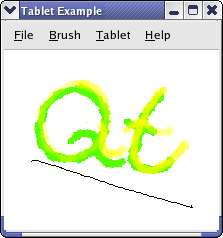
从查看构造函数开始:
TabletCanvas::TabletCanvas()
    : QWidget(nullptr), m_brush(m_color)
    , m_pen(m_brush, 1.0, Qt::SolidLine, Qt::RoundCap, Qt::RoundJoin)
{
    resize(500, 500);
    setAutoFillBackground(true);
    setAttribute(Qt::WA_TabletTracking);
}
In the constructor we initialize most of our class variables.
这里是实现为
saveImage()
:
bool TabletCanvas::saveImage(const QString &file)
{
    return m_pixmap.save(file);
}
QPixmap
implements functionality to save itself to disk, so we simply call
save()
.
这里是实现为
loadImage()
:
bool TabletCanvas::loadImage(const QString &file)
{
    bool success = m_pixmap.load(file);
    if (success) {
        update();
        return true;
    }
    return false;
}
We simply call
load()
, which loads the image from
file
.
这里是实现为
tabletEvent()
:
void TabletCanvas::tabletEvent(QTabletEvent *event)
{
    switch (event->type()) {
        case QEvent::TabletPress:
            if (!m_deviceDown) {
                m_deviceDown = true;
                lastPoint.pos = event->posF();
                lastPoint.pressure = event->pressure();
                lastPoint.rotation = event->rotation();
            }
            break;
        case QEvent::TabletMove:
#ifndef Q_OS_IOS
            if (event->deviceType() == QTabletEvent::RotationStylus)
                updateCursor(event);
#endif
            if (m_deviceDown) {
                updateBrush(event);
                QPainter painter(&m_pixmap);
                paintPixmap(painter, event);
                lastPoint.pos = event->posF();
                lastPoint.pressure = event->pressure();
                lastPoint.rotation = event->rotation();
            }
            break;
        case QEvent::TabletRelease:
            if (m_deviceDown && event->buttons() == Qt::NoButton)
                m_deviceDown = false;
            update();
            break;
        default:
            break;
    }
    event->accept();
}
We get three kind of events to this function:
TabletPress
,
TabletRelease
,和
TabletMove
, which are generated when a drawing tool is pressed down on, lifed up from, or moved across the tablet. We set
m_deviceDown
to
true
when a device is pressed down on the tablet; we then know that we should draw when we receive move events. We have implemented
updateBrush()
to update
m_brush
and
m_pen
depending on which of the tablet event properties the user has chosen to pay attention to. The
updateCursor()
function selects a cursor to represent the drawing tool in use, so that as you hover with the tool in proximity of the tablet, you can see what kind of stroke you are about to make.
void TabletCanvas::updateCursor(const QTabletEvent *event)
{
    QCursor cursor;
    if (event->type() != QEvent::TabletLeaveProximity) {
        if (event->pointerType() == QTabletEvent::Eraser) {
            cursor = QCursor(QPixmap(":/images/cursor-eraser.png"), 3, 28);
        } else {
            switch (event->deviceType()) {
            case QTabletEvent::Stylus:
                cursor = QCursor(QPixmap(":/images/cursor-pencil.png"), 0, 0);
                break;
            case QTabletEvent::Airbrush:
                cursor = QCursor(QPixmap(":/images/cursor-airbrush.png"), 3, 4);
                break;
            case QTabletEvent::RotationStylus: {
                QImage origImg(QLatin1String(":/images/cursor-felt-marker.png"));
                QImage img(32, 32, QImage::Format_ARGB32);
                QColor solid = m_color;
                solid.setAlpha(255);
                img.fill(solid);
                QPainter painter(&img);
                QTransform transform = painter.transform();
                transform.translate(16, 16);
                transform.rotate(event->rotation());
                painter.setTransform(transform);
                painter.setCompositionMode(QPainter::CompositionMode_DestinationIn);
                painter.drawImage(-24, -24, origImg);
                painter.setCompositionMode(QPainter::CompositionMode_HardLight);
                painter.drawImage(-24, -24, origImg);
                painter.end();
                cursor = QCursor(QPixmap::fromImage(img), 16, 16);
            } break;
            default:
                break;
            }
        }
    }
    setCursor(cursor);
}
If an art pen (
RotationStylus
) is in use,
updateCursor()
is also called for each
TabletMove
event, and renders a rotated cursor so that you can see the angle of the pen tip.
这里是实现为
paintEvent()
:
void TabletCanvas::initPixmap()
{
    qreal dpr = devicePixelRatioF();
    QPixmap newPixmap = QPixmap(qRound(width() * dpr), qRound(height() * dpr));
    newPixmap.setDevicePixelRatio(dpr);
    newPixmap.fill(Qt::white);
    QPainter painter(&newPixmap);
    if (!m_pixmap.isNull())
        painter.drawPixmap(0, 0, m_pixmap);
    painter.end();
    m_pixmap = newPixmap;
}
void TabletCanvas::paintEvent(QPaintEvent *event)
{
    if (m_pixmap.isNull())
        initPixmap();
    QPainter painter(this);
    QRect pixmapPortion = QRect(event->rect().topLeft() * devicePixelRatioF(),
                                event->rect().size() * devicePixelRatioF());
    painter.drawPixmap(event->rect().topLeft(), m_pixmap, pixmapPortion);
}
The first time Qt calls paintEvent(), m_pixmap is default-constructed, so
isNull()
返回
true
. Now that we know which screen we will be rendering to, we can create a pixmap with the appropriate resolution. The size of the pixmap with which we fill the window depends on the screen resolution, as the example does not support zoom; and it may be that one screen is high DPI while another is not. We need to draw the background too, as the default is gray.
After that, we simply draw the pixmap to the top left of the widget.
这里是实现为
paintPixmap()
:
void TabletCanvas::paintPixmap(QPainter &painter, QTabletEvent *event)
{
    static qreal maxPenRadius = pressureToWidth(1.0);
    painter.setRenderHint(QPainter::Antialiasing);
    switch (event->deviceType()) {
        case QTabletEvent::Airbrush:
            {
                painter.setPen(Qt::NoPen);
                QRadialGradient grad(lastPoint.pos, m_pen.widthF() * 10.0);
                QColor color = m_brush.color();
                color.setAlphaF(color.alphaF() * 0.25);
                grad.setColorAt(0, m_brush.color());
                grad.setColorAt(0.5, Qt::transparent);
                painter.setBrush(grad);
                qreal radius = grad.radius();
                painter.drawEllipse(event->posF(), radius, radius);
                update(QRect(event->pos() - QPoint(radius, radius), QSize(radius * 2, radius * 2)));
            }
            break;
        case QTabletEvent::RotationStylus:
            {
                m_brush.setStyle(Qt::SolidPattern);
                painter.setPen(Qt::NoPen);
                painter.setBrush(m_brush);
                QPolygonF poly;
                qreal halfWidth = pressureToWidth(lastPoint.pressure);
                QPointF brushAdjust(qSin(qDegreesToRadians(-lastPoint.rotation)) * halfWidth,
                                    qCos(qDegreesToRadians(-lastPoint.rotation)) * halfWidth);
                poly << lastPoint.pos + brushAdjust;
                poly << lastPoint.pos - brushAdjust;
                halfWidth = m_pen.widthF();
                brushAdjust = QPointF(qSin(qDegreesToRadians(-event->rotation())) * halfWidth,
                                      qCos(qDegreesToRadians(-event->rotation())) * halfWidth);
                poly << event->posF() - brushAdjust;
                poly << event->posF() + brushAdjust;
                painter.drawConvexPolygon(poly);
                update(poly.boundingRect().toRect());
            }
            break;
        case QTabletEvent::Puck:
        case QTabletEvent::FourDMouse:
            {
                const QString error(tr("This input device is not supported by the example."));
#if QT_CONFIG(statustip)
                QStatusTipEvent status(error);
                QCoreApplication::sendEvent(this, &status);
#else
                qWarning() << error;
#endif
            }
            break;
        default:
            {
                const QString error(tr("Unknown tablet device - treating as stylus"));
#if QT_CONFIG(statustip)
                QStatusTipEvent status(error);
                QCoreApplication::sendEvent(this, &status);
#else
                qWarning() << error;
#endif
            }
            Q_FALLTHROUGH();
        case QTabletEvent::Stylus:
            painter.setPen(m_pen);
            painter.drawLine(lastPoint.pos, event->posF());
            update(QRect(lastPoint.pos.toPoint(), event->pos()).normalized()
                   .adjusted(-maxPenRadius, -maxPenRadius, maxPenRadius, maxPenRadius));
            break;
    }
}
In this function we draw on the pixmap based on the movement of the tool. If the tool used on the tablet is a stylus, we want to draw a line from the last-known position to the current position. We also assume that this is a reasonable handling of any unknown device, but update the status bar with a warning. If it is an airbrush, we want to draw a circle filled with a soft gradient, whose density can depend on various event parameters. By default it depends on the tangential pressure, which is the position of the finger wheel on the airbrush. If the tool is a rotation stylus, we simulate a felt marker by drawing trapezoidal stroke segments.
case QTabletEvent::Airbrush:
    {
        painter.setPen(Qt::NoPen);
        QRadialGradient grad(lastPoint.pos, m_pen.widthF() * 10.0);
        QColor color = m_brush.color();
        color.setAlphaF(color.alphaF() * 0.25);
        grad.setColorAt(0, m_brush.color());
        grad.setColorAt(0.5, Qt::transparent);
        painter.setBrush(grad);
        qreal radius = grad.radius();
        painter.drawEllipse(event->posF(), radius, radius);
        update(QRect(event->pos() - QPoint(radius, radius), QSize(radius * 2, radius * 2)));
    }
    break;
case QTabletEvent::RotationStylus:
    {
        m_brush.setStyle(Qt::SolidPattern);
        painter.setPen(Qt::NoPen);
        painter.setBrush(m_brush);
        QPolygonF poly;
        qreal halfWidth = pressureToWidth(lastPoint.pressure);
        QPointF brushAdjust(qSin(qDegreesToRadians(-lastPoint.rotation)) * halfWidth,
                            qCos(qDegreesToRadians(-lastPoint.rotation)) * halfWidth);
        poly << lastPoint.pos + brushAdjust;
        poly << lastPoint.pos - brushAdjust;
        halfWidth = m_pen.widthF();
        brushAdjust = QPointF(qSin(qDegreesToRadians(-event->rotation())) * halfWidth,
                              qCos(qDegreesToRadians(-event->rotation())) * halfWidth);
        poly << event->posF() - brushAdjust;
        poly << event->posF() + brushAdjust;
        painter.drawConvexPolygon(poly);
        update(poly.boundingRect().toRect());
    }
    break;
在
updateBrush()
we set the pen and brush used for drawing to match
m_alphaChannelValuator
,
m_lineWidthValuator
,
m_colorSaturationValuator
,和
m_color
. We will examine the code to set up
m_brush
and
m_pen
for each of these variables:
void TabletCanvas::updateBrush(const QTabletEvent *event)
{
    int hue, saturation, value, alpha;
    m_color.getHsv(&hue, &saturation, &value, &alpha);
    int vValue = int(((event->yTilt() + 60.0) / 120.0) * 255);
    int hValue = int(((event->xTilt() + 60.0) / 120.0) * 255);
We fetch the current drawingcolor’s hue, saturation, value, and alpha values.
hValue
and
vValue
are set to the horizontal and vertical tilt as a number from 0 to 255. The original values are in degrees from -60 to 60, i.e., 0 equals -60, 127 equals 0, and 255 equals 60 degrees. The angle measured is between the device and the perpendicular of the tablet (see
QTabletEvent
for an illustration).
switch (m_alphaChannelValuator) {
    case PressureValuator:
        m_color.setAlphaF(event->pressure());
        break;
    case TangentialPressureValuator:
        if (event->deviceType() == QTabletEvent::Airbrush)
            m_color.setAlphaF(qMax(0.01, (event->tangentialPressure() + 1.0) / 2.0));
        else
            m_color.setAlpha(255);
        break;
    case TiltValuator:
        m_color.setAlpha(std::max(std::abs(vValue - 127),
                                  std::abs(hValue - 127)));
        break;
    default:
        m_color.setAlpha(255);
}
The alpha channel of
QColor
is given as a number between 0 and 255 where 0 is transparent and 255 is opaque, or as a floating-point number where 0 is transparent and 1.0 is opaque.
pressure()
returns the pressure as a qreal between 0.0 and 1.0. We get the smallest alpha values (i.e., the color is most transparent) when the pen is perpendicular to the tablet. We select the largest of the vertical and horizontal tilt values.
switch (m_colorSaturationValuator) {
    case VTiltValuator:
        m_color.setHsv(hue, vValue, value, alpha);
        break;
    case HTiltValuator:
        m_color.setHsv(hue, hValue, value, alpha);
        break;
    case PressureValuator:
        m_color.setHsv(hue, int(event->pressure() * 255.0), value, alpha);
        break;
    default:
        ;
}
The color saturation in the HSV color model can be given as an integer between 0 and 255 or as a floating-point value between 0 and 1. We chose to represent alpha as an integer, so we call
setHsv()
with integer values. That means we need to multiply the pressure to a number between 0 and 255.
switch (m_lineWidthValuator) {
    case PressureValuator:
        m_pen.setWidthF(pressureToWidth(event->pressure()));
        break;
    case TiltValuator:
        m_pen.setWidthF(std::max(std::abs(vValue - 127),
                                 std::abs(hValue - 127)) / 12);
        break;
    default:
        m_pen.setWidthF(1);
}
The width of the pen stroke can increase with pressure, if so chosen. But when the pen width is controlled by tilt, we let the width increase with the angle between the tool and the perpendicular of the tablet.
    if (event->pointerType() == QTabletEvent::Eraser) {
        m_brush.setColor(Qt::white);
        m_pen.setColor(Qt::white);
        m_pen.setWidthF(event->pressure() * 10 + 1);
    } else {
        m_brush.setColor(m_color);
        m_pen.setColor(m_color);
    }
}
We finally check whether the pointer is the stylus or the eraser. If it is the eraser, we set the color to the background color of the pixmap and let the pressure decide the pen width, else we set the colors we have decided previously in the function.