QActionGroupclass groups actions together. 更多 …

def
actions
()
def
addAction
(a)
def
addAction
(icon, text)
def
addAction
(text)
def
checkedAction
()
def
exclusionPolicy
()
def
isEnabled
()
def
isExclusive
()
def
isVisible
()
def
removeAction
(a)
def
setDisabled
(b)
def
setEnabled
(arg__1)
def
setExclusionPolicy
(policy)
def
setExclusive
(arg__1)
def
setVisible
(arg__1)
In some situations it is useful to group
QActionobjects together. For example, if you have a Left Align action, a Right Align action, a Justify action, and a Center action, only one of these actions should be active at any one time. One simple way of achieving this is to group the actions together in an action group.Here’s a example (from the 菜单 范例):
alignmentGroup =  QActionGroup(self)
alignmentGroup.addAction(leftAlignAct)
alignmentGroup.addAction(rightAlignAct)
alignmentGroup.addAction(justifyAct)
alignmentGroup.addAction(centerAct)
leftAlignAct.setChecked(True)
Here we create a new action group. Since the action group is exclusive by default, only one of the actions in the group is checked at any one time.
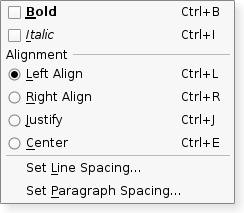
A
QActionGroupemits antriggered()signal when one of its actions is chosen. Each action in an action group emits itstriggered()signal as usual.As stated above, an action group is exclusive by default; it ensures that at most only one checkable action is active at any one time. If you want to group checkable actions without making them exclusive, you can turn off exclusiveness by calling
setExclusive(false).By default the active action of an exclusive group cannot be unchecked. In some cases it may be useful to allow unchecking all the actions, you can allow this by calling
setExclusionPolicy(QActionGroup::ExclusionPolicy::ExclusiveOptional).Actions can be added to an action group using
addAction(), but it is usually more convenient to specify a group when creating actions; this ensures that actions are automatically created with a parent. Actions can be visually separated from each other by adding a separator action to the group; create an action and useQAction‘ssetSeparator()function to make it considered a separator. Action groups are added to widgets with theaddActions()函数。另请参阅
QActionGroup
(
parent
)

- param parent
QObject
Constructs an action group for the
parent
对象。
The action group is exclusive by default. Call
setExclusive
(false) to make the action group non-exclusive. To make the group exclusive but allow unchecking the active action call instead
setExclusionPolicy
(QActionGroup::ExclusionPolicy::ExclusiveOptional)
PySide2.QtWidgets.QActionGroup.
ExclusionPolicy

This enum specifies the different policies that can be used to control how the group performs exclusive checking on checkable actions.
|
常量 |
描述 |
|---|---|
|
QActionGroup.ExclusionPolicy.None |
The actions in the group can be checked independently of each other. |
|
QActionGroup.ExclusionPolicy.Exclusive |
Exactly one action can be checked at any one time. This is the default policy. |
|
QActionGroup.ExclusionPolicy.ExclusiveOptional |
At most one action can be checked at any one time. The actions can also be all unchecked. |
另请参阅
New in version 5.14.
PySide2.QtWidgets.QActionGroup.
actions
(
)

Returns the list of this groups’s actions. This may be empty.
PySide2.QtWidgets.QActionGroup.
addAction
(
icon
,
text
)

icon
–
QIcon
text – unicode
Creates and returns an action with
text
和
icon
. The newly created action is a child of this action group.
Normally an action is added to a group by creating it with the group as its parent, so this function is not usually used.
另请参阅
setActionGroup()
PySide2.QtWidgets.QActionGroup.
addAction
(
a
)

添加
action
to this group, and returns it.
Normally an action is added to a group by creating it with the group as its parent, so this function is not usually used.
另请参阅
setActionGroup()
PySide2.QtWidgets.QActionGroup.
checkedAction
(
)

Returns the currently checked action in the group, or
None
if none are checked.
PySide2.QtWidgets.QActionGroup.
exclusionPolicy
(
)

另请参阅
PySide2.QtWidgets.QActionGroup.
isEnabled
(
)

bool
PySide2.QtWidgets.QActionGroup.
isExclusive
(
)

bool
Returns true if the group is exclusive
The group is exclusive if the
ExclusionPolicy
is either Exclusive or ExclusionOptional.
PySide2.QtWidgets.QActionGroup.
isVisible
(
)

bool
PySide2.QtWidgets.QActionGroup.
removeAction
(
a
)

a
–
QAction
移除
action
from this group. The action will have no parent as a result.
另请参阅
setActionGroup()
PySide2.QtWidgets.QActionGroup.
setDisabled
(
b
)

b
–
bool
这是方便函数,为
enabled
property, that is useful for signals–slots connections. If
b
is true the action group is disabled; otherwise it is enabled.
PySide2.QtWidgets.QActionGroup.
setEnabled
(
arg__1
)

arg__1
–
bool
另请参阅
PySide2.QtWidgets.QActionGroup.
setExclusionPolicy
(
policy
)

policy
–
ExclusionPolicy
另请参阅
PySide2.QtWidgets.QActionGroup.
setExclusive
(
arg__1
)

arg__1
–
bool
Enable or disable the group exclusion checking
This is a convenience method that calls
setExclusionPolicy
(ExclusionPolicy::Exclusive) when
b
is true, else
setExclusionPolicy
(QActionGroup::ExclusionPolicy::None).
PySide2.QtWidgets.QActionGroup.
setVisible
(
arg__1
)

arg__1
–
bool
另请参阅
