The Wiggly example shows how to animate a widget using
QBasicTimerandtimerEvent(). In addition, the example demonstrates how to useQFontMetricsto determine the size of text on screen.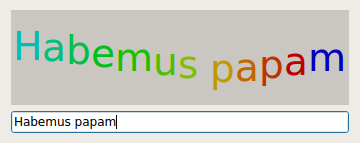
QBasicTimeris a low-level class for timers. UnlikeQTimer,QBasicTimerdoesn’t inherit fromQObject; instead of emitting atimeout()signal when a certain amount of time has passed, it sends aQTimerEvent到QObjectof our choice. This makesQBasicTimera more lightweight alternative toQTimer. Qt’s built-in widgets use it internally, and it is provided in Qt’s API for highly-optimized applications (such as embedded applications).范例由 2 个类组成:
WigglyWidgetis the custom widget displaying the text in a wiggly line.
Dialogis the dialog widget allowing the user to enter a text. It combines aWigglyWidget和QLineEdit.We will first take a quick look at the
Dialogclass, then we will review theWigglyWidget类。
class Dialog : public QDialog
{
    Q_OBJECT
public:
    explicit Dialog(QWidget *parent = nullptr);
};
Dialogclass provides a dialog widget that allows the user to enter a text. The text is then rendered byWigglyWidget.
Dialog::Dialog(QWidget *parent)
    : QDialog(parent)
{
    WigglyWidget *wigglyWidget = new WigglyWidget;
    QLineEdit *lineEdit = new QLineEdit;
    QVBoxLayout *layout = new QVBoxLayout(this);
    layout->addWidget(wigglyWidget);
    layout->addWidget(lineEdit);
    connect(lineEdit, &QLineEdit::textChanged, wigglyWidget, &WigglyWidget::setText);
    lineEdit->setText(tr("Hello world!"));
    setWindowTitle(tr("Wiggly"));
    resize(360, 145);
}
In the constructor we create a wiggly widget along with a
													line


													edit
, and we put the two widgets in a vertical layout. We connect the line edit’stextChanged()signal to the wiggly widget’ssetText()slot to obtain the real time interaction with the wiggly widget. The widget’s default text is “Hello world!”.
class WigglyWidget : public QWidget
{
    Q_OBJECT
public:
    WigglyWidget(QWidget *parent = nullptr);
public slots:
    void setText(const QString &newText) { text = newText; }
protected:
    void paintEvent(QPaintEvent *event) override;
    void timerEvent(QTimerEvent *event) override;
private:
    QBasicTimer timer;
    QString text;
    int step;
};
WigglyWidgetclass provides the wiggly line displaying the text. We subclassQWidgetand reimplement the standardpaintEvent()andtimerEvent()functions to draw and update the widget. In addition we implement a publicsetText()slot that sets the widget’s text.
timer变量,类型QBasicTimer, is used to update the widget at regular intervals, making the widget move. Thetextvariable is used to store the currently displayed text, andstepto calculate position and color for each character on the wiggly line.
WigglyWidget::WigglyWidget(QWidget *parent)
    : QWidget(parent), step(0)
{
    setBackgroundRole(QPalette::Midlight);
    setAutoFillBackground(true);
    QFont newFont = font();
    newFont.setPointSize(newFont.pointSize() + 20);
    setFont(newFont);
    timer.start(60, this);
}
In the constructor, we make the widget’s background slightly lighter than the usual background using the
Midlightcolor role. The background role defines the brush from the widget’s palette that Qt uses to paint the background. Then we enlarge the widget’s font with 20 points.Finally we start the timer; the call to
start()makes sure that this particular wiggly widget will receive the timer events generated when the timer times out (every 60 milliseconds).void WigglyWidget::paintEvent(QPaintEvent * /* event */) { static constexpr int sineTable[16] = { 0, 38, 71, 92, 100, 92, 71, 38, 0, -38, -71, -92, -100, -92, -71, -38 }; QFontMetrics metrics(font()); int x = (width() - metrics.horizontalAdvance(text)) / 2; int y = (height() + metrics.ascent() - metrics.descent()) / 2; QColor color;
paintEvent()function is called whenever aQPaintEventis sent to the widget. Paint events are sent to widgets that need to update themselves, for instance when part of a widget is exposed because a covering widget was moved. For the wiggly widget, a paint event will also be generated every 60 milliseconds from thetimerEvent()槽。
sineTablerepresents y-values of the sine curve, multiplied by 100. It is used to make the wiggly widget move along the sine curve.
QFontMetricsobject provides information about the widget’s font. Thexvariable is the horizontal position where we start drawing the text. Theyvariable is the vertical position of the text’s base line. Both variables are computed so that the text is horizontally and vertically centered. To compute the base line, we take into account the font’s ascent (the height of the font above the base line) and font’s descent (the height of the font below the base line). If the descent equals the ascent, they cancel out each other and the base line is atheight()/ 2.QPainter painter(this); for (int i = 0; i < text.size(); ++i) { int index = (step + i) % 16; color.setHsv((15 - index) * 16, 255, 191); painter.setPen(color); painter.drawText(x, y - ((sineTable[index] * metrics.height()) / 400), QString(text[i])); x += metrics.horizontalAdvance(text[i]); } }Each time the
paintEvent()function is called, we create aQPainterobjectpainterto draw the contents of the widget. For each character intext, we determine the color and the position on the wiggly line based onstep. In addition,xis incremented by the character’s width.For simplicity, we assume that
horizontalAdvance(text) returns the sum of the individual character advances (horizontalAdvance(text[i])). In practice, this is not always the case becausehorizontalAdvance(text) also takes into account the kerning between certain letters (e.g., ‘A’ and ‘V’). The result is that the text isn’t perfectly centered. You can verify this by typing “AVAVAVAVAVAV” in the line edit.void WigglyWidget::timerEvent(QTimerEvent *event) { if (event->timerId() == timer.timerId()) { ++step; update(); } else { QWidget::timerEvent(event); }
timerEvent()function receives all the timer events that are generated for this widget. If a timer event is sent from the widget’sQBasicTimer, we incrementstepto make the text move, and callupdate()to refresh the display. Any other timer event is passed on to the base class’s implementation of thetimerEvent()函数。
update()slot does not cause an immediate repaint; instead the slot schedules a paint event for processing when Qt returns to the main event loop. The paint events are then handled byWigglyWidget‘spaintEvent()函数。
