插件为描绘功能提供基本工具。
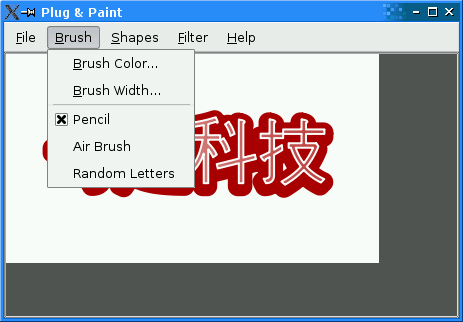
The Basic Tools example is a static plugin for the 插件和描绘 example. It provides a set of basic brushes, shapes, and filters. Through the Basic Tools example, we will review the four steps involved in writing a Qt plugin:
声明插件类。
Implement the interfaces provided by the plugin.
导出插件使用
Q_PLUGIN_METADATA()宏。Build the plugin using an adequate
.pro文件。
#include <interfaces.h>
#include <QImage>
#include <QObject>
#include <QPainterPath>
#include <QRect>
#include <QStringList>
#include <QtPlugin>
class BasicToolsPlugin : public QObject,
                         public BrushInterface,
                         public ShapeInterface,
                         public FilterInterface
{
    Q_OBJECT
    Q_PLUGIN_METADATA(IID "org.qt-project.Qt.Examples.PlugAndPaint.BrushInterface" FILE "basictools.json")
    Q_INTERFACES(BrushInterface ShapeInterface FilterInterface)
We start by including
interfaces.h, which defines the plugin interfaces for the 插件和描绘 application. For the#includeto work, we need to add anINCLUDEPATHentry to the.profile with the path to the header file.
BasicToolsPluginclass is aQObjectsubclass that implements theBrushInterface,ShapeInterface,和FilterInterface. This is done through multiple inheritance. TheQ_INTERFACES()macro is necessary to tell moc, Qt’s meta-object compiler, that the base classes are plugin interfaces. Without theQ_INTERFACES()macro, we couldn’t useqobject_cast()在 插件和描绘 application to detect interfaces. For an explanation for theQ_PLUGIN_METADATA()macro see 导出插件 .public: // BrushInterface QStringList brushes() const override; QRect mousePress(const QString &brush, QPainter &painter, const QPoint &pos) override; QRect mouseMove(const QString &brush, QPainter &painter, const QPoint &oldPos, const QPoint &newPos) override; QRect mouseRelease(const QString &brush, QPainter &painter, const QPoint &pos) override; // ShapeInterface QStringList shapes() const override; QPainterPath generateShape(const QString &shape, QWidget *parent) override; // FilterInterface QStringList filters() const override; QImage filterImage(const QString &filter, const QImage &image, QWidget *parent) override; };在
publicsection of the class, we declare all the functions from the three interfaces.
Let’s now review the implementation of the
BasicToolsPluginmember functions inherited fromBrushInterface.QStringList BasicToolsPlugin::brushes() const { return {tr("Pencil"), tr("Air Brush"), tr("Random Letters")}; }
brushes()function returns a list of brushes provided by this plugin. We provide three brushes: Pencil, Air Brush, and Random Letters.QRect BasicToolsPlugin::mousePress(const QString &brush, QPainter &painter, const QPoint &pos) { return mouseMove(brush, painter, pos, pos); }On a mouse press event, we just call
mouseMove()to draw the spot where the event occurred.QRect BasicToolsPlugin::mouseMove(const QString &brush, QPainter &painter, const QPoint &oldPos, const QPoint &newPos) { painter.save(); int rad = painter.pen().width() / 2; QRect boundingRect = QRect(oldPos, newPos).normalized() .adjusted(-rad, -rad, +rad, +rad); QColor color = painter.pen().color(); int thickness = painter.pen().width(); QColor transparentColor(color.red(), color.green(), color.blue(), 0);在
mouseMove(), we start by saving the state of theQPainterand we compute a few variables that we’ll need later.if (brush == tr("Pencil")) { painter.drawLine(oldPos, newPos); } else if (brush == tr("Air Brush")) { int numSteps = 2 + (newPos - oldPos).manhattanLength() / 2; painter.setBrush(QBrush(color, Qt::Dense6Pattern)); painter.setPen(Qt::NoPen); for (int i = 0; i < numSteps; ++i) { int x = oldPos.x() + i * (newPos.x() - oldPos.x()) / (numSteps - 1); int y = oldPos.y() + i * (newPos.y() - oldPos.y()) / (numSteps - 1); painter.drawEllipse(x - (thickness / 2), y - (thickness / 2), thickness, thickness); } } else if (brush == tr("Random Letters")) { QChar ch(QRandomGenerator::global()->bounded('A', 'Z' + 1)); QFont biggerFont = painter.font(); biggerFont.setBold(true); biggerFont.setPointSize(biggerFont.pointSize() + thickness); painter.setFont(biggerFont); painter.drawText(newPos, QString(ch)); QFontMetrics metrics(painter.font()); boundingRect = metrics.boundingRect(ch); boundingRect.translate(newPos); boundingRect.adjust(-10, -10, +10, +10); } painter.restore(); return boundingRect; }Then comes the brush-dependent part of the code:
If the brush is Pencil, we just call
drawLine()with the currentQPen.If the brush is Air Brush, we start by setting the painter’s
QBrushtoDense6Patternto obtain a dotted pattern. Then we draw a circle filled with thatQBrushseveral times, resulting in a thick line.If the brush is Random Letters, we draw a random letter at the new cursor position. Most of the code is for setting the font to be bold and larger than the default font and for computing an appropriate bounding rect.
At the end, we restore the painter state to what it was upon entering the function and we return the bounding rectangle.
QRect BasicToolsPlugin::mouseRelease(const QString & /* brush */,
                                     QPainter & /* painter */,
                                     const QPoint & /* pos */)
{
    return QRect(0, 0, 0, 0);
}
When the user releases the mouse, we do nothing and return an empty
QRect.
QStringList BasicToolsPlugin::shapes() const
{
    return {tr("Circle"), tr("Star"), tr("Text...")};
}
The plugin provides three shapes: Circle, Star, and Text…. The three dots after Text are there because the shape pops up a dialog asking for more information. We know that the shape names will end up in a menu, so we include the three dots in the shape name.
A cleaner but more complicated design would have been to distinguish between the internal shape name and the name used in the user interface.
QPainterPath BasicToolsPlugin::generateShape(const QString &shape,
                                             QWidget *parent)
{
    QPainterPath path;
    if (shape == tr("Circle")) {
        path.addEllipse(0, 0, 50, 50);
    } else if (shape == tr("Star")) {
        path.moveTo(90, 50);
        for (int i = 1; i < 5; ++i) {
            path.lineTo(50 + 40 * std::cos(0.8 * i * M_PI),
                        50 + 40 * std::sin(0.8 * i * M_PI));
        }
        path.closeSubpath();
    } else if (shape == tr("Text...")) {
        QString text = QInputDialog::getText(parent, tr("Text Shape"),
                                             tr("Enter text:"),
                                             QLineEdit::Normal, tr("Qt"));
        if (!text.isEmpty()) {
            QFont timesFont("Times", 50);
            timesFont.setStyleStrategy(QFont::ForceOutline);
            path.addText(0, 0, timesFont, text);
        }
    }
    return path;
}
generateShape()创建QPainterPathfor the specified shape. If the shape is Text, we pop up aQInputDialogto let the user enter some text.
QStringList BasicToolsPlugin::filters() const
{
    return {tr("Invert Pixels"), tr("Swap RGB"), tr("Grayscale")};
}
The plugin provides three filters: Invert Pixels, Swap RGB, and Grayscale.
QImage BasicToolsPlugin::filterImage(const QString &filter, const QImage &image,
                                     QWidget * /* parent */)
{
    QImage result = image.convertToFormat(QImage::Format_RGB32);
    if (filter == tr("Invert Pixels")) {
        result.invertPixels();
    } else if (filter == tr("Swap RGB")) {
        result = result.rgbSwapped();
    } else if (filter == tr("Grayscale")) {
        for (int y = 0; y < result.height(); ++y) {
            for (int x = 0; x < result.width(); ++x) {
                QRgb pixel = result.pixel(x, y);
                int gray = qGray(pixel);
                int alpha = qAlpha(pixel);
                result.setPixel(x, y, qRgba(gray, gray, gray, alpha));
            }
        }
    }
    return result;
}
filterImage()function takes a filter name and aQImageas parameters and returns an alteredQImage. The first thing we do is to convert the image to a 32-bit RGB format, to ensure that the algorithms will work as expected. For example,invertPixels(), which is used to implement the Invert Pixels filter, gives counterintuitive results for 8-bit images, because they invert the indices into the color table instead of inverting the color table’s entries.
To finally export your plugin you just have to add the
Q_PLUGIN_METADATA()macro right next to theQ_OBJECT()macro into the header file of the plugin. It must contain the plugins IID and optionally a filename pointing to a json file containing the metadata for the plugin.Q_PLUGIN_METADATA(IID "org.qt-project.Qt.Examples.PlugAndPaint.BrushInterface" FILE "basictools.json")Within this example the json file does not need to export any metadata, so it just contains an empty json object.
{}
Here’s the project file for building the Basic Tools plugin:
<Code snippet "tools/plugandpaint/plugins/basictools/basictools.pro:0" not found>
.profile differs from typical.profiles in many respects. First, it starts with aTEMPLATEentry specifyinglib. (The default template isapp.) It also addsplugin到CONFIGvariable. This is necessary on some platforms to avoid generating symbolic links with version numbers in the file name, which is appropriate for most dynamic libraries but not for plugins.To make the plugin a static plugin, all that is required is to specify
staticin addition toplugin。 Extra Filters plugin, which is compiled as a dynamic plugin, doesn’t specifystaticin its.pro文件。
INCLUDEPATHvariable sets the search paths for global headers (i.e., header files included using#include <...>). We add../../appto the list, so that we can include<interfaces.h>.
TARGETvariable specifies which name we want to give the target library. We usepnp_as the prefix to show that the plugin is designed to work with Plug & Paint. On Unix,libis also prepended to that name. On all platforms, a platform-specific suffix is appended (e.g.,.dll在 Windows,.a在 Linux)。
CONFIG()code at the end is necessary for this example because the example is part of the Qt distribution and Qt can be configured to be built simultaneously in debug and in release modes. You don’t need to for your own plugins.
