This example shows how to create an editor that can be used by a
QItemDelegate.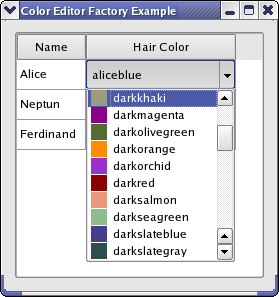
When editing data in a
QListView,QTableView,或QTreeView, editors are created and displayed by a delegate .QItemDelegate, which is the default delegate used by Qt’s item views , uses aQItemEditorFactoryto create editors for it. A unique instance provided byQItemEditorFactoryis by default installed on all item delegates.An item editor factory contains a collection of
QItemEditorCreatorBaseinstances, which are specialized factories that produce editors for one particularQVariantdata type (all models in Qt store their data inQVariants). An editor can be any Qt or custom widget.In this example, we will create an editor (implemented in the
ColorListEditorclass) that can edit theQColordata type and be used byQItemDelegates. We do this by creating a newQItemEditorCreatorBasethat producesColorListEditorsand register it with a new factory, which we set as the default editor item factory (the unique factory instance). To test our editor, we have implemented theWindowclass, which displays aQTableWidgetin whichQColors can be edited.
In the Window class, we create the item editor creator base for our color editor and add it to the default factory. We also create a
QTableWidgetin which our editor can be tested. It is filled with some data and displayed in a window.We take a closer look at the constructor:
Window::Window()
{
    QItemEditorFactory *factory = new QItemEditorFactory;
    QItemEditorCreatorBase *colorListCreator =
        new QStandardItemEditorCreator<ColorListEditor>();
    factory->registerEditor(QMetaType::QColor, colorListCreator);
    QItemEditorFactory::setDefaultFactory(factory);
    createGUI();
}
QStandardItemEditorCreatoris a convenience class that inheritsQItemEditorCreatorBase. Its constructor takes a template class, of which instances are returned fromcreateWidget(). The creator uses a constructor that takes aQWidgetas its only parameter; the template class must provide this. This way, there is no need to subclassQStandardItemEditorCreator.After the new factory has been set, all standard item delegates will use it (i.e, also delegates that were created before the new default factory was set).
createGUI()function sets up the table and fills it with data.
ColorListEditor 继承
QComboBoxand lets the user select aQColorfrom its popup list.class ColorListEditor : public QComboBox { Q_OBJECT Q_PROPERTY(QColor color READ color WRITE setColor USER true) public: ColorListEditor(QWidget *widget = nullptr); public: QColor color() const; void setColor(const QColor &color); private: void populateList(); };
QItemDelegatemanages the interaction between the editor and the model, i.e., it retrieves data to edit from the model and store data from the editor in the model. The data that is edited by an editor is stored in the editor’s user data property, and the delegate uses Qt’s 特性系统 to access it by name. We declare our user data property with theQ_PROPERTYmacro. The property is set to be the user type with the USER keyword.
The constructor of
ColorListEditor只需调用populateList(), which we will look at later. We move on to thecolor()函数:QColor ColorListEditor::color() const { return qvariant_cast<QColor>(itemData(currentIndex(), Qt::DecorationRole)); }We return the data that is selected in the combobox. The data is stored in the
DecorationRoleas the color is then also displayed in the popup list (as shown in the image above).void ColorListEditor::setColor(const QColor &color) { setCurrentIndex(findData(color, Qt::DecorationRole)); }
findData()function searches the items in the combobox and returns the index of the item that hascolorin the Qt::Decoration role.void ColorListEditor::populateList() { const QStringList colorNames = QColor::colorNames(); for (int i = 0; i < colorNames.size(); ++i) { QColor color(colorNames[i]); insertItem(i, colorNames[i]); setItemData(i, color, Qt::DecorationRole); } }Qt knows some predefined colors by name. We simply loop through these to fill our editor with items.
You can customize Qt’s model view framework in many ways. The procedure shown in this example is usually sufficient to provide custom editors. Further customization is achieved by subclassing
QItemEditorFactoryandQItemEditorCreatorBase. It is also possible to subclassQItemDelegateif you don’t wish to use a factory at all.可能的建议:
If the editor widget has no user property defined, the delegate asks the factory for the property name, which it in turn asks the item editor creator for. In this case, you can use the
QItemEditorCreatorclass, which takes the property name to use for editing as a constructor argument.If the editor requires other constructors or other initialization than provided by
QItemEditorCreatorBase, you must reimplementcreateWidget().You could also subclass
QItemEditorFactoryif you only want to provide editors for certain kinds of data or use another method of creating the editors than using creator bases.In this example, we use a standard
QVariantdata type. You can also use custom types. In the 星号委托范例 , we show how to store a custom data type in aQVariantand paint and edit it in a class that inheritsQItemDelegate.
