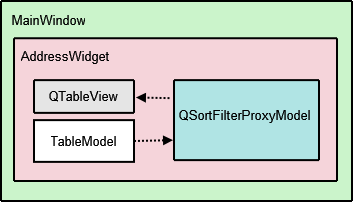
AddressWidget
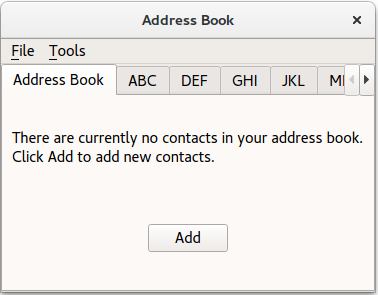
constructor accepts a parent widget and instantiates
NewAddressTab
,
TableModel
and
QSortFilterProxyModel
。
NewAddressTab
object, which is used to indicate that the address book is empty, is added and the rest of the 9 tabs are set up with
setupTabs()
.
AddressWidget::AddressWidget(QWidget *parent)
    : QTabWidget(parent),
      table(new TableModel(this)),
      newAddressTab(new NewAddressTab(this))
{
    connect(newAddressTab, &NewAddressTab::sendDetails,
        this, &AddressWidget::addEntry);
    addTab(newAddressTab, tr("Address Book"));
    setupTabs();
}
setupTabs()
function is used to set up the 9 alphabet group tabs, table views and proxy models in
AddressWidget
. Each proxy model in turn is set to filter contact names according to the relevant alphabet group using a
case-insensitive
QRegExp
object. The table views are also sorted in ascending order using the corresponding proxy model’s
sort()
函数。
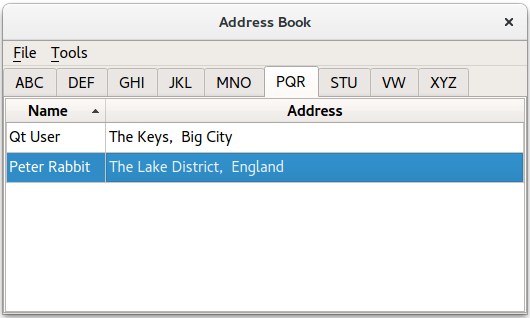
Each table view’s
selectionMode
is set to
SingleSelection
and
selectionBehavior
is set to
SelectRows
, allowing the user to select all the items in one row at the same time. Each
QTableView
object is automatically given a
QItemSelectionModel
that keeps track of the selected indexes.
void AddressWidget::setupTabs()
{
    const auto groups = { "ABC", "DEF", "GHI", "JKL", "MNO", "PQR", "STU", "VW", "XYZ" };
    for (const QString &str : groups) {
        const auto regExp = QRegularExpression(QString("^[%1].*").arg(str),
                                               QRegularExpression::CaseInsensitiveOption);
        auto proxyModel = new QSortFilterProxyModel(this);
        proxyModel->setSourceModel(table);
        proxyModel->setFilterRegularExpression(regExp);
        proxyModel->setFilterKeyColumn(0);
        QTableView *tableView = new QTableView;
        tableView->setModel(proxyModel);
        tableView->setSelectionBehavior(QAbstractItemView::SelectRows);
        tableView->horizontalHeader()->setStretchLastSection(true);
        tableView->verticalHeader()->hide();
        tableView->setEditTriggers(QAbstractItemView::NoEditTriggers);
        tableView->setSelectionMode(QAbstractItemView::SingleSelection);
        tableView->setSortingEnabled(true);
        connect(tableView->selectionModel(), &QItemSelectionModel::selectionChanged,
                this, &AddressWidget::selectionChanged);
        connect(this, &QTabWidget::currentChanged, this, [this, tableView](int tabIndex) {
            if (widget(tabIndex) == tableView)
                emit selectionChanged(tableView->selectionModel()->selection());
        });
        addTab(tableView, str);
    }
}
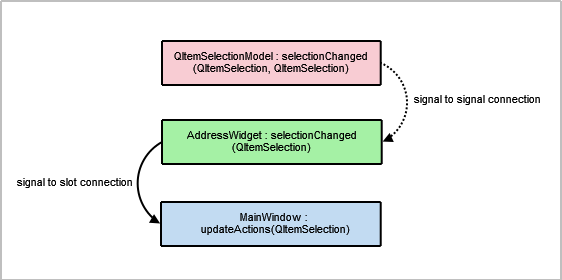
QItemSelectionModel
类提供
selectionChanged
signal that is connected to
AddressWidget
‘s
selectionChanged()
signal. We also connect
currentChanged()
signal to the lambda expression which emits
AddressWidget
‘s
selectionChanged()
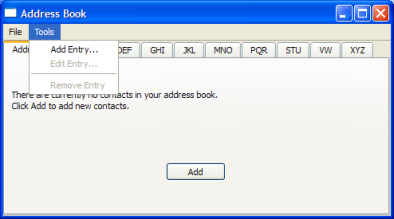
as well. These connections are necessary to enable the Edit Entry… and Remove Entry actions in
MainWindow
‘s Tools menu. It is further explained in
MainWindow
‘s implementation.
Each table view in the address book is added as a tab to the
QTabWidget
with the relevant label, obtained from the
QStringList
of groups.
We provide two
addEntry()
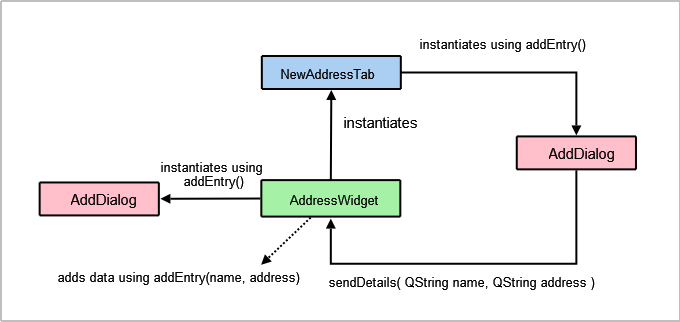
functions: One which is intended to be used to accept user input, and the other which performs the actual task of adding new entries to the address book. We divide the responsibility of adding entries into two parts to allow
newAddressTab
to insert data without having to popup a dialog.
The first
addEntry()
function is a slot connected to the
MainWindow
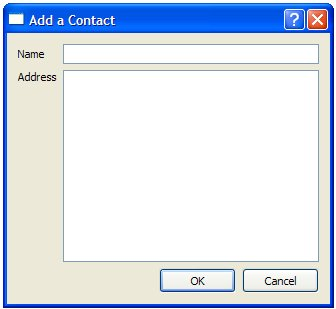
‘s Add Entry… action. This function creates an
AddDialog
object and then calls the second
addEntry()
function to actually add the contact to
table
.
void AddressWidget::showAddEntryDialog()
{
    AddDialog aDialog;
    if (aDialog.exec())
        addEntry(aDialog.name(), aDialog.address());
}
Basic validation is done in the second
addEntry()
function to prevent duplicate entries in the address book. As mentioned with
TableModel
, this is part of the reason why we require the getter method
getContacts()
.
void AddressWidget::addEntry(const QString &name, const QString &address)
{
    if (!table->getContacts().contains({ name, address })) {
        table->insertRows(0, 1, QModelIndex());
        QModelIndex index = table->index(0, 0, QModelIndex());
        table->setData(index, name, Qt::EditRole);
        index = table->index(0, 1, QModelIndex());
        table->setData(index, address, Qt::EditRole);
        removeTab(indexOf(newAddressTab));
    } else {
        QMessageBox::information(this, tr("Duplicate Name"),
            tr("The name \"%1\" already exists.").arg(name));
    }
}
If the model does not already contain an entry with the same name, we call
setData()
to insert the name and address into the first and second columns. Otherwise, we display a
QMessageBox
to inform the user.
注意
newAddressTab
is removed once a contact is added as the address book is no longer empty.
Editing an entry is a way to update the contact’s address only, as the example does not allow the user to change the name of an existing contact.
Firstly, we obtain the active tab’s
QTableView
object using
currentWidget()
. Then we extract the
selectionModel
从
tableView
to obtain the selected indexes.
void AddressWidget::editEntry()
{
    QTableView *temp = static_cast<QTableView*>(currentWidget());
    QSortFilterProxyModel *proxy = static_cast<QSortFilterProxyModel*>(temp->model());
    QItemSelectionModel *selectionModel = temp->selectionModel();
    const QModelIndexList indexes = selectionModel->selectedRows();
    QString name;
    QString address;
    int row = -1;
    for (const QModelIndex &index : indexes) {
        row = proxy->mapToSource(index).row();
        QModelIndex nameIndex = table->index(row, 0, QModelIndex());
        QVariant varName = table->data(nameIndex, Qt::DisplayRole);
        name = varName.toString();
        QModelIndex addressIndex = table->index(row, 1, QModelIndex());
        QVariant varAddr = table->data(addressIndex, Qt::DisplayRole);
        address = varAddr.toString();
    }
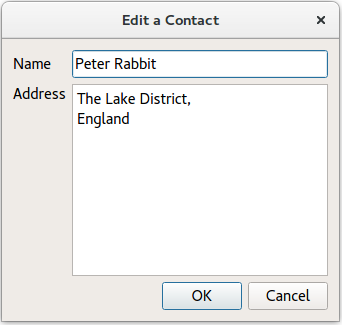
Next we extract data from the row the user intends to edit. This data is displayed in an instance of
AddDialog
with a different window title. The
table
is only updated if changes have been made to data in
aDialog
.
    AddDialog aDialog;
    aDialog.setWindowTitle(tr("Edit a Contact"));
    aDialog.editAddress(name, address);
    if (aDialog.exec()) {
        const QString newAddress = aDialog.address();
        if (newAddress != address) {
            const QModelIndex index = table->index(row, 1, QModelIndex());
            table->setData(index, newAddress, Qt::EditRole);
        }
    }
}
Entries are removed using the
removeEntry()
function. The selected row is removed by accessing it through the
QItemSelectionModel
对象,
selectionModel
。
newAddressTab
is re-added to the
AddressWidget
only if the user removes all the contacts in the address book.
void AddressWidget::removeEntry()
{
    QTableView *temp = static_cast<QTableView*>(currentWidget());
    QSortFilterProxyModel *proxy = static_cast<QSortFilterProxyModel*>(temp->model());
    QItemSelectionModel *selectionModel = temp->selectionModel();
    const QModelIndexList indexes = selectionModel->selectedRows();
    for (QModelIndex index : indexes) {
        int row = proxy->mapToSource(index).row();
        table->removeRows(row, 1, QModelIndex());
    }
    if (table->rowCount(QModelIndex()) == 0)
        insertTab(0, newAddressTab, tr("Address Book"));
}
writeToFile()
function is used to save a file containing all the contacts in the address book. The file is saved in a custom
.dat
format. The contents of the list of contacts are written to
file
使用
QDataStream
. If the file cannot be opened, a
QMessageBox
is displayed with the related error message.
void AddressWidget::writeToFile(const QString &fileName)
{
    QFile file(fileName);
    if (!file.open(QIODevice::WriteOnly)) {
        QMessageBox::information(this, tr("Unable to open file"), file.errorString());
        return;
    }
    QDataStream out(&file);
    out << table->getContacts();
}
readFromFile()
function loads a file containing all the contacts in the address book, previously saved using
writeToFile()
.
QDataStream
is used to read the contents of a
.dat
file into a list of contacts and each of these is added using
addEntry()
.
void AddressWidget::readFromFile(const QString &fileName)
{
    QFile file(fileName);
    if (!file.open(QIODevice::ReadOnly)) {
        QMessageBox::information(this, tr("Unable to open file"),
            file.errorString());
        return;
    }
    QVector<Contact> contacts;
    QDataStream in(&file);
    in >> contacts;
    if (contacts.isEmpty()) {
        QMessageBox::information(this, tr("No contacts in file"),
                                 tr("The file you are attempting to open contains no contacts."));
    } else {
        for (const auto &contact: qAsConst(contacts))
            addEntry(contact.name, contact.address);
    }
}

 class MainWindow : public QMainWindow { Q_OBJECT public: MainWindow(); private slots: void updateActions(const QItemSelection &selection); void openFile(); void saveFile(); private: void createMenus(); AddressWidget *addressWidget; QAction *editAct; QAction *removeAct; };
class MainWindow : public QMainWindow
{
    Q_OBJECT
public:
    MainWindow();
private slots:
    void updateActions(const QItemSelection &selection);
    void openFile();
    void saveFile();
private:
    void createMenus();
    AddressWidget *addressWidget;
    QAction *editAct;
    QAction *removeAct;
};