QQuickItemclass provides the most basic of all visual items in Qt Quick . 更多 …
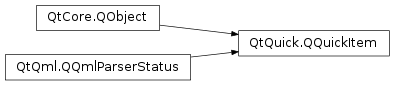
继承者: QQuickFramebufferObject , QQuickPaintedItem
def
acceptHoverEvents
()
def
acceptTouchEvents
()
def
acceptedMouseButtons
()
def
activeFocusOnTab
()
def
antialiasing
()
def
baselineOffset
()
def
childAt
(x, y)
def
childItems
()
def
childrenRect
()
def
clip
()
def
containmentMask
()
def
cursor
()
def
filtersChildMouseEvents
()
def
flags
()
def
forceActiveFocus
()
def
forceActiveFocus
(reason)
def
grabMouse
()
def
grabToImage
([targetSize=QSize()])
def
grabToImage
(callback[, targetSize=QSize()])
def
grabTouchPoints
(ids)
def
hasActiveFocus
()
def
hasFocus
()
def
height
()
def
heightValid
()
def
implicitHeight
()
def
implicitWidth
()
def
isAncestorOf
(child)
def
isComponentComplete
()
def
isEnabled
()
def
isFocusScope
()
def
isUnderMouse
()
def
isVisible
()
def
itemTransform
(arg__1)
def
keepMouseGrab
()
def
keepTouchGrab
()
def
mapFromGlobal
(point)
def
mapFromItem
(item, point)
def
mapFromScene
(point)
def
mapRectFromItem
(item, rect)
def
mapRectFromScene
(rect)
def
mapRectToItem
(item, rect)
def
mapRectToScene
(rect)
def
mapToGlobal
(point)
def
mapToItem
(item, point)
def
mapToScene
(point)
def
nextItemInFocusChain
([forward=true])
def
opacity
()
def
parentItem
()
def
polish
()
def
position
()
def
resetAntialiasing
()
def
resetHeight
()
def
resetWidth
()
def
rotation
()
def
scale
()
def
scopedFocusItem
()
def
setAcceptHoverEvents
(enabled)
def
setAcceptTouchEvents
(accept)
def
setAcceptedMouseButtons
(buttons)
def
setActiveFocusOnTab
(arg__1)
def
setAntialiasing
(arg__1)
def
setBaselineOffset
(arg__1)
def
setClip
(arg__1)
def
setContainmentMask
(mask)
def
setCursor
(cursor)
def
setEnabled
(arg__1)
def
setFiltersChildMouseEvents
(filter)
def
setFlag
(flag[, enabled=true])
def
setFlags
(flags)
def
setFocus
(arg__1)
def
setFocus
(focus, reason)
def
setHeight
(arg__1)
def
setImplicitHeight
(arg__1)
def
setImplicitSize
(arg__1, arg__2)
def
setImplicitWidth
(arg__1)
def
setKeepMouseGrab
(arg__1)
def
setKeepTouchGrab
(arg__1)
def
setOpacity
(arg__1)
def
setParentItem
(parent)
def
setPosition
(arg__1)
def
setRotation
(arg__1)
def
setScale
(arg__1)
def
setSize
(size)
def
setSmooth
(arg__1)
def
setState
(arg__1)
def
setTransformOrigin
(arg__1)
def
setTransformOriginPoint
(arg__1)
def
setVisible
(arg__1)
def
setWidth
(arg__1)
def
setX
(arg__1)
def
setY
(arg__1)
def
setZ
(arg__1)
def
size
()
def
smooth
()
def
stackAfter
(arg__1)
def
stackBefore
(arg__1)
def
state
()
def
transformOrigin
()
def
transformOriginPoint
()
def
ungrabMouse
()
def
ungrabTouchPoints
()
def
unsetCursor
()
def
updateInputMethod
([queries=Qt.ImQueryInput])
def
width
()
def
widthValid
()
def
window
()
def
x
()
def
y
()
def
z
()
def
boundingRect
()
def
childMouseEventFilter
(arg__1, arg__2)
def
clipRect
()
def
contains
(point)
def
dragEnterEvent
(arg__1)
def
dragLeaveEvent
(arg__1)
def
dragMoveEvent
(arg__1)
def
dropEvent
(arg__1)
def
focusInEvent
(arg__1)
def
focusOutEvent
(arg__1)
def
geometryChanged
(newGeometry, oldGeometry)
def
hoverEnterEvent
(event)
def
hoverLeaveEvent
(event)
def
hoverMoveEvent
(event)
def
inputMethodEvent
(arg__1)
def
inputMethodQuery
(query)
def
isTextureProvider
()
def
keyPressEvent
(event)
def
keyReleaseEvent
(event)
def
mouseDoubleClickEvent
(event)
def
mouseMoveEvent
(event)
def
mousePressEvent
(event)
def
mouseReleaseEvent
(event)
def
mouseUngrabEvent
()
def
releaseResources
()
def
textureProvider
()
def
touchEvent
(event)
def
touchUngrabEvent
()
def
updatePaintNode
(arg__1, arg__2)
def
updatePolish
()
def
wheelEvent
(event)
def
windowDeactivateEvent
()
def
activeFocusChanged
(arg__1)
def
activeFocusOnTabChanged
(arg__1)
def
antialiasingChanged
(arg__1)
def
baselineOffsetChanged
(arg__1)
def
childrenChanged
()
def
childrenRectChanged
(arg__1)
def
clipChanged
(arg__1)
def
containmentMaskChanged
()
def
enabledChanged
()
def
focusChanged
(arg__1)
def
heightChanged
()
def
implicitHeightChanged
()
def
implicitWidthChanged
()
def
opacityChanged
()
def
parentChanged
(arg__1)
def
rotationChanged
()
def
scaleChanged
()
def
smoothChanged
(arg__1)
def
stateChanged
(arg__1)
def
transformOriginChanged
(arg__1)
def
visibleChanged
()
def
visibleChildrenChanged
()
def
widthChanged
()
def
windowChanged
(window)
def
xChanged
()
def
yChanged
()
def
zChanged
()
All visual items in Qt Quick inherit from
QQuickItem. Although aQQuickIteminstance has no visual appearance, it defines all the attributes that are common across visual items, such as x and y position, width and height, anchoring and key handling support.You can subclass
QQuickItemto provide your own custom visual item that inherits these features.
All visual QML items are rendered using the scene graph, the default implementation of which is a low-level, high-performance rendering stack, closely tied to OpenGL. It is possible for subclasses of
QQuickItemto add their own custom content into the scene graph by setting theItemHasContentsflag and reimplementing theupdatePaintNode()函数。警告
It is crucial that OpenGL operations and interaction with the scene graph happens exclusively on the rendering thread, primarily during the
updatePaintNode()call. The best rule of thumb is to only use classes with the “QSG” prefix inside theupdatePaintNode()函数。注意
All classes with QSG prefix should be used solely on the scene graph’s rendering thread. See 场景图形和渲染 了解更多信息。
The preferred way to handle cleanup of graphics resources used in the scene graph, is to rely on the automatic cleanup of nodes. A
QSGNodereturned fromupdatePaintNode()is automatically deleted on the right thread at the right time. Trees ofQSGNodeinstances are managed through the use ofOwnedByParent, which is set by default. So, for the majority of custom scene graph items, no extra work will be required.Implementations that store graphics resources outside the node tree, such as an item implementing
textureProvider(), will need to take care in cleaning it up correctly depending on how the item is used in QML. The situations to handle are:
The scene graph is invalidated; This can happen, for instance, if the window is hidden using
hide(). If the item class implements aslotnamedinvalidateSceneGraph(), this slot will be called on the rendering thread while the GUI thread is blocked. This is equivalent to connecting tosceneGraphInvalidated(). The OpenGL context of this item’s window will be bound when this slot is called. The only exception is if the native OpenGL has been destroyed outside Qt’s control, for instance throughEGL_CONTEXT_LOST.The item is removed from the scene; If an item is taken out of the scene, for instance because it’s parent was set to
nullor an item in another window, thereleaseResources()will be called on the GUI thread.scheduleRenderJob()should be used to schedule cleanup of rendering resources.The item is deleted; When the destructor if an item runs, it should delete any graphics resources it has. If neither of the two conditions above were already met, the item will be part of a window and it is possible to use
scheduleRenderJob()to have them cleaned up. If an implementation ignores the call toreleaseResources(), the item will in many cases no longer have access to aQQuickWindowand thus no means of scheduling cleanup.When scheduling cleanup of graphics resources using
scheduleRenderJob(), one should use eitherBeforeSynchronizingStageorAfterSynchronizingStage。 synchronization stage is where the scene graph is changed as a result of changes to the QML tree. If cleanup is scheduled at any other time, it may result in other parts of the scene graph referencing the newly deleted objects as these parts have not been updated.注意
使用
deleteLater()to clean up graphics resources is not recommended as this will run at an arbitrary time and it is unknown if there will be an OpenGL context bound when the deletion takes place.
QQuickItem提供子类QQuickPaintedItem,允许用户去渲染内容使用QPainter.警告
使用
QQuickPaintedItemuses an indirect 2D surface to render its content, either using software rasterization or using an OpenGL framebuffer object (FBO), so the rendering is a two-step operation. First rasterize the surface, then draw the surface. Using scene graph API directly is always significantly faster.
If your Item uses the 行为 type to define animations for property changes, you should always use either
setProperty(), QQmlProperty(), orwrite()when you need to modify those properties from C++. This ensures that the QML engine knows about the property change. Otherwise, the engine won’t be able to carry out your requested animation. Note that these functions incur a slight performance penalty. For more details, see Accessing Members of a QML Object Type from C++ .
QQuickItem
(
[
parent=None
]
)

- param parent
构造
QQuickItem
采用给定
parent
.
parent
will be used as both the
														visual


														parent
和
QObject
parent.
PySide2.QtQuick.QQuickItem.
Flag

This enum type is used to specify various item properties.
|
常量 |
描述 |
|---|---|
|
QQuickItem.ItemClipsChildrenToShape |
Indicates this item should visually clip its children so that they are rendered only within the boundaries of this item. |
|
QQuickItem.ItemAcceptsInputMethod |
Indicates the item supports text input methods. |
|
QQuickItem.ItemIsFocusScope |
Indicates the item is a focus scope. See Qt Quick 中的键盘聚焦 了解更多信息。 |
|
QQuickItem.ItemHasContents |
Indicates the item has visual content and should be rendered by the scene graph. |
|
QQuickItem.ItemAcceptsDrops |
Indicates the item accepts drag and drop events. |
另请参阅
PySide2.QtQuick.QQuickItem.
ItemChange

Used in conjunction with
itemChange()
to notify the item about certain types of changes.
|
常量 |
描述 |
|---|---|
|
QQuickItem.ItemChildAddedChange |
A child was added. ItemChangeData::item contains the added child. |
|
QQuickItem.ItemChildRemovedChange |
A child was removed. ItemChangeData::item contains the removed child. |
|
QQuickItem.ItemSceneChange |
The item was added to or removed from a scene. The
|
|
QQuickItem.ItemVisibleHasChanged |
The item’s visibility has changed. ItemChangeData::boolValue contains the new visibility. |
|
QQuickItem.ItemParentHasChanged |
The item’s parent has changed. ItemChangeData::item contains the new parent. |
|
QQuickItem.ItemOpacityHasChanged |
The item’s opacity has changed. ItemChangeData::realValue contains the new opacity. |
|
QQuickItem.ItemActiveFocusHasChanged |
The item’s focus has changed. ItemChangeData::boolValue contains whether the item has focus or not. |
|
QQuickItem.ItemRotationHasChanged |
The item’s rotation has changed. ItemChangeData::realValue contains the new rotation. |
|
QQuickItem.ItemDevicePixelRatioHasChanged |
The device pixel ratio of the screen the item is on has changed. ItemChangedData::realValue contains the new device pixel ratio. |
|
QQuickItem.ItemAntialiasingHasChanged |
The antialiasing has changed. The current (boolean) value can be found in
|
|
QQuickItem.ItemEnabledHasChanged |
The item’s enabled state has changed. ItemChangeData::boolValue contains the new enabled state. (since Qt 5.10) |
PySide2.QtQuick.QQuickItem.
TransformOrigin

Controls the point about which simple transforms like scale apply.
|
常量 |
描述 |
|---|---|
|
QQuickItem.TopLeft |
The top-left corner of the item. |
|
QQuickItem.Top |
The center point of the top of the item. |
|
QQuickItem.TopRight |
The top-right corner of the item. |
|
QQuickItem.Left |
The left most point of the vertical middle. |
|
QQuickItem.Center |
The center of the item. |
|
QQuickItem.Right |
The right most point of the vertical middle. |
|
QQuickItem.BottomLeft |
The bottom-left corner of the item. |
|
QQuickItem.Bottom |
The center point of the bottom of the item. |
|
QQuickItem.BottomRight |
The bottom-right corner of the item. |
PySide2.QtQuick.QQuickItem.
acceptHoverEvents
(
)

bool
Returns whether hover events are accepted by this item.
默认值为 false。
If this is false, then the item will not receive any hover events through the
hoverEnterEvent()
,
hoverMoveEvent()
and
hoverLeaveEvent()
函数。
PySide2.QtQuick.QQuickItem.
acceptTouchEvents
(
)

bool
Returns whether touch events are accepted by this item.
默认值为 false。
If this is false, then the item will not receive any touch events through the
touchEvent()
函数。
PySide2.QtQuick.QQuickItem.
acceptedMouseButtons
(
)

MouseButtons
Returns the mouse buttons accepted by this item.
默认值为
NoButton
; that is, no mouse buttons are accepted.
If an item does not accept the mouse button for a particular mouse event, the mouse event will not be delivered to the item and will be delivered to the next item in the item hierarchy instead.
PySide2.QtQuick.QQuickItem.
activeFocusChanged
(
arg__1
)

arg__1
–
bool
PySide2.QtQuick.QQuickItem.
activeFocusOnTab
(
)

bool
PySide2.QtQuick.QQuickItem.
activeFocusOnTabChanged
(
arg__1
)

arg__1
–
bool
PySide2.QtQuick.QQuickItem.
antialiasing
(
)

bool
另请参阅
PySide2.QtQuick.QQuickItem.
antialiasingChanged
(
arg__1
)

arg__1
–
bool
PySide2.QtQuick.QQuickItem.
baselineOffset
(
)

qreal
另请参阅
PySide2.QtQuick.QQuickItem.
baselineOffsetChanged
(
arg__1
)

arg__1
–
qreal
PySide2.QtQuick.QQuickItem.
boundingRect
(
)

QRectF
PySide2.QtQuick.QQuickItem.
childAt
(
x
,
y
)

x
–
qreal
y
–
qreal
Returns the first visible child item found at point (
x
,
y
) within the coordinate system of this item.
返回
None
if there is no such item.
PySide2.QtQuick.QQuickItem.
childItems
(
)

Returns the children of this item.
PySide2.QtQuick.QQuickItem.
childMouseEventFilter
(
arg__1
,
arg__2
)

arg__1
–
QQuickItem
arg__2
–
QEvent
bool
Reimplement this method to filter the mouse events that are received by this item’s children.
This method will only be called if
filtersChildMouseEvents()
为 true。
Return true if the specified
event
should not be passed onto the specified child
item
, and false otherwise.
PySide2.QtQuick.QQuickItem.
childrenChanged
(
)

PySide2.QtQuick.QQuickItem.
childrenRect
(
)

QRectF
PySide2.QtQuick.QQuickItem.
childrenRectChanged
(
arg__1
)

arg__1
–
QRectF
PySide2.QtQuick.QQuickItem.
clipChanged
(
arg__1
)

arg__1
–
bool
PySide2.QtQuick.QQuickItem.
clipRect
(
)

QRectF
PySide2.QtQuick.QQuickItem.
containmentMask
(
)

QObject
另请参阅
PySide2.QtQuick.QQuickItem.
containmentMaskChanged
(
)

PySide2.QtQuick.QQuickItem.
contains
(
point
)

point
–
QPointF
bool
Returns true if this item contains
point
, which is in local coordinates; returns false otherwise.
This function can be overwritten in order to handle point collisions in items with custom shapes. The default implementation checks if the point is inside the item’s bounding rect.
Note that this method is generally used to check whether the item is under the mouse cursor, and for that reason, the implementation of this function should be as light-weight as possible.
PySide2.QtQuick.QQuickItem.
cursor
(
)

QCursor
Returns the cursor shape for this item.
The mouse cursor will assume this shape when it is over this item, unless an override cursor is set. See the
													list


													of


													predefined


													cursor


													对象
了解有用形状范围。
If no cursor shape has been set this returns a cursor with the
ArrowCursor
shape, however another cursor shape may be displayed if an overlapping item has a valid cursor.
另请参阅
PySide2.QtQuick.QQuickItem.
dragEnterEvent
(
arg__1
)

arg__1
–
QDragEnterEvent
This event handler can be reimplemented in a subclass to receive drag-enter events for an item. The event information is provided by the
event
参数。
Drag and drop events are only provided if the
ItemAcceptsDrops
flag has been set for this item.
The event is accepted by default, so it is not necessary to explicitly accept the event if you reimplement this function. If you don’t accept the event, call
event->ignore()
.
另请参阅
Drag 拖放
PySide2.QtQuick.QQuickItem.
dragLeaveEvent
(
arg__1
)

arg__1
–
QDragLeaveEvent
This event handler can be reimplemented in a subclass to receive drag-leave events for an item. The event information is provided by the
event
参数。
Drag and drop events are only provided if the
ItemAcceptsDrops
flag has been set for this item.
The event is accepted by default, so it is not necessary to explicitly accept the event if you reimplement this function. If you don’t accept the event, call
event->ignore()
.
另请参阅
Drag 拖放
PySide2.QtQuick.QQuickItem.
dragMoveEvent
(
arg__1
)

arg__1
–
QDragMoveEvent
This event handler can be reimplemented in a subclass to receive drag-move events for an item. The event information is provided by the
event
参数。
Drag and drop events are only provided if the
ItemAcceptsDrops
flag has been set for this item.
The event is accepted by default, so it is not necessary to explicitly accept the event if you reimplement this function. If you don’t accept the event, call
event->ignore()
.
另请参阅
Drag 拖放
PySide2.QtQuick.QQuickItem.
dropEvent
(
arg__1
)

arg__1
–
QDropEvent
This event handler can be reimplemented in a subclass to receive drop events for an item. The event information is provided by the
event
参数。
Drag and drop events are only provided if the
ItemAcceptsDrops
flag has been set for this item.
The event is accepted by default, so it is not necessary to explicitly accept the event if you reimplement this function. If you don’t accept the event, call
event->ignore()
.
另请参阅
Drag 拖放
PySide2.QtQuick.QQuickItem.
enabledChanged
(
)

PySide2.QtQuick.QQuickItem.
filtersChildMouseEvents
(
)

bool
Returns whether mouse and touch events of this item’s children should be filtered through this item.
PySide2.QtQuick.QQuickItem.
flags
(
)

标志
Returns the item flags for this item.
另请参阅
PySide2.QtQuick.QQuickItem.
focusChanged
(
arg__1
)

arg__1
–
bool
PySide2.QtQuick.QQuickItem.
focusInEvent
(
arg__1
)

arg__1
–
QFocusEvent
This event handler can be reimplemented in a subclass to receive focus-in events for an item. The event information is provided by the
event
参数。
The event is accepted by default, so it is not necessary to explicitly accept the event if you reimplement this function. If you don’t accept the event, call
event->ignore()
.
If you do reimplement this function, you should call the base class implementation.
PySide2.QtQuick.QQuickItem.
focusOutEvent
(
arg__1
)

arg__1
–
QFocusEvent
This event handler can be reimplemented in a subclass to receive focus-out events for an item. The event information is provided by the
event
参数。
The event is accepted by default, so it is not necessary to explicitly accept the event if you reimplement this function. If you don’t accept the event, call
event->ignore()
.
PySide2.QtQuick.QQuickItem.
forceActiveFocus
(
)

Forces active focus on the item.
This method sets focus on the item and ensures that all ancestor
FocusScope
objects in the object hierarchy are also given
focus
.
The reason for the focus change will be
OtherFocusReason
. Use the overloaded method to specify the focus reason to enable better handling of the focus change.
另请参阅
activeFocus
PySide2.QtQuick.QQuickItem.
forceActiveFocus
(
reason
)

reason
–
FocusReason
这是重载函数。
Forces active focus on the item with the given
reason
.
This method sets focus on the item and ensures that all ancestor
FocusScope
objects in the object hierarchy are also given
focus
.
另请参阅
activeFocus
FocusReason
PySide2.QtQuick.QQuickItem.
geometryChanged
(
newGeometry
,
oldGeometry
)

newGeometry
–
QRectF
oldGeometry
–
QRectF
This function is called to handle this item’s changes in geometry from
oldGeometry
to
newGeometry
. If the two geometries are the same, it doesn’t do anything.
Derived classes must call the base class method within their implementation.
PySide2.QtQuick.QQuickItem.
grabMouse
(
)

抓取鼠标输入。
This item will receive all mouse events until
ungrabMouse()
is called. Usually this function should not be called, since accepting for example a mouse press event makes sure that the following events are delivered to the item. If an item wants to take over mouse events from the current receiver, it needs to call this function.
警告
This function should be used with caution.
PySide2.QtQuick.QQuickItem.
grabToImage
(
callback
[
,
targetSize=QSize()
]
)

callback
–
QJSValue
targetSize
–
QSize
bool
Only visible from QML.
PySide2.QtQuick.QQuickItem.
grabToImage
(
[
targetSize=QSize()
]
)

targetSize
–
QSize
QSharedPointer
Grabs the item into an in-memory image.
The grab happens asynchronously and the signal
ready()
is emitted when the grab has been completed.
使用
targetSize
to specify the size of the target image. By default, the result will have the same size as item.
If the grab could not be initiated, the function returns
null
.
注意
This function will render the item to an offscreen surface and copy that surface from the GPU’s memory into the CPU’s memory, which can be quite costly. For “live” preview, use layers or ShaderEffectSource .
另请参阅
PySide2.QtQuick.QQuickItem.
grabTouchPoints
(
ids
)

ids –
Grabs the touch points specified by
ids
.
These touch points will be owned by the item until they are released. Alternatively, the grab can be stolen by a filtering item like Flickable. Use
setKeepTouchGrab()
to prevent the grab from being stolen.
PySide2.QtQuick.QQuickItem.
hasActiveFocus
(
)

bool
PySide2.QtQuick.QQuickItem.
hasFocus
(
)

bool
PySide2.QtQuick.QQuickItem.
height
(
)

qreal
另请参阅
PySide2.QtQuick.QQuickItem.
heightChanged
(
)

PySide2.QtQuick.QQuickItem.
heightValid
(
)

bool
Returns whether the height property has been set explicitly.
PySide2.QtQuick.QQuickItem.
hoverEnterEvent
(
event
)

event
–
QHoverEvent
This event handler can be reimplemented in a subclass to receive hover-enter events for an item. The event information is provided by the
event
参数。
Hover events are only provided if
acceptHoverEvents()
为 true。
The event is accepted by default, so it is not necessary to explicitly accept the event if you reimplement this function. If you don’t accept the event, call
event->ignore()
.
PySide2.QtQuick.QQuickItem.
hoverLeaveEvent
(
event
)

event
–
QHoverEvent
This event handler can be reimplemented in a subclass to receive hover-leave events for an item. The event information is provided by the
event
参数。
Hover events are only provided if
acceptHoverEvents()
为 true。
The event is accepted by default, so it is not necessary to explicitly accept the event if you reimplement this function. If you don’t accept the event, call
event->ignore()
.
PySide2.QtQuick.QQuickItem.
hoverMoveEvent
(
event
)

event
–
QHoverEvent
This event handler can be reimplemented in a subclass to receive hover-move events for an item. The event information is provided by the
event
参数。
Hover events are only provided if
acceptHoverEvents()
为 true。
The event is accepted by default, so it is not necessary to explicitly accept the event if you reimplement this function. If you don’t accept the event, call
event->ignore()
.
PySide2.QtQuick.QQuickItem.
implicitHeight
(
)

qreal
另请参阅
PySide2.QtQuick.QQuickItem.
implicitHeightChanged
(
)

PySide2.QtQuick.QQuickItem.
implicitWidth
(
)

qreal
Returns the width of the item that is implied by other properties that determine the content.
另请参阅
PySide2.QtQuick.QQuickItem.
implicitWidthChanged
(
)

PySide2.QtQuick.QQuickItem.
inputMethodEvent
(
arg__1
)

arg__1
–
QInputMethodEvent
This event handler can be reimplemented in a subclass to receive input method events for an item. The event information is provided by the
event
参数。
The event is accepted by default, so it is not necessary to explicitly accept the event if you reimplement this function. If you don’t accept the event, call
event->ignore()
.
PySide2.QtQuick.QQuickItem.
inputMethodQuery
(
query
)

query
–
InputMethodQuery
object
This method is only relevant for input items.
If this item is an input item, this method should be reimplemented to return the relevant input method flags for the given
query
.
另请参阅
inputMethodQuery()
PySide2.QtQuick.QQuickItem.
isAncestorOf
(
child
)

child
–
QQuickItem
bool
返回
true
if this item is an ancestor of
child
(i.e., if this item is
child
‘s parent, or one of
child
‘s parent’s ancestors).
另请参阅
PySide2.QtQuick.QQuickItem.
isComponentComplete
(
)

bool
Returns true if construction of the QML component is complete; otherwise returns false.
It is often desirable to delay some processing until the component is completed.
另请参阅
componentComplete()
PySide2.QtQuick.QQuickItem.
isEnabled
(
)

bool
PySide2.QtQuick.QQuickItem.
isFocusScope
(
)

bool
Returns true if this item is a focus scope, and false otherwise.
PySide2.QtQuick.QQuickItem.
isTextureProvider
(
)

bool
Returns true if this item is a texture provider. The default implementation returns false.
This function can be called from any thread.
PySide2.QtQuick.QQuickItem.
isUnderMouse
(
)

bool
PySide2.QtQuick.QQuickItem.
isVisible
(
)

bool
PySide2.QtQuick.QQuickItem.
itemTransform
(
arg__1
)

arg__1
–
QQuickItem
PyTuple
PySide2.QtQuick.QQuickItem.
keepMouseGrab
(
)

bool
Returns whether mouse input should exclusively remain with this item.
另请参阅
PySide2.QtQuick.QQuickItem.
keepTouchGrab
(
)

bool
Returns whether the touch points grabbed by this item should exclusively remain with this item.
PySide2.QtQuick.QQuickItem.
keyPressEvent
(
event
)

event
–
QKeyEvent
This event handler can be reimplemented in a subclass to receive key press events for an item. The event information is provided by the
event
参数。
The event is accepted by default, so it is not necessary to explicitly accept the event if you reimplement this function. If you don’t accept the event, call
event->ignore()
.
PySide2.QtQuick.QQuickItem.
keyReleaseEvent
(
event
)

event
–
QKeyEvent
This event handler can be reimplemented in a subclass to receive key release events for an item. The event information is provided by the
event
参数。
The event is accepted by default, so it is not necessary to explicitly accept the event if you reimplement this function. If you don’t accept the event, call
event->ignore()
.
PySide2.QtQuick.QQuickItem.
mapFromGlobal
(
point
)

point
–
QPointF
QPointF
Maps the given
point
in the global screen coordinate system to the equivalent point within this item’s coordinate system, and returns the mapped coordinate.
The following properties of the item are used in the mapping:
x
,
y
,
scale
,
rotation
,
transformOrigin
,和
transform
.
For example, this may be helpful to add a popup to a Qt Quick component.
注意
Window positioning is done by the window manager and this value is treated only as a hint. So, the resulting window position may differ from what is expected.
PySide2.QtQuick.QQuickItem.
mapFromItem
(
item
,
point
)

item
–
QQuickItem
point
–
QPointF
QPointF
Maps the given
point
in
item
‘s coordinate system to the equivalent point within this item’s coordinate system, and returns the mapped coordinate.
The following properties of the item are used in the mapping:
x
,
y
,
scale
,
rotation
,
transformOrigin
,和
transform
.
若
item
is 0, this maps
point
from the coordinate system of the scene.
PySide2.QtQuick.QQuickItem.
mapFromScene
(
point
)

point
–
QPointF
QPointF
Maps the given
point
in the scene’s coordinate system to the equivalent point within this item’s coordinate system, and returns the mapped coordinate.
The following properties of the item are used in the mapping:
x
,
y
,
scale
,
rotation
,
transformOrigin
,和
transform
.
PySide2.QtQuick.QQuickItem.
mapRectFromItem
(
item
,
rect
)

item
–
QQuickItem
rect
–
QRectF
QRectF
Maps the given
rect
in
item
‘s coordinate system to the equivalent rectangular area within this item’s coordinate system, and returns the mapped rectangle value.
The following properties of the item are used in the mapping:
x
,
y
,
scale
,
rotation
,
transformOrigin
,和
transform
.
若
item
is 0, this maps
rect
from the coordinate system of the scene.
PySide2.QtQuick.QQuickItem.
mapRectFromScene
(
rect
)

rect
–
QRectF
QRectF
Maps the given
rect
in the scene’s coordinate system to the equivalent rectangular area within this item’s coordinate system, and returns the mapped rectangle value.
The following properties of the item are used in the mapping:
x
,
y
,
scale
,
rotation
,
transformOrigin
,和
transform
.
PySide2.QtQuick.QQuickItem.
mapRectToItem
(
item
,
rect
)

item
–
QQuickItem
rect
–
QRectF
QRectF
Maps the given
rect
in this item’s coordinate system to the equivalent rectangular area within
item
‘s coordinate system, and returns the mapped rectangle value.
The following properties of the item are used in the mapping:
x
,
y
,
scale
,
rotation
,
transformOrigin
,和
transform
.
若
item
is 0, this maps
rect
to the coordinate system of the scene.
PySide2.QtQuick.QQuickItem.
mapRectToScene
(
rect
)

rect
–
QRectF
QRectF
Maps the given
rect
in this item’s coordinate system to the equivalent rectangular area within the scene’s coordinate system, and returns the mapped rectangle value.
The following properties of the item are used in the mapping:
x
,
y
,
scale
,
rotation
,
transformOrigin
,和
transform
.
PySide2.QtQuick.QQuickItem.
mapToGlobal
(
point
)

point
–
QPointF
QPointF
Maps the given
point
in this item’s coordinate system to the equivalent point within global screen coordinate system, and returns the mapped coordinate.
The following properties of the item are used in the mapping:
x
,
y
,
scale
,
rotation
,
transformOrigin
,和
transform
.
For example, this may be helpful to add a popup to a Qt Quick component.
注意
Window positioning is done by the window manager and this value is treated only as a hint. So, the resulting window position may differ from what is expected.
PySide2.QtQuick.QQuickItem.
mapToItem
(
item
,
point
)

item
–
QQuickItem
point
–
QPointF
QPointF
Maps the given
point
in this item’s coordinate system to the equivalent point within
item
‘s coordinate system, and returns the mapped coordinate.
The following properties of the item are used in the mapping:
x
,
y
,
scale
,
rotation
,
transformOrigin
,和
transform
.
若
item
is 0, this maps
point
to the coordinate system of the scene.
PySide2.QtQuick.QQuickItem.
mapToScene
(
point
)

point
–
QPointF
QPointF
Maps the given
point
in this item’s coordinate system to the equivalent point within the scene’s coordinate system, and returns the mapped coordinate.
The following properties of the item are used in the mapping:
x
,
y
,
scale
,
rotation
,
transformOrigin
,和
transform
.
PySide2.QtQuick.QQuickItem.
mouseDoubleClickEvent
(
event
)

event
–
QMouseEvent
This event handler can be reimplemented in a subclass to receive mouse double-click events for an item. The event information is provided by the
event
参数。
The event is accepted by default, so it is not necessary to explicitly accept the event if you reimplement this function. If you don’t accept the event, call
event->ignore()
.
PySide2.QtQuick.QQuickItem.
mouseMoveEvent
(
event
)

event
–
QMouseEvent
This event handler can be reimplemented in a subclass to receive mouse move events for an item. The event information is provided by the
event
参数。
In order to receive mouse movement events, the preceding mouse press event must be accepted (by overriding
mousePressEvent()
, for example) and
acceptedMouseButtons()
must return the relevant mouse button.
The event is accepted by default, so it is not necessary to explicitly accept the event if you reimplement this function. If you don’t accept the event, call
event->ignore()
.
PySide2.QtQuick.QQuickItem.
mousePressEvent
(
event
)

event
–
QMouseEvent
This event handler can be reimplemented in a subclass to receive mouse press events for an item. The event information is provided by the
event
参数。
In order to receive mouse press events,
acceptedMouseButtons()
must return the relevant mouse button.
The event is accepted by default, so it is not necessary to explicitly accept the event if you reimplement this function. If you don’t accept the event, call
event->ignore()
.
PySide2.QtQuick.QQuickItem.
mouseReleaseEvent
(
event
)

event
–
QMouseEvent
This event handler can be reimplemented in a subclass to receive mouse release events for an item. The event information is provided by the
event
参数。
In order to receive mouse release events, the preceding mouse press event must be accepted (by overriding
mousePressEvent()
, for example) and
acceptedMouseButtons()
must return the relevant mouse button.
The event is accepted by default, so it is not necessary to explicitly accept the event if you reimplement this function. If you don’t accept the event, call
event->ignore()
.
PySide2.QtQuick.QQuickItem.
mouseUngrabEvent
(
)

This event handler can be reimplemented in a subclass to be notified when a mouse ungrab event has occurred on this item.
PySide2.QtQuick.QQuickItem.
nextItemInFocusChain
(
[
forward=true
]
)

forward
–
bool
Returns the item in the focus chain which is next to this item. If
forward
is
true
, or not supplied, it is the next item in the forwards direction. If
forward
is
false
, it is the next item in the backwards direction.
PySide2.QtQuick.QQuickItem.
opacity
(
)

qreal
另请参阅
PySide2.QtQuick.QQuickItem.
opacityChanged
(
)

PySide2.QtQuick.QQuickItem.
parentChanged
(
arg__1
)

arg__1
–
QQuickItem
PySide2.QtQuick.QQuickItem.
parentItem
(
)

另请参阅
PySide2.QtQuick.QQuickItem.
polish
(
)

Schedules a polish event for this item.
When the scene graph processes the request, it will call
updatePolish()
on this item.
另请参阅
updatePolish()
qIsPolishScheduled()
PySide2.QtQuick.QQuickItem.
position
(
)

QPointF
PySide2.QtQuick.QQuickItem.
releaseResources
(
)

This function is called when an item should release graphics resources which are not already managed by the nodes returned from
updatePaintNode()
.
This happens when the item is about to be removed from the window it was previously rendering to. The item is guaranteed to have a
window
when the function is called.
The function is called on the GUI thread and the state of the rendering thread, when it is used, is unknown. Objects should not be deleted directly, but instead scheduled for cleanup using
scheduleRenderJob()
.
另请参阅
														图形


														Resource


														Handling
PySide2.QtQuick.QQuickItem.
resetAntialiasing
(
)

PySide2.QtQuick.QQuickItem.
resetHeight
(
)

PySide2.QtQuick.QQuickItem.
resetWidth
(
)

PySide2.QtQuick.QQuickItem.
rotation
(
)

qreal
另请参阅
PySide2.QtQuick.QQuickItem.
rotationChanged
(
)

PySide2.QtQuick.QQuickItem.
scale
(
)

qreal
另请参阅
PySide2.QtQuick.QQuickItem.
scaleChanged
(
)

PySide2.QtQuick.QQuickItem.
scopedFocusItem
(
)

If this item is a focus scope, this returns the item in its focus chain that currently has focus.
返回
None
if this item is not a focus scope.
PySide2.QtQuick.QQuickItem.
setAcceptHoverEvents
(
enabled
)

enabled
–
bool
若
enabled
is true, this sets the item to accept hover events; otherwise, hover events are not accepted by this item.
另请参阅
PySide2.QtQuick.QQuickItem.
setAcceptTouchEvents
(
accept
)

accept
–
bool
若
enabled
is true, this sets the item to accept touch events; otherwise, touch events are not accepted by this item.
另请参阅
PySide2.QtQuick.QQuickItem.
setAcceptedMouseButtons
(
buttons
)

buttons
–
MouseButtons
Sets the mouse buttons accepted by this item to
buttons
.
PySide2.QtQuick.QQuickItem.
setActiveFocusOnTab
(
arg__1
)

arg__1
–
bool
另请参阅
PySide2.QtQuick.QQuickItem.
setAntialiasing
(
arg__1
)

arg__1
–
bool
另请参阅
PySide2.QtQuick.QQuickItem.
setBaselineOffset
(
arg__1
)

arg__1
–
qreal
另请参阅
PySide2.QtQuick.QQuickItem.
setContainmentMask
(
mask
)

mask
–
QObject
另请参阅
PySide2.QtQuick.QQuickItem.
setCursor
(
cursor
)

cursor
–
QCursor
设置
cursor
shape for this item.
另请参阅
PySide2.QtQuick.QQuickItem.
setEnabled
(
arg__1
)

arg__1
–
bool
另请参阅
PySide2.QtQuick.QQuickItem.
setFiltersChildMouseEvents
(
filter
)

filter
–
bool
Sets whether mouse and touch events of this item’s children should be filtered through this item.
若
filter
is true,
childMouseEventFilter()
will be called when a mouse event is triggered for a child item.
PySide2.QtQuick.QQuickItem.
setFlag
(
flag
[
,
enabled=true
]
)

flag
–
Flag
enabled
–
bool
Enables the specified
flag
for this item if
enabled
is true; if
enabled
is false, the flag is disabled.
These provide various hints for the item; for example, the
ItemClipsChildrenToShape
flag indicates that all children of this item should be clipped to fit within the item area.
PySide2.QtQuick.QQuickItem.
setFlags
(
flags
)

flags
–
标志
Enables the specified
flags
for this item.
PySide2.QtQuick.QQuickItem.
setFocus
(
arg__1
)

arg__1
–
bool
另请参阅
PySide2.QtQuick.QQuickItem.
setFocus
(
focus
,
reason
)

focus
–
bool
reason
–
FocusReason
PySide2.QtQuick.QQuickItem.
setImplicitHeight
(
arg__1
)

arg__1
–
qreal
另请参阅
PySide2.QtQuick.QQuickItem.
setImplicitSize
(
arg__1
,
arg__2
)

arg__1
–
qreal
arg__2
–
qreal
PySide2.QtQuick.QQuickItem.
setImplicitWidth
(
arg__1
)

arg__1
–
qreal
另请参阅
PySide2.QtQuick.QQuickItem.
setKeepMouseGrab
(
arg__1
)

arg__1
–
bool
Sets whether the mouse input should remain exclusively with this item.
This is useful for items that wish to grab and keep mouse interaction following a predefined gesture. For example, an item that is interested in horizontal mouse movement may set
keepMouseGrab
to true once a threshold has been exceeded. Once
keepMouseGrab
has been set to true, filtering items will not react to mouse events.
若
keep
is false, a filtering item may steal the grab. For example,
Flickable
may attempt to steal a mouse grab if it detects that the user has begun to move the viewport.
另请参阅
PySide2.QtQuick.QQuickItem.
setKeepTouchGrab
(
arg__1
)

arg__1
–
bool
Sets whether the touch points grabbed by this item should remain exclusively with this item.
This is useful for items that wish to grab and keep specific touch points following a predefined gesture. For example, an item that is interested in horizontal touch point movement may set to true once a threshold has been exceeded. Once has been set to true, filtering items will not react to the relevant touch points.
若
keep
is false, a filtering item may steal the grab. For example,
Flickable
may attempt to steal a touch point grab if it detects that the user has begun to move the viewport.
PySide2.QtQuick.QQuickItem.
setParentItem
(
parent
)

parent
–
QQuickItem
另请参阅
PySide2.QtQuick.QQuickItem.
setPosition
(
arg__1
)

arg__1
–
QPointF
PySide2.QtQuick.QQuickItem.
setRotation
(
arg__1
)

arg__1
–
qreal
另请参阅
PySide2.QtQuick.QQuickItem.
setSize
(
size
)

size
–
QSizeF
Sets the size of the item to
size
.
PySide2.QtQuick.QQuickItem.
setTransformOrigin
(
arg__1
)

arg__1
–
TransformOrigin
另请参阅
PySide2.QtQuick.QQuickItem.
setTransformOriginPoint
(
arg__1
)

arg__1
–
QPointF
PySide2.QtQuick.QQuickItem.
setVisible
(
arg__1
)

arg__1
–
bool
另请参阅
PySide2.QtQuick.QQuickItem.
size
(
)

QSizeF
Returns the size of the item.
PySide2.QtQuick.QQuickItem.
smooth
(
)

bool
另请参阅
PySide2.QtQuick.QQuickItem.
smoothChanged
(
arg__1
)

arg__1
–
bool
PySide2.QtQuick.QQuickItem.
stackAfter
(
arg__1
)

arg__1
–
QQuickItem
Moves the specified
sibling
item to the index after this item within the list of children. The order of children affects both the visual stacking order and tab focus navigation order.
Assuming the z values of both items are the same, this will cause
sibling
to be rendered below this item.
If both items have
activeFocusOnTab
设为
true
, this will also cause the tab focus order to change, with
sibling
receiving focus before this item.
给定
sibling
must be a sibling of this item; that is, they must have the same immediate
parent
.
另请参阅
PySide2.QtQuick.QQuickItem.
stackBefore
(
arg__1
)

arg__1
–
QQuickItem
Moves the specified
sibling
item to the index before this item within the list of children. The order of children affects both the visual stacking order and tab focus navigation order.
Assuming the z values of both items are the same, this will cause
sibling
to be rendered above this item.
If both items have
activeFocusOnTab
设为
true
, this will also cause the tab focus order to change, with
sibling
receiving focus after this item.
给定
sibling
must be a sibling of this item; that is, they must have the same immediate
parent
.
另请参阅
PySide2.QtQuick.QQuickItem.
state
(
)

unicode
另请参阅
PySide2.QtQuick.QQuickItem.
stateChanged
(
arg__1
)

arg__1 – unicode
PySide2.QtQuick.QQuickItem.
textureProvider
(
)

Returns the texture provider for an item. The default implementation returns
None
.
This function may only be called on the rendering thread.
PySide2.QtQuick.QQuickItem.
touchEvent
(
event
)

event
–
QTouchEvent
This event handler can be reimplemented in a subclass to receive touch events for an item. The event information is provided by the
event
参数。
The event is accepted by default, so it is not necessary to explicitly accept the event if you reimplement this function. If you don’t accept the event, call
event->ignore()
.
PySide2.QtQuick.QQuickItem.
touchUngrabEvent
(
)

This event handler can be reimplemented in a subclass to be notified when a touch ungrab event has occurred on this item.
PySide2.QtQuick.QQuickItem.
transformOrigin
(
)

另请参阅
PySide2.QtQuick.QQuickItem.
transformOriginChanged
(
arg__1
)

arg__1
–
TransformOrigin
PySide2.QtQuick.QQuickItem.
transformOriginPoint
(
)

QPointF
PySide2.QtQuick.QQuickItem.
ungrabMouse
(
)

Releases the mouse grab following a call to
grabMouse()
.
Note that this function should only be called when the item wants to stop handling further events. There is no need to call this function after a release or cancel event since no future events will be received in any case. No move or release events will be delivered after this function was called.
PySide2.QtQuick.QQuickItem.
ungrabTouchPoints
(
)

Ungrabs the touch points owned by this item.
注意
there is hardly any reason to call this function. It should only be called when an item does not want to receive any further events, so no move or release events will be delivered after calling this function.
另请参阅
PySide2.QtQuick.QQuickItem.
unsetCursor
(
)

Clears the cursor shape for this item.
另请参阅
PySide2.QtQuick.QQuickItem.
update
(
)

Schedules a call to
updatePaintNode()
for this item.
The call to
updatePaintNode()
will always happen if the item is showing in a
QQuickWindow
.
Only items which specify
ItemHasContents
are allowed to call .
PySide2.QtQuick.QQuickItem.
updateInputMethod
(
[
queries=Qt.ImQueryInput
]
)

queries
–
InputMethodQueries
Notify input method on updated query values if needed.
queries
indicates the changed attributes.
PySide2.QtQuick.QQuickItem.
updatePaintNode
(
arg__1
,
arg__2
)

Called on the render thread when it is time to sync the state of the item with the scene graph.
The function is called as a result of
update()
, if the user has set the
ItemHasContents
flag on the item.
The function should return the root of the scene graph subtree for this item. Most implementations will return a single
QSGGeometryNode
containing the visual representation of this item.
oldNode
is the node that was returned the last time the function was called.
updatePaintNodeData
provides a pointer to the
QSGTransformNode
associated with this
QQuickItem
.
QSGNode *MyItem::updatePaintNode(QSGNode *node, UpdatePaintNodeData *)
{
    QSGSimpleRectNode *n = static_cast<QSGSimpleRectNode *>(node);
    if (!n) {
        n = new QSGSimpleRectNode();
        n->setColor(Qt::red);
    }
    n->setRect(boundingRect());
    return n;
}
The main thread is blocked while this function is executed so it is safe to read values from the
QQuickItem
instance and other objects in the main thread.
If no call to result in actual scene graph changes, like
markDirty()
or adding and removing nodes, then the underlying implementation may decide to not render the scene again as the visual outcome is identical.
警告
It is crucial that OpenGL operations and interaction with the scene graph happens exclusively on the render thread, primarily during the call. The best rule of thumb is to only use classes with the “QSG” prefix inside the function.
警告
This function is called on the render thread. This means any QObjects or thread local storage that is created will have affinity to the render thread, so apply caution when doing anything other than rendering in this function. Similarly for signals, these will be emitted on the render thread and will thus often be delivered via queued connections.
注意
All classes with QSG prefix should be used solely on the scene graph’s rendering thread. See 场景图形和渲染 了解更多信息。
另请参阅
QSGMaterial
QSGSimpleMaterial
QSGGeometryNode
QSGGeometry
QSGFlatColorMaterial
QSGTextureMaterial
markDirty()
														图形


														Resource


														Handling
PySide2.QtQuick.QQuickItem.
updatePolish
(
)

This function should perform any layout as required for this item.
当
polish()
is called, the scene graph schedules a polish event for this item. When the scene graph is ready to render this item, it calls to do any item layout as required before it renders the next frame.
PySide2.QtQuick.QQuickItem.
visibleChanged
(
)

PySide2.QtQuick.QQuickItem.
visibleChildrenChanged
(
)

PySide2.QtQuick.QQuickItem.
wheelEvent
(
event
)

event
–
QWheelEvent
This event handler can be reimplemented in a subclass to receive wheel events for an item. The event information is provided by the
event
参数。
The event is accepted by default, so it is not necessary to explicitly accept the event if you reimplement this function. If you don’t accept the event, call
event->ignore()
.
PySide2.QtQuick.QQuickItem.
width
(
)

qreal
另请参阅
PySide2.QtQuick.QQuickItem.
widthChanged
(
)

PySide2.QtQuick.QQuickItem.
widthValid
(
)

bool
Returns whether the width property has been set explicitly.
PySide2.QtQuick.QQuickItem.
window
(
)

Returns the window in which this item is rendered.
The item does not have a window until it has been assigned into a scene. The
windowChanged()
signal provides a notification both when the item is entered into a scene and when it is removed from a scene.
PySide2.QtQuick.QQuickItem.
windowChanged
(
window
)

window
–
QQuickWindow
PySide2.QtQuick.QQuickItem.
windowDeactivateEvent
(
)

PySide2.QtQuick.QQuickItem.
xChanged
(
)

PySide2.QtQuick.QQuickItem.
yChanged
(
)

PySide2.QtQuick.QQuickItem.
zChanged
(
)

