The example shows how to distinguish the various MIME formats available in a drag and drop operation.
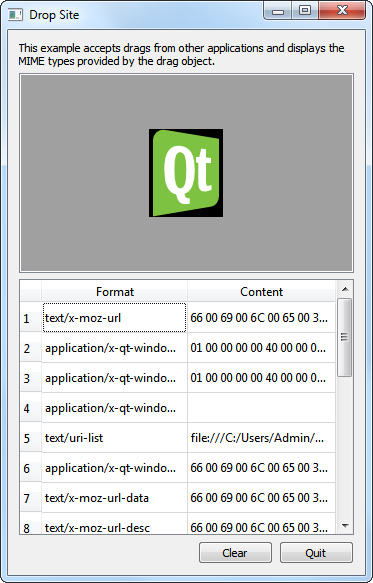
The Drop Site example accepts drops from other applications, and displays the MIME formats provided by the drag object.
There are two classes,
DropAreaandDropSiteWindow,和main()function in this example. ADropAreaobject is instantiated inDropSiteWindow; aDropSiteWindowobject is then invoked in themain()函数。
DropArea类是子类化的QLabelwith a public slot,clear(),和changed()信号。class DropArea : public QLabel { Q_OBJECT public: explicit DropArea(QWidget *parent = nullptr); public slots: void clear(); signals: void changed(const QMimeData *mimeData = nullptr);此外,
DropAreaalso contains a private instance ofQLabeland reimplementations of fourQWidgetevent handlers:
dragEnterEvent()
dragMoveEvent()
dragLeaveEvent()
dropEvent()These event handlers are further explained in the implementation of the
DropArea类。protected: void dragEnterEvent(QDragEnterEvent *event) override; void dragMoveEvent(QDragMoveEvent *event) override; void dragLeaveEvent(QDragLeaveEvent *event) override; void dropEvent(QDropEvent *event) override; private: QLabel *label; };
在
DropAreaconstructor, we set theminimum sizeto 200x200 pixels, theframe styleto bothSunkenandStyledPanel, and we align its contents to the center.DropArea::DropArea(QWidget *parent) : QLabel(parent) { setMinimumSize(200, 200); setFrameStyle(QFrame::Sunken | QFrame::StyledPanel); setAlignment(Qt::AlignCenter); setAcceptDrops(true); setAutoFillBackground(true); clear(); }Also, we enable drop events in
DropAreaby setting theacceptDrops特性到true. Then, we enable theautoFillBackgroundproperty and invoke theclear()函数。
dragEnterEvent()event handler is called when a drag is in progress and the mouse enters theDropAreaobject. For theDropSiteexample, when the mouse entersDropArea, we set its text to “<drop content>” and highlight its background.<Code snippet "draganddrop/dropsite/droparea.cpp:dragEnterEvent() function" not found>Then, we invoke
acceptProposedAction()onevent, setting the drop action to the one proposed. Lastly, we emit thechanged()signal, with the data that was dropped and its MIME type information as a parameter.For
dragMoveEvent(), we just accept the proposedQDragMoveEvent对象,event,采用acceptProposedAction().<Code snippet "draganddrop/dropsite/droparea.cpp:dragMoveEvent() function" not found>
DropAreaclass’s implementation ofdropEvent()extracts theevent‘s mime data and displays it accordingly.<Code snippet "draganddrop/dropsite/droparea.cpp:dropEvent() function part1" not found>
mimeDataobject can contain one of the following objects: an image, HTML text, plain text, or a list of URLs.<Code snippet "draganddrop/dropsite/droparea.cpp:dropEvent() function part2" not found>
若
mimeDatacontains an image, we display it inDropAreawithsetPixmap().若
mimeDatacontains HTML, we display it withsetText()and setDropArea’s text format asRichText.若
mimeDatacontains plain text, we display it withsetText()and setDropArea’s text format asPlainText. In the event thatmimeDatacontains URLs, we iterate through the list of URLs to display them on individual lines.若
mimeDatacontains other types of objects, we setDropArea’s text, withsetText()to “Cannot display data” to inform the user.We then set
DropArea‘sbackgroundRoletoDarkand we acceptevent‘s proposed action.<Code snippet "draganddrop/dropsite/droparea.cpp:dropEvent() function part3" not found>
dragLeaveEvent()event handler is called when a drag is in progress and the mouse leaves the widget.<Code snippet "draganddrop/dropsite/droparea.cpp:dragLeaveEvent() function" not found>For
DropArea‘s implementation, we clear invokeclear()and then accept the proposed event.
clear()function sets the text inDropAreato “<drop content>” and sets thebackgroundRoletoDark. Lastly, it emits thechanged()信号。<Code snippet "draganddrop/dropsite/droparea.cpp:clear() function" not found>
DropSiteWindowclass contains a constructor and a public slot,updateFormatsTable().class DropSiteWindow : public QWidget { Q_OBJECT public: DropSiteWindow(); public slots: void updateFormatsTable(const QMimeData *mimeData); void copy(); private: DropArea *dropArea; QLabel *abstractLabel; QTableWidget *formatsTable; QPushButton *clearButton; QPushButton *copyButton; QPushButton *quitButton; QDialogButtonBox *buttonBox; };The class also contains a private instance of
DropArea,dropArea,QLabel,abstractLabel,QTableWidget,formatsTable,QDialogButtonBox,buttonBox, and twoQPushButton对象,clearButtonandquitButton.
In the constructor of
DropSiteWindow, we instantiateabstractLabeland set itswordWrap特性到true. We also call theadjustSize()function to adjustabstractLabel‘s size according to its contents.DropSiteWindow::DropSiteWindow() { abstractLabel = new QLabel(tr("This example accepts drags from other " "applications and displays the MIME types " "provided by the drag object.")); abstractLabel->setWordWrap(true); abstractLabel->adjustSize();Then we instantiate
dropAreaand connect itschanged()signal toDropSiteWindow‘supdateFormatsTable()槽。dropArea = new DropArea; connect(dropArea, &DropArea::changed, this, &DropSiteWindow::updateFormatsTable);We now set up the
QTableWidget对象,formatsTable. Its horizontal header is set using aQStringList对象,labels. The number of columms are set to two and the table is not editable. Also, theformatTable‘s horizontal header is formatted to ensure that its second column stretches to occupy additional space available.QStringList labels; labels << tr("Format") << tr("Content"); formatsTable = new QTableWidget; formatsTable->setColumnCount(2); formatsTable->setEditTriggers(QAbstractItemView::NoEditTriggers); formatsTable->setHorizontalHeaderLabels(labels); formatsTable->horizontalHeader()->setStretchLastSection(true);Three
QPushButton对象,clearButton,copyButton,和quitButton, are instantiated and added tobuttonBox- aQDialogButtonBoxobject. We useQDialogButtonBoxhere to ensure that the push buttons are presented in a layout that conforms to the platform’s style.clearButton = new QPushButton(tr("Clear")); copyButton = new QPushButton(tr("Copy")); quitButton = new QPushButton(tr("Quit")); buttonBox = new QDialogButtonBox; buttonBox->addButton(clearButton, QDialogButtonBox::ActionRole); buttonBox->addButton(copyButton, QDialogButtonBox::ActionRole); #if !QT_CONFIG(clipboard) copyButton->setVisible(false); #endif buttonBox->addButton(quitButton, QDialogButtonBox::RejectRole); connect(quitButton, &QAbstractButton::clicked, this, &QWidget::close); connect(clearButton, &QAbstractButton::clicked, dropArea, &DropArea::clear); connect(copyButton, &QAbstractButton::clicked, this, &DropSiteWindow::copy);
clicked()signals forcopyButton,clearButton,和quitButtonare connected tocopy(),clear()andclose(),分别。For the layout, we use a
QVBoxLayout,mainLayout, to arrange our widgets vertically. We also set the window title to “Drop Site” and the minimum size to 350x500 pixels.QVBoxLayout *mainLayout = new QVBoxLayout(this); mainLayout->addWidget(abstractLabel); mainLayout->addWidget(dropArea); mainLayout->addWidget(formatsTable); mainLayout->addWidget(buttonBox); setWindowTitle(tr("Drop Site")); setMinimumSize(350, 500); }We move on to the
updateFormatsTable()function. This function updates theformatsTable, displaying the MIME formats of the object dropped onto theDropAreaobject. First, we setQTableWidget‘srowCountproperty to 0. Then, we validate to ensure that theQMimeDataobject passed in is a valid object.<Code snippet "draganddrop/dropsite/dropsitewindow.cpp:updateFormatsTable() part1" not found>Once we are sure that
mimeDatais valid, we iterate through its supported formats.注意
formats()function returns aQStringListobject, containing all the formats supported by themimeData.<Code snippet "draganddrop/dropsite/dropsitewindow.cpp:updateFormatsTable() part2" not found>Within each iteration, we create a
QTableWidgetItem,formatItemand we set itsflagstoItemIsEnabled, and itstext alignmenttoAlignTopandAlignLeft.A
QString对象,text, is customized to display data according to the contents offormat. We invokeQString‘ssimplified()function ontext, to obtain a string that has no additional space before, after or in between words.<Code snippet "draganddrop/dropsite/dropsitewindow.cpp:updateFormatsTable() part3" not found>若
formatcontains a list of URLs, we iterate through them, using spaces to separate them. On the other hand, ifformatcontains an image, we display the data by converting the text to hexadecimal.<Code snippet "draganddrop/dropsite/dropsitewindow.cpp:updateFormatsTable() part4" not found>一旦
texthas been customized to contain the appropriate data, we insert bothformatandtextintoformatsTablewithsetItem(). Lastly, we invokeresizeColumnToContents()onformatsTable‘s first column.
Within the
main()function, we instantiateDropSiteWindowand invoke itsshow()函数。<Code snippet "draganddrop/dropsite/main.cpp:main() function" not found>
