The Trivial Wizard example illustrates how to create a linear three-page registration wizard using three instances of
QWizardPageand one instance ofQWizard.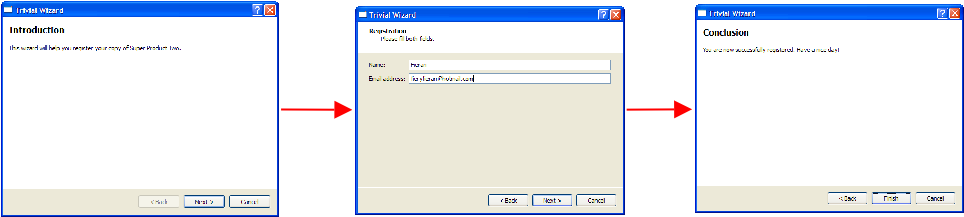
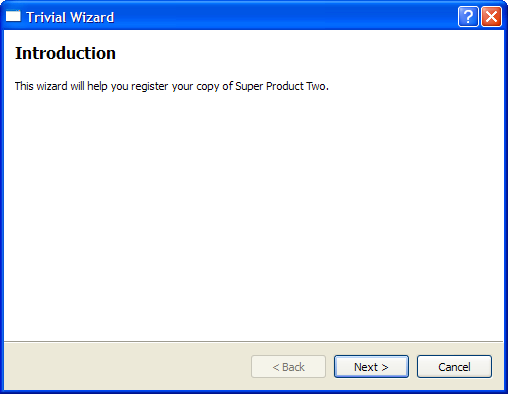
The introduction page is created with the
createIntroPage()function where aQWizardPageis created and its title is set to “Introduction”. AQLabelis used to hold the description ofpage. AQVBoxLayoutis used to hold thelabel. Thispageis returned when thecreateIntroPage()函数被调用。QWizardPage *createIntroPage() { QWizardPage *page = new QWizardPage; page->setTitle("Introduction"); QLabel *label = new QLabel("This wizard will help you register your copy " "of Super Product Two."); label->setWordWrap(true); QVBoxLayout *layout = new QVBoxLayout; layout->addWidget(label); page->setLayout(layout); return page; }
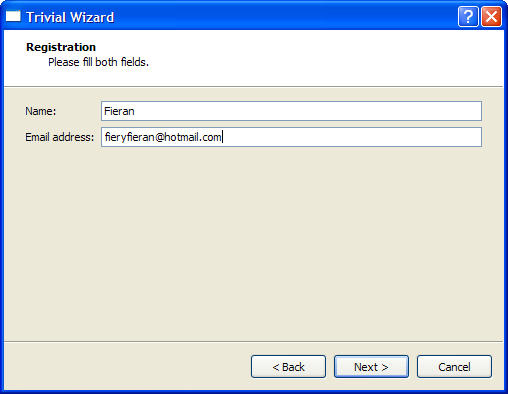
The registration page is created with the
createRegistrationPage()函数。QLineEditobjects are used to allow the user to input a name and an e-mail address. AQGridLayoutis used to hold theQLabelandQLineEdit对象。QWizardPage *createRegistrationPage() { QWizardPage *page = new QWizardPage; page->setTitle("Registration"); page->setSubTitle("Please fill both fields."); QLabel *nameLabel = new QLabel("Name:"); QLineEdit *nameLineEdit = new QLineEdit; QLabel *emailLabel = new QLabel("Email address:"); QLineEdit *emailLineEdit = new QLineEdit; QGridLayout *layout = new QGridLayout; layout->addWidget(nameLabel, 0, 0); layout->addWidget(nameLineEdit, 0, 1); layout->addWidget(emailLabel, 1, 0); layout->addWidget(emailLineEdit, 1, 1); page->setLayout(layout); return page; }
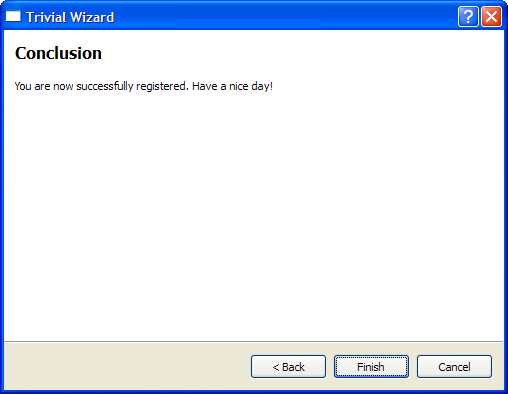
The conclusion page is created in the
createConclusionPage()function. This function’s content is similar tocreateIntroPage(). AQLabelis used to inform the user that the registration process has completed successfully.QWizardPage *createConclusionPage() { QWizardPage *page = new QWizardPage; page->setTitle("Conclusion"); QLabel *label = new QLabel("You are now successfully registered. Have a " "nice day!"); label->setWordWrap(true); QVBoxLayout *layout = new QVBoxLayout; layout->addWidget(label); page->setLayout(layout); return page; }
main()
main()function instantiates aQWizard对象,wizard, and adds all threeQWizardPageobjects to it. Thewizardwindow title is set to “Trivial Wizard” and itsshow()function is invoked to display it.int main(int argc, char *argv[]) { QCoreApplication::setAttribute(Qt::AA_UseHighDpiPixmaps); QApplication app(argc, argv); #ifndef QT_NO_TRANSLATION QString translatorFileName = QLatin1String("qtbase_"); translatorFileName += QLocale::system().name(); QTranslator *translator = new QTranslator(&app); if (translator->load(translatorFileName, QLibraryInfo::location(QLibraryInfo::TranslationsPath))) app.installTranslator(translator); #endif QWizard wizard; wizard.addPage(createIntroPage()); wizard.addPage(createRegistrationPage()); wizard.addPage(createConclusionPage()); wizard.setWindowTitle("Trivial Wizard"); wizard.show(); return app.exec(); }
