线程化 Fortune 服务器范例展示如何创建服务器,为使用线程处理来自不同客户端的请求的简单网络服务。它旨在与 Fortune 客户端范例一起运行。
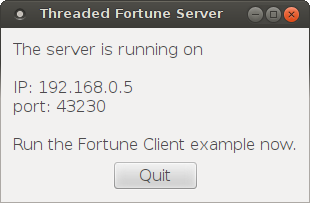
此范例的实现类似于 Fortune 服务器 范例,但这里我们将实现子类化的
QTcpServer在不同线程启动每个连接。为此,我们需要 2 个类:FortuneServer
QTcpServer子类,和 FortuneThread 继承QThread.class FortuneServer : public QTcpServer { Q_OBJECT public: FortuneServer(QObject *parent = nullptr); protected: void incomingConnection(qintptr socketDescriptor) override; private: QStringList fortunes; };FortuneServer 继承
QTcpServer并重实现incomingConnection(). We also use it for storing the list of random fortunes.FortuneServer::FortuneServer(QObject *parent) : QTcpServer(parent) { fortunes << tr("You've been leading a dog's life. Stay off the furniture.") << tr("You've got to think about tomorrow.") << tr("You will be surprised by a loud noise.") << tr("You will feel hungry again in another hour.") << tr("You might have mail.") << tr("You cannot kill time without injuring eternity.") << tr("Computers are not intelligent. They only think they are."); }We use FortuneServer’s constructor to simply generate the list of fortunes.
void FortuneServer::incomingConnection(qintptr socketDescriptor)
{
    QString fortune = fortunes.at(QRandomGenerator::global()->bounded(fortunes.size()));
    FortuneThread *thread = new FortuneThread(socketDescriptor, fortune, this);
    connect(thread, &FortuneThread::finished, thread, &FortuneThread::deleteLater);
    thread->start();
}
我们实现的
incomingConnection()creates a FortuneThread object, passing the incoming socket descriptor and a random fortune to FortuneThread’s constructor. By connecting FortuneThread’s finished() signal todeleteLater(), we ensure that the thread gets deleted once it has finished. We can then callstart(), which starts the thread.class FortuneThread : public QThread { Q_OBJECT public: FortuneThread(int socketDescriptor, const QString &fortune, QObject *parent); void run() override; signals: void error(QTcpSocket::SocketError socketError); private: int socketDescriptor; QString text; };转到 FortuneThread 类,这是
QThread子类,其工作是把 Fortune 写入连接套接字。类重实现run(), and it has a signal for reporting errors.FortuneThread::FortuneThread(int socketDescriptor, const QString &fortune, QObject *parent) : QThread(parent), socketDescriptor(socketDescriptor), text(fortune) { }FortuneThread’s constructor simply stores the socket descriptor and fortune text, so that they are available for run() later on.
void FortuneThread::run()
{
    QTcpSocket tcpSocket;
run() 函数要做的第一件事是创建
QTcpSocketobject on the stack. What’s worth noticing is that we are creating this object inside the thread, which automatically associates the socket to the thread’s event loop. This ensures that Qt will not try to deliver events to our socket from the main thread while we are accessing it from FortuneThread::run().if (!tcpSocket.setSocketDescriptor(socketDescriptor)) { emit error(tcpSocket.error()); return; }套接字被初始化通过调用
setSocketDescriptor(), passing our socket descriptor as an argument. We expect this to succeed, but just to be sure, (although unlikely, the system may run out of resources,) we catch the return value and report any error.QByteArray block; QDataStream out(&block, QIODevice::WriteOnly); out.setVersion(QDataStream::Qt_4_0); out << text;就像 Fortune 服务器 范例,我们把 Fortune 编码成
QByteArray使用QDataStream.tcpSocket.write(block); tcpSocket.disconnectFromHost(); tcpSocket.waitForDisconnected(); }不像先前范例,结束是通过调用
waitForDisconnected(), which blocks the calling thread until the socket has disconnected. Because we are running in a separate thread, the GUI will remain responsive.
