QAbstractItemDelegateclass is used to display and edit data items from a model. 更多 …

继承者: QItemDelegate , QStyledItemDelegate
def
createEditor
(parent, option, index)
def
destroyEditor
(editor, index)
def
editorEvent
(event, model, option, index)
def
helpEvent
(event, view, option, index)
def
paint
(painter, option, index)
def
paintingRoles
()
def
setEditorData
(editor, index)
def
setModelData
(editor, model, index)
def
sizeHint
(option, index)
def
updateEditorGeometry
(editor, option, index)
def
closeEditor
(editor[, hint=NoHint])
def
commitData
(editor)
def
sizeHintChanged
(arg__1)
def
elidedText
(fontMetrics, width, mode, text)
A
QAbstractItemDelegateprovides the interface and common functionality for delegates in the model/view architecture. Delegates display individual items in views, and handle the editing of model data.
QAbstractItemDelegateclass is one of the 模型/视图类 and is part of Qt’s 模型/视图框架 .要以自定义方式渲染项,必须实现
paint()andsizeHint()。QStyledItemDelegate类为这些函数提供默认实现;若不需要自定义渲染,以子类化该类取而代之。范例,在项中绘制进度条;在包管理程序范例中。
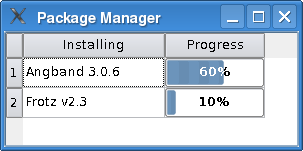
创建
WidgetDelegate类,继承自QStyledItemDelegate。履行绘制在paint()函数:class WidgetDelegate (QStyledItemDelegate): # ... def paint(painter, option, index): if index.column() == 1: progress = index.data().toInt() progressBarOption = QStyleOptionProgressBar() progressBarOption.rect = option.rect progressBarOption.minimum = 0 progressBarOption.maximum = 100 progressBarOption.progress = progress progressBarOption.text = QString::number(progress) + "%" progressBarOption.textVisible = True QApplication.style().drawControl(QStyle.CE_ProgressBar, progressBarOption, painter) else: QStyledItemDelegate.paint(self, painter, option, index)注意,使用
QStyleOptionProgressBar并初始化其成员。然后可以使用当前QStyle来绘制它。要提供自定义编辑,有 2 种方式可以使用。第 1 种方式是创建编辑器 Widget 并将其直接显示在项顶部。要做到这点,必须重实现
createEditor()to provide an editor widget,setEditorData()to populate the editor with the data from the model, andsetModelData()so that the delegate can update the model with data from the editor.第 2 种方式是直接处理用户事件通过重实现
editorEvent().
QAbstractItemDelegate
(
[
parent=None
]
)

- param parent
QObject
创建新的抽象项委托采用给定
parent
.
PySide2.QtWidgets.QAbstractItemDelegate.
EndEditHint

此枚举描述委托可以赋予模型和视图组件的不同提示,以使用户体验舒适地在模型中编辑数据。
|
常量 |
描述 |
|---|---|
|
QAbstractItemDelegate.NoHint |
没有推荐要履行的操作。 |
这些提示让委托影响视图的行为:
|
常量 |
描述 |
|---|---|
|
QAbstractItemDelegate.EditNextItem |
视图应使用委托来打开下一视图项的编辑器。 |
|
QAbstractItemDelegate.EditPreviousItem |
视图应使用委托来打开上一视图项的编辑器。 |
注意,自定义视图可能将下一和上一解释成不同概念。
以下提示最有用,当使用模型缓存数据时,譬如:操纵本地数据以提高性能 (或节省网络带宽) 的那些模型。
|
常量 |
描述 |
|---|---|
|
QAbstractItemDelegate.SubmitModelCache |
若模型缓存数据,应将缓存数据写出到底层数据存储。 |
|
QAbstractItemDelegate.RevertModelCache |
若模型缓存数据,应丢弃缓存数据并将其替换为来自底层数据存储的数据。 |
Although models and views should respond to these hints in appropriate ways, custom components may ignore any or all of them if they are not relevant.
PySide2.QtWidgets.QAbstractItemDelegate.
closeEditor
(
editor
[
,
hint=NoHint
]
)

editor
–
QWidget
hint
–
EndEditHint
PySide2.QtWidgets.QAbstractItemDelegate.
createEditor
(
parent
,
option
,
index
)

parent
–
QWidget
option
–
QStyleOptionViewItem
index
–
QModelIndex
Returns the editor to be used for editing the data item with the given
index
. Note that the index contains information about the model being used. The editor’s parent widget is specified by
parent
, and the item options by
option
.
基实现返回
None
. If you want custom editing you will need to reimplement this function.
返回编辑器 Widget 应该拥有
StrongFocus
;否则,
QMouseEvent
s received by the widget will propagate to the view. The view’s background will shine through unless the editor paints its own background (e.g., with
setAutoFillBackground()
).
PySide2.QtWidgets.QAbstractItemDelegate.
destroyEditor
(
editor
,
index
)

editor
–
QWidget
index
–
QModelIndex
被调用当
editor
is no longer needed for editing the data item with the given
index
and should be destroyed. The default behavior is a call to
deleteLater
on the editor. It is possible e.g. to avoid this delete by reimplementing this function.
另请参阅
PySide2.QtWidgets.QAbstractItemDelegate.
editorEvent
(
event
,
model
,
option
,
index
)

event
–
QEvent
model
–
QAbstractItemModel
option
–
QStyleOptionViewItem
index
–
QModelIndex
bool
当开始编辑项时,此函数被调用采用
event
触发编辑,
model
,
index
对于项,和
option
用于渲染项。
Mouse events are sent to even if they don’t start editing of the item. This can, for instance, be useful if you wish to open a context menu when the right mouse button is pressed on an item.
基实现返回
false
(指示它没有处理事件)。
PySide2.QtWidgets.QAbstractItemDelegate.
elidedText
(
fontMetrics
,
width
,
mode
,
text
)

fontMetrics
–
QFontMetrics
width
–
int
mode
–
TextElideMode
text – unicode
unicode
注意
此函数被弃用。
使用
elidedText()
代替。
For example, if you have code like
you can rewrite it as
PySide2.QtWidgets.QAbstractItemDelegate.
helpEvent
(
event
,
view
,
option
,
index
)

event
–
QHelpEvent
view
–
QAbstractItemView
option
–
QStyleOptionViewItem
index
–
QModelIndex
bool
Whenever a help event occurs, this function is called with the
event
view
option
和
index
that corresponds to the item where the event occurs.
返回
true
若委托可以处理事件;否则返回
false
. A return value of true indicates that the data obtained using the index had the required role.
For
ToolTip
and
WhatsThis
events that were handled successfully, the relevant popup may be shown depending on the user’s system configuration.
另请参阅
PySide2.QtWidgets.QAbstractItemDelegate.
paint
(
painter
,
option
,
index
)

painter
–
QPainter
option
–
QStyleOptionViewItem
index
–
QModelIndex
This pure abstract function must be reimplemented if you want to provide custom rendering. Use the
painter
and style
option
to render the item specified by the item
index
.
若重实现此,还必须重实现
sizeHint()
.
PySide2.QtWidgets.QAbstractItemDelegate.
paintingRoles
(
)

This virtual method is reserved and will be used in Qt 5.1.
PySide2.QtWidgets.QAbstractItemDelegate.
setEditorData
(
editor
,
index
)

editor
–
QWidget
index
–
QModelIndex
Sets the contents of the given
editor
to the data for the item at the given
index
. Note that the index contains information about the model being used.
基实现什么都不做。若想要自定义编辑,需要重实现此函数。
另请参阅
PySide2.QtWidgets.QAbstractItemDelegate.
setModelData
(
editor
,
model
,
index
)

editor
–
QWidget
model
–
QAbstractItemModel
index
–
QModelIndex
设置用于项的数据在给定
index
在
model
到内容为给定
editor
.
基实现什么都不做。若想要自定义编辑,需要重实现此函数。
另请参阅
PySide2.QtWidgets.QAbstractItemDelegate.
sizeHint
(
option
,
index
)

option
–
QStyleOptionViewItem
index
–
QModelIndex
QSize
必须重实现此纯抽象函数,若想要提供自定义渲染。选项的指定通过
option
和模型项通过
index
.
若重实现此,还必须重实现
paint()
.
PySide2.QtWidgets.QAbstractItemDelegate.
sizeHintChanged
(
arg__1
)

arg__1
–
QModelIndex
PySide2.QtWidgets.QAbstractItemDelegate.
updateEditorGeometry
(
editor
,
option
,
index
)

editor
–
QWidget
option
–
QStyleOptionViewItem
index
–
QModelIndex
Updates the geometry of the
editor
for the item with the given
index
, according to the rectangle specified in the
option
. If the item has an internal layout, the editor will be laid out accordingly. Note that the index contains information about the model being used.
基实现什么都不做。若想要自定义编辑,必须重实现此函数。
