PySide.QtSql.QSqlRelationalTableModel class provides an editable data model for a single database table, with foreign key support.
PySide.QtSql.QSqlRelationalTableModel 举动像 PySide.QtSql.QSqlTableModel , but allows columns to be set as foreign keys into other database tables.
|
|
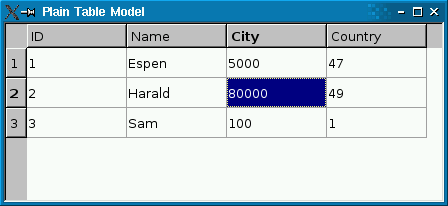
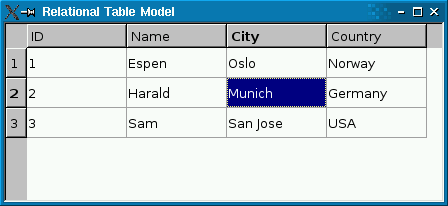
The screenshot on the left shows a plain PySide.QtSql.QSqlTableModel 在 PySide.QtGui.QTableView . Foreign keys ( city and country ) aren't resolved to human-readable values. The screenshot on the right shows a PySide.QtSql.QSqlRelationalTableModel , with foreign keys resolved into human-readable text strings.
The following code snippet shows how the PySide.QtSql.QSqlRelationalTableModel was set up:
model.setTable("employee")
model.setRelation(2, QSqlRelation("city", "id", "name"))
model.setRelation(3, QSqlRelation("country", "id", "name"))
PySide.QtSql.QSqlRelationalTableModel.setRelation() function calls establish a relationship between two tables. The first call specifies that column 2 in table employee is a foreign key that maps with field id of table city , and that the view should present the city ‘s name field to the user. The second call does something similar with column 3.
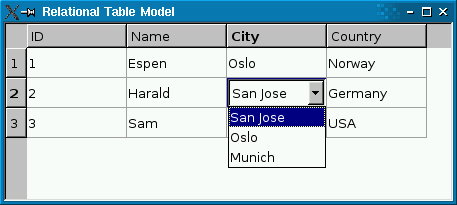
If you use a read-write PySide.QtSql.QSqlRelationalTableModel , you probably want to use PySide.QtSql.QSqlRelationalDelegate on the view. Unlike the default delegate, PySide.QtSql.QSqlRelationalDelegate provides a combobox for fields that are foreign keys into other tables. To use the class, simply call QAbstractItemView.setItemDelegate() on the view with an instance of PySide.QtSql.QSqlRelationalDelegate :
view =  QTableView()
view.setModel(model)
view.setItemDelegate(QSqlRelationalDelegate(view))
sql/relationaltablemodel example illustrates how to use PySide.QtSql.QSqlRelationalTableModel in conjunction with PySide.QtSql.QSqlRelationalDelegate to provide tables with foreign key support.
注意事项:
另请参阅
PySide.QtSql.QSqlRelation PySide.QtSql.QSqlRelationalDelegate Relational Table Model Example
| 参数: |
|
|---|
Creates an empty PySide.QtSql.QSqlRelationalTableModel and sets the parent to parent and the database connection to db 。若 db is not valid, the default database connection will be used.
| 参数: | column – PySide.QtCore.int |
|---|---|
| 返回类型: | PySide.QtSql.QSqlRelation |
Returns the relation for the column column , or an invalid relation if no relation is set.
| 参数: | column – PySide.QtCore.int |
|---|---|
| 返回类型: | PySide.QtSql.QSqlTableModel |
返回 PySide.QtSql.QSqlTableModel object for accessing the table for which column is a foreign key, or 0 if there is no relation for the given column .
The returned object is owned by the PySide.QtSql.QSqlRelationalTableModel .
| 参数: |
|
|---|
Lets the specified column be a foreign index specified by relation .
范例:
model.setTable("employee")
model.setRelation(2, QSqlRelation("city", "id", "name"))
PySide.QtSql.QSqlRelationalTableModel.setRelation() call specifies that column 2 in table employee is a foreign key that maps with field id of table city , and that the view should present the city ‘s name field to the user.
Note: The table's primary key may not contain a relation to another table.

