PySide.QtGui.QStatusTipEvent class provides an event that is used to show messages in a status bar.
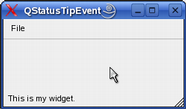
可以为 Widget 设置状态提示使用 QWidget.setStatusTip() function. They are shown in the status bar when the mouse cursor enters the widget. For example:
def __init__(self, parent):
    QMainWindow.__init__(self, parent)
    myWidget = QWidget()
    myWidget.setStatusTip(tr("This is my widget."))
    setCentralWidget(myWidget)
    ...
|
|
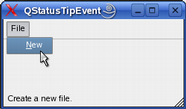
也可以为动作设置状态提示使用 QAction.setStatusTip() 函数:
def __init__(self, parent):
    QMainWindow.__init__(self, parent)
    fileMenu = menuBar().addMenu(tr("File"))
    Act = QAction(self.tr("&New"), self)
    Act.setStatusTip(tr("Create a new file."))
    fileMenu.addAction(Act)
    ...
|
|
最后,项视图类的状态提示被支持透过 Qt.StatusTipRole 枚举值。
| 参数: | tip – unicode |
|---|
构造状态提示事件,采用的文本指定通过 tip .
| 返回类型: | unicode |
|---|
返回要展示在状态栏中的消息。

