bookdwindow.cpp
to
bookwindow.py

After the bookdelegate, port the C++ code for the
BookWindow
class. It offers a QMainWindow, containing a
QTableView
to present the books data, and a
细节
section with a set of input fields to edit the selected row in the table. To begin with, create the
bookwindow.py
and add the following imports to it:
注意
The imports include the
BookDelegate
you ported earlier and the
Ui_BookWindow
. The pyside-uic tool generates the
ui_bookwindow
Python code based on the
bookwindow.ui
XML file.
To generate this Python code, run the following command on the prompt:
pyside2-uic bookwindow.ui > ui_bookwindow.py
Try porting the remaining code now. To begin with, here is how both the versions of the constructor code looks:
注意
The Python version of the
BookWindow
class definition inherits from both
QMainWindow
and
Ui_BookWindow
, which is defined in the
ui_bookwindow.py
file that you generated earlier.
Here is how the rest of the code looks like:
Now that all the necessary pieces are in place, try to put them together in
main.py
.
Try running this to see if you get the following output:
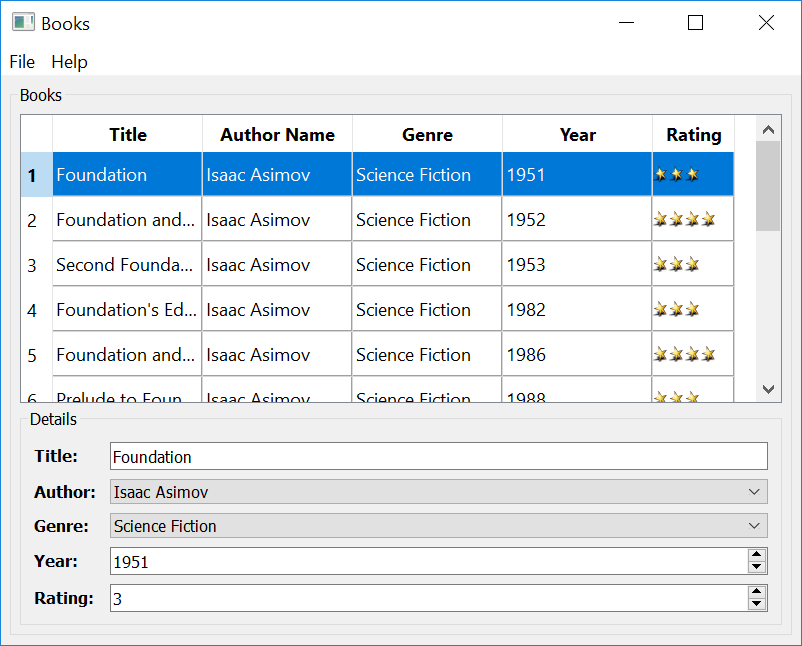
Now, if you look back at
chapter2
, you’ll notice that the
bookdelegate.py
loads the
star.png
from the filesytem. Instead, you could add it to a
qrc
file, and load from it. The later approach is rececommended if your application is targeted for different platforms, as most of the popular platforms employ stricter file access policy these days.
To add the
star.png
到
.qrc
, create a file called
books.qrc
and the following XML content to it:
This is a simple XML file defining a list all resources that your application needs. In this case, it is the
star.png
image only.
Now, run the
pyside2-rcc
tool on the
books.qrc
file to generate
rc_books.py
.
pyside2-rcc books.qrc > rc_books.py
Once you have the Python script generated, make the following changes to
bookdelegate.py
and
main.py
:
--- /tmp/snapshot-pyside-5.15-rel/pyside-setup/testenv-5.153_build/py3.6-qt5.15.0-64bit-release/pyside2/doc/rst/tutorials/portingguide/chapter2/bookdelegate.py
+++ /tmp/snapshot-pyside-5.15-rel/pyside-setup/testenv-5.153_build/py3.6-qt5.15.0-64bit-release/pyside2/doc/rst/tutorials/portingguide/chapter3/bookdelegate.py
@@ -48,10 +48,9 @@
 class BookDelegate(QSqlRelationalDelegate):
     """Books delegate to rate the books"""
-    def __init__(self, parent=None):
+    def __init__(self, star_png, parent=None):
         QSqlRelationalDelegate.__init__(self, parent)
-        star_png = os.path.dirname(__file__) + "\images\star.png"
-        self.star = QPixmap(star_png)
+        self.star = QPixmap(":/images/star.png")
     def paint(self, painter, option, index):
         """ Paint the items in the table.
--- /tmp/snapshot-pyside-5.15-rel/pyside-setup/testenv-5.153_build/py3.6-qt5.15.0-64bit-release/pyside2/doc/rst/tutorials/portingguide/chapter3/main-old.py
+++ /tmp/snapshot-pyside-5.15-rel/pyside-setup/testenv-5.153_build/py3.6-qt5.15.0-64bit-release/pyside2/doc/rst/tutorials/portingguide/chapter3/main.py
@@ -41,6 +41,7 @@
 import sys
 from PySide2.QtWidgets import QApplication
 from bookwindow import BookWindow
+import rc_books
 if __name__ == "__main__":
     app = QApplication([])
Although there will be no noticeable difference in the UI after these changes, using a
.qrc
is a better approach.
Now that you have successfully ported the SQL Books example, you know how easy it is. Try porting another C++ application.
