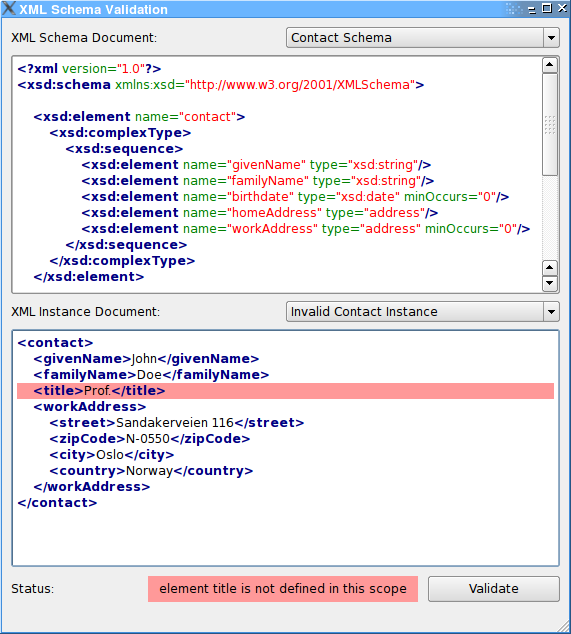
Using Qt XML Patterns to validate XML with a W3C XML Schema.
The XML Schema Validation example shows how to use Qt XML Patterns to validate XML with a W3C XML Schema.
The example application shows different XML schema definitions and for every definition two XML instance documents, one that is valid according to the schema and one that is not. The user can select the valid or invalid instance document, change it and validate it again.
You can select one of the three predefined XML schemas and for each schema an valid or invalid instance document. A click on the ‘Validate’ button will validate the content of the XML instance editor against the schema from the XML schema viewer. As you can modify the content of the instance editor, different instances can be tested and validation error messages analysed.
The example’s main() function creates the standard instance of
QApplication. Then it creates an instance of the mainwindow class, shows it, and starts the Qt event loop:int main(int argc, char* argv[]) { Q_INIT_RESOURCE(schema); QApplication app(argc, argv); MainWindow* const window = new MainWindow; window->show(); return app.exec(); }
The example’s UI is a conventional Qt GUI application inheriting
QMainWindowand the class generated by Qt Designer:class MainWindow : public QMainWindow, private Ui::SchemaMainWindow { Q_OBJECT public: MainWindow(); private Q_SLOTS: void schemaSelected(int index); void instanceSelected(int index); void validate(); void textChanged(); private: void moveCursor(int line, int column); };The constructor fills the schema and instance
QComboBoxselections with the predefined schemas and instances and connects theircurrentIndexChanged()signals to the window’sschemaSelected()resp.instanceSelected()slot. Furthermore the signal-slot connections for the validationbuttonand the instanceeditorare set up.The call to
schemaSelected(0)andinstanceSelected(0)will trigger the validation of the initial Contact Schema example.MainWindow::MainWindow() { setupUi(this); new XmlSyntaxHighlighter(schemaView->document()); new XmlSyntaxHighlighter(instanceEdit->document()); schemaSelection->addItem(tr("Contact Schema")); schemaSelection->addItem(tr("Recipe Schema")); schemaSelection->addItem(tr("Order Schema")); instanceSelection->addItem(tr("Valid Contact Instance")); instanceSelection->addItem(tr("Invalid Contact Instance")); connect(schemaSelection, SIGNAL(currentIndexChanged(int)), SLOT(schemaSelected(int))); connect(instanceSelection, SIGNAL(currentIndexChanged(int)), SLOT(instanceSelected(int))); connect(validateButton, SIGNAL(clicked()), SLOT(validate())); connect(instanceEdit, SIGNAL(textChanged()), SLOT(textChanged())); validationStatus->setAlignment(Qt::AlignCenter | Qt::AlignVCenter); schemaSelected(0); instanceSelected(0); }在
schemaSelected()slot the content of the instanceselectionis adapted to the selected schema and the corresponding schema is loaded from the resource file and displayed in the schemaviewer. At the end of the method a revalidation is triggered.void MainWindow::schemaSelected(int index) { instanceSelection->clear(); if (index == 0) { instanceSelection->addItem(tr("Valid Contact Instance")); instanceSelection->addItem(tr("Invalid Contact Instance")); } else if (index == 1) { instanceSelection->addItem(tr("Valid Recipe Instance")); instanceSelection->addItem(tr("Invalid Recipe Instance")); } else if (index == 2) { instanceSelection->addItem(tr("Valid Order Instance")); instanceSelection->addItem(tr("Invalid Order Instance")); } textChanged(); const QString fileName = QStringLiteral(":/schema_") + QString::number(index) + QStringLiteral(".xsd"); QFile schemaFile(fileName); if (!schemaFile.open(QIODevice::ReadOnly)) { qWarning() << "Cannot open" << QDir::toNativeSeparators(fileName) << ':' << schemaFile.errorString(); return; } const QString schemaText(QString::fromUtf8(schemaFile.readAll())); schemaView->setPlainText(schemaText); validate(); }在
instanceSelected()slot the selected instance is loaded from the resource file and loaded into the instanceeditoran the revalidation is triggered again.void MainWindow::instanceSelected(int index) { if (index < 0) { instanceEdit->setPlainText(QString()); return; } const QString fileName = QStringLiteral(":/instance_") + QString::number(2 * schemaSelection->currentIndex() + index) + QStringLiteral(".xml"); QFile instanceFile(fileName); if (!instanceFile.open(QIODevice::ReadOnly)) { qWarning() << "Cannot open" << QDir::toNativeSeparators(fileName) << ':' << instanceFile.errorString(); return; } const QString instanceText(QString::fromUtf8(instanceFile.readAll())); instanceEdit->setPlainText(instanceText); validate(); }
validate()slot does the actual work in this example. At first it stores the content of the schemaviewer和editorinto temporaryvariables. Then it instanciates aMessageHandlerobject which inherits fromQAbstractMessageHandlerand is a convenience class to store error messages from the XmlPatterns system.class MessageHandler : public QAbstractMessageHandler { public: MessageHandler() : QAbstractMessageHandler(0) { } QString statusMessage() const { return m_description; } int line() const { return m_sourceLocation.line(); } int column() const { return m_sourceLocation.column(); } protected: virtual void handleMessage(QtMsgType type, const QString &description, const QUrl &identifier, const QSourceLocation &sourceLocation) { Q_UNUSED(type); Q_UNUSED(identifier); m_description = description; m_sourceLocation = sourceLocation; } private: QString m_description; QSourceLocation m_sourceLocation; };之后
QXmlSchemais instanciated and the message handler set on it, theload()method is called with the schema data as argument. If the schema is invalid or a parsing error has occurred,isValid()返回falseand the error is flagged inerrorOccurred. If the loading was successful, aQXmlSchemaValidatoris instanciated and the schema passed in the constructor. A call tovalidate()will validate the passed XML instance data against the XML schema. The return value of that method signals whether the validation was successful. Depending on the success the statuslabelis set to ‘validation successful’ or the error message stored in theMessageHandlerThe rest of the code does only some fancy coloring and eyecandy.
void MainWindow::validate()
{
    const QByteArray schemaData = schemaView->toPlainText().toUtf8();
    const QByteArray instanceData = instanceEdit->toPlainText().toUtf8();
    MessageHandler messageHandler;
    QXmlSchema schema;
    schema.setMessageHandler(&messageHandler);
    schema.load(schemaData);
    bool errorOccurred = false;
    if (!schema.isValid()) {
        errorOccurred = true;
    } else {
        QXmlSchemaValidator validator(schema);
        if (!validator.validate(instanceData))
            errorOccurred = true;
    }
    if (errorOccurred) {
        validationStatus->setText(messageHandler.statusMessage());
        moveCursor(messageHandler.line(), messageHandler.column());
    } else {
        validationStatus->setText(tr("validation successful"));
    }
    const QString styleSheet = QString("QLabel {background: %1; padding: 3px}")
                                      .arg(errorOccurred ? QColor(Qt::red).lighter(160).name() :
                                                           QColor(Qt::green).lighter(160).name());
    validationStatus->setStyleSheet(styleSheet);
}