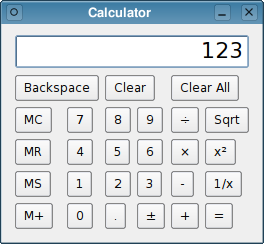
范例展示如何使用信号/槽来实现计算器 Widget 功能,及如何使用
QGridLayout将子级小部件放在栅格中。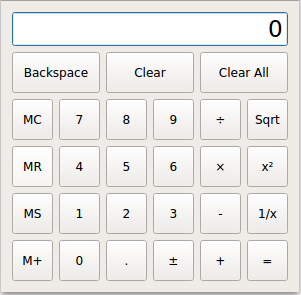
范例由 2 个类组成:
计算器is the calculator widget, with all the calculator functionality.
Buttonis the widget used for each of the calculator button. It derives fromQToolButton.We will start by reviewing
计算器, then we will take a look atButton.
class Calculator : public QWidget
{
    Q_OBJECT
public:
    Calculator(QWidget *parent = nullptr);
private slots:
    void digitClicked();
    void unaryOperatorClicked();
    void additiveOperatorClicked();
    void multiplicativeOperatorClicked();
    void equalClicked();
    void pointClicked();
    void changeSignClicked();
    void backspaceClicked();
    void clear();
    void clearAll();
    void clearMemory();
    void readMemory();
    void setMemory();
    void addToMemory();
计算器class provides a simple calculator widget. It inherits fromQDialogand has several private slots associated with the calculator’s buttons.eventFilter()is reimplemented to handle mouse events on the calculator’s display.Buttons are grouped in categories according to their behavior. For example, all the digit buttons (labeled 0 to 9) append a digit to the current operand. For these, we connect multiple buttons to the same slot (e.g.,
digitClicked()). The categories are digits, unary operators (Sqrt, x², 1/x), additive operators (+, -), and multiplicative operators (×, ÷). The other buttons have their own slots.private: Button *createButton(const QString &text, const char *member); void abortOperation(); bool calculate(double rightOperand, const QString &pendingOperator);私有
createButton()函数用作 Widget 构造部分。abortOperation()is called whenever a division by zero occurs or when a square root operation is applied to a negative number.calculate()applies a binary operator (+, -, ×, or ÷).double sumInMemory; double sumSoFar; double factorSoFar; QString pendingAdditiveOperator; QString pendingMultiplicativeOperator; bool waitingForOperand;These variables, together with the contents of the calculator display (a
QLineEdit), encode the state of the calculator:
sumInMemorycontains the value stored in the calculator’s memory (using MS, M+, or MC).
sumSoFarstores the value accumulated so far. When the user clicks =,sumSoFaris recomputed and shown on the display. Clear All resetssumSoFarto zero.
factorSoFarstores a temporary value when doing multiplications and divisions.
pendingAdditiveOperatorstores the last additive operator clicked by the user.
pendingMultiplicativeOperatorstores the last multiplicative operator clicked by the user.
waitingForOperandistruewhen the calculator is expecting the user to start typing an operand.Additive and multiplicative operators are treated differently because they have different precedences. For example, 1 + 2 ÷ 3 is interpreted as 1 + (2 ÷ 3) because ÷ has higher precedence than +.
The table below shows the evolution of the calculator state as the user enters a mathematical expression.
用户输入
显示
Sum so Far
Add. Op.
Factor so Far
Mult. Op.
Waiting for Operand?
0
0
true1
1
0
false1 +
1
1
true1 + 2
2
1
false1 + 2 ÷
2
1
2
÷
true1 + 2 ÷ 3
3
1
2
÷
false1 + 2 ÷ 3 -
1.66667
1.66667
true1 + 2 ÷ 3 - 4
4
1.66667
false1 + 2 ÷ 3 - 4 =
-2.33333
0
trueUnary operators, such as Sqrt, require no special handling; they can be applied immediately since the operand is already known when the operator button is clicked.
    QLineEdit *display;
    enum { NumDigitButtons = 10 };
    Button *digitButtons[NumDigitButtons];
};
Finally, we declare the variables associated with the display and the buttons used to display numerals.
Calculator::Calculator(QWidget *parent)
    : QWidget(parent), sumInMemory(0.0), sumSoFar(0.0)
    , factorSoFar(0.0), waitingForOperand(true)
{
In the constructor, we initialize the calculator’s state. The
pendingAdditiveOperatorandpendingMultiplicativeOperatorvariables don’t need to be initialized explicitly, because theQStringconstructor initializes them to empty strings. It is also possible to initialize those variable directly in the header. This is calledmember-initializatonand avoids a long initialization list.display = new QLineEdit("0"); display->setReadOnly(true); display->setAlignment(Qt::AlignRight); display->setMaxLength(15); QFont font = display->font(); font.setPointSize(font.pointSize() + 8); display->setFont(font);创建
QLineEditrepresenting the calculator’s display and set up some of its properties. In particular, we set it to be read-only.We also enlarge
display‘s font by 8 points.for (int i = 0; i < NumDigitButtons; ++i) digitButtons[i] = createButton(QString::number(i), SLOT(digitClicked())); Button *pointButton = createButton(tr("."), SLOT(pointClicked())); Button *changeSignButton = createButton(tr("\302\261"), SLOT(changeSignClicked())); Button *backspaceButton = createButton(tr("Backspace"), SLOT(backspaceClicked())); Button *clearButton = createButton(tr("Clear"), SLOT(clear())); Button *clearAllButton = createButton(tr("Clear All"), SLOT(clearAll())); Button *clearMemoryButton = createButton(tr("MC"), SLOT(clearMemory())); Button *readMemoryButton = createButton(tr("MR"), SLOT(readMemory())); Button *setMemoryButton = createButton(tr("MS"), SLOT(setMemory())); Button *addToMemoryButton = createButton(tr("M+"), SLOT(addToMemory())); Button *divisionButton = createButton(tr("\303\267"), SLOT(multiplicativeOperatorClicked())); Button *timesButton = createButton(tr("\303\227"), SLOT(multiplicativeOperatorClicked())); Button *minusButton = createButton(tr("-"), SLOT(additiveOperatorClicked())); Button *plusButton = createButton(tr("+"), SLOT(additiveOperatorClicked())); Button *squareRootButton = createButton(tr("Sqrt"), SLOT(unaryOperatorClicked())); Button *powerButton = createButton(tr("x\302\262"), SLOT(unaryOperatorClicked())); Button *reciprocalButton = createButton(tr("1/x"), SLOT(unaryOperatorClicked())); Button *equalButton = createButton(tr("="), SLOT(equalClicked()));For each button, we call the private
createButton()function with the proper text label and a slot to connect to the button.QGridLayout *mainLayout = new QGridLayout; mainLayout->setSizeConstraint(QLayout::SetFixedSize); mainLayout->addWidget(display, 0, 0, 1, 6); mainLayout->addWidget(backspaceButton, 1, 0, 1, 2); mainLayout->addWidget(clearButton, 1, 2, 1, 2); mainLayout->addWidget(clearAllButton, 1, 4, 1, 2); mainLayout->addWidget(clearMemoryButton, 2, 0); mainLayout->addWidget(readMemoryButton, 3, 0); mainLayout->addWidget(setMemoryButton, 4, 0); mainLayout->addWidget(addToMemoryButton, 5, 0); for (int i = 1; i < NumDigitButtons; ++i) { int row = ((9 - i) / 3) + 2; int column = ((i - 1) % 3) + 1; mainLayout->addWidget(digitButtons[i], row, column); } mainLayout->addWidget(digitButtons[0], 5, 1); mainLayout->addWidget(pointButton, 5, 2); mainLayout->addWidget(changeSignButton, 5, 3); mainLayout->addWidget(divisionButton, 2, 4); mainLayout->addWidget(timesButton, 3, 4); mainLayout->addWidget(minusButton, 4, 4); mainLayout->addWidget(plusButton, 5, 4); mainLayout->addWidget(squareRootButton, 2, 5); mainLayout->addWidget(powerButton, 3, 5); mainLayout->addWidget(reciprocalButton, 4, 5); mainLayout->addWidget(equalButton, 5, 5); setLayout(mainLayout); setWindowTitle(tr("Calculator")); }The layout is handled by a single
QGridLayout。setSizeConstraint()call ensures that the计算器widget is always shown as its optimal size (itssize hint), preventing the user from resizing the calculator. The size hint is determined by the size andsize policyof the child widgets.Most child widgets occupy only one cell in the grid layout. For these, we only need to pass a row and a column to
addWidget()。display,backspaceButton,clearButton,和clearAllButtonwidgets occupy more than one column; for these we must also pass a row span and a column span.void Calculator::digitClicked() { Button *clickedButton = qobject_cast<Button *>(sender()); int digitValue = clickedButton->text().toInt(); if (display->text() == "0" && digitValue == 0.0) return; if (waitingForOperand) { display->clear(); waitingForOperand = false; } display->setText(display->text() + QString::number(digitValue)); }Pressing one of the calculator’s digit buttons will emit the button’s
clicked()signal, which will trigger thedigitClicked()槽。First, we find out which button sent the signal using
sender(). This function returns the sender as aQObjectpointer. Since we know that the sender is aButtonobject, we can safely cast theQObject. We could have used a C-style cast or a C++static_cast<>(), but as a defensive programming technique we use aqobject_cast(). The advantage is that if the object has the wrong type, a null pointer is returned. Crashes due to null pointers are much easier to diagnose than crashes due to unsafe casts. Once we have the button, we extract the operator usingtext().The slot needs to consider two situations in particular. If
displaycontains “0” and the user clicks the 0 button, it would be silly to show “00”. And if the calculator is in a state where it is waiting for a new operand, the new digit is the first digit of that new operand; in that case, any result of a previous calculation must be cleared first.At the end, we append the new digit to the value in the display.
void Calculator::unaryOperatorClicked() { Button *clickedButton = qobject_cast<Button *>(sender()); QString clickedOperator = clickedButton->text(); double operand = display->text().toDouble(); double result = 0.0; if (clickedOperator == tr("Sqrt")) { if (operand < 0.0) { abortOperation(); return; } result = std::sqrt(operand); } else if (clickedOperator == tr("x\302\262")) { result = std::pow(operand, 2.0); } else if (clickedOperator == tr("1/x")) { if (operand == 0.0) { abortOperation(); return; } result = 1.0 / operand; } display->setText(QString::number(result)); waitingForOperand = true; }
unaryOperatorClicked()slot is called whenever one of the unary operator buttons is clicked. Again a pointer to the clicked button is retrieved usingsender(). The operator is extracted from the button’s text and stored inclickedOperator. The operand is obtained fromdisplay.Then we perform the operation. If Sqrt is applied to a negative number or 1/x to zero, we call
abortOperation(). If everything goes well, we display the result of the operation in the line edit and we setwaitingForOperandtotrue. This ensures that if the user types a new digit, the digit will be considered as a new operand, instead of being appended to the current value.void Calculator::additiveOperatorClicked() { Button *clickedButton = qobject_cast<Button *>(sender()); if (!clickedButton) return; QString clickedOperator = clickedButton->text(); double operand = display->text().toDouble();
additiveOperatorClicked()slot is called when the user clicks the + or - button.Before we can actually do something about the clicked operator, we must handle any pending operations. We start with the multiplicative operators, since these have higher precedence than additive operators:
if (!pendingMultiplicativeOperator.isEmpty()) { if (!calculate(operand, pendingMultiplicativeOperator)) { abortOperation(); return; } display->setText(QString::number(factorSoFar)); operand = factorSoFar; factorSoFar = 0.0; pendingMultiplicativeOperator.clear(); }If × or ÷ has been clicked earlier, without clicking = afterward, the current value in the display is the right operand of the × or ÷ operator and we can finally perform the operation and update the display.
if (!pendingAdditiveOperator.isEmpty()) { if (!calculate(operand, pendingAdditiveOperator)) { abortOperation(); return; } display->setText(QString::number(sumSoFar)); } else { sumSoFar = operand; }If + or - has been clicked earlier,
sumSoFaris the left operand and the current value in the display is the right operand of the operator. If there is no pending additive operator,sumSoFaris simply set to be the text in the display.pendingAdditiveOperator = clickedOperator; waitingForOperand = true; }Finally, we can take care of the operator that was just clicked. Since we don’t have the right-hand operand yet, we store the clicked operator in the
pendingAdditiveOperatorvariable. We will apply the operation later, when we have a right operand, withsumSoFaras the left operand.void Calculator::multiplicativeOperatorClicked() { Button *clickedButton = qobject_cast<Button *>(sender()); if (!clickedButton) return; QString clickedOperator = clickedButton->text(); double operand = display->text().toDouble(); if (!pendingMultiplicativeOperator.isEmpty()) { if (!calculate(operand, pendingMultiplicativeOperator)) { abortOperation(); return; } display->setText(QString::number(factorSoFar)); } else { factorSoFar = operand; } pendingMultiplicativeOperator = clickedOperator; waitingForOperand = true; }
multiplicativeOperatorClicked()slot is similar toadditiveOperatorClicked(). We don’t need to worry about pending additive operators here, because multiplicative operators have precedence over additive operators.void Calculator::equalClicked() { double operand = display->text().toDouble(); if (!pendingMultiplicativeOperator.isEmpty()) { if (!calculate(operand, pendingMultiplicativeOperator)) { abortOperation(); return; } operand = factorSoFar; factorSoFar = 0.0; pendingMultiplicativeOperator.clear(); } if (!pendingAdditiveOperator.isEmpty()) { if (!calculate(operand, pendingAdditiveOperator)) { abortOperation(); return; } pendingAdditiveOperator.clear(); } else { sumSoFar = operand; } display->setText(QString::number(sumSoFar)); sumSoFar = 0.0; waitingForOperand = true; }Like in
additiveOperatorClicked(), we start by handling any pending multiplicative and additive operators. Then we displaysumSoFarand reset the variable to zero. Resetting the variable to zero is necessary to avoid counting the value twice.void Calculator::pointClicked() { if (waitingForOperand) display->setText("0"); if (!display->text().contains('.')) display->setText(display->text() + tr(".")); waitingForOperand = false; }
pointClicked()slot adds a decimal point to the content indisplay.void Calculator::changeSignClicked() { QString text = display->text(); double value = text.toDouble(); if (value > 0.0) { text.prepend(tr("-")); } else if (value < 0.0) { text.remove(0, 1); } display->setText(text); }
changeSignClicked()slot changes the sign of the value indisplay. If the current value is positive, we prepend a minus sign; if the current value is negative, we remove the first character from the value (the minus sign).void Calculator::backspaceClicked() { if (waitingForOperand) return; QString text = display->text(); text.chop(1); if (text.isEmpty()) { text = "0"; waitingForOperand = true; } display->setText(text); }
backspaceClicked()removes the rightmost character in the display. If we get an empty string, we show “0” and setwaitingForOperandtotrue.void Calculator::clear() { if (waitingForOperand) return; display->setText("0"); waitingForOperand = true; }
clear()slot resets the current operand to zero. It is equivalent to clicking Backspace enough times to erase the entire operand.void Calculator::clearAll() { sumSoFar = 0.0; factorSoFar = 0.0; pendingAdditiveOperator.clear(); pendingMultiplicativeOperator.clear(); display->setText("0"); waitingForOperand = true; }
clearAll()slot resets the calculator to its initial state.void Calculator::clearMemory() { sumInMemory = 0.0; } void Calculator::readMemory() { display->setText(QString::number(sumInMemory)); waitingForOperand = true; } void Calculator::setMemory() { equalClicked(); sumInMemory = display->text().toDouble(); } void Calculator::addToMemory() { equalClicked(); sumInMemory += display->text().toDouble(); }
clearMemory()slot erases the sum kept in memory,readMemory()displays the sum as an operand,setMemory()replace the sum in memory with the current sum, andaddToMemory()adds the current value to the value in memory. ForsetMemory()andaddToMemory(), we start by callingequalClicked()to updatesumSoFarand the value in the display.Button *Calculator::createButton(const QString &text, const char *member) { Button *button = new Button(text); connect(button, SIGNAL(clicked()), this, member); return button; }私有
createButton()function is called from the constructor to create calculator buttons.void Calculator::abortOperation() { clearAll(); display->setText(tr("####")); }私有
abortOperation()function is called whenever a calculation fails. It resets the calculator state and displays “####”.bool Calculator::calculate(double rightOperand, const QString &pendingOperator) { if (pendingOperator == tr("+")) { sumSoFar += rightOperand; } else if (pendingOperator == tr("-")) { sumSoFar -= rightOperand; } else if (pendingOperator == tr("\303\227")) { factorSoFar *= rightOperand; } else if (pendingOperator == tr("\303\267")) { if (rightOperand == 0.0) return false; factorSoFar /= rightOperand; } return true; }私有
calculate()function performs a binary operation. The right operand is given byrightOperand. For additive operators, the left operand issumSoFar; for multiplicative operators, the left operand isfactorSoFar. The function returnfalseif a division by zero occurs.
Let’s now take a look at the
Button类:class Button : public QToolButton { Q_OBJECT public: explicit Button(const QString &text, QWidget *parent = nullptr); QSize sizeHint() const override; };
Buttonclass has a convenience constructor that takes a text label and a parent widget, and it reimplementssizeHint()to provide more space around the text than the amountQToolButtonnormally provides.
Button::Button(const QString &text, QWidget *parent) : QToolButton(parent) { setSizePolicy(QSizePolicy::Expanding, QSizePolicy::Preferred); setText(text); }The buttons’ appearance is determined by the layout of the calculator widget through the size and
												size


												policy
of the layout’s child widgets. The call to thesetSizePolicy()function in the constructor ensures that the button will expand horizontally to fill all the available space; by default,QToolButtons don’t expand to fill available space. Without this call, the different buttons in a same column would have different widths.QSize Button::sizeHint() const { QSize size = QToolButton::sizeHint(); size.rheight() += 20; size.rwidth() = qMax(size.width(), size.height()); return size; }在
sizeHint(), we try to return a size that looks good for most buttons. We reuse the size hint of the base class (QToolButton) but modify it in the following ways:
We add 20 to the
heightcomponent of the size hint.We make the
widthcomponent of the size hint at least as much as theheight.This ensures that with most fonts, the digit and operator buttons will be square, without truncating the text on the Backspace, Clear, and Clear All buttons.
The screenshot below shows how the
计算器widget would look like if we didn’t set the horizontal size policy toExpandingin the constructor and if we didn’t reimplementsizeHint().