此范例展示如何创建 Qt 插件。
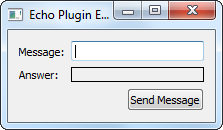
There are two kinds of plugins in Qt: plugins that extend Qt itself and plugins that extend applications written in Qt. In this example, we show the procedure of implementing plugins that extend applications. When you create a plugin you declare an interface, which is a class with only pure virtual functions. This interface is inherited by the class that implements the plugin. The class is stored in a shared library and can therefore be loaded by applications at run-time. When loaded, the plugin is dynamically cast to the interface using Qt’s 元对象系统 . The plugin overview document gives a high-level introduction to plugins.
We have implemented a plugin, the
EchoPlugin, which implements theEchoInterface. The interface consists ofecho(), which takes aQStringas argument. TheEchoPluginreturns the string unaltered (i.e., it works as the familiar echo command found in both Unix and Windows).We test the plugin in
EchoWindow: when you push theQPushButton(as seen in the image above), the application sends the text in theQLineEditto the plugin, which echoes it back to the application. The answer from the plugin is displayed in theQLabel.
EchoWindowclass lets us test theEchoPluginthrough a GUI.class EchoWindow : public QWidget { Q_OBJECT public: EchoWindow(); private slots: void sendEcho(); private: void createGUI(); bool loadPlugin(); EchoInterface *echoInterface; QLineEdit *lineEdit; QLabel *label; QPushButton *button; QGridLayout *layout; };We load the plugin in
loadPlugin()and cast it toEchoInterface. When the user clicks thebuttonwe take the text inlineEditand call the interface’secho()with it.
从查看构造函数开始:
EchoWindow::EchoWindow()
{
    createGUI();
    setLayout(layout);
    setWindowTitle("Echo Plugin Example");
    if (!loadPlugin()) {
        QMessageBox::information(this, "Error", "Could not load the plugin");
        lineEdit->setEnabled(false);
        button->setEnabled(false);
    }
}
We create the widgets and set a title for the window. We then load the plugin.
loadPlugin()returns false if the plugin could not be loaded, in which case we disable the widgets. If you wish a more detailed error message, you can useerrorString(); we will look more closely atQPluginLoaderlater.这里是实现为
sendEcho():void EchoWindow::sendEcho() { QString text = echoInterface->echo(lineEdit->text()); label->setText(text); }This slot is called when the user pushes
buttonor presses enter inlineEdit. We callecho()of the echo interface. In our example this is theEchoPlugin, but it could be any plugin that inherit theEchoInterface. We take theQStringreturned fromecho()and display it in thelabel.这里是实现为
createGUI():void EchoWindow::createGUI() { lineEdit = new QLineEdit; label = new QLabel; label->setFrameStyle(QFrame::Box | QFrame::Plain); button = new QPushButton(tr("Send Message")); connect(lineEdit, &QLineEdit::editingFinished, this, &EchoWindow::sendEcho); connect(button, &QPushButton::clicked, this, &EchoWindow::sendEcho); layout = new QGridLayout; layout->addWidget(new QLabel(tr("Message:")), 0, 0); layout->addWidget(lineEdit, 0, 1); layout->addWidget(new QLabel(tr("Answer:")), 1, 0); layout->addWidget(label, 1, 1); layout->addWidget(button, 2, 1, Qt::AlignRight); layout->setSizeConstraint(QLayout::SetFixedSize); }We create the widgets and lay them out in a grid layout. We connect the label and line edit to our
sendEcho()槽。这里是
loadPlugin()函数:bool EchoWindow::loadPlugin() { QDir pluginsDir(QCoreApplication::applicationDirPath()); #if defined(Q_OS_WIN) if (pluginsDir.dirName().toLower() == "debug" || pluginsDir.dirName().toLower() == "release") pluginsDir.cdUp(); #elif defined(Q_OS_MAC) if (pluginsDir.dirName() == "MacOS") { pluginsDir.cdUp(); pluginsDir.cdUp(); pluginsDir.cdUp(); } #endif pluginsDir.cd("plugins"); const QStringList entries = pluginsDir.entryList(QDir::Files); for (const QString &fileName : entries) { QPluginLoader pluginLoader(pluginsDir.absoluteFilePath(fileName)); QObject *plugin = pluginLoader.instance(); if (plugin) { echoInterface = qobject_cast<EchoInterface *>(plugin); if (echoInterface) return true; pluginLoader.unload(); } } return false; }Access to plugins at run-time is provided by
QPluginLoader. You supply it with the filename of the shared library the plugin is stored in and callinstance(), which loads and returns the root component of the plugin (i.e., it resolves the type of the plugin and creates aQObjectinstance of it). If the plugin was not successfully loaded, it will be null, so we return false. If it was loaded correctly, we can cast the plugin to ourEchoInterfaceand return true. In the case that the plugin loaded does not implement theEchoInterface,instance()will return null, but this cannot happen in our example. Notice that the location of the plugin is not the same for all platforms.
EchoInterfacedefines the functions that the plugin will provide. An interface is a class that only consists of pure virtual functions. If non virtual functions were present in the class you would get misleading compile errors in the moc files.class EchoInterface { public: virtual ~EchoInterface() = default; virtual QString echo(const QString &message) = 0; }; QT_BEGIN_NAMESPACE #define EchoInterface_iid "org.qt-project.Qt.Examples.EchoInterface" Q_DECLARE_INTERFACE(EchoInterface, EchoInterface_iid) QT_END_NAMESPACEWe declare
echo(). In ourEchoPluginwe use this method to return, or echo,message.我们使用
Q_DECLARE_INTERFACEmacro to let Qt’s meta object system aware of the interface. We do this so that it will be possible to identify plugins that implements the interface at run-time. The second argument is a string that must identify the interface in a unique way.
We inherit both
QObjectandEchoInterfaceto make this class a plugin. TheQ_INTERFACESmacro tells Qt which interfaces the class implements. In our case we only implement theEchoInterface. If a class implements more than one interface, they are given as a space separated list. TheQ_PLUGIN_METADATAmacro is included next to theQ_OBJECTmacro. It contains the plugins IID and a filename pointing to a json file containing the metadata for the plugin. The json file is compiled into the plugin and does not need to be installed.class EchoPlugin : public QObject, EchoInterface { Q_OBJECT Q_PLUGIN_METADATA(IID "org.qt-project.Qt.Examples.EchoInterface" FILE "echoplugin.json") Q_INTERFACES(EchoInterface) public: QString echo(const QString &message) override; };
这里是实现为
echo():QString EchoPlugin::echo(const QString &message) { return message; }只需返回函数参数。
main()
int main(int argv, char *args[])
{
    QApplication app(argv, args);
    EchoWindow window;
    window.show();
    return app.exec();
}
We create an
EchoWindowand display it as a top-level window.
When creating plugins the profiles need to be adjusted. We show here what changes need to be done.
The profile in the echoplugin directory uses the
subdirstemplate and simply includes includes to directories in which the echo window and echo plugin lives:<Code snippet "tools/echoplugin/echoplugin.pro:0" not found>The profile for the echo window does not need any plugin specific settings. We move on to the plugin profile:
<Code snippet "tools/echoplugin/plugin/plugin.pro:0" not found>We need to set the TEMPLATE as we now want to make a library instead of an executable. We also need to tell qmake that we are creating a plugin. The
EchoInterfacethat the plugin implements lives in theechowindowdirectory, so we need to add that directory to the include path. We set the TARGET of the project, which is the name of the library file in which the plugin will be stored; qmake appends the appropriate file extension depending on the platform. By convention the target should have the same name as the plugin (set with Q_EXPORT_PLUGIN2)
The Defining Plugins page presents an overview of the macros needed to create plugins.
We give an example of a plugin that extends Qt in the style plugin example. The plug and paint example shows how to create static plugins.
