Shows how to re-orient widgets in running applications.
Dynamic Layouts implements dynamically placed widgets within running applications. The widget placement depends on whether
HorizontalorVerticalis chosen.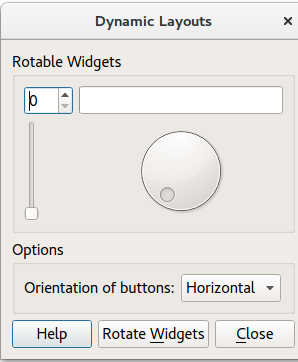
更多信息,拜访 布局管理 页面。
To begin with, the application creates the UI components by calling the following methods:
createRotatableGroupBox()
createOptionsGroupBox()
createButtonBox()
It then adds the UI components to a GridLayout (
mainLayout).最后,
Dialog::rotateWidgets()被调用。
createRotatableGroupBox()method creates a rotatable group box, then adds a series of widgets:It goes on to add signals and slots to each widget, and assigns a
QGridLayoutcalledrotatableLayout.
createOptionsGroupBox()creates the following widgets:
optionsGroupBox
buttonsOrientationLabel
buttonsOrientationComboBox. The orientation of the ComboBox is eitherhorizontal(default value) orvertical. These two values are added during the startup of the application. It is not possible to leave the option empty.
createButtonBox() constructs a
QDialogButtonBoxcalledbuttonBoxto which are added acloseButton,helpButton和rotateWidgetsButton. It then assigns a signal and a slot to each button inbuttonBox.
Removes the current widgets and activates the next widget.
要运行范例从 Qt Creator ,打开 欢迎 模式,然后选择范例从 范例 . For more information, visit Building and Running an Example.
