Using a form created with Qt Designer in an application.
The Multiple Inheritance Example shows how to use a form created with Qt Designer in an application by subclassing both
QWidgetand the user interface class, which isUi::CalculatorForm.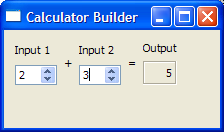
To subclass the
calculatorform.uifile and ensure thatqmakeprocesses it with theuic, we have to includecalculatorform.ui在.profile, as shown below:<Code snippet "multipleinheritance/multipleinheritance.pro:0" not found>When the project is compiled, the
uicwill generate a correspondingui_calculatorform.h.
在
CalculatorFormdefinition, we include theui_calculatorform.hthat was generated earlier.#include "ui_calculatorform.h"As mentioned earlier, the class is a subclass of both
QWidgetandUi::CalculatorForm.class CalculatorForm : public QWidget, private Ui::CalculatorForm { Q_OBJECT public: explicit CalculatorForm(QWidget *parent = nullptr); private slots: void on_inputSpinBox1_valueChanged(int value); void on_inputSpinBox2_valueChanged(int value); };Two slots are defined according to the automatic connection naming convention required by
uic. This is to ensure thatQMetaObject‘s auto-connection facilities connect all the signals and slots involved automatically.
In the constructor, we call
setupUi()to load the user interface file. Note that setupUi is a method ofUi::CalculatorForm.CalculatorForm::CalculatorForm(QWidget *parent) : QWidget(parent) { setupUi(this); }We include two slots,
on_inputSpinBox1_valueChanged()andon_inputSpinBox2_valueChanged(). These slots respond to thevalueChanged()signal that both spin boxes emit. Whenever there is a change in one spin box’s value, we take that value and add it to whatever value the other spin box has.void CalculatorForm::on_inputSpinBox1_valueChanged(int value) { outputWidget->setText(QString::number(value + inputSpinBox2->value())); } void CalculatorForm::on_inputSpinBox2_valueChanged(int value) { outputWidget->setText(QString::number(value + inputSpinBox1->value())); }
main()
main()function instantiatesQApplicationandCalculatorForm。calculatorobject is displayed by invoking theshow()函数。int main(int argc, char *argv[]) { QApplication app(argc, argv); CalculatorForm calculator; calculator.show(); return app.exec(); }There are various approaches to include forms into applications. The Multiple Inheritance approach is just one of them. See Using a Designer UI File in Your Application for more information on the other approaches available.
