将自定义项添加到表面图形。
The custom items example shows how to add your own custom meshes as items to a graph, and how to remove them.
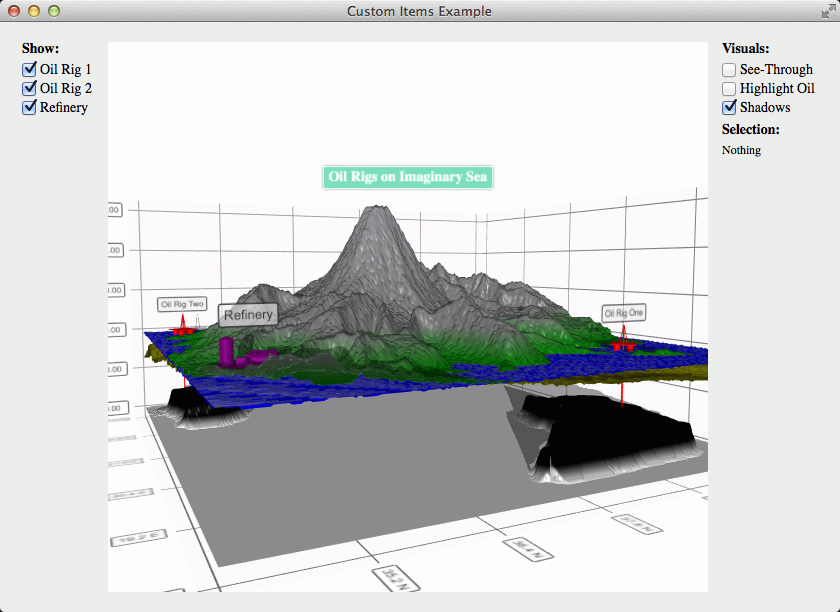
要运行范例从 Qt Creator ,打开 欢迎 模式,然后选择范例从 范例 . For more information, visit Building and Running an Example.
We’ll add the meshes in a resource file:
<RCC>
...
<qresource prefix="/items">
    <file>refinery.obj</file>
    <file>oilrig.obj</file>
</qresource>
</RCC>
In this example we do not have specific textures for our meshes, so we’ll just create a small
QImageand fill it with a single color:QImage color = QImage(2, 2, QImage::Format_RGB32); color.fill(Qt::red);Then we’ll specify the position for the item in a variable. This way we’ll be able to use it later for removing the correct item:
QVector3D positionOne = QVector3D(39.0f, 77.0f, 19.2f);Then we’ll create a new
QCustom3DItemwith all the parameters:QCustom3DItem *item = new QCustom3DItem(":/items/oilrig.obj", positionOne, QVector3D(0.025f, 0.025f, 0.025f), QQuaternion::fromAxisAndAngle(0.0f, 1.0f, 0.0f, 45.0f), color);And finally we’ll just add the item:
m_graph->addCustomItem(item);
We’ll just call
removeCustomItemAt()with the position of the item:m_graph->removeCustomItemAt(positionOne);注意
Removing a custom item from the graph also deletes it. If you want to preserve the item, you need to use
releaseCustomItem()method instead.
