在 Widget 应用程序中实现自定义输入处理程序。
The Custom Input example shows how to customize the 3D graph controls in a widget application using a custom graph input handler to capture and process mouse events. The code in this example shows also how the camera is controlled by using
QPropertyAnimationto animate the camera and item selection is done on mouseover rather than clicking any mouse buttons. Also the code shows how to implement similar zoom with mouse wheel functionality as the default input handler implements.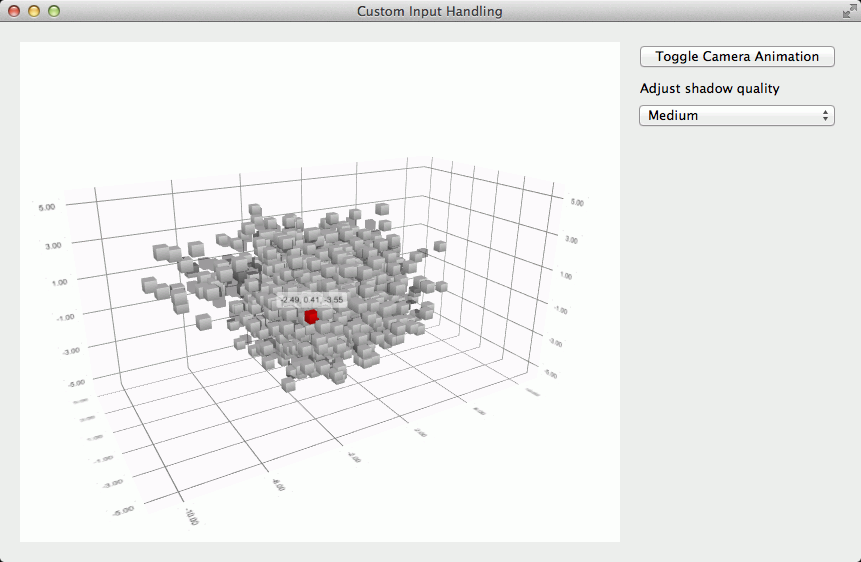
要运行范例从 Qt Creator ,打开 欢迎 模式,然后选择范例从 范例 . For more information, visit Building and Running an Example.
The default input handling mechanism is replaced by setting the active input handler of
Q3DScattertoCustomInputHandlerthat implements the custom behavior.m_graph->setActiveInputHandler(m_inputHandler);
The on mouseover selection handling is implemented in the
CustomInputHandlerthat captures the mouse events. It then stores the last known coordinates to theinputPosition特性。void CustomInputHandler::mouseMoveEvent(QMouseEvent *event, const QPoint &mousePos) { Q_UNUSED(event) setInputPosition(mousePos); }As the selection is one shot, and is cleared each time a 3D frame is rendered, a timer is setup to retrigger selection so that the selection moves to the item currently under the mouse cursor as the camera animates around the graph even when the mouse cursor is not moving.
m_selectionTimer = new QTimer(this);
m_selectionTimer->setInterval(10);
m_selectionTimer->setSingleShot(false);
QObject::connect(m_selectionTimer, &QTimer::timeout, this,
                 &ScatterDataModifier::triggerSelection);
m_selectionTimer->start();
The camera has a zoom factor that represents amount of zoom in percentages. In this example the zoom range is limited between 10% and 500%. This range is then divided to four subranges where
angleDeltais scaled to different amount of zoom change based on the current subrange.void CustomInputHandler::wheelEvent(QWheelEvent *event) { // Adjust zoom level based on what zoom range we're in. int zoomLevel = scene()->activeCamera()->zoomLevel(); if (zoomLevel > 100) zoomLevel += event->angleDelta().y() / 12; else if (zoomLevel > 50) zoomLevel += event->angleDelta().y() / 60; else zoomLevel += event->angleDelta().y() / 120; if (zoomLevel > 500) zoomLevel = 500; else if (zoomLevel < 10) zoomLevel = 10; scene()->activeCamera()->setZoomLevel(zoomLevel); }
The camera is animated to constantly rotate around the graph with two animations. The rotation around the graph is done with a simple
QPropertyAnimationthat just increments during 20 seconds from 0 degrees to 360 degrees and sets thexRotation特性。m_animationCameraX = new QPropertyAnimation(m_graph->scene()->activeCamera(), "xRotation"); m_animationCameraX->setDuration(20000); m_animationCameraX->setStartValue(QVariant::fromValue(0.0f)); m_animationCameraX->setEndValue(QVariant::fromValue(360.0f)); m_animationCameraX->setLoopCount(-1);The camera movement up and down is implemented with a
QSequentialAnimationGroupthat varies theyRotationproperty of the camera from 5 degrees to 45 degrees and back with in and out easing.QPropertyAnimation *upAnimation = new QPropertyAnimation(m_graph->scene()->activeCamera(), "yRotation"); upAnimation->setDuration(9000); upAnimation->setStartValue(QVariant::fromValue(5.0f)); upAnimation->setEndValue(QVariant::fromValue(45.0f)); QPropertyAnimation *downAnimation = new QPropertyAnimation(m_graph->scene()->activeCamera(), "yRotation"); downAnimation->setDuration(9000); downAnimation->setStartValue(QVariant::fromValue(45.0f)); downAnimation->setEndValue(QVariant::fromValue(5.0f)); m_animationCameraY = new QSequentialAnimationGroup(); m_animationCameraY->setLoopCount(-1); m_animationCameraY->addAnimation(upAnimation); m_animationCameraY->addAnimation(downAnimation);
