
Web 浏览器范例

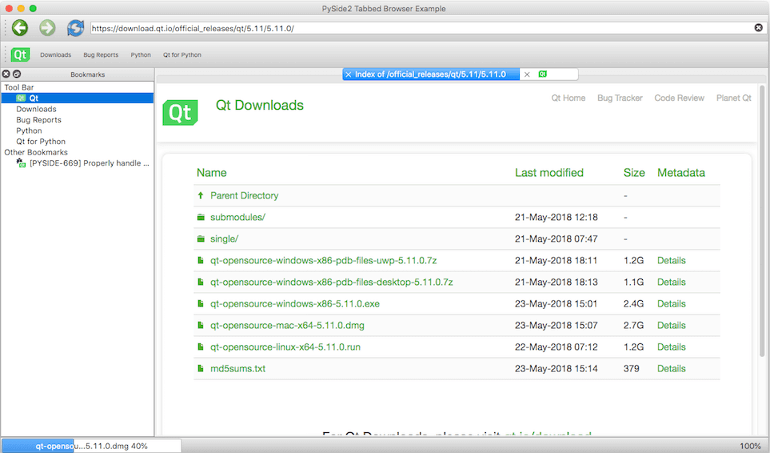
The example demonstrates the power and simplicity offered by Qt for Python to developers. It uses several PySide2 submodules to offer a fluid and modern-looking UI that is apt for a web browser. The application offers the following features:

  • Tab-based browsing experience using QTabWidget.

  • Download manager using a QProgressBar and QWebEngineDownloadItem.

  • Bookmark manager using QTreeView.

../_images/tabbedbrowser.png

The application’s code is organized in several parts for ease of maintenance. For example, DownloadWidget provides a widget to track progress of a download item. In the following sections, these different parts are discussed briefly to help you understand the Python code behind them a little better.

BookmarkWidget 或 bookmarkwidget.py

This widget docks to the left of the main window by default. It inherits QTreeView and loads a default set of bookmarks using a QStandardItemModel. The model is populated at startup from a JSON file, which is updated when you add or remove bookmarks from the tree view.

class BookmarkWidget [source]

提供树视图来管理书签。

DownloadWidget 或 downloadwidget.py

The widget tracks progress of the download item. It inherits QProgressBar to display progress of the QWebEngineDownloadItem instance, and offers a context-menu with actions such as Launch, Show in folder, Cancel, and Remove.

class DownloadWidget ( download_item ) [source]

Lets you track progress of a QWebEngineDownloadItem.

contextMenuEvent ( self , event : PySide2.QtGui.QContextMenuEvent ) [source]
mouseDoubleClickEvent ( self , event : PySide2.QtGui.QMouseEvent ) [source]

BrowserTabWidget 或 browsertabwidget.py

The widget includes a QWebEngineView to enable viewing web content. It docks to the right of BookmarkWidget in the main window.

class BrowserTabWidget ( window_factory_function ) [source]

Enables having several tabs with QWebEngineView.

find ( arg__1 : int ) PySide2.QtWidgets.QWidget [source]

MainWindow 或 main.py

This is the parent window that collates all the other widgets together to offer the complete package.

PySide2 WebEngineWidgets 范例

class MainWindow [source]

Provides the parent window that includes the BookmarkWidget, BrowserTabWidget, and a DownloadWidget, to offer the complete web browsing experience.

create_main_window ( ) [source]

Creates a MainWindow using 75% of the available screen resolution.

create_main_window_with_browser ( ) [source]

Creates a MainWindow with a BrowserTabWidget.

Try running the example to explore it further.