def
__eq__
(url)
def
__lt__
(url)
def
__ne__
(url)
def
__reduce__
()
def
__repr__
()
def
adjusted
(options)
def
authority
([options=QUrl.PrettyDecoded])
def
clear
()
def
errorString
()
def
fileName
([options=QUrl.FullyDecoded])
def
fragment
([options=QUrl.PrettyDecoded])
def
hasFragment
()
def
hasQuery
()
def
host
([arg__1=QUrl.FullyDecoded])
def
isEmpty
()
def
isLocalFile
()
def
isParentOf
(url)
def
isRelative
()
def
isValid
()
def
匹配
(url, options)
def
operator=
(url)
def
password
([arg__1=QUrl.FullyDecoded])
def
path
([options=QUrl.FullyDecoded])
def
port
([defaultPort=-1])
def
query
([arg__1=QUrl.PrettyDecoded])
def
resolved
(relative)
def
scheme
()
def
setAuthority
(authority[, mode=TolerantMode])
def
setFragment
(fragment[, mode=TolerantMode])
def
setHost
(host[, mode=DecodedMode])
def
setPassword
(password[, mode=DecodedMode])
def
setPath
(path[, mode=DecodedMode])
def
setPort
(port)
def
setQuery
(query)
def
setQuery
(query[, mode=TolerantMode])
def
setScheme
(scheme)
def
setUrl
(url[, mode=TolerantMode])
def
setUserInfo
(userInfo[, mode=TolerantMode])
def
setUserName
(userName[, mode=DecodedMode])
def
swap
(other)
def
toDisplayString
([options=QUrl.FormattingOptions(PrettyDecoded)])
def
toEncoded
([options=QUrl.FullyEncoded])
def
toLocalFile
()
def
toString
([options=QUrl.FormattingOptions(PrettyDecoded)])
def
topLevelDomain
([options=QUrl.FullyDecoded])
def
url
([options=QUrl.FormattingOptions(PrettyDecoded)])
def
userInfo
([options=QUrl.PrettyDecoded])
def
userName
([options=QUrl.FullyDecoded])
def
fromAce
(arg__1)
def
fromEncoded
(url[, mode=TolerantMode])
def
fromLocalFile
(localfile)
def
fromPercentEncoding
(arg__1)
def
fromStringList
(uris[, mode=TolerantMode])
def
fromUserInput
(userInput)
def
fromUserInput
(userInput, workingDirectory[, options=QUrl.DefaultResolution])
def
idnWhitelist
()
def
setIdnWhitelist
(arg__1)
def
toAce
(arg__1)
def
toPercentEncoding
(arg__1[, exclude=QByteArray()[, include=QByteArray()]])
def
toStringList
(uris[, options=QUrl.FormattingOptions(PrettyDecoded)])
It can parse and construct URLs in both encoded and unencoded form.
QUrlalso has support for internationalized domain names (IDNs).The most common way to use
QUrlis to initialize it via the constructor by passing aQString。否则,setUrl()can also be used.URLs can be represented in two forms: encoded or unencoded. The unencoded representation is suitable for showing to users, but the encoded representation is typically what you would send to a web server. For example, the unencoded URL “ http:/ /bühler.example.com/List of applicants.xml” would be sent to the server as “ http://xn–bhler-kva.example.com/List%20of%20applicants.xml ”.
URL 也可以逐段构造通过调用
setScheme(),setUserName(),setPassword(),setHost(),setPort(),setPath(),setQuery()andsetFragment(). Some convenience functions are also available:setAuthority()sets the user name, password, host and port.setUserInfo()sets the user name and password at once.调用
isValid()to check if the URL is valid. This can be done at any point during the constructing of a URL. IfisValid()返回false,应该clear()the URL before proceeding, or start over by parsing a new URL withsetUrl().构造查询特别方便,透过使用
QUrlQuery类及其方法setQueryItems(),addQueryItem()andremoveQueryItem()。使用setQueryDelimiters()to customize the delimiters used for generating the query string.为方便生成编码 URL 字符串或查询字符串,有 2 个静态函数称为
fromPercentEncoding()andtoPercentEncoding()which deal with percent encoding and decoding ofQString对象。
fromLocalFile()constructs aQUrlby parsing a local file path.toLocalFile()converts a URL to a local file path.人类可读 URL 表示的抓取是采用
toString(). This representation is appropriate for displaying a URL to a user in unencoded form. The encoded form however, as returned bytoEncoded(), is for internal use, passing to web servers, mail clients and so on. Both forms are technically correct and represent the same URL unambiguously – in fact, passing either form toQUrl‘s constructor or tosetUrl()will yield the sameQUrl对象。
QUrlconforms to the URI specification from RFC 3986 (Uniform Resource Identifier: Generic Syntax), and includes scheme extensions from RFC 1738 (Uniform Resource Locators). Case folding rules inQUrlconform to RFC 3491 (Nameprep: A Stringprep Profile for Internationalized Domain Names (IDN)). It is also compatible with the 文件 URI 规范 来自 freedesktop.org,前提是区域设置编码文件名使用 UTF-8 (IDN 要求)。
调用
isRelative()will return whether or not the URL is relative. A relative URL has noscheme。例如:qDebug() << QUrl("main.qml").isRelative(); // true: no scheme qDebug() << QUrl("qml/main.qml").isRelative(); // true: no scheme qDebug() << QUrl("file:main.qml").isRelative(); // false: has "file" scheme qDebug() << QUrl("file:qml/main.qml").isRelative(); // false: has "file" scheme预告,URL 可以是绝对的当包含相对路径时,反之亦然:
// Absolute URL, relative path
QUrl url("file:file.txt");
qDebug() << url.isRelative();                 // false: has "file" scheme
qDebug() << QDir::isAbsolutePath(url.path()); // false: relative path
// Relative URL, absolute path
url = QUrl("/home/user/file.txt");
qDebug() << url.isRelative();                 // true: has no scheme
qDebug() << QDir::isAbsolutePath(url.path()); // true: absolute path
可以解析相对 URL,通过将其作为自变量传递给
resolved(), which returns an absolute URL.isParentOf()is used for determining whether one URL is a parent of another.
QUrlis capable of detecting many errors in URLs while parsing it or when components of the URL are set with individual setter methods (likesetScheme(),setHost()orsetPath()). If the parsing or setter function is successful, any previously recorded error conditions will be discarded.默认情况下,
QUrlsetter methods operate inTolerantMode,这意味着他们接受一些常见过失和数据过失表示。替代剖析方法是StrictMode, 应用进一步校验。见ParsingMode用于描述剖析模式的差异。
QUrlonly checks for conformance with the URL specification. It does not try to verify that high-level protocol URLs are in the format they are expected to be by handlers elsewhere. For example, the following URIs are all considered valid byQUrl, even if they do not make sense when used:当剖析器遇到错误时,它信号事件通过使
isValid()return false andtoString()/toEncoded()return an empty string. If it is necessary to show the user the reason why the URL failed to parse, the error condition can be obtained fromQUrl通过调用errorString(). Note that this message is highly technical and may not make sense to end-users.
QUrlis capable of recording only one error condition. If more than one error is found, it is undefined which error is reported.
遵循这些规则以避免错误字符转换,当处理 URL 和字符串时:
当创建
QString以包含 URL 从QByteArray或 char*,始终使用fromUtf8().
QUrl

QUrl(url[, mode=TolerantMode])
QUrl(copy)
- param url
unicode
- param copy
- param mode
ParsingMode
构造空
QUrl
对象。
构造 URL 通过剖析
url
.
QUrl
will automatically percent encode all characters that are not allowed in a URL and decode the percent-encoded sequences that represent an unreserved character (letters, digits, hyphens, undercores, dots and tildes). All other characters are left in their original forms.
剖析
url
使用剖析模式
parsingMode
。在
TolerantMode
(默认),
QUrl
will correct certain mistakes, notably the presence of a percent character (‘%’) not followed by two hexadecimal digits, and it will accept any character in any position. In
StrictMode
, encoding mistakes will not be tolerated and
QUrl
will also check that certain forbidden characters are not present in unencoded form. If an error is detected in
StrictMode
,
isValid()
will return false. The parsing mode
DecodedMode
在此上下文中不准许。
范例:
url = QUrl("http://www.example.com/List of holidays.xml")
# url.toEncoded() == "http://www.example.com/List%20of%20holidays.xml"
要从编码字符串构造 URL,还可以使用
fromEncoded()
:
url = QUrl.fromEncoded("http://qtsoftware.com/List%20of%20holidays.xml")
Both functions are equivalent and, in Qt 5, both functions accept encoded data. Usually, the choice of the
QUrl
constructor or
setUrl()
versus
fromEncoded()
will depend on the source data: the constructor and
setUrl()
接受
QString
,而
fromEncoded
接受
QByteArray
.
另请参阅
setUrl()
fromEncoded()
TolerantMode
PySide2.QtCore.QUrl.
ParsingMode

The parsing mode controls the way
QUrl
parses strings.
|
常量 |
描述 |
|---|---|
|
QUrl.TolerantMode |
|
|
QUrl.StrictMode |
Only valid URLs are accepted. This mode is useful for general URL validation. |
|
QUrl.DecodedMode |
|
In , the parser has the following behaviour:
Spaces and “%20”: unencoded space characters will be accepted and will be treated as equivalent to “%20”.
Single “%” characters: Any occurrences of a percent character “%” not followed by exactly two hexadecimal characters (e.g., “13% coverage.html”) will be replaced by “%25”. Note that one lone “%” character will trigger the correction mode for all percent characters.
Reserved and unreserved characters: An encoded URL should only contain a few characters as literals; all other characters should be percent-encoded. In , these characters will be accepted if they are found in the URL: space / double-quote / “<” / “>” / “” / “^” / “`” / “{” / “|” / “}” Those same characters can be decoded again by passing
DecodeReserved
to
toString()
or
toEncoded()
. In the getters of individual components, those characters are often returned in decoded form.
When in , if a parsing error is found,
isValid()
will return
false
and
errorString()
will return a message describing the error. If more than one error is detected, it is undefined which error gets reported.
Note that is not usually enough for parsing user input, which often contains more errors and expectations than the parser can deal with. When dealing with data coming directly from the user – as opposed to data coming from data-transfer sources, such as other programs – it is recommended to use
fromUserInput()
.
另请参阅
fromUserInput()
setUrl()
toString()
toEncoded()
FormattingOptions
PySide2.QtCore.QUrl.
UrlFormattingOption

格式化选项定义 URL 是如何被格式的,当以文本写出时。
|
常量 |
描述 |
|---|---|
|
QUrl.None |
The format of the URL is unchanged. |
|
QUrl.RemoveScheme |
The scheme is removed from the URL. |
|
QUrl.RemovePassword |
Any password in the URL is removed. |
|
QUrl.RemoveUserInfo |
Any user information in the URL is removed. |
|
QUrl.RemovePort |
Any specified port is removed from the URL. |
|
QUrl.RemoveAuthority |
|
|
QUrl.RemovePath |
The URL’s path is removed, leaving only the scheme, host address, and port (if present). |
|
QUrl.RemoveQuery |
The query part of the URL (following a ‘?’ character) is removed. |
|
QUrl.RemoveFragment |
|
|
QUrl.RemoveFilename |
The filename (i.e. everything after the last ‘/’ in the path) is removed. The trailing ‘/’ is kept, unless is set. Only valid if is not set. |
|
QUrl.PreferLocalFile |
If the URL is a local file according to
|
|
QUrl.StripTrailingSlash |
The trailing slash is removed from the path, if one is present. |
|
QUrl.NormalizePathSegments |
Modifies the path to remove redundant directory separators, and to resolve “.”s and “..”s (as far as possible). For non-local paths, adjacent slashes are preserved. |
Note that the case folding rules in Nameprep, which
QUrl
conforms to, require host names to always be converted to lower case, regardless of the Qt::FormattingOptions used.
The options from
ComponentFormattingOptions
are also possible.
另请参阅
ComponentFormattingOptions
PySide2.QtCore.QUrl.
ComponentFormattingOption

The component formatting options define how the components of an URL will be formatted when written out as text. They can be combined with the options from
FormattingOptions
当用于
toString()
and
toEncoded()
.
|
常量 |
描述 |
|---|---|
|
QUrl.PrettyDecoded |
The component is returned in a “pretty form”, with most percent-encoded characters decoded. The exact behavior of varies from component to component and may also change from Qt release to Qt release. This is the default. |
|
QUrl.EncodeSpaces |
Leave space characters in their encoded form (“%20”). |
|
QUrl.EncodeUnicode |
Leave non-US-ASCII characters encoded in their UTF-8 percent-encoded form (e.g., “%C3%A9” for the U+00E9 codepoint, LATIN SMALL LETTER E WITH ACUTE). |
|
QUrl.EncodeDelimiters |
Leave certain delimiters in their encoded form, as would appear in the URL when the full URL is represented as text. The delimiters are affected by this option change from component to component. This flag has no effect in
|
|
QUrl.EncodeReserved |
Leave US-ASCII characters not permitted in the URL by the specification in their encoded form. This is the default on
|
|
QUrl.DecodeReserved |
Decode the US-ASCII characters that the URL specification does not allow to appear in the URL. This is the default on the getters of individual components. |
|
QUrl.FullyEncoded |
Leave all characters in their properly-encoded form, as this component would appear as part of a URL. When used with
|
|
QUrl.FullyDecoded |
Attempt to decode as much as possible. For individual components of the URL, this decodes every percent encoding sequence, including control characters (U+0000 to U+001F) and UTF-8 sequences found in percent-encoded form. Use of this mode may cause data loss, see below for more information. |
The values of and should not be used together in one call. The behavior is undefined if that happens. They are provided as separate values because the behavior of the “pretty mode” with regards to reserved characters is different on certain components and specially on the full URL.
The mode is similar to the behavior of the functions returning
QStringin Qt 4.x, in that every character represents itself and never has any special meaning. This is true even for the percent character (‘%’), which should be interpreted to mean a literal percent, not the beginning of a percent-encoded sequence. The same actual character, in all other decoding modes, is represented by the sequence “%25”.Whenever re-applying data obtained with into a
QUrl, care must be taken to use theDecodedModeparameter to the setters (likesetPath()andsetUserName()). Failure to do so may cause re-interpretation of the percent character (‘%’) as the beginning of a percent-encoded sequence.This mode is quite useful when portions of a URL are used in a non-URL context. For example, to extract the username, password or file paths in an FTP client application, the mode should be used.
This mode should be used with care, since there are two conditions that cannot be reliably represented in the returned
QString. They are:
Non-UTF-8 sequences: URLs may contain sequences of percent-encoded characters that do not form valid UTF-8 sequences. Since URLs need to be decoded using UTF-8, any decoder failure will result in the
QStringcontaining one or more replacement characters where the sequence existed.编码定界符: URLs are also allowed to make a distinction between a delimiter found in its literal form and its equivalent in percent-encoded form. This is most commonly found in the query, but is permitted in most parts of the URL.
The following example illustrates the problem:
QUrl original("http://example.com/?q=a%2B%3Db%26c");
QUrl copy(original);
copy.setQuery(copy.query(QUrl::FullyDecoded), QUrl::DecodedMode);
qDebug() << original.toString();   // prints: http://example.com/?q=a%2B%3Db%26c
qDebug() << copy.toString();       // prints: http://example.com/?q=a+=b&c
If the two URLs were used via HTTP GET, the interpretation by the web server would probably be different. In the first case, it would interpret as one parameter, with a key of “q” and value “a+=b&c”. In the second case, it would probably interpret as two parameters, one with a key of “q” and value “a =b”, and the second with a key “c” and no value.
另请参阅
FormattingOptions
PySide2.QtCore.QUrl.
UserInputResolutionOption

The user input resolution options define how
fromUserInput()
should interpret strings that could either be a relative path or the short form of a HTTP URL. For instance
file.pl
can be either a local file or the URL
http://file.pl
.
|
常量 |
描述 |
|---|---|
|
QUrl.DefaultResolution |
The default resolution mechanism is to check whether a local file exists, in the working directory given to
|
|
QUrl.AssumeLocalFile |
This option makes
|
另请参阅
PySide2.QtCore.QUrl.
__reduce__
(
)

PyObject
PySide2.QtCore.QUrl.
__repr__
(
)

PyObject
PySide2.QtCore.QUrl.
adjusted
(
options
)

options
–
FormattingOptions
Returns an adjusted version of the URL. The output can be customized by passing flags with
options
.
The encoding options from
ComponentFormattingOption
don’t make much sense for this method, nor does
PreferLocalFile
.
这始终相当于
QUrl
(url.
toString
(options)).
另请参阅
FormattingOptions
toEncoded()
toString()
options
–
ComponentFormattingOptions
unicode
Returns the authority of the URL if it is defined; otherwise an empty string is returned.
This function returns an unambiguous value, which may contain that characters still percent-encoded, plus some control sequences not representable in decoded form in
QString
.
options
argument controls how to format the user info component. The value of
FullyDecoded
is not permitted in this function. If you need to obtain fully decoded data, call
userName()
,
password()
,
host()
and
port()
individually.
PySide2.QtCore.QUrl.
errorString
(
)

unicode
返回错误消息,若最后操作修改此
QUrl
对象遇到剖析错误。若未检测到错误,此函数返回空字符串和
isValid()
返回
true
.
由此函数返回的错误消息本质上是技术性的,最终用户可能不理解。对于开发人员最有用的是试着理解为什么
QUrl
不接受某些输入。
另请参阅
ParsingMode
PySide2.QtCore.QUrl.
fileName
(
[
options=QUrl.FullyDecoded
]
)

options
–
ComponentFormattingOptions
unicode
返回文件名,排除目录路径。
注意:若此
QUrl
给定以斜杠结尾的路径,认为文件名是空的。
If the path doesn’t contain any slash, it is fully returned as the .
范例:
QUrl url("http://qt-project.org/support/file.html");
// url.adjusted(RemoveFilename) == "http://qt-project.org/support/"
// url.fileName() == "file.html"
options
argument controls how to format the file name component. All values produce an unambiguous result. With
FullyDecoded
, all percent-encoded sequences are decoded; otherwise, the returned value may contain some percent-encoded sequences for some control sequences not representable in decoded form in
QString
.
另请参阅
PySide2.QtCore.QUrl.
fragment
(
[
options=QUrl.PrettyDecoded
]
)

options
–
ComponentFormattingOptions
unicode
Returns the fragment of the URL. To determine if the parsed URL contained a fragment, use
hasFragment()
.
options
argument controls how to format the fragment component. All values produce an unambiguous result. With
FullyDecoded
, all percent-encoded sequences are decoded; otherwise, the returned value may contain some percent-encoded sequences for some control sequences not representable in decoded form in
QString
.
注意:
FullyDecoded
may cause data loss if those non-representable sequences are present. It is recommended to use that value when the result will be used in a non-URL context.
PySide2.QtCore.QUrl.
fromAce
(
arg__1
)

arg__1
–
QByteArray
unicode
Returns the Unicode form of the given domain name
domain
, which is encoded in the ASCII Compatible Encoding (ACE). The result of this function is considered equivalent to
domain
.
If the value in
domain
cannot be encoded, it will be converted to
QString
and returned.
The ASCII Compatible Encoding (ACE) is defined by RFC 3490, RFC 3491 and RFC 3492. It is part of the Internationalizing Domain Names in Applications (IDNA) specification, which allows for domain names (like
"example.com"
) to be written using international characters.
PySide2.QtCore.QUrl.
fromEncoded
(
url
[
,
mode=TolerantMode
]
)

url
–
QByteArray
mode
–
ParsingMode
剖析
input
and returns the corresponding
QUrl
.
input
is assumed to be in encoded form, containing only ASCII characters.
Parses the URL using
parsingMode
。见
setUrl()
for more information on this parameter.
DecodedMode
在此上下文中不准许。
另请参阅
PySide2.QtCore.QUrl.
fromLocalFile
(
localfile
)

localfile – unicode
返回
QUrl
representation of
localFile
, interpreted as a local file. This function accepts paths separated by slashes as well as the native separator for this platform.
This function also accepts paths with a doubled leading slash (or backslash) to indicate a remote file, as in “//servername/path/to/file.txt”. Note that only certain platforms can actually open this file using
open()
.
An empty
localFile
leads to an empty URL (since Qt 5.4).
qDebug() << QUrl::fromLocalFile("file.txt");            // QUrl("file:file.txt")
qDebug() << QUrl::fromLocalFile("/home/user/file.txt"); // QUrl("file:///home/user/file.txt")
qDebug() << QUrl::fromLocalFile("file:file.txt");       // doesn't make sense; expects path, not url with scheme
In the first line in snippet above, a file URL is constructed from a local, relative path. A file URL with a relative path only makes sense if there is a base URL to resolve it against. For example:
QUrl url = QUrl::fromLocalFile("file.txt");
QUrl baseUrl = QUrl("file:/home/user/");
// wrong: prints QUrl("file:file.txt"), as url already has a scheme
qDebug() << baseUrl.resolved(url);
To resolve such a URL, it’s necessary to remove the scheme beforehand:
// correct: prints QUrl("file:///home/user/file.txt")
url.setScheme(QString());
qDebug() << baseUrl.resolved(url);
For this reason, it is better to use a relative URL (that is, no scheme) for relative file paths:
QUrl url = QUrl("file.txt");
QUrl baseUrl = QUrl("file:/home/user/");
// prints QUrl("file:///home/user/file.txt")
qDebug() << baseUrl.resolved(url);
PySide2.QtCore.QUrl.
fromPercentEncoding
(
arg__1
)

arg__1
–
QByteArray
unicode
返回的解码拷贝源于
input
.
input
首先从百分比编码解码,然后从 UTF-8 转换成 Unicode。
注意
Given invalid input (such as a string containing the sequence “%G5”, which is not a valid hexadecimal number) the output will be invalid as well. As an example: the sequence “%G5” could be decoded to ‘W’.
PySide2.QtCore.QUrl.
fromStringList
(
uris
[
,
mode=TolerantMode
]
)

uris – 字符串列表
mode
–
ParsingMode
Converts a list of strings representing
urls
into a list of urls, using
QUrl
(str,
mode
). Note that this means all strings must be urls, not for instance local paths.
PySide2.QtCore.QUrl.
fromUserInput
(
userInput
)

userInput – unicode
返回有效 URL 从用户提供的
userInput
字符串若可以被扣除。在不可能的情况下,无效
QUrl()
被返回。
大多数可以浏览 Web 的应用程序都允许用户以纯字符串形式输入 URL。此字符串可以被手动键入位置栏,从剪贴板获得,或通过命令行自变量传入。
当字符串不是有效 URL 时,履行最佳猜测做出各种 Web 相关假定。
In the case the string corresponds to a valid file path on the system, a
file://
URL is constructed, using
fromLocalFile()
.
If that is not the case, an attempt is made to turn the string into a
http://
or
ftp://
URL. The latter in the case the string starts with ‘ftp’. The result is then passed through
QUrl
‘s tolerant parser, and in the case or success, a valid
QUrl
被返回,否则返回
QUrl()
.
qt-project.org becomes http://qt-project.org
ftp.qt-project.org becomes ftp://ftp.qt-project.org
hostname becomes http://hostname
/home/user/test.html becomes file:///home/user/test.html
PySide2.QtCore.QUrl.
fromUserInput
(
userInput
,
workingDirectory
[
,
options=QUrl.DefaultResolution
]
)

userInput – unicode
workingDirectory – unicode
options
–
UserInputResolutionOptions
返回有效 URL 从用户提供的
userInput
字符串若可以被扣除。在不可能的情况下,无效
QUrl()
被返回。
这重载接受
workingDirectory
路径,为了能够处理相对路径。这特别有用当处理命令行自变量时。若
workingDirectory
为空,不会做相对路径处理,因此,此方法的行为像重载其某一自变量。
默认情况下,输入字符串才会看起来像要被这样对待的相对路径若文件实际存在于给定工作目录下时。
If the application can handle files that don’t exist yet, it should pass the flag
AssumeLocalFile
in
options
.
PySide2.QtCore.QUrl.
hasFragment
(
)

bool
返回
true
若此 URL 包含片段 (即:若看到 # 位于其中)。
另请参阅
PySide2.QtCore.QUrl.
hasQuery
(
)

bool
返回
true
若此 URL 包含 Query (即:若看到 ? 位于其中)。
PySide2.QtCore.QUrl.
host
(
[
arg__1=QUrl.FullyDecoded
]
)

arg__1
–
ComponentFormattingOptions
unicode
返回 URL 的主机若 URL 有定义;否则返回空字符串。
options
argument controls how the hostname will be formatted. The
EncodeUnicode
option will cause this function to return the hostname in the ASCII-Compatible Encoding (ACE) form, which is suitable for use in channels that are not 8-bit clean or that require the legacy hostname (such as DNS requests or in HTTP request headers). If that flag is not present, this function returns the International Domain Name (IDN) in Unicode form, according to the list of permissible top-level domains (see
idnWhitelist()
).
All other flags are ignored. Host names cannot contain control or percent characters, so the returned value can be considered fully decoded.
PySide2.QtCore.QUrl.
idnWhitelist
(
)

字符串列表
返回顶级域名的当前白名单,这些域名的组合中允许有非 ASCII 字符。
见
setIdnWhitelist()
for the rationale of this list.
另请参阅
PySide2.QtCore.QUrl.
isLocalFile
(
)

bool
返回
true
if this URL is pointing to a local file path. A URL is a local file path if the scheme is “file”.
Note that this function considers URLs with hostnames to be local file paths, even if the eventual file path cannot be opened with
open()
.
PySide2.QtCore.QUrl.
isParentOf
(
url
)

url
–
QUrl
bool
返回
true
if this URL is a parent of
childUrl
.
childUrl
is a child of this URL if the two URLs share the same scheme and authority, and this URL’s path is a parent of the path of
childUrl
.
PySide2.QtCore.QUrl.
isRelative
(
)

bool
返回
true
if the URL is relative; otherwise returns
false
. A URL is relative reference if its scheme is undefined; this function is therefore equivalent to calling
scheme()
.
isEmpty()
.
Relative references are defined in RFC 3986 section 4.2.
另请参阅
														Relative


														URLs


														vs


														Relative


														Paths
PySide2.QtCore.QUrl.
isValid
(
)

bool
返回
true
if the URL is non-empty and valid; otherwise returns
false
.
The URL is run through a conformance test. Every part of the URL must conform to the standard encoding rules of the URI standard for the URL to be reported as valid.
def checkUrl(url):
    if !url.isValid():
        print "Invalid URL: %s" % url.toString()
        return False
    return True
PySide2.QtCore.QUrl.
匹配
(
url
,
options
)

url
–
QUrl
options
–
FormattingOptions
bool
返回
true
若此 URL 和给定
url
are equal after applying
options
to both; otherwise returns
false
.
This is equivalent to calling adjusted(options) on both URLs and comparing the resulting urls, but faster.
PySide2.QtCore.QUrl.
__ne__
(
url
)

url
–
QUrl
bool
返回
true
若此 URL 和给定
url
不相等;则返回
false
.
PySide2.QtCore.QUrl.operator=(url)
url – unicode
PySide2.QtCore.QUrl.
__eq__
(
url
)

url
–
QUrl
bool
返回
true
若此 URL 和给定
url
相等;否则返回
false
.
PySide2.QtCore.QUrl.
password
(
[
arg__1=QUrl.FullyDecoded
]
)

arg__1
–
ComponentFormattingOptions
unicode
Returns the password of the URL if it is defined; otherwise an empty string is returned.
options
argument controls how to format the user name component. All values produce an unambiguous result. With
FullyDecoded
, all percent-encoded sequences are decoded; otherwise, the returned value may contain some percent-encoded sequences for some control sequences not representable in decoded form in
QString
.
注意:
FullyDecoded
may cause data loss if those non-representable sequences are present. It is recommended to use that value when the result will be used in a non-URL context, such as setting in
QAuthenticator
or negotiating a login.
另请参阅
PySide2.QtCore.QUrl.
path
(
[
options=QUrl.FullyDecoded
]
)

options
–
ComponentFormattingOptions
unicode
返回 URL 路径。
qDebug() << QUrl("file:file.txt").path();                   // "file.txt"
qDebug() << QUrl("/home/user/file.txt").path();             // "/home/user/file.txt"
qDebug() << QUrl("http://www.example.com/test/123").path(); // "/test/123"
options
argument controls how to format the path component. All values produce an unambiguous result. With
FullyDecoded
, all percent-encoded sequences are decoded; otherwise, the returned value may contain some percent-encoded sequences for some control sequences not representable in decoded form in
QString
.
注意:
FullyDecoded
may cause data loss if those non-representable sequences are present. It is recommended to use that value when the result will be used in a non-URL context, such as sending to an FTP server.
An example of data loss is when you have non-Unicode percent-encoded sequences and use
FullyDecoded
(the default):
qDebug() << QUrl("/foo%FFbar").path();
In this example, there will be some level of data loss because the
%FF
cannot be converted.
Data loss can also occur when the path contains sub-delimiters (such as
+
):
qDebug() << QUrl("/foo+bar%2B").path(); // "/foo+bar+"
Other decoding examples:
const QUrl url("/tmp/Mambo %235%3F.mp3");
qDebug() << url.path(QUrl::FullyDecoded);  // "/tmp/Mambo #5?.mp3"
qDebug() << url.path(QUrl::PrettyDecoded); // "/tmp/Mambo #5?.mp3"
qDebug() << url.path(QUrl::FullyEncoded);  // "/tmp/Mambo%20%235%3F.mp3"
另请参阅
PySide2.QtCore.QUrl.
port
(
[
defaultPort=-1
]
)

defaultPort
–
int
int
返回 URL 端口,或
defaultPort
若端口未指定。
范例:
ftp = QFtp()
ftp.connectToHost(url.host(), url.port(21))
另请参阅
PySide2.QtCore.QUrl.
query
(
[
arg__1=QUrl.PrettyDecoded
]
)

arg__1
–
ComponentFormattingOptions
unicode
Returns the query string of the URL if there’s a query string, or an empty result if not. To determine if the parsed URL contained a query string, use
hasQuery()
.
options
argument controls how to format the query component. All values produce an unambiguous result. With
FullyDecoded
, all percent-encoded sequences are decoded; otherwise, the returned value may contain some percent-encoded sequences for some control sequences not representable in decoded form in
QString
.
Note that use of
FullyDecoded
in queries is discouraged, as queries often contain data that is supposed to remain percent-encoded, including the use of the “%2B” sequence to represent a plus character (‘+’).
另请参阅
PySide2.QtCore.QUrl.
resolved
(
relative
)

Returns the result of the merge of this URL with
relative
. This URL is used as a base to convert
relative
to an absolute URL.
若
relative
is not a relative URL, this function will return
relative
directly. Otherwise, the paths of the two URLs are merged, and the new URL returned has the scheme and authority of the base URL, but with the merged path, as in the following example:
baseUrl = QUrl("http://qtsoftware.com/support")
relativeUrl = QUrl("../products/solutions")
print baseUrl.resolved(relativeUrl).toString()
# prints "http://qtsoftware.com/products/solutions"
Calling with “..” returns a
QUrl
whose directory is one level higher than the original. Similarly, calling with “../..” removes two levels from the path. If
relative
is “/”, the path becomes “/”.
另请参阅
PySide2.QtCore.QUrl.
scheme
(
)

unicode
Returns the scheme of the URL. If an empty string is returned, this means the scheme is undefined and the URL is then relative.
The scheme can only contain US-ASCII letters or digits, which means it cannot contain any character that would otherwise require encoding. Additionally, schemes are always returned in lowercase form.
另请参阅
PySide2.QtCore.QUrl.
setAuthority
(
authority
[
,
mode=TolerantMode
]
)

authority – unicode
mode
–
ParsingMode
Sets the authority of the URL to
authority
.
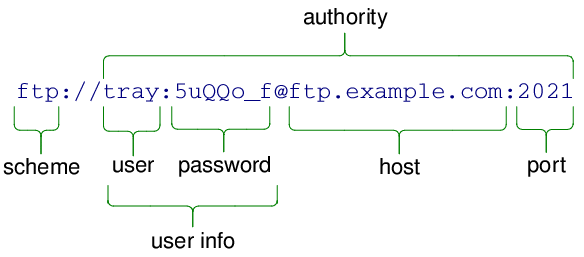
The authority of a URL is the combination of user info, a host name and a port. All of these elements are optional; an empty authority is therefore valid.
The user info and host are separated by a ‘@’, and the host and port are separated by a ‘:’. If the user info is empty, the ‘@’ must be omitted; although a stray ‘:’ is permitted if the port is empty.
The following example shows a valid authority string:
authority
data is interpreted according to
mode
: in
StrictMode
, any ‘%’ characters must be followed by exactly two hexadecimal characters and some characters (including space) are not allowed in undecoded form. In
TolerantMode
(the default), all characters are accepted in undecoded form and the tolerant parser will correct stray ‘%’ not followed by two hex characters.
This function does not allow
mode
to be
DecodedMode
. To set fully decoded data, call
setUserName()
,
setPassword()
,
setHost()
and
setPort()
individually.
PySide2.QtCore.QUrl.
setFragment
(
fragment
[
,
mode=TolerantMode
]
)

fragment – unicode
mode
–
ParsingMode
Sets the fragment of the URL to
fragment
. The fragment is the last part of the URL, represented by a ‘#’ followed by a string of characters. It is typically used in HTTP for referring to a certain link or point on a page:

The fragment is sometimes also referred to as the URL “reference”.
Passing an argument of QString() (a null
QString
) will unset the fragment. Passing an argument of
QString
(“”) (an empty but not null
QString
) will set the fragment to an empty string (as if the original URL had a lone “#”).
fragment
data is interpreted according to
mode
: in
StrictMode
, any ‘%’ characters must be followed by exactly two hexadecimal characters and some characters (including space) are not allowed in undecoded form. In
TolerantMode
, all characters are accepted in undecoded form and the tolerant parser will correct stray ‘%’ not followed by two hex characters. In
DecodedMode
, ‘%’ stand for themselves and encoded characters are not possible.
DecodedMode
should be used when setting the fragment from a data source which is not a URL or with a fragment obtained by calling
fragment()
采用
FullyDecoded
formatting option.
另请参阅
PySide2.QtCore.QUrl.
setHost
(
host
[
,
mode=DecodedMode
]
)

host – unicode
mode
–
ParsingMode
Sets the host of the URL to
host
. The host is part of the authority.
host
data is interpreted according to
mode
: in
StrictMode
, any ‘%’ characters must be followed by exactly two hexadecimal characters and some characters (including space) are not allowed in undecoded form. In
TolerantMode
, all characters are accepted in undecoded form and the tolerant parser will correct stray ‘%’ not followed by two hex characters. In
DecodedMode
, ‘%’ stand for themselves and encoded characters are not possible.
Note that, in all cases, the result of the parsing must be a valid hostname according to STD 3 rules, as modified by the Internationalized Resource Identifiers specification (RFC 3987). Invalid hostnames are not permitted and will cause
isValid()
to become false.
另请参阅
PySide2.QtCore.QUrl.
setIdnWhitelist
(
arg__1
)

arg__1 – 字符串列表
Sets the whitelist of Top-Level Domains (TLDs) that are allowed to have non-ASCII characters in domains to the value of
list
.
Note that if you call this function, you need to do so
before
you start any threads that might access
idnWhitelist()
.
Qt comes with a default list that contains the Internet top-level domains that have published support for Internationalized Domain Names (IDNs) and rules to guarantee that no deception can happen between similarly-looking characters (such as the Latin lowercase letter
'a'
and the Cyrillic equivalent, which in most fonts are visually identical).
This list is periodically maintained, as registrars publish new rules.
This function is provided for those who need to manipulate the list, in order to add or remove a TLD. It is not recommended to change its value for purposes other than testing, as it may expose users to security risks.
另请参阅
PySide2.QtCore.QUrl.
setPassword
(
password
[
,
mode=DecodedMode
]
)

password – unicode
mode
–
ParsingMode
Sets the URL’s password to
password
。
password
is part of the user info element in the authority of the URL, as described in
setUserInfo()
.
password
data is interpreted according to
mode
: in
StrictMode
, any ‘%’ characters must be followed by exactly two hexadecimal characters and some characters (including space) are not allowed in undecoded form. In
TolerantMode
, all characters are accepted in undecoded form and the tolerant parser will correct stray ‘%’ not followed by two hex characters. In
DecodedMode
, ‘%’ stand for themselves and encoded characters are not possible.
DecodedMode
should be used when setting the password from a data source which is not a URL, such as a password dialog shown to the user or with a password obtained by calling
password()
采用
FullyDecoded
formatting option.
另请参阅
PySide2.QtCore.QUrl.
setPath
(
path
[
,
mode=DecodedMode
]
)

path – unicode
mode
–
ParsingMode
Sets the path of the URL to
path
. The path is the part of the URL that comes after the authority but before the query string.

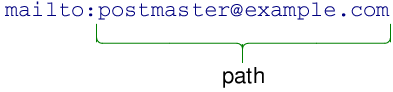
For non-hierarchical schemes, the path will be everything following the scheme declaration, as in the following example:
path
data is interpreted according to
mode
: in
StrictMode
, any ‘%’ characters must be followed by exactly two hexadecimal characters and some characters (including space) are not allowed in undecoded form. In
TolerantMode
, all characters are accepted in undecoded form and the tolerant parser will correct stray ‘%’ not followed by two hex characters. In
DecodedMode
, ‘%’ stand for themselves and encoded characters are not possible.
DecodedMode
should be used when setting the path from a data source which is not a URL, such as a dialog shown to the user or with a path obtained by calling
path()
采用
FullyDecoded
formatting option.
另请参阅
PySide2.QtCore.QUrl.
setPort
(
port
)

port
–
int
Sets the port of the URL to
port
. The port is part of the authority of the URL, as described in
setAuthority()
.
port
must be between 0 and 65535 inclusive. Setting the port to -1 indicates that the port is unspecified.
另请参阅
PySide2.QtCore.QUrl.
setQuery
(
query
)

query
–
QUrlQuery
这是重载函数。
Sets the query string of the URL to
query
.
This function reconstructs the query string from the
QUrlQuery
object and sets on this
QUrl
object. This function does not have parsing parameters because the
QUrlQuery
contains data that is already parsed.
另请参阅
PySide2.QtCore.QUrl.
setQuery
(
query
[
,
mode=TolerantMode
]
)

query – unicode
mode
–
ParsingMode
Sets the query string of the URL to
query
.
This function is useful if you need to pass a query string that does not fit into the key-value pattern, or that uses a different scheme for encoding special characters than what is suggested by
QUrl
.
Passing a value of QString() to
query
(a null
QString
) unsets the query completely. However, passing a value of
QString
(“”) will set the query to an empty value, as if the original URL had a lone “?”.
query
data is interpreted according to
mode
: in
StrictMode
, any ‘%’ characters must be followed by exactly two hexadecimal characters and some characters (including space) are not allowed in undecoded form. In
TolerantMode
, all characters are accepted in undecoded form and the tolerant parser will correct stray ‘%’ not followed by two hex characters. In
DecodedMode
, ‘%’ stand for themselves and encoded characters are not possible.
Query strings often contain percent-encoded sequences, so use of
DecodedMode
is discouraged. One special sequence to be aware of is that of the plus character (‘+’).
QUrl
does not convert spaces to plus characters, even though HTML forms posted by web browsers do. In order to represent an actual plus character in a query, the sequence “%2B” is usually used. This function will leave “%2B” sequences untouched in
TolerantMode
or
StrictMode
.
另请参阅
PySide2.QtCore.QUrl.
setScheme
(
scheme
)

scheme – unicode
Sets the scheme of the URL to
scheme
. As a scheme can only contain ASCII characters, no conversion or decoding is done on the input. It must also start with an ASCII letter.
The scheme describes the type (or protocol) of the URL. It’s represented by one or more ASCII characters at the start the URL.
A scheme is strictly
RFC 3986
-compliant:
													scheme


													=


													ALPHA


													*(


													ALPHA


													/


													DIGIT


													/


													"+"


													/


													"-"


													/


													"."


													)
The following example shows a URL where the scheme is “ftp”:

To set the scheme, the following call is used:
QUrl url;
url.setScheme("ftp");
The scheme can also be empty, in which case the URL is interpreted as relative.
另请参阅
PySide2.QtCore.QUrl.
setUrl
(
url
[
,
mode=TolerantMode
]
)

url – unicode
mode
–
ParsingMode
剖析
url
and sets this object to that value.
QUrl
will automatically percent encode all characters that are not allowed in a URL and decode the percent-encoded sequences that represent an unreserved character (letters, digits, hyphens, undercores, dots and tildes). All other characters are left in their original forms.
剖析
url
使用剖析模式
parsingMode
。在
TolerantMode
(默认),
QUrl
will correct certain mistakes, notably the presence of a percent character (‘%’) not followed by two hexadecimal digits, and it will accept any character in any position. In
StrictMode
, encoding mistakes will not be tolerated and
QUrl
will also check that certain forbidden characters are not present in unencoded form. If an error is detected in
StrictMode
,
isValid()
will return false. The parsing mode
DecodedMode
is not permitted in this context and will produce a run-time warning.
另请参阅
PySide2.QtCore.QUrl.
setUserInfo
(
userInfo
[
,
mode=TolerantMode
]
)

userInfo – unicode
mode
–
ParsingMode
Sets the user info of the URL to
userInfo
. The user info is an optional part of the authority of the URL, as described in
setAuthority()
.
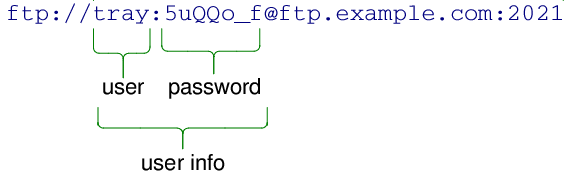
The user info consists of a user name and optionally a password, separated by a ‘:’. If the password is empty, the colon must be omitted. The following example shows a valid user info string:
userInfo
data is interpreted according to
mode
: in
StrictMode
, any ‘%’ characters must be followed by exactly two hexadecimal characters and some characters (including space) are not allowed in undecoded form. In
TolerantMode
(the default), all characters are accepted in undecoded form and the tolerant parser will correct stray ‘%’ not followed by two hex characters.
This function does not allow
mode
to be
DecodedMode
. To set fully decoded data, call
setUserName()
and
setPassword()
individually.
PySide2.QtCore.QUrl.
setUserName
(
userName
[
,
mode=DecodedMode
]
)

userName – unicode
mode
–
ParsingMode
Sets the URL’s user name to
userName
。
userName
is part of the user info element in the authority of the URL, as described in
setUserInfo()
.
userName
data is interpreted according to
mode
: in
StrictMode
, any ‘%’ characters must be followed by exactly two hexadecimal characters and some characters (including space) are not allowed in undecoded form. In
TolerantMode
(the default), all characters are accepted in undecoded form and the tolerant parser will correct stray ‘%’ not followed by two hex characters. In
DecodedMode
, ‘%’ stand for themselves and encoded characters are not possible.
DecodedMode
should be used when setting the user name from a data source which is not a URL, such as a password dialog shown to the user or with a user name obtained by calling
userName()
采用
FullyDecoded
formatting option.
另请参阅
PySide2.QtCore.QUrl.
swap
(
other
)

other
–
QUrl
Swaps URL
other
with this URL. This operation is very fast and never fails.
PySide2.QtCore.QUrl.
toAce
(
arg__1
)

arg__1 – unicode
Returns the ASCII Compatible Encoding of the given domain name
domain
. The result of this function is considered equivalent to
domain
.
The ASCII-Compatible Encoding (ACE) is defined by RFC 3490, RFC 3491 and RFC 3492. It is part of the Internationalizing Domain Names in Applications (IDNA) specification, which allows for domain names (like
"example.com"
) to be written using international characters.
This function returns an empty
QByteArray
if
domain
is not a valid hostname. Note, in particular, that IPv6 literals are not valid domain names.
PySide2.QtCore.QUrl.
toDisplayString
(
[
options=QUrl.FormattingOptions(PrettyDecoded)
]
)

options
–
FormattingOptions
unicode
Returns a human-displayable string representation of the URL. The output can be customized by passing flags with
options
。选项
RemovePassword
is always enabled, since passwords should never be shown back to users.
With the default options, the resulting
QString
can be passed back to a
QUrl
later on, but any password that was present initially will be lost.
另请参阅
FormattingOptions
toEncoded()
toString()
PySide2.QtCore.QUrl.
toEncoded
(
[
options=QUrl.FullyEncoded
]
)

options
–
FormattingOptions
Returns the encoded representation of the URL if it’s valid; otherwise an empty
QByteArray
is returned. The output can be customized by passing flags with
options
.
The user info, path and fragment are all converted to UTF-8, and all non-ASCII characters are then percent encoded. The host name is encoded using Punycode.
PySide2.QtCore.QUrl.
toLocalFile
(
)

unicode
Returns the path of this URL formatted as a local file path. The path returned will use forward slashes, even if it was originally created from one with backslashes.
If this URL contains a non-empty hostname, it will be encoded in the returned value in the form found on SMB networks (for example, “//servername/path/to/file.txt”).
qDebug() << QUrl("file:file.txt").toLocalFile();            // "file.txt"
qDebug() << QUrl("file:/home/user/file.txt").toLocalFile(); // "/home/user/file.txt"
qDebug() << QUrl("file.txt").toLocalFile();                 // ""; wasn't a local file as it had no scheme
Note: if the path component of this URL contains a non-UTF-8 binary sequence (such as %80), the behaviour of this function is undefined.
PySide2.QtCore.QUrl.
toPercentEncoding
(
arg__1
[
,
exclude=QByteArray()
[
,
include=QByteArray()
]
]
)

arg__1 – unicode
exclude
–
QByteArray
include
–
QByteArray
返回编码副本为
input
.
input
is first converted to UTF-8, and all ASCII-characters that are not in the unreserved group are percent encoded. To prevent characters from being percent encoded pass them to
exclude
. To force characters to be percent encoded pass them to
include
.
无保留定义为:
													ALPHA


													/


													DIGIT


													/


													"-"


													/


													"."


													/


													"_"


													/


													"~"
ba = QUrl.toPercentEncoding("{a fishy string?}", "{}", "s")
print ba
# prints "{a fi%73hy %73tring%3F}"
PySide2.QtCore.QUrl.
toString
(
[
options=QUrl.FormattingOptions(PrettyDecoded)
]
)

options
–
FormattingOptions
unicode
Returns a string representation of the URL. The output can be customized by passing flags with
options
。选项
FullyDecoded
is not permitted in this function since it would generate ambiguous data.
默认格式化选项为
PrettyDecoded
.
PySide2.QtCore.QUrl.
toStringList
(
uris
[
,
options=QUrl.FormattingOptions(PrettyDecoded)
]
)

uris –
options
–
FormattingOptions
字符串列表
Converts a list of
urls
into a list of
QString
对象,使用
toString
(
options
).
PySide2.QtCore.QUrl.
topLevelDomain
(
[
options=QUrl.FullyDecoded
]
)

options
–
ComponentFormattingOptions
unicode
注意
此函数被弃用。
Returns the TLD (Top-Level Domain) of the URL, (e.g. .co.uk, .net). Note that the return value is prefixed with a ‘.’ unless the URL does not contain a valid TLD, in which case the function returns an empty string.
Note that this function considers a TLD to be any domain that allows users to register subdomains under, including many home, dynamic DNS websites and blogging providers. This is useful for determining whether two websites belong to the same infrastructure and communication should be allowed, such as browser cookies: two domains should be considered part of the same website if they share at least one label in addition to the value returned by this function.
foo.co.uk
and
foo.com
do not share a top-level domain
foo.co.uk
and
bar.co.uk
share the
.co.uk
domain, but the next label is different
www.foo.co.uk
and
ftp.foo.co.uk
share the same top-level domain and one more label, so they are considered part of the same site
若
options
includes
EncodeUnicode
, the returned string will be in ASCII Compatible Encoding.
PySide2.QtCore.QUrl.
url
(
[
options=QUrl.FormattingOptions(PrettyDecoded)
]
)

options
–
FormattingOptions
unicode
Returns a string representation of the URL. The output can be customized by passing flags with
options
。选项
FullyDecoded
is not permitted in this function since it would generate ambiguous data.
结果
QString
can be passed back to a
QUrl
later on.
同义词为
toString
(options).
另请参阅
setUrl()
FormattingOptions
toEncoded()
toString()
PySide2.QtCore.QUrl.
userInfo
(
[
options=QUrl.PrettyDecoded
]
)

options
–
ComponentFormattingOptions
unicode
Returns the user info of the URL, or an empty string if the user info is undefined.
This function returns an unambiguous value, which may contain that characters still percent-encoded, plus some control sequences not representable in decoded form in
QString
.
options
argument controls how to format the user info component. The value of
FullyDecoded
is not permitted in this function. If you need to obtain fully decoded data, call
userName()
and
password()
individually.
PySide2.QtCore.QUrl.
userName
(
[
options=QUrl.FullyDecoded
]
)

options
–
ComponentFormattingOptions
unicode
Returns the user name of the URL if it is defined; otherwise an empty string is returned.
options
argument controls how to format the user name component. All values produce an unambiguous result. With
FullyDecoded
, all percent-encoded sequences are decoded; otherwise, the returned value may contain some percent-encoded sequences for some control sequences not representable in decoded form in
QString
.
注意:
FullyDecoded
may cause data loss if those non-representable sequences are present. It is recommended to use that value when the result will be used in a non-URL context, such as setting in
QAuthenticator
or negotiating a login.
另请参阅
