注意
This class was introduced in Qt 4.7
PySide.QtNetwork.QNetworkSession class provides control over the system's access points and enables session management for cases when multiple clients access the same access point.
A PySide.QtNetwork.QNetworkSession enables control over the system's network interfaces. The session's configuration parameter are determined via the PySide.QtNetwork.QNetworkConfiguration object to which it is bound. Depending on the type of the session (single access point or service network) a session may be linked to one or more network interfaces. By means of opening and closing of network sessions a developer can start and stop the systems network interfaces. If the configuration represents multiple access points (see QNetworkConfiguration.ServiceNetwork ) more advanced features such as roaming may be supported.
PySide.QtNetwork.QNetworkSession supports session management within the same process and depending on the platform's capabilities may support out-of-process sessions. If the same network configuration is used by multiple open sessions the underlying network interface is only terminated once the last session has been closed.
Applications may connect to the PySide.QtNetwork.QNetworkSession.preferredConfigurationChanged() signal in order to receive notifications when a more suitable access point becomes available. In response to this signal the application must either initiate the roaming via PySide.QtNetwork.QNetworkSession.migrate() or PySide.QtNetwork.QNetworkSession.ignore() the new access point. Once the session has roamed the PySide.QtNetwork.QNetworkSession.newConfigurationActivated() signal is emitted. The application may now test the carrier and must either PySide.QtNetwork.QNetworkSession.accept() or PySide.QtNetwork.QNetworkSession.reject() it. The session will return to the previous access point if the roaming was rejected. The subsequent state diagram depicts the required state transitions.
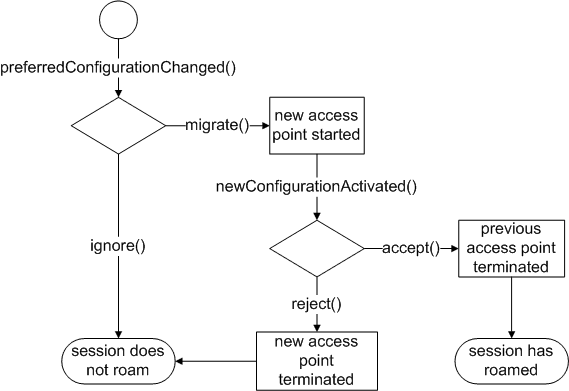
Some platforms may distinguish forced roaming and application level roaming (ALR). ALR implies that the application controls (via PySide.QtNetwork.QNetworkSession.migrate() , PySide.QtNetwork.QNetworkSession.ignore() , PySide.QtNetwork.QNetworkSession.accept() and PySide.QtNetwork.QNetworkSession.reject() ) whether a network session can roam from one access point to the next. Such control is useful if the application maintains stateful socket connections and wants to control the transition from one interface to the next. Forced roaming implies that the system automatically roams to the next network without consulting the application. This has the advantage that the application can make use of roaming features without actually being aware of it. It is expected that the application detects that the underlying socket is broken and automatically reconnects via the new network link.
If the platform supports both modes of roaming, an application indicates its preference by connecting to the PySide.QtNetwork.QNetworkSession.preferredConfigurationChanged() signal. Connecting to this signal means that the application wants to take control over the roaming behavior and therefore implies application level roaming. If the client does not connect to the PySide.QtNetwork.QNetworkSession.preferredConfigurationChanged() , forced roaming is used. If forced roaming is not supported the network session will not roam by default.
Some applications may want to suppress any form of roaming altogether. Possible use cases may be high priority downloads or remote services which cannot handle a roaming enabled client. Clients can suppress roaming by connecting to the PySide.QtNetwork.QNetworkSession.preferredConfigurationChanged() signal and answer each signal emission with PySide.QtNetwork.QNetworkSession.ignore() .
| 参数: |
|
|---|
Constructs a session based on connectionConfig 采用给定 parent .
This enum describes the session errors that can occur.
| 常量 | 描述 |
|---|---|
| QNetworkSession.UnknownSessionError | 发生无法识别的错误。 |
| QNetworkSession.SessionAbortedError | The session was aborted by the user or system. |
| QNetworkSession.RoamingError | The session cannot roam to a new configuration. |
| QNetworkSession.OperationNotSupportedError | The operation is not supported for current configuration. |
| QNetworkSession.InvalidConfigurationError | The operation cannot currently be performed for the current configuration. |
注意
This enum was introduced or modified in Qt 4.7
This enum describes the connectivity state of the session. If the session is based on a single access point configuration the state of the session is the same as the state of the associated network interface.
| 常量 | 描述 |
|---|---|
| QNetworkSession.Invalid | The session is invalid due to an invalid configuration. This may happen due to a removed access point or a configuration that was invalid to begin with. |
| QNetworkSession.NotAvailable | The session is based on a defined but not yet discovered PySide.QtNetwork.QNetworkConfiguration (见 QNetworkConfiguration.StateFlag ). |
| QNetworkSession.Connecting | The network session is being established. |
| QNetworkSession.Connected | The network session is connected. If the current process wishes to use this session it has to register its interest by calling PySide.QtNetwork.QNetworkSession.open() . A network session is considered to be ready for socket operations if it PySide.QtNetwork.QNetworkSession.isOpen() and connected. |
| QNetworkSession.Closing | The network session is in the process of being shut down. |
| QNetworkSession.Disconnected | The network session is not connected. The associated PySide.QtNetwork.QNetworkConfiguration has the state QNetworkConfiguration.Discovered . |
| QNetworkSession.Roaming | The network session is roaming from one access point to another access point. |
注意
This enum was introduced or modified in Qt 4.7
Instructs the session to permanently accept the new access point. Once this function has been called the session may not return to the old access point.
The old access point may be closed in the process if there are no other network sessions for it. Therefore any open socket that still uses the old access point may become unusable and should be closed before completing the migration.
| 返回类型: | PySide.QtCore.quint64 |
|---|
Returns the number of seconds that the session has been active.
| 返回类型: | PySide.QtCore.quint64 |
|---|
Returns the amount of data received in bytes; otherwise 0.
This field value includes the usage across all open network sessions which use the same network interface.
If the session is based on a service network configuration the number of sent bytes across all active member configurations are returned.
This function may not always be supported on all platforms and returns 0. The platform capability can be detected via QNetworkConfigurationManager.DataStatistics .
注意
On some platforms this function may run the main event loop.
| 返回类型: | PySide.QtCore.quint64 |
|---|
Returns the amount of data sent in bytes; otherwise 0.
This field value includes the usage across all open network sessions which use the same network interface.
If the session is based on a service network configuration the number of sent bytes across all active member configurations are returned.
This function may not always be supported on all platforms and returns 0. The platform capability can be detected via QNetworkConfigurationManager.DataStatistics .
注意
On some platforms this function may run the main event loop.
Decreases the session counter on the associated network configuration. If the session counter reaches zero the active network interface is shut down. This also means that PySide.QtNetwork.QNetworkSession.state() will only change from Connected to Disconnected if the current session was the last open session.
If the platform does not support out-of-process sessions calling this function does not stop the interface. In this case PySide.QtNetwork.QNetworkSession.stop() has to be used to force a shut down. The platform capabilities can be detected via QNetworkConfigurationManager.capabilities() .
Note that this call is asynchronous. Depending on the outcome of this call the results can be enquired by connecting to the PySide.QtNetwork.QNetworkSession.stateChanged() , PySide.QtNetwork.QNetworkSession.opened() or PySide.QtNetwork.QNetworkSession.error() signals.
| 返回类型: | PySide.QtNetwork.QNetworkConfiguration |
|---|
返回 PySide.QtNetwork.QNetworkConfiguration that this network session object is based on.
| 参数: | arg__1 – PySide.QtNetwork.QNetworkSession.SessionError |
|---|
| 返回类型: | PySide.QtNetwork.QNetworkSession.SessionError |
|---|
返回最后发生的错误类型。
| 返回类型: | unicode |
|---|
返回人类可读的最后发生的设备错误描述。
This function indicates that the application does not wish to roam the session.
| 返回类型: | PySide.QtNetwork.QNetworkInterface |
|---|
Returns the network interface that is used by this session.
This function only returns a valid PySide.QtNetwork.QNetworkInterface when this session is Connected .
The returned interface may change as a result of a roaming process.
Note: this function does not work in Symbian emulator due to the way the connectivity is emulated on Windows.
| 返回类型: | PySide.QtCore.bool |
|---|
Returns true if this session is open. If the number of all open sessions is greater than zero the underlying network interface will remain connected/up.
The session can be controlled via PySide.QtNetwork.QNetworkSession.open() and PySide.QtNetwork.QNetworkSession.close() .
Instructs the session to roam to the new access point. The old access point remains active until the application calls PySide.QtNetwork.QNetworkSession.accept() .
PySide.QtNetwork.QNetworkSession.newConfigurationActivated() signal is emitted once roaming has been completed.
Creates an open session which increases the session counter on the underlying network interface. The system will not terminate a network interface until the session reference counter reaches zero. Therefore an open session allows an application to register its use of the interface.
As a result of calling PySide.QtNetwork.QNetworkSession.open() the interface will be started if it is not connected/up yet. Some platforms may not provide support for out-of-process sessions. On such platforms the session counter ignores any sessions held by another process. The platform capabilities can be detected via QNetworkConfigurationManager.capabilities() .
Note that this call is asynchronous. Depending on the outcome of this call the results can be enquired by connecting to the PySide.QtNetwork.QNetworkSession.stateChanged() , PySide.QtNetwork.QNetworkSession.opened() or PySide.QtNetwork.QNetworkSession.error() signals.
It is not a requirement to open a session in order to monitor the underlying network interface.
| 参数: |
|
|---|
The new access point is not suitable for the application. By calling this function the session returns to the previous access point/configuration. This action may invalidate any socket that has been created via the not desired access point.
| 参数: | key – unicode |
|---|---|
| 返回类型: | object |
Returns the value for property key .
A network session can have properties attached which may describe the session in more details. This function can be used to gain access to those properties.
The following property keys are guaranteed to be specified on all platforms:
| Key | 描述 |
| ActiveConfiguration |
If the session PySide.QtNetwork.QNetworkSession.isOpen() this property returns the identifier of the PySide.QtNetwork.QNetworkConfiguration that is used by this session; otherwise an empty string. The main purpose of this key is to determine which Internet access point is used if the session is based on a ServiceNetwork . The following code snippet highlights the difference:
QNetworkConfigurationManager mgr;
QNetworkConfiguration ap = mgr.defaultConfiguration();
QNetworkSession *session = new QNetworkSession(ap);
... //code activates session
QString ident = session->sessionProperty("ActiveConfiguration").toString();
if ( ap.type() == QNetworkConfiguration::ServiceNetwork ) {
    Q_ASSERT( ap.identifier() != ident );
    Q_ASSERT( ap.children().contains( mgr.configurationFromIdentifier(ident) ) );
} else if ( ap.type() == QNetworkConfiguration::InternetAccessPoint ) {
    Q_ASSERT( ap.identifier() == ident );
}
|
| UserChoiceConfiguration |
If the session PySide.QtNetwork.QNetworkSession.isOpen() and is bound to a PySide.QtNetwork.QNetworkConfiguration of type UserChoice, this property returns the identifier of the PySide.QtNetwork.QNetworkConfiguration that the configuration resolved to when PySide.QtNetwork.QNetworkSession.open() was called; otherwise an empty string.
The purpose of this key is to determine the real
PySide.QtNetwork.QNetworkConfiguration
that the session is using. This key is different from
ActiveConfiguration
in that this key may return an identifier for either a
service
network
或
Internet
access
points
configurations, whereas
ActiveConfiguration
always returns identifiers to
Internet
access
points
configurations.
|
| ConnectInBackground | 把此特性设为 true before calling PySide.QtNetwork.QNetworkSession.open() implies that the connection attempt is made but if no connection can be established, the user is not connsulted and asked to select a suitable connection. This property is not set by default and support for it depends on the platform. |
| AutoCloseSessionTimeout |
If the session requires polling to keep its state up to date, this property holds the timeout in milliseconds before the session will automatically close. If the value of this property is -1 the session will not automatically close. This property is set to -1 by default.
The purpose of this property is to minimize resource use on platforms that use polling to update the state of the session. Applications can set the value of this property to the desired timeout before the session is closed. In response to the
PySide.QtNetwork.QNetworkSession.closed()
signal the network session should be deleted to ensure that all polling is stopped. The session can then be recreated once it is required again. This property has no effect for sessions that do not require polling.
|
| 参数: |
|
|---|
设置特性 value on the session. The property is identified using key . Removing an already set property can be achieved by passing an invalid PySide.QtCore.QVariant .
注意: UserChoiceConfiguration and ActiveConfiguration properties are read only and cannot be changed using this method.
| 返回类型: | PySide.QtNetwork.QNetworkSession.State |
|---|
Returns the state of the session.
If the session is based on a single access point configuration the state of the session is the same as the state of the associated network interface. Therefore a network session object can be used to monitor network interfaces.
A QNetworkConfiguration.ServiceNetwork based session summarizes the state of all its children and therefore returns the Connected state if at least one of the service network's PySide.QtNetwork.QNetworkConfiguration.children() configurations is active.
Note that it is not required to hold an open session in order to obtain the network interface state. A connected but closed session may be used to monitor network interfaces whereas an open and connected session object may prevent the network interface from being shut down.
| 参数: | arg__1 – PySide.QtNetwork.QNetworkSession.State |
|---|
Invalidates all open sessions against the network interface and therefore stops the underlying network interface. This function always changes the session's PySide.QtNetwork.QNetworkSession.state() flag to Disconnected .
On Symbian platform, a ‘NetworkControl' capability is required for full interface-level stop (without the capability, only the current session is stopped).
| 参数: | msecs – PySide.QtCore.int |
|---|---|
| 返回类型: | PySide.QtCore.bool |
Waits until the session has been opened, up to msecs milliseconds. If the session has been opened, this function returns true; otherwise it returns false. In the case where it returns false, you can call PySide.QtNetwork.QNetworkSession.error() to determine the cause of the error.
The following example waits up to one second for the session to be opened:
session->open();
if (session->waitForOpened(1000))
    qDebug("Open!");
若 msecs 是 -1,此函数不会超时。

