We can add a child widget to the window created in the previous example by passing
windowas the parent to its constructor. In this case, we add a button to the window and place it in a specific location:
#include <QtWidgets>
int main(int argc, char *argv[])
{
    QApplication app(argc, argv);
    QWidget window;
    window.resize(320, 240);
    window.setWindowTitle
          (QApplication::translate("childwidget", "Child widget"));
    window.show();
//! [create, position and show]
    QPushButton *button = new QPushButton(
        QApplication::translate("childwidget", "Press me"), &window);
    button->move(100, 100);
    button->show();
//! [create, position and show]
    return app.exec();
}
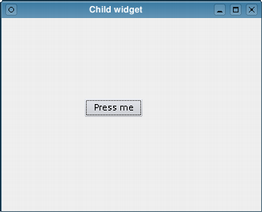
The button is now a child of the window and will be deleted when the window is destroyed. Note that hiding or closing the window does not automatically destroy it. It will be destroyed when the example exits.
