这是文本相关 QML 范例的集合。
文本 is a collection of small QML examples relating to text. Each example is a small QML file, usually containing or emphasizing a particular type or feature. You can run and observe the behavior of each example.
Hello shows how to change and animate the letter spacing of a 文本 type. It uses a sequential animation to first animate the font.letterSpacing property from
0to50over three seconds and then move the text to a random position on screen:SequentialAnimation on font.letterSpacing { loops: Animation.Infinite; NumberAnimation { from: 0; to: 50; easing.type: Easing.InQuad; duration: 3000 } ScriptAction { script: { container.y = (screen.height / 4) + (Math.random() * screen.height / 2) container.x = (screen.width / 4) + (Math.random() * screen.width / 2) } } }
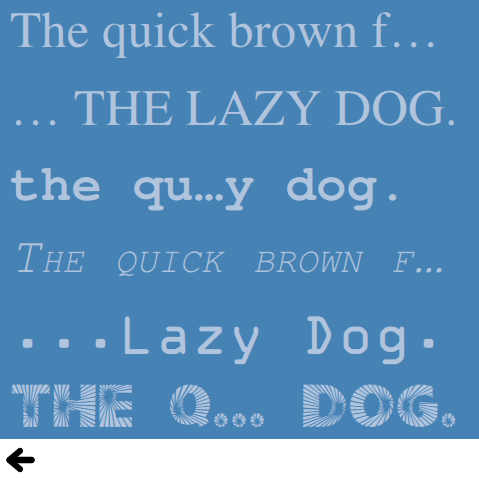
字体 shows different ways of using fonts with the 文本 type. Simply by name, using the font.family property directly:
font.family: "Times"或使用 FontLoader 类型:
FontLoader { id: fixedFont; name: "Courier" }或使用 FontLoader and specifying a local font file:
FontLoader { id: localFont; source: "content/fonts/tarzeau_ocr_a.ttf" }or finally using a FontLoader and specifying a remote font file:
FontLoader { id: webFont; source: "http://www.princexml.com/fonts/steffmann/Starburst.ttf" }
可用字体 展示如何使用 Qt global object and a list view to display all the fonts available on the system. The ListView type uses the list of fonts available as its model:
model: Qt.fontFamilies()Inside the delegate, the font family is set with the modelData:
font.family: parent.modelData
Banner is a simple example showing how to create a banner using a row of text types and a NumberAnimation .
Img tag shows different ways of displaying images in text objects using the
<img>tag.
文本布局 shows how to create a more complex layout for a text item. This example lays out the text in two columns using the onLineLaidOut handler that allows you to position and resize each line:
onLineLaidOut: (line) => {
    line.width = width / 2  - main.margin
    if (line.y + line.height >= height) {
        line.y -= height - main.margin
        line.x = width / 2 + main.activeFocusmargin
    }
    if (line.isLast) {
        lastLineMarker.x = line.x + line.implicitWidth
        lastLineMarker.y = line.y + (line.height - lastLineMarker.height) / 2
    }
}
