播放音频和视频。
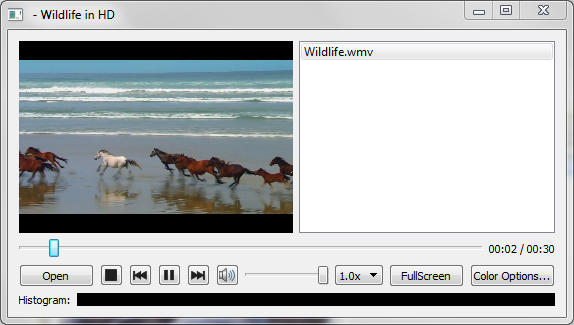
媒体播放器 演示可以使用各种编解码器播放音频和或视频文件的简单多媒体播放器。
要运行范例从 Qt Creator ,打开 欢迎 模式,然后选择范例从 范例 . For more information, visit Building and Running an Example.
范例使用
QMediaPlayer对象传入QVideoWidget以控制视频输出。为赋予应用程序播放列表能力,还使用了 QPlayList 对象。To activate the various functions such as play and stop on the dialog, the button clicked events emit the play() and stop() signals, which are connected to the play() and stop() slots of
QMediaPlayer.connect(controls, SIGNAL(play()), player, SLOT(play())); connect(controls, SIGNAL(pause()), player, SLOT(pause())); connect(controls, SIGNAL(stop()), player, SLOT(stop()));可以获取音量 (并设置用户界面表示)
controls->setVolume(player->volume());and we can make widget ‘volume’ changes change the volume
connect(controls, SIGNAL(changeVolume(int)), player, SLOT(setVolume(int)));The example also allows us to change various video properties by means of the
QVideoWidgetobject. We can go to Full Screen mode with a single button click, and back again. Or if we press the “Color Options” dialog button we can have access to more subtle influences. The dialog has a set of sliders so that we can change the brightness, contrast, hue and saturation of the video being watched. The connect() statements are in pairs so that changes to either the user interface widget (the relevant slider) or theQVideoWidget对象将更新其它对象。connect(brightnessSlider, SIGNAL(sliderMoved(int)), videoWidget, SLOT(setBrightness(int))); connect(videoWidget, SIGNAL(brightnessChanged(int)), brightnessSlider, SLOT(setValue(int))); connect(contrastSlider, SIGNAL(sliderMoved(int)), videoWidget, SLOT(setContrast(int))); connect(videoWidget, SIGNAL(contrastChanged(int)), contrastSlider, SLOT(setValue(int))); connect(hueSlider, SIGNAL(sliderMoved(int)), videoWidget, SLOT(setHue(int))); connect(videoWidget, SIGNAL(hueChanged(int)), hueSlider, SLOT(setValue(int))); connect(saturationSlider, SIGNAL(sliderMoved(int)), videoWidget, SLOT(setSaturation(int))); connect(videoWidget, SIGNAL(saturationChanged(int)), saturationSlider, SLOT(setValue(int)));
