QOrientationReadingclass represents one reading from the orientation sensor. 更多 …

def
orientation
()
def
setOrientation
(orientation)
The orientation sensor reports the orientation of the device. As it operates below the UI level it does not report on or even know how the UI is rotated. Most importantly this means that this sensor cannot be used to detect if a device is in portrait or landscape mode.
This sensor is useful to detect that a particular side of the device is pointing up.
The orientation sensor returns the orientation of the device using the pre-defined values found in the
取向枚举。
QOrientationReading
(
parent
)

parent
–
QObject
PySide2.QtSensors.QOrientationReading.
取向

This enum represents the orientation of the device.
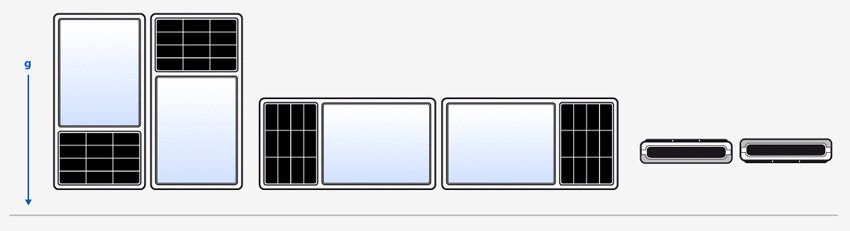
To explain the meaning of each value it is helpful to refer to the following diagram.
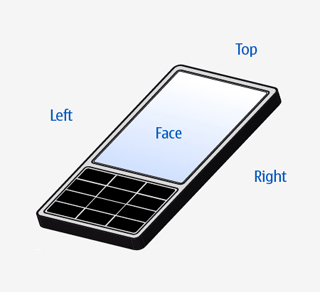
The orientations are shown here in order: , , , , , .
|
常量 |
描述 |
|---|---|
|
QOrientationReading.Undefined |
The orientation is unknown. |
|
QOrientationReading.TopUp |
The Top edge of the device is pointing up. |
|
QOrientationReading.TopDown |
The Top edge of the device is pointing down. |
|
QOrientationReading.LeftUp |
The Left edge of the device is pointing up. |
|
QOrientationReading.RightUp |
The Right edge of the device is pointing up. |
|
QOrientationReading.FaceUp |
The Face of the device is pointing up. |
|
QOrientationReading.FaceDown |
The Face of the device is pointing down. |
It should be noted that the orientation sensor reports the orientation of the device and not the UI. The orientation of the device will not change just because the UI is rotated. This means this sensor cannot be used to detect if a device is in portrait or landscape mode.
PySide2.QtSensors.QOrientationReading.
orientation
(
)

另请参阅
