QTextTableclass represents a table in aQTextDocument. 更多 …

def
appendColumns
(count)
def
appendRows
(count)
def
cellAt
(c)
def
cellAt
(position)
def
cellAt
(row, col)
def
columns
()
def
format
()
def
insertColumns
(pos, num)
def
insertRows
(pos, num)
def
mergeCells
(cursor)
def
mergeCells
(row, col, numRows, numCols)
def
removeColumns
(pos, num)
def
removeRows
(pos, num)
def
resize
(rows, cols)
def
rowEnd
(c)
def
rowStart
(c)
def
rows
()
def
setFormat
(format)
def
splitCell
(row, col, numRows, numCols)
A table is a group of cells ordered into rows and columns. Each table contains at least one row and one column. Each cell contains a block, and is surrounded by a frame.
Tables are usually created and inserted into a document with the
insertTable()function. For example, we can insert a table with three rows and two columns at the current cursor position in an editor using the following lines of code:cursor = QTextCursor(editor.textCursor()) cursor.movePosition(QTextCursor.Start) table = cursor.insertTable(rows, columns, tableFormat)The table format is either defined when the table is created or changed later with
setFormat().The table currently being edited by the cursor is found with
currentTable(). This allows its format or dimensions to be changed after it has been inserted into a document.A table’s size can be changed with
resize(), or by usinginsertRows(),insertColumns(),removeRows(),或removeColumns()。使用cellAt()to retrieve table cells.The starting and ending positions of table rows can be found by moving a cursor within a table, and using the
rowStart()androwEnd()functions to obtain cursors at the start and end of each row.Rows and columns within a
QTextTablecan be merged and split using themergeCells()andsplitCell()functions. However, only cells that span multiple rows or columns can be split. (Merging or splitting does not increase or decrease the number of rows and columns.)Note that if you have merged multiple columns and rows into one cell, you will not be able to split the merged cell into new cells spanning over more than one row or column. To be able to split cells spanning over several rows and columns you need to do this over several iterations.
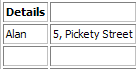
Suppose we have a 2x3 table of names and addresses. To merge both columns in the first row we invoke
mergeCells()withrow= 0,column= 0,numRows= 1 andnumColumns= 2.table.mergeCells(0, 0, 1, 2)
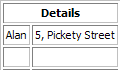
This gives us the following table. To split the first row of the table back into two cells, we invoke the
splitCell()function withnumRowsandnumCols= 1.table.splitCell(0, 0, 1, 1)
This results in the original table.
另请参阅
QTextTable
(
doc
)

doc
–
QTextDocument
PySide2.QtGui.QTextTable.
appendColumns
(
count
)

count
–
int
追加
count
columns at the right side of the table.
PySide2.QtGui.QTextTable.
appendRows
(
count
)

count
–
int
追加
count
rows at the bottom of the table.
PySide2.QtGui.QTextTable.
cellAt
(
c
)

c
–
QTextCursor
PySide2.QtGui.QTextTable.
cellAt
(
position
)

position
–
int
这是重载函数。
Returns the table cell that contains the character at the given
position
in the document.
PySide2.QtGui.QTextTable.
cellAt
(
row
,
col
)

row
–
int
col
–
int
Returns the table cell at the given
row
and
column
in the table.
PySide2.QtGui.QTextTable.
columns
(
)

int
Returns the number of columns in the table.
另请参阅
PySide2.QtGui.QTextTable.
format
(
)

Returns the table’s format.
另请参阅
PySide2.QtGui.QTextTable.
insertColumns
(
pos
,
num
)

pos
–
int
num
–
int
Inserts a number of
columns
before the column with the specified
index
.
PySide2.QtGui.QTextTable.
insertRows
(
pos
,
num
)

pos
–
int
num
–
int
Inserts a number of
rows
before the row with the specified
index
.
PySide2.QtGui.QTextTable.
mergeCells
(
cursor
)

cursor
–
QTextCursor
这是重载函数。
Merges the cells selected by the provided
cursor
.
另请参阅
PySide2.QtGui.QTextTable.
mergeCells
(
row
,
col
,
numRows
,
numCols
)

row
–
int
col
–
int
numRows
–
int
numCols
–
int
Merges the cell at the specified
row
and
column
with the adjacent cells into one cell. The new cell will span
numRows
rows and
numCols
columns. This method does nothing if
numRows
or
numCols
is less than the current number of rows or columns spanned by the cell.
另请参阅
PySide2.QtGui.QTextTable.
removeColumns
(
pos
,
num
)

pos
–
int
num
–
int
Removes a number of
columns
starting with the column at the specified
index
.
PySide2.QtGui.QTextTable.
removeRows
(
pos
,
num
)

pos
–
int
num
–
int
Removes a number of
rows
starting with the row at the specified
index
.
PySide2.QtGui.QTextTable.
resize
(
rows
,
cols
)

rows
–
int
cols
–
int
Resizes the table to contain the required number of
rows
and
columns
.
PySide2.QtGui.QTextTable.
rowEnd
(
c
)

c
–
QTextCursor
Returns a cursor pointing to the end of the row that contains the given
cursor
.
另请参阅
PySide2.QtGui.QTextTable.
rowStart
(
c
)

c
–
QTextCursor
Returns a cursor pointing to the start of the row that contains the given
cursor
.
另请参阅
PySide2.QtGui.QTextTable.
rows
(
)

int
Returns the number of rows in the table.
另请参阅
PySide2.QtGui.QTextTable.
setFormat
(
format
)

format
–
QTextTableFormat
Sets the table’s
format
.
另请参阅
PySide2.QtGui.QTextTable.
splitCell
(
row
,
col
,
numRows
,
numCols
)

row
–
int
col
–
int
numRows
–
int
numCols
–
int
Splits the specified cell at
row
and
column
into an array of multiple cells with dimensions specified by
numRows
and
numCols
.
注意
It is only possible to split cells that span multiple rows or columns, such as rows that have been merged using
mergeCells()
.
另请参阅
