内容表

上一话题

QStaticText

下一话题

QStyleHints

QStatusTipEvent

QStatusTipEvent class provides an event that is used to show messages in a status bar. 更多

Inheritance diagram of PySide2.QtGui.QStatusTipEvent

概要

函数

详细描述

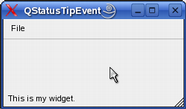
可以为 Widget 设置状态提示使用 setStatusTip() function. They are shown in the status bar when the mouse cursor enters the widget. For example:
def __init__(self, parent):
    QMainWindow.__init__(self, parent)
    myWidget = QWidget()
    myWidget.setStatusTip(tr("This is my widget."))
    setCentralWidget(myWidget)
    ...
															
../../_images/qstatustipevent-widget.png

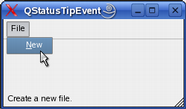
也可以为动作设置状态提示使用 setStatusTip() 函数:

def __init__(self, parent):
    QMainWindow.__init__(self, parent)
    fileMenu = menuBar().addMenu(tr("File"))
    Act = QAction(self.tr("&New"), self)
    Act.setStatusTip(tr("Create a new file."))
    fileMenu.addAction(Act)
    ...
															
../../_images/qstatustipevent-action.png

最后,项视图类的状态提示被支持透过 StatusTipRole 枚举值。

class QStatusTipEvent ( tip )
param tip

unicode

构造状态提示事件,采用的文本指定通过 tip .

另请参阅

tip()

PySide2.QtGui.QStatusTipEvent. tip ( )
返回类型

unicode

返回要展示在状态栏中的消息。

另请参阅

showMessage()