QEasingCurveclass provides easing curves for controlling animation. 更多 …
4.6 版新增。
def
__eq__
(other)
def
__ne__
(other)
def
addCubicBezierSegment
(c1, c2, endPoint)
def
addTCBSegment
(nextPoint, t, c, b)
def
amplitude
()
def
customType
()
def
overshoot
()
def
period
()
def
setAmplitude
(amplitude)
def
setCustomType
(arg__1)
def
setOvershoot
(overshoot)
def
setPeriod
(period)
def
setType
(type)
def
swap
(other)
def
toCubicSpline
()
def
type
()
def
valueForProgress
(progress)
Easing curves describe a function that controls how the speed of the interpolation between 0 and 1 should be. Easing curves allow transitions from one value to another to appear more natural than a simple constant speed would allow. The
QEasingCurveclass is usually used in conjunction with theQVariantAnimationandQPropertyAnimationclasses but can be used on its own. It is usually used to accelerate the interpolation from zero velocity (ease in) or decelerate to zero velocity (ease out). Ease in and ease out can also be combined in the same easing curve.To calculate the speed of the interpolation, the easing curve provides the function
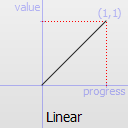
valueForProgress(), where theprogressargument specifies the progress of the interpolation: 0 is the start value of the interpolation, 1 is the end value of the interpolation. The returned value is the effective progress of the interpolation. If the returned value is the same as the input value for all input values the easing curve is a linear curve. This is the default behaviour.例如,
QEasingCurve easing(QEasingCurve::InOutQuad);
for (qreal t = 0.0; t < 1.0; t += 0.1)
    qWarning() << "Effective progress" << t << "is"
               << easing.valueForProgress(t);
will print the effective progress of the interpolation between 0 and 1.
当使用
QPropertyAnimation, the associated easing curve will be used to control the progress of the interpolation between startValue and endValue:QPropertyAnimation animation; animation.setStartValue(0); animation.setEndValue(1000); animation.setDuration(1000); animation.setEasingCurve(QEasingCurve::InOutQuad);The ability to set an amplitude, overshoot, or period depends on the
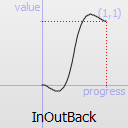
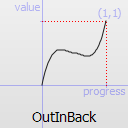
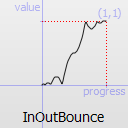
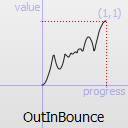
QEasingCurvetype. Amplitude access is available to curves that behave as springs such as elastic and bounce curves. Changing the amplitude changes the height of the curve. Period access is only available to elastic curves and setting a higher period slows the rate of bounce. Only curves that have “boomerang” behaviors such as theInBack,OutBack,InOutBack,和OutInBackhave overshoot settings. These curves will interpolate beyond the end points and return to the end point, acting similar to a boomerang.缓和曲线范例 contains samples of
QEasingCurvetypes and lets you change the curve settings.
QEasingCurve
(
[
type=Linear
]
)

QEasingCurve(other)
- param type
Type- param other
Constructs an easing curve of the given
type
.
PySide2.QtCore.QEasingCurve.
Type

The type of easing curve.
|
常量 |
描述 |
|---|---|
|
QEasingCurve.Linear |
|
常量 |
描述 |
|---|---|
|
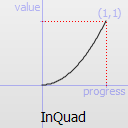
QEasingCurve.InQuad |
|
常量 |
描述 |
|---|---|
|
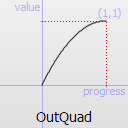
QEasingCurve.OutQuad |
|
常量 |
描述 |
|---|---|
|
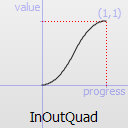
QEasingCurve.InOutQuad |
|
常量 |
描述 |
|---|---|
|
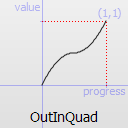
QEasingCurve.OutInQuad |
|
常量 |
描述 |
|---|---|
|
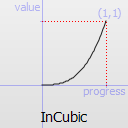
QEasingCurve.InCubic |
|
常量 |
描述 |
|---|---|
|
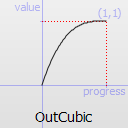
QEasingCurve.OutCubic |
|
常量 |
描述 |
|---|---|
|
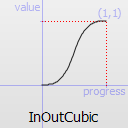
QEasingCurve.InOutCubic |
|
常量 |
描述 |
|---|---|
|
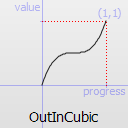
QEasingCurve.OutInCubic |
|
常量 |
描述 |
|---|---|
|
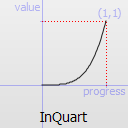
QEasingCurve.InQuart |
|
常量 |
描述 |
|---|---|
|
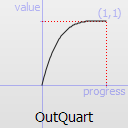
QEasingCurve.OutQuart |
|
常量 |
描述 |
|---|---|
|
QEasingCurve.InOutQuart |
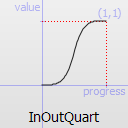
|
常量 |
描述 |
|---|---|
|
QEasingCurve.OutInQuart |
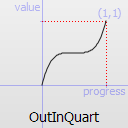
|
常量 |
描述 |
|---|---|
|
QEasingCurve.InQuint |
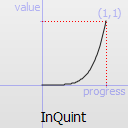
|
常量 |
描述 |
|---|---|
|
QEasingCurve.OutQuint |
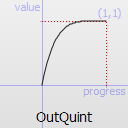
|
常量 |
描述 |
|---|---|
|
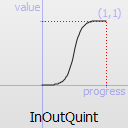
QEasingCurve.InOutQuint |
|
常量 |
描述 |
|---|---|
|
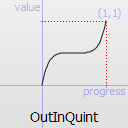
QEasingCurve.OutInQuint |
|
常量 |
描述 |
|---|---|
|
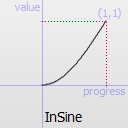
QEasingCurve.InSine |
|
常量 |
描述 |
|---|---|
|
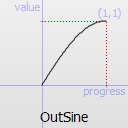
QEasingCurve.OutSine |
|
常量 |
描述 |
|---|---|
|
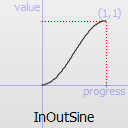
QEasingCurve.InOutSine |
|
常量 |
描述 |
|---|---|
|
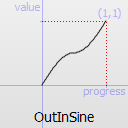
QEasingCurve.OutInSine |
|
常量 |
描述 |
|---|---|
|
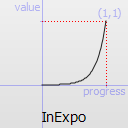
QEasingCurve.InExpo |
|
常量 |
描述 |
|---|---|
|
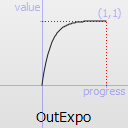
QEasingCurve.OutExpo |
|
常量 |
描述 |
|---|---|
|
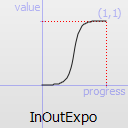
QEasingCurve.InOutExpo |
|
常量 |
描述 |
|---|---|
|
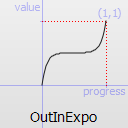
QEasingCurve.OutInExpo |
|
常量 |
描述 |
|---|---|
|
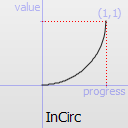
QEasingCurve.InCirc |
|
常量 |
描述 |
|---|---|
|
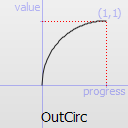
QEasingCurve.OutCirc |
|
常量 |
描述 |
|---|---|
|
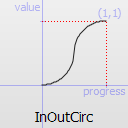
QEasingCurve.InOutCirc |
|
常量 |
描述 |
|---|---|
|
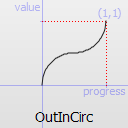
QEasingCurve.OutInCirc |
|
常量 |
描述 |
|---|---|
|
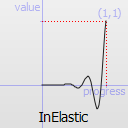
QEasingCurve.InElastic |
|
常量 |
描述 |
|---|---|
|
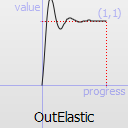
QEasingCurve.OutElastic |
|
常量 |
描述 |
|---|---|
|
QEasingCurve.InOutElastic |
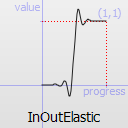
|
常量 |
描述 |
|---|---|
|
QEasingCurve.OutInElastic |
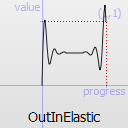
|
常量 |
描述 |
|---|---|
|
QEasingCurve.InBack |
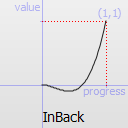
|
常量 |
描述 |
|---|---|
|
QEasingCurve.OutBack |
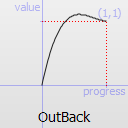
|
常量 |
描述 |
|---|---|
|
QEasingCurve.InOutBack |
|
常量 |
描述 |
|---|---|
|
QEasingCurve.OutInBack |
|
常量 |
描述 |
|---|---|
|
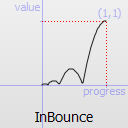
QEasingCurve.InBounce |
|
常量 |
描述 |
|---|---|
|
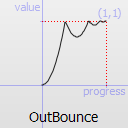
QEasingCurve.OutBounce |
|
常量 |
描述 |
|---|---|
|
QEasingCurve.InOutBounce |
|
常量 |
描述 |
|---|---|
|
QEasingCurve.OutInBounce |
|
常量 |
描述 |
|---|---|
|
QEasingCurve.BezierSpline |
Allows defining a custom easing curve using a cubic bezier spline |
|
QEasingCurve.TCBSpline |
Allows defining a custom easing curve using a TCB spline |
|
QEasingCurve.Custom |
This is returned if the user specified a custom curve type with
|
PySide2.QtCore.QEasingCurve.
addCubicBezierSegment
(
c1
,
c2
,
endPoint
)

Adds a segment of a cubic bezier spline to define a custom easing curve. It is only applicable if
type()
is
BezierSpline
. Note that the spline implicitly starts at (0.0, 0.0) and has to end at (1.0, 1.0) to be a valid easing curve.
c1
and
c2
are the control points used for drawing the curve.
endPoint
is the endpoint of the curve.
PySide2.QtCore.QEasingCurve.
addTCBSegment
(
nextPoint
,
t
,
c
,
b
)

nextPoint
–
QPointF
t
–
qreal
c
–
qreal
b
–
qreal
Adds a segment of a TCB bezier spline to define a custom easing curve. It is only applicable if
type()
is
TCBSpline
. The spline has to start explitly at (0.0, 0.0) and has to end at (1.0, 1.0) to be a valid easing curve. The tension
t
changes the length of the tangent vector. The continuity
c
changes the sharpness in change between the tangents. The bias
b
changes the direction of the tangent vector.
nextPoint
is the sample position. All three parameters are valid between -1 and 1 and define the tangent of the control point. If all three parameters are 0 the resulting spline is a Catmull-Rom spline. The begin and endpoint always have a bias of -1 and 1, since the outer tangent is not defined.
PySide2.QtCore.QEasingCurve.
amplitude
(
)

qreal
Returns the amplitude. This is not applicable for all curve types. It is only applicable for bounce and elastic curves (curves of
type()
InBounce
,
OutBounce
,
InOutBounce
,
OutInBounce
,
InElastic
,
OutElastic
,
InOutElastic
or
OutInElastic
).
另请参阅
PySide2.QtCore.QEasingCurve.
customType
(
)

PyObject
PySide2.QtCore.QEasingCurve.
__ne__
(
other
)

other
–
QEasingCurve
bool
Compare this easing curve with
other
并返回
true
if they are not equal. It will also compare the properties of a curve.
另请参阅
operator==()
PySide2.QtCore.QEasingCurve.
__eq__
(
other
)

other
–
QEasingCurve
bool
Compare this easing curve with
other
并返回
true
if they are equal. It will also compare the properties of a curve.
PySide2.QtCore.QEasingCurve.
overshoot
(
)

qreal
Returns the overshoot. This is not applicable for all curve types. It is only applicable if
type()
is
InBack
,
OutBack
,
InOutBack
or
OutInBack
.
另请参阅
PySide2.QtCore.QEasingCurve.
period
(
)

qreal
Returns the period. This is not applicable for all curve types. It is only applicable if
type()
is
InElastic
,
OutElastic
,
InOutElastic
or
OutInElastic
.
另请参阅
PySide2.QtCore.QEasingCurve.
setAmplitude
(
amplitude
)

amplitude
–
qreal
Sets the amplitude to
amplitude
.
This will set the amplitude of the bounce or the amplitude of the elastic “spring” effect. The higher the number, the higher the amplitude.
另请参阅
PySide2.QtCore.QEasingCurve.
setCustomType
(
arg__1
)

arg__1
–
PyObject
PySide2.QtCore.QEasingCurve.
setOvershoot
(
overshoot
)

overshoot
–
qreal
Sets the overshoot to
overshoot
.
0 produces no overshoot, and the default value of 1.70158 produces an overshoot of 10 percent.
另请参阅
PySide2.QtCore.QEasingCurve.
setPeriod
(
period
)

period
–
qreal
Sets the period to
period
. Setting a small period value will give a high frequency of the curve. A large period will give it a small frequency.
另请参阅
PySide2.QtCore.QEasingCurve.
setType
(
type
)

type
–
Type
Sets the type of the easing curve to
type
.
另请参阅
PySide2.QtCore.QEasingCurve.
swap
(
other
)

other
–
QEasingCurve
Swaps curve
other
with this curve. This operation is very fast and never fails.
PySide2.QtCore.QEasingCurve.
toCubicSpline
(
)

返回
cubicBezierSpline
that defines a custom easing curve. If the easing curve does not have a custom bezier easing curve the list is empty.
PySide2.QtCore.QEasingCurve.
type
(
)

Returns the type of the easing curve.
另请参阅
PySide2.QtCore.QEasingCurve.
valueForProgress
(
progress
)

progress
–
qreal
qreal
Return the effective progress for the easing curve at
progress
. Whereas
progress
must be between 0 and 1, the returned effective progress can be outside those bounds. For example,
InBack
will return negative values in the beginning of the function.
